维修历史
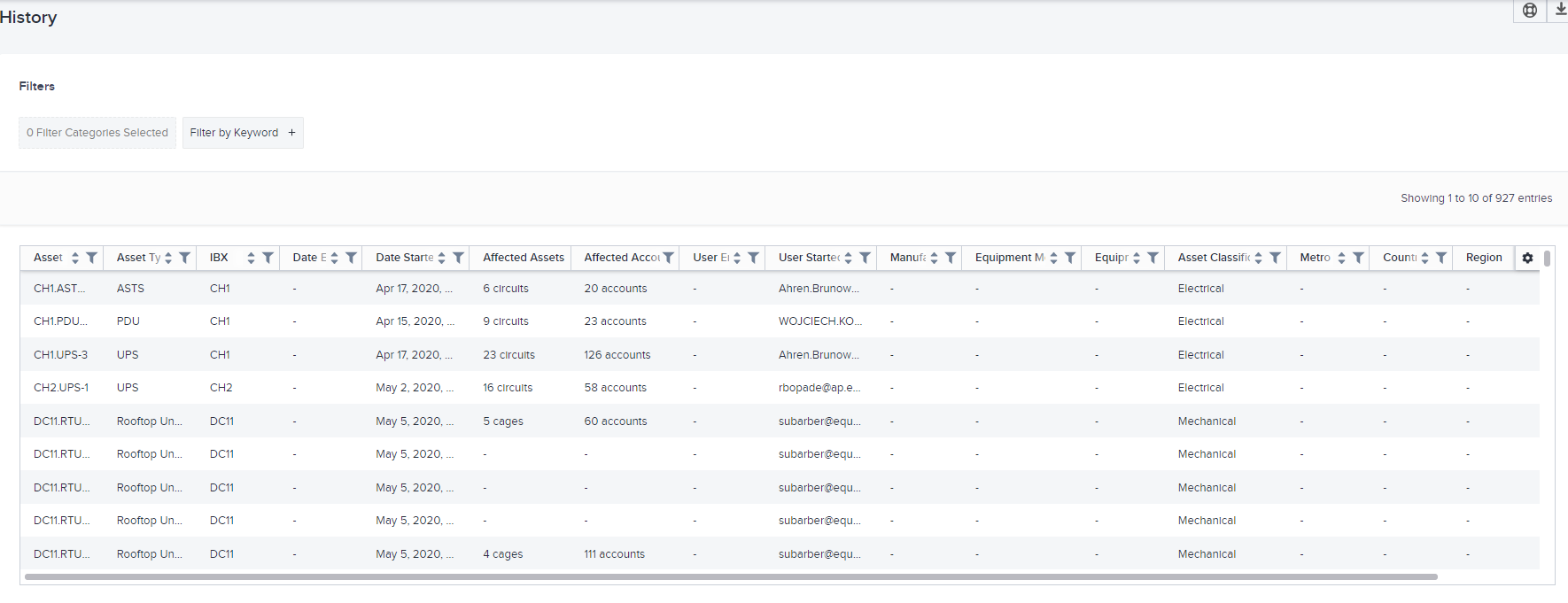
Maintenance History (维护历史记录)部分显示电气和机械资产上已完成的维护历史记录。您可以在此处查看资产设备信息及其地理详细信息。您可以筛选这些资产以查看它们进行日常维护的频率,并显示其过去维护开始和结束的日期。
查看对数据中心资产执行的所有已完成维护事件的详细信息。您可以筛选这些资产,以查看它们在过去进行日常维护的频率。智能数据网格显示资产设备信息及其地理详细信息。此部分显示对资产执行维护的最后开始日期和结束日期。
提示
智能数据网格允许您搜索,排序和筛选列。您也可以单击齿轮以选择要隐藏/显示的列,或重新排列列列。有关详细信息, 请参阅智能数据网格。
数据列
这些列会显示在网格中。
| 名称 | 描述 |
|---|---|
| 资产 | 每项资产的唯一标识符。 |
| 资产类型 | 资产类型(例如,冷水机组、ATS)。 |
| IBX | 所有经过维护的数据中心。(这仅显示您订阅了Smart View的数据中心。) |
| 开始日期 | 维护开始的日期和时间。 |
| 结束日期 | 维护结束的日期和时间。 |
| 用户已启动 | 启动维护的用户。 |
| 用户已结束 | 结束维护的用户。 |
| 制造商 | 资产制造商。 |
| 设备型号 | 资产设备的型号。 |
| 设备序列号 | 资产设备的序列号。 |
| 受影响的资产 | 维护中的资产所支持的机笼或电路的数量。 |
| 受影响的帐户 | 受维护事件影响的账户数。 |
| 资产分类 | 资产类别(例如,电气、机械)。 |
| 地铁 | 资产所在的大都市区。 |
| 国家/地区 | 资产所在国家。 |
| 地区 | 资产所在地区。 |
注意:
- 您不能隐藏IBX,Asset/Location和数据点列。
- 您可以筛选和排序除受影响的资产外的所有列。
查看一排的详细信息
点击数据网格中的资产,可以看到其维护事件的浓缩视图。
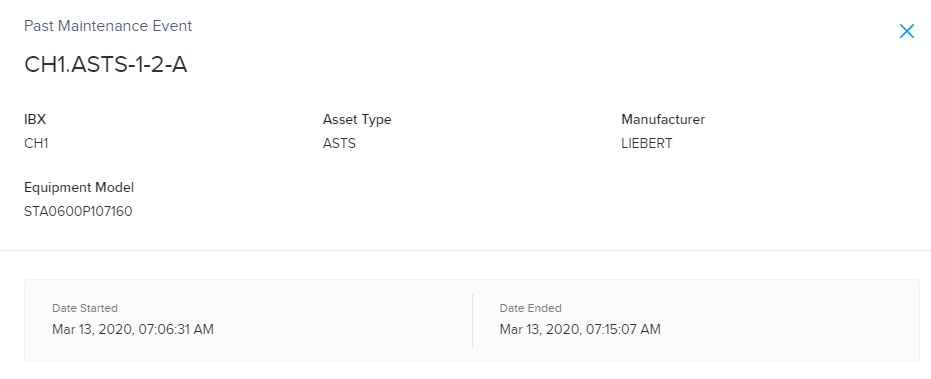
此面板显示资产所在的特定IBX并显示资产的设备信息。它还显示此资产的维护开始和完成时间。
将数据导出到文件
将数据保存到 CSV 文件:
-
排列要导出的数据。
提示您可以设置筛选器、使用搜索框、选择排序列、隐藏列和重新排列列。
-
单击下载图标。
系统会将文件下载.csv到您的设备。
创建故障单
要向Equinix提交TT,请单击右上角(数据网格上方)的TT。另请参阅支持页面。