事件
Equinix在客户门户网站和Equinix API中提供以下资产的事件数据:
- 端口-生命周期事件和启动/停机事件。
- Fabric云路由器-生命周期事件,BGP会话状态,路由聚合状态和路由过滤状态事件。
- Precision Time服务-生命周期事件
- 虚拟连接-配置/取消配置事件数据可用于端口或云路由器为A侧的连接。端口至ETree连接,云路由器至虚拟设备连接或云路由器至IPWAN连接的故障事件数据不可用。
- 服务令牌-生命周期事件。
- 公司简介 - 简介属性、标签和生命周期事件。
此外,还在项目和组织级别提供活动。
-
项目-项目事件数据包括项目中所有资产的生命周期状态事件。资产的任何状态更改(包括配置,取消配置和故障)都将导致发送事件。在项目级别,所有上述资产的生命周期事件以及:
- 生命周期事件,IP块事件和ASN事件。
- Network Edge虚拟设备-生命周期事件,访问控制列表(ACL),设备属性,重新引导和设备链接组(DLG)事件。
- 服务配置文件-生命周期事件。
-
组织事件 - 这些事件来自访问管理器和资源管理器,用于通知组织管理员组织内发生的变化事件,例如为用户添加或删除角色。
您还可以将事件数据传输给支持更大范围事件类型和资产的第三方数据收集器。请参阅流式事件数据部分。
查看特定资产事件
您可以在客户门户网站或Equinix API中查看或检索特定资产的事件数据。要访问资产的事件数据,您必须拥有授予该资产权限的角色read。
端口
- Portal
- API
-
登录客户门户网站并导航至端口清单。
-
从列表中选择端口。
-
在端口的详情页面中,单击事件。
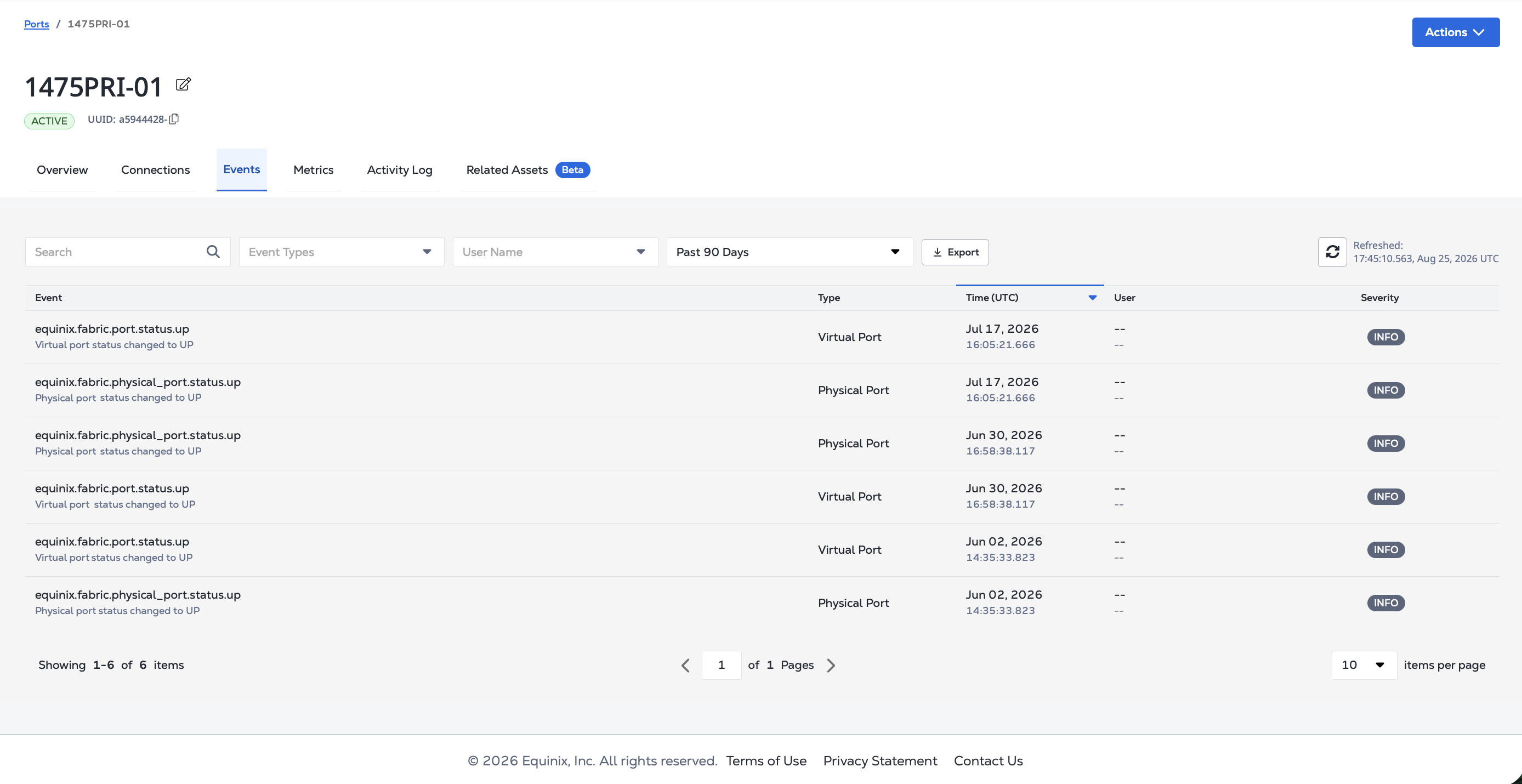
要查看端口的事件,请向端点发送GET请求/fabric/v4/{asset}/{assetId}/cloudevents。路径中:
- 指定
asset为ports。 - 将
assetID作为端口的UUID。
使用可选fromDateTime参数和toDateTime查询参数,将结果范围缩小到特定时间段。
cURL 请求示例:
curl -X GET 'https://api.equinix.com/fabric/v4/ports/<asset_id>/cloudevents?fromDateTime=<date_time>&toDateTime=<date_time>' \
-H 'Content-Type: application/json' \
-H 'Authorization: Bearer <Bearer Token>'
云路由器
- Portal
- API
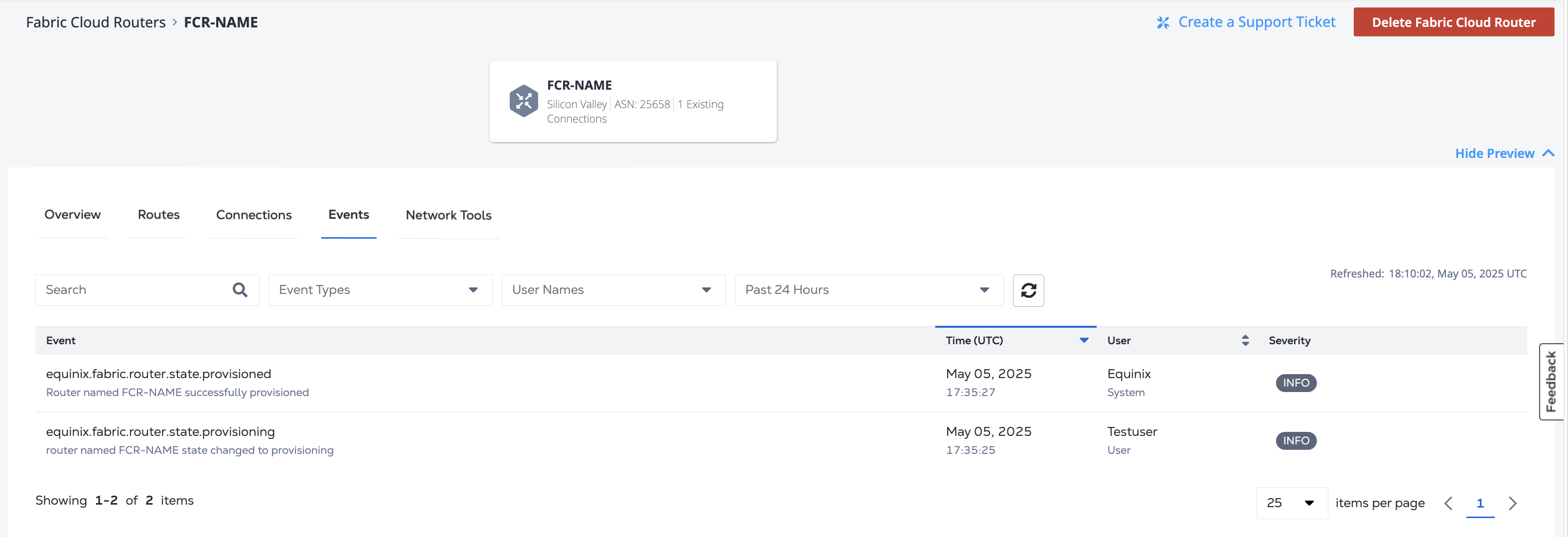
要查看云路由器的事件,请向端点发送GET请求/fabric/v4/{asset}/{assetId}/cloudevents。路径中:
- 指定
asset为routers。 - 将
assetID作为路由器的UUID。
使用可选fromDateTime参数和toDateTime查询参数,将结果范围缩小到特定时间段。
cURL 请求示例:
curl -X GET 'https://api.equinix.com/fabric/v4/routers/<asset_id>/cloudevents?fromDateTime=<date_time>&toDateTime=<date_time>' \
-H 'Content-Type: application/json' \
-H 'Authorization: Bearer <Bearer Token>'
连接
端口或云路由器为A侧的虚拟连接提供事件数据。
- Portal
- API
-
登录客户门户网站并导航至您的连接清单。
-
从列表中选择连接
-
在_连接详情_页面上,单击事件。
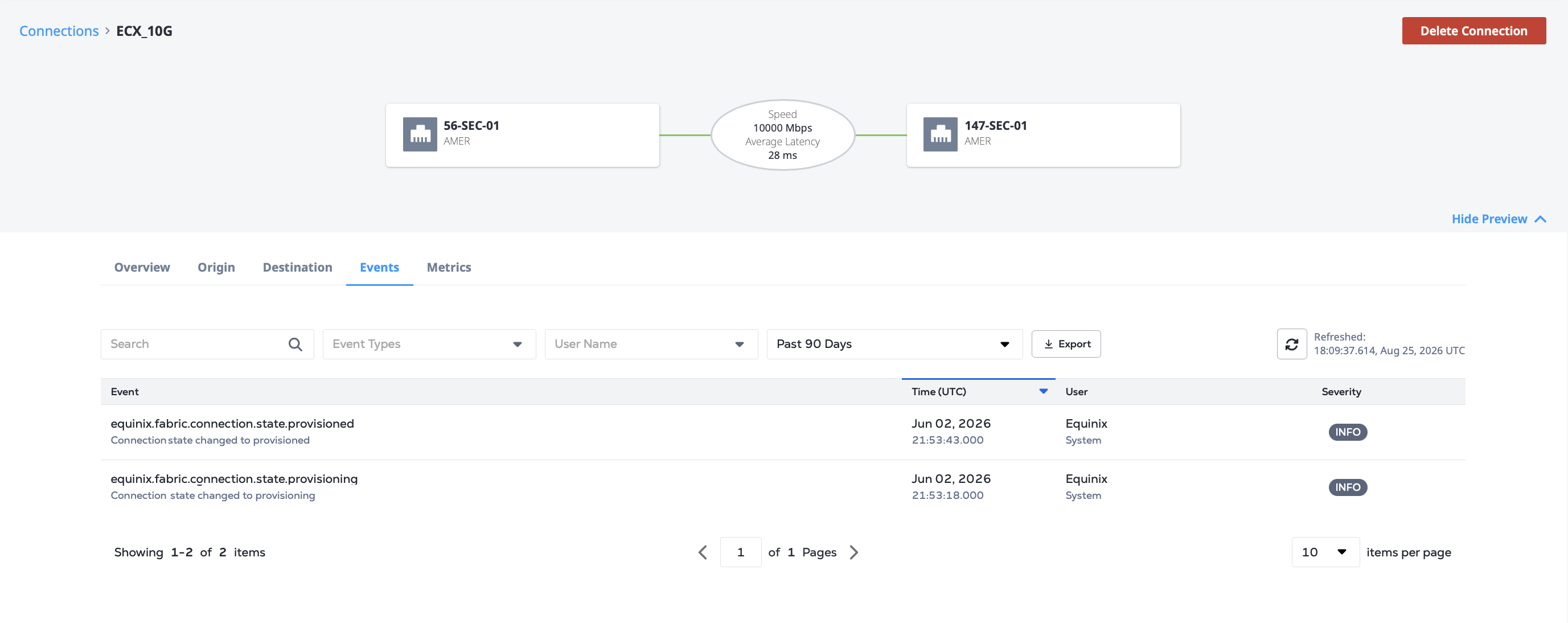
要查看连接的事件,请向端点发送GET请求/fabric/v4/{asset}/{assetId}/cloudevents。路径中:
- 指定
asset为connections。 - 将
assetID用作连接的UUID。
使用可选fromDateTime参数和toDateTime查询参数,将结果范围缩小到特定时间段。
cURL 请求示例:
curl -X GET 'https://api.equinix.com/fabric/v4/connections/<asset_id>/cloudevents?fromDateTime=<date_time>&toDateTime=<date_time>' \
-H 'Content-Type: application/json' \
-H 'Authorization: Bearer <Bearer Token>'
精确时间
- Portal
- API
-
登录客户门户网站并导航至您的Precision Time Inventory。
-
从列表中选择Precision Time服务。
-
在服务的详细信息页面中,单击事件。
要查看Precision Time服务的事件,请向端点发送GET请求/fabric/v4/{asset}/{assetId}/cloudevents。路径中:
- 指定
asset为timeServices。 - 将
assetID用作Precision Time服务的UUID。
使用可选fromDateTime参数和toDateTime查询参数,将结果范围缩小到特定时间段。
cURL 请求示例:
curl -X GET 'https://api.equinix.com/fabric/v4/timeServices/<asset_id>/cloudevents?fromDateTime=<date_time>&toDateTime=<date_time>' \
-H 'Content-Type: application/json' \
-H 'Authorization: Bearer <Bearer Token>'
服务令牌
要查看服务令牌的事件,请向端点发送GET请求/fabric/v4/{asset}/{assetId}/cloudevents。路径中:
- 指定
asset为serviceTokens。 - 将
assetID用作服务令牌的UUID。
使用可选fromDateTime参数和toDateTime查询参数,将结果范围缩小到特定时间段。
cURL 请求示例:
curl -X GET 'https://api.equinix.com/fabric/v4/serviceTokens/<asset_id>/cloudevents?fromDateTime=<date_time>&toDateTime=<date_time>' \
-H 'Content-Type: application/json' \
-H 'Authorization: Bearer <Bearer Token>'
公司简介
要查看公司配置文件的事件,请向端点发送GET请求/fabric/v4/{asset}/{assetId}/cloudevents。路径中:
- 指定
asset为companyProfiles。 - 将
assetID作为公司简介的UUID。
使用可选fromDateTime参数和toDateTime查询参数,将结果范围缩小到特定时间段。
cURL 请求示例:
curl -X GET 'https://api.equinix.com/fabric/v4/companyProfiles/<asset_id>/cloudevents?fromDateTime=<date_time>&toDateTime=<date_time>' \
-H 'Content-Type: application/json' \
-H 'Authorization: Bearer <Bearer Token>'
查看项目事件
项目事件数据包括项目中所有资产的支持事件,包括:
- 端口
- 云路由器
- 连接
- 精确时间服务
- 公司简介
- 服务令牌
- 虚拟设备
- 互联网接入服务
- 服务配置文件
要查看项目的事件,请向端点发送GET请求/fabric/v4/{asset}/{assetId}/cloudevents。路径中:
- 指定
asset为projects。 - 将
assetID作为项目的UUID。
使用可选fromDateTime参数和toDateTime查询参数,将结果范围缩小到特定时间段。
cURL 请求示例:
curl -X GET 'https://api.equinix.com/fabric/v4/projects/<asset_id>/cloudevents?fromDateTime=<date_time>&toDateTime=<date_time>' \
-H 'Content-Type: application/json' \
-H 'Authorization: Bearer <Bearer Token>'
查看组织事件
要查看组织的事件,请向端点发送GET请求/fabric/v4/{asset}/{assetId}/cloudevents。路径中:
- 指定
asset为organizations。 - 将
assetID作为组织的UUID。
使用可选fromDateTime参数和toDateTime查询参数,将结果范围缩小到特定时间段。
cURL 请求示例:
curl -X GET 'https://api.equinix.com/fabric/v4/organizations/<asset_id>/cloudevents?fromDateTime=<date_time>&toDateTime=<date_time>' \
-H 'Content-Type: application/json' \
-H 'Authorization: Bearer <Bearer Token>'
搜索活动
Equinix API能够在事件数据中搜索符合指定条件的事件。云事件调用支持的资产类型包括端口,连接,路由器,都会区,组织,项目,虚拟设备和公司简介。
要在云事件中搜索资产,请向端点发送POST请求/fabric/v4/cloudevents/search。在请求正文中指定搜索条件。此外,POST /fabric/v4/cloudevents/search端点要求主体具有强制性的第一级资源UUID。
cURL 请求示例:
curl -X POST 'https://api.equinix.com/fabric/v4/cloudevents/search' \
-H 'Content-Type: application/json' \
-H 'Authorization: Bearer $TOKEN' \
-d '{
    "filter": {
        "and": [
            {
                "property": "/type",
                "operator": "IN",
                "values": [
                    "equinix.network_edge.device.*"
                ]
            },
            {
                "property": "/subject",
                "operator": "IN",
                "values": [
                    "/ne/v1/devices/903bb0ad-65cd-422c-94d3-a506cce0a36a*"
                ]
            },
            {
                "property": "/time",
                "operator": "BETWEEN",
                "values": [
                    "2025-08-15T17:31:00.000Z",
                    "2025-08-25T17:31:00.000Z"
                ]
            }
        ]
    },
    "pagination": {
        "offset": 0,
        "limit": 20
    }
}'
可搜索参数的完整列表可参见API参考手册。
获取活动详情
要获取指定云事件的详细信息,请向端点发送GET请求/fabric/v4/cloudevents/<cloudEventId>。
cURL 请求示例:
curl -X GET 'https://api.equinix.com/fabric/v4/cloudevents/<cloudEventId>' \
-H 'Content-Type: application/json' \
-H 'Authorization: Bearer <Bearer Token>'
流式事件数据
Equinix支持将事件数据流传输到数据收集平台。配置数据收集:
- 创建数据流。
- 将您的资产,项目或组织添加到数据流。
- 创建订阅以将数据发送至数据收集器。
可用事件列表,请参阅支持事件列表。每种事件类型都有一个定义的架构, 我们所有的事件数据架构和数据类型都发布在GitHub仓库中/equinix/equinix-cloudevents。