告警
创建告警规则,以便在指标超过定义阈值时发送告警事件。警报可以在和上触发criticalThreshold,如果指标值低于或超过预期阈值,则会触发警报warningThreshold事件。
要接收由告警触发的事件,您需要能够在所选接收器中接收来自已订阅的流的事件。告警触发的事件在客户门户网站或API中不可用。
要查看支持的指标列表,请参阅“指标”页面。
创建警报
前提条件:要添加告警规则,您应创建一个数据流,其中已关联端口和/或连接资源并启用指标
- Portal
- API
-
在“可观测性”菜单中,单击数据流。
-
从_数据流清单_中选择数据流。
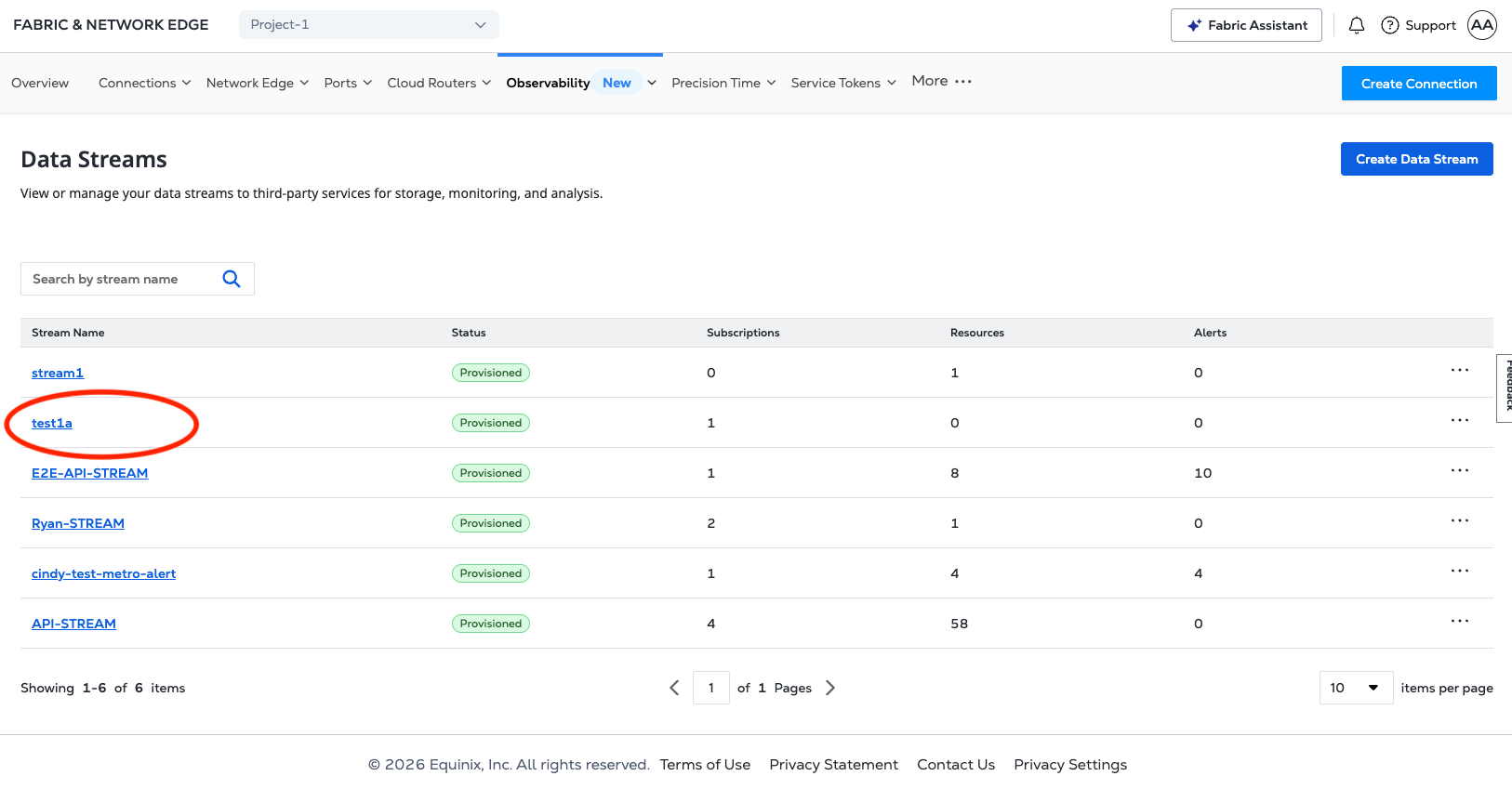
-
在“流详情”页面上,从“操作”下拉菜单中,单击添加告警。
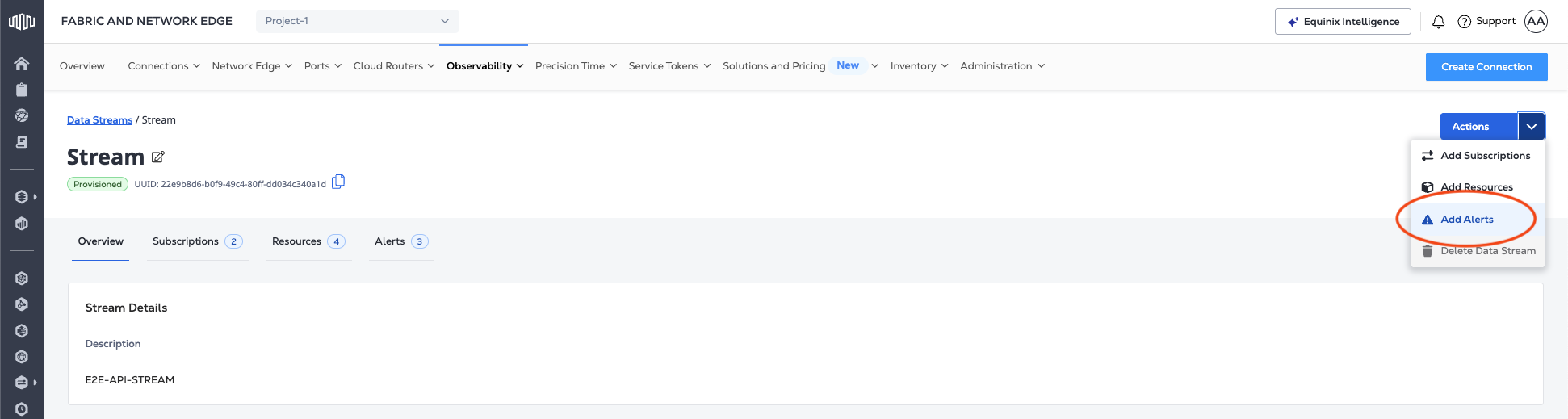
-
在_添加告警_页面上,输入规则参数。
- 从“选择指标”下拉菜单中选择连接或端口指标。
- 给你的提醒命名。
- 添加警报描述(可选)。
- 选择操作数值:
ABOVE或BELOW。 - 从下拉菜单中选择窗口大小。
- 在_警告阈值_字段中设置触发警告事件的值。
- 在_严重阈值_字段中设置触发严重事件的值。
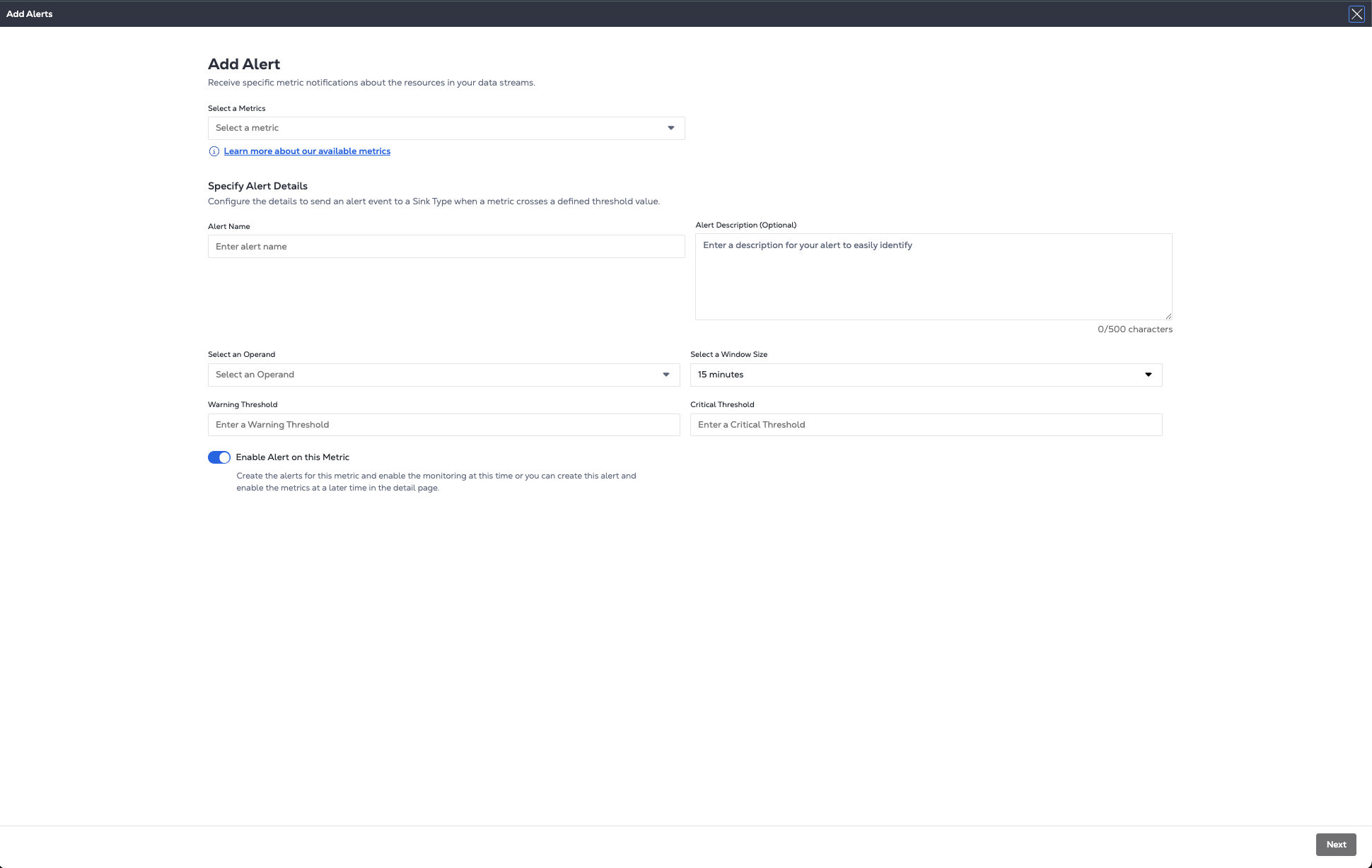
-
点击“下一步”
-
从列表中选择要应用警报的连接或端口。
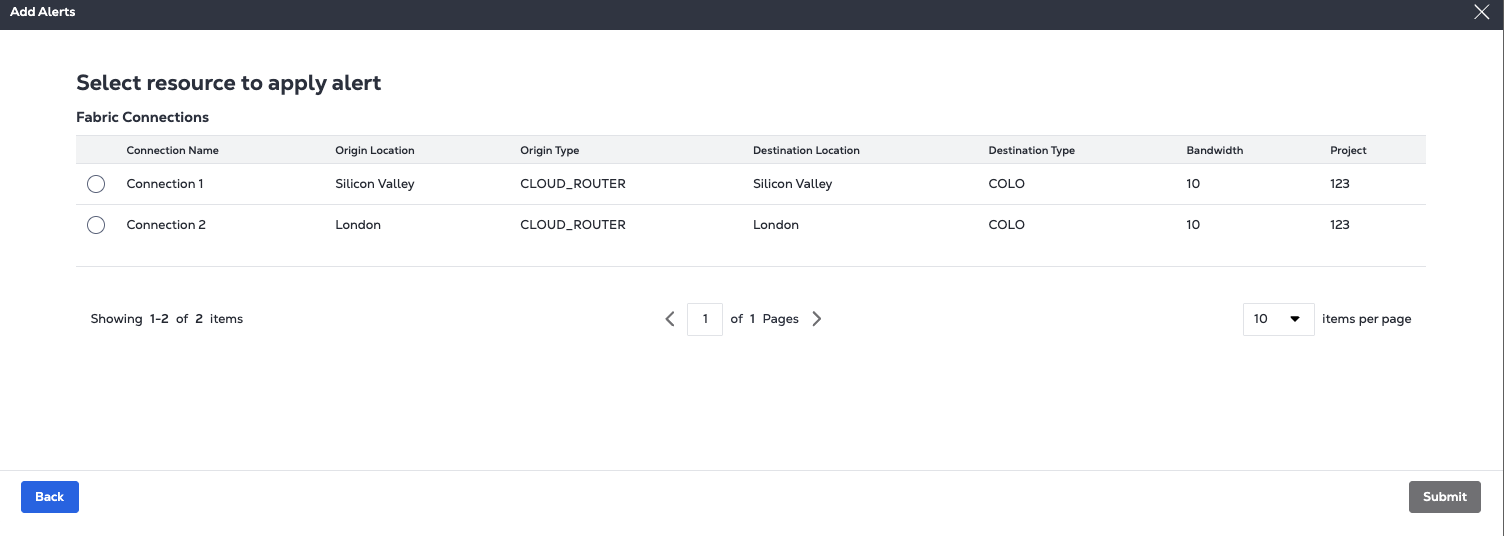
-
单击提交。
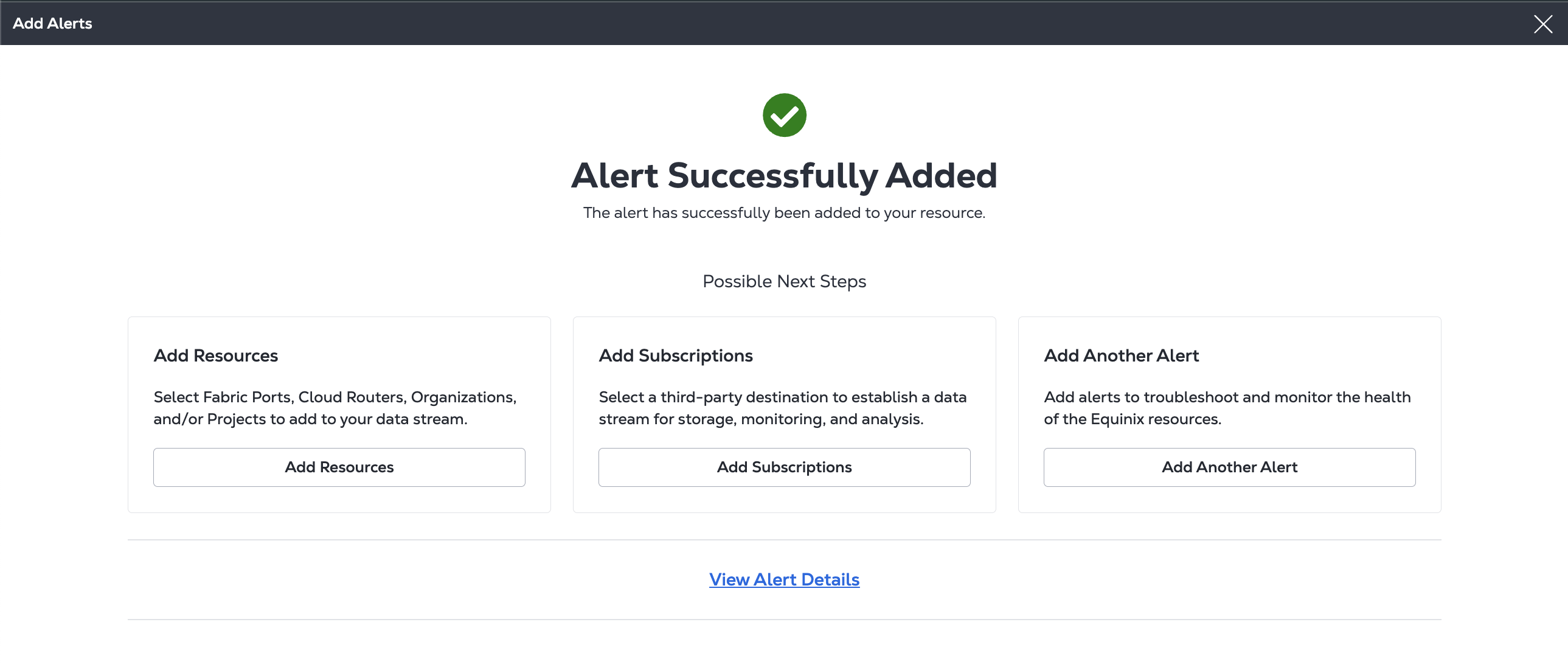
在确认屏幕中,您可以向告警添加更多资源,向数据流添加订阅以接收告警,或添加其他告警。要查看新告警的详细信息,请单击查看告警详情。
要创建告警,请向端点发送POST请求/fabric/v4/streams/{streamId}/alertRules。
cURL 请求示例:
curl -X 'POST' 'https://api.equinix.com/fabric/v4/streams/<streamId>/alertRules' \
-H 'Content-Type: application/json' \
-H 'Authorization: Bearer <Bearer Token>' \
-d '{
    "type": "METRIC_ALERT",
    "name": "<alert_rule_name>",
    "description": "<alert_rule_desc>",
    "enabled": "true",
    "metricSelector": {
        "include": [
            "equinix.fabric.port.bandwidth_tx.usage"
        ]
    },
    "resourceSelector": {
        "include": [
            "/fabric/v4/ports/780d384f-2eb6-4c07-ac89-ea106ca12814"
        ]
    },
    "detectionMethod": {
        "type": "THRESHOLD",
        "operand": "ABOVE",
        "windowSize": "PT5M",
        "warningThreshold": 200000,
        "criticalThreshold": 300000
    }
}'
示例回答:
{
    "href": "https://api.equinix.com/fabric/v4/streams/128cfe7c-e24f-4b1b-8a4f-680cd650c46c/alertRules/28da40d8-09bf-49f2-a02d-af34210f275e",
    "uuid": "128cfe7c-e24f-4b1b-8a4f-680cd650c46c",
    "type": "METRIC_ALERT",
    "name": "<alert_rule_name>",
    "description": "<alert_rule_name>",
    "state": "ACTIVE",
    "enabled": true,
    "metricSelector": {
        "include": [
            "equinix.fabric.port.bandwidth_tx.usage"
        ]
    },
    "resourceSelector": {
        "include": [
            "/fabric/v4/ports/780d384f-2eb6-4c07-ac89-ea106ca12814"
        ]
    },
    "detectionMethod": {
        "type": "THRESHOLD",
        "operand": "ABOVE",
        "windowSize": "PT5M",
        "warningThreshold": 200000,
        "criticalThreshold": 300000
    }
    "changeLog": {
        "createdBy": "testuser",
        "createdDateTime": "2025-02-04T23:17:54.323427936Z"
    }
}
创建智能警报 - 延迟
对于您已关联都会区的流,您可以为延迟阈值创建智能告警。这些由人工智能驱动的告警分析都会区网点的历史时延数据,利用机器学习来建立基准性能并生成智能告警阈值,从而无需手动配置告警。
- Portal
- API
要创建智能告警规则,请按照创建告警的相同步骤操作,以及:
-
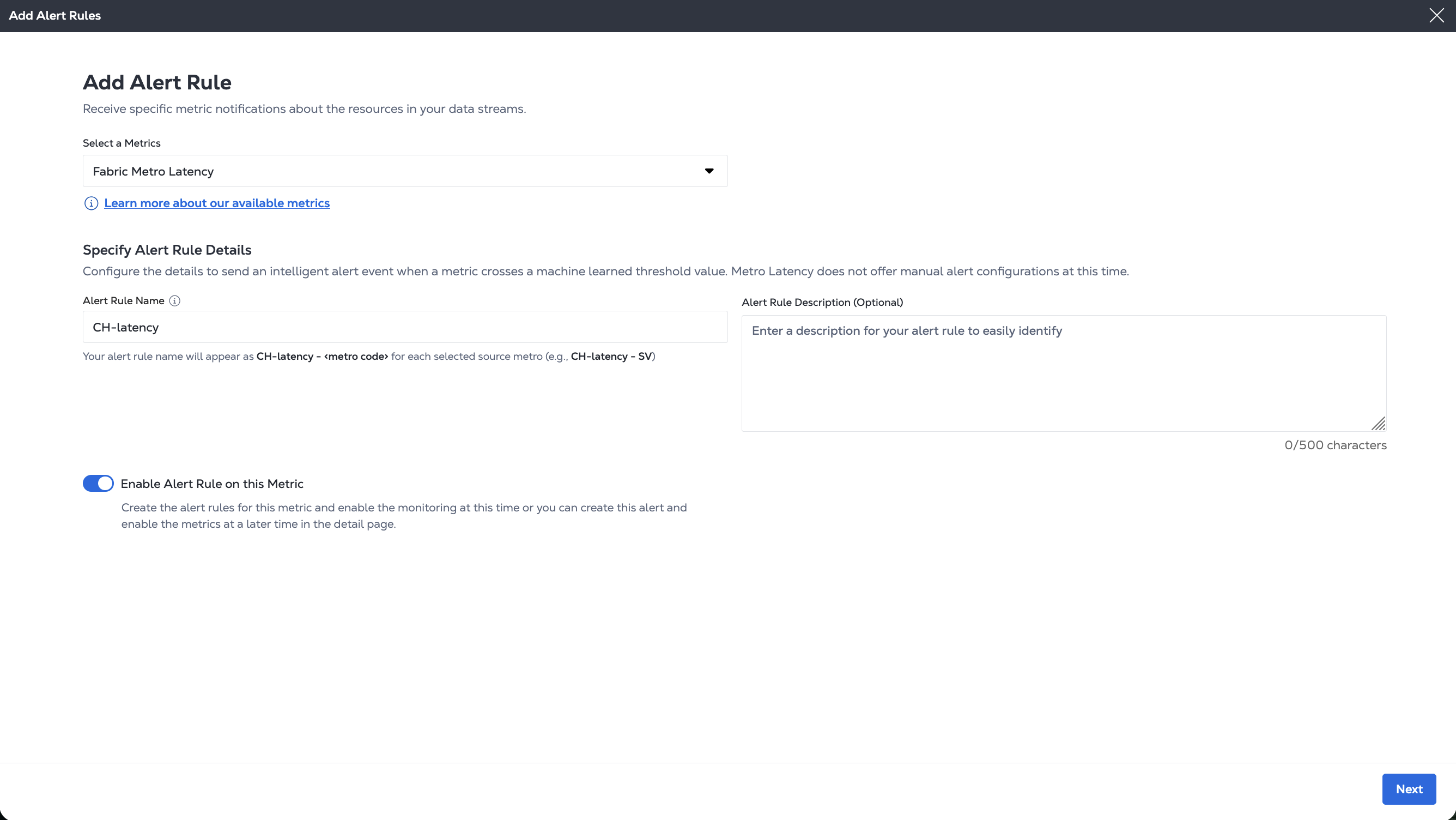
从_选择指标_下拉菜单中选择Fabric都会区延迟指标。
-
提供告警名称和描述(可选)。单击下一步。
-
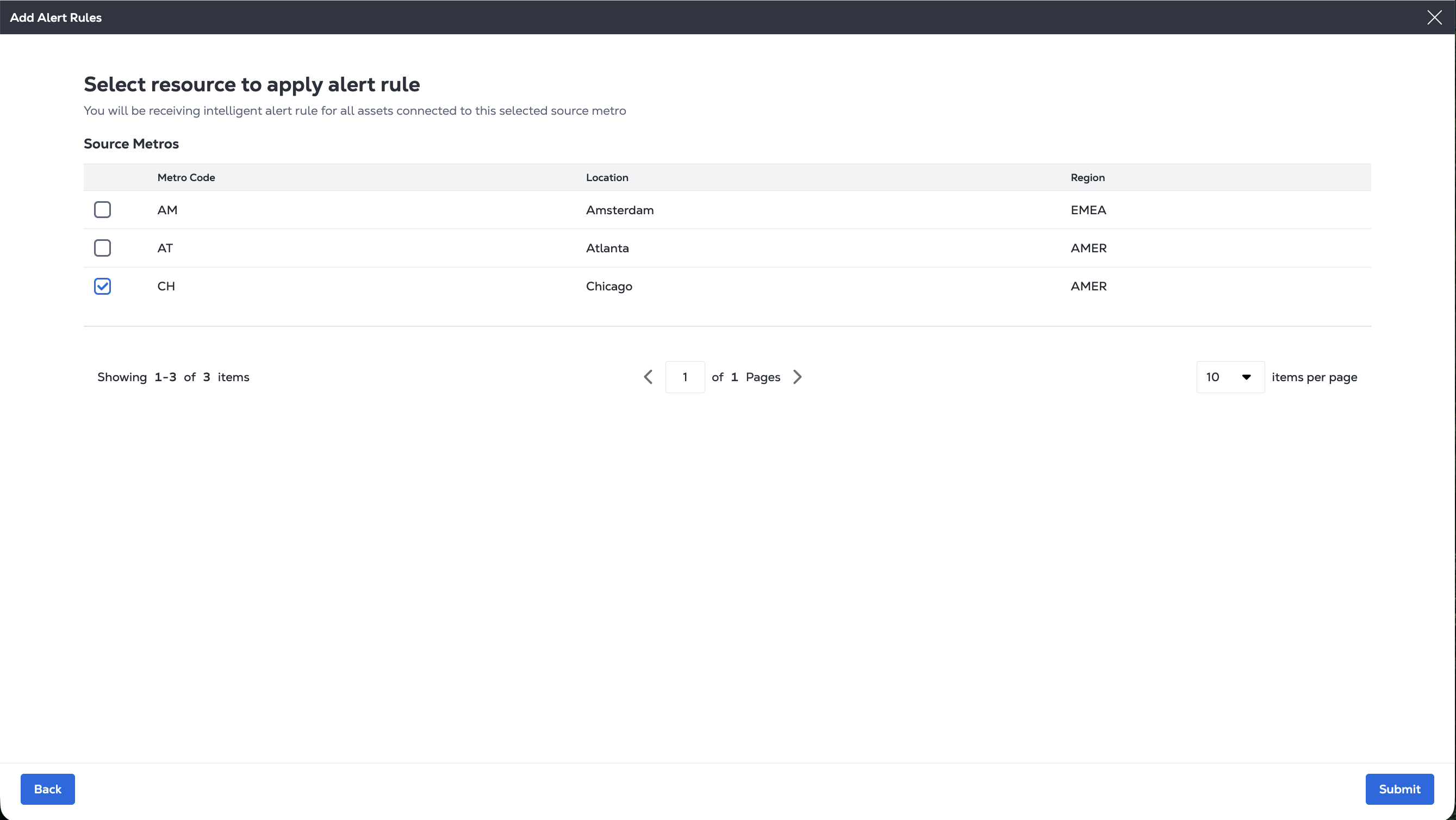
选择一个或多个城市,并应用智能警报规则。
-
点击“提交”
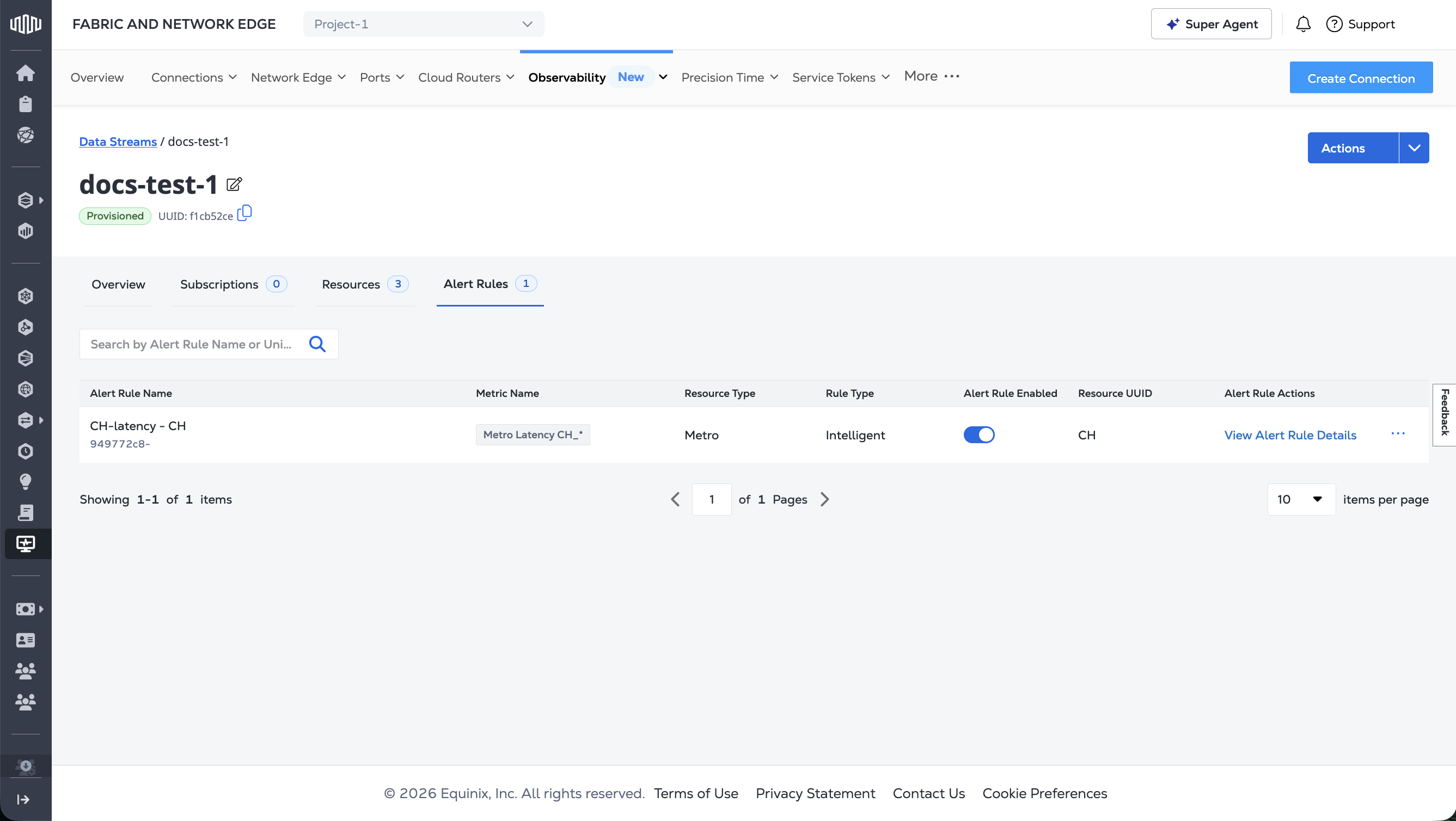
您的警报已显示在警报列表中。
要创建智能告警规则,请向端点发送POST请求/fabric/v4/streams/{streamId}/alertRules。
在对象中指定要为其创建告警的都会区特有指标metricSelector,连接到要在对象中作为资源添加的流的都会区resourceSelector,并指定detectionMethod.type为OUTLIER。
curl -X 'POST' 'https://api.equinix.com/fabric/v4/streams/<streamId>/alertRules' \
-H 'Content-Type: application/json' \
-H 'Authorization: Bearer <Bearer Token>' \
-d '{
    "type": "METRIC_ALERT",
    "name": "<alert_rule_name>",
    "description": "<alert_rule_description>",
    "enabled": true,
    "metricSelector": {
        "include": [
            "equinix.fabric.metro.<metro_code>_<metro_code>.latency"
        ]
    },
    "resourceSelector": {
        "include": [
            "/fabric/v4/metros/{metro_code}"
        ]
    },
    "detectionMethod": {
        "type": "OUTLIER"
    }
}'
获取您的提醒
- Portal
- API
要查看流的警报列表:
-
在“可观测性”菜单中,单击数据流。
-
从_数据流清单_中选择数据流。
-
单击告警。
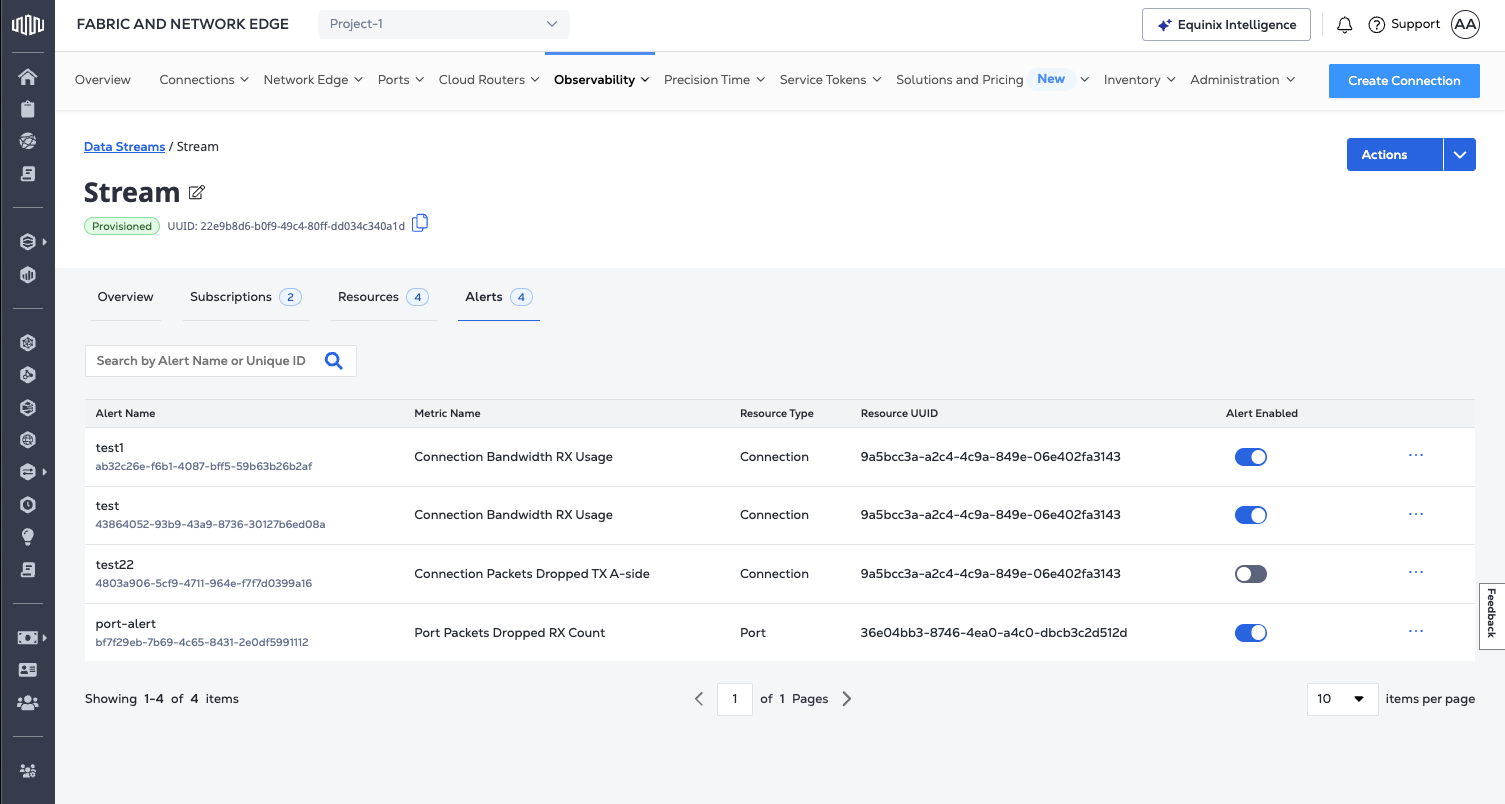
要获取告警详细信息,请向端点发送GET请求/fabric/v4/streams/{streamId}/alertRules/{alertRuleId}。
cURL 请求示例:
curl -X 'GET' 'https://api.equinix.com/fabric/v4/streams/<streamId>/alertRules/<alertRuleId>' \
-H 'Content-Type: application/json' \
-H 'Authorization: Bearer <Bearer Token>'
示例回答:
{
    "href": "https://api.equinix.com/fabric/v4/streams/128cfe7c-e24f-4b1b-8a4f-680cd650c46c/alertRules/28da40d8-09bf-49f2-a02d-af34210f275e",
    "uuid": "128cfe7c-e24f-4b1b-8a4f-680cd650c46c",
    "type": "METRIC_ALERT",
    "name": "<alert_rule_name>",
    "description": "<alert_rule_name>",
    "state": "ACTIVE",
    "enabled": true,
    "metricSelector": {
        "include": [
            "equinix.fabric.port.bandwidth_tx.usage"
        ]
    },
    "resourceSelector": {
        "include": [
            "/fabric/v4/ports/780d384f-2eb6-4c07-ac89-ea106ca12814"
        ]
    },
    "detectionMethod": {
        "type": "THRESHOLD",
        "operand": "ABOVE",
        "windowSize": "PT5M",
        "warningThreshold": 200000,
        "criticalThreshold": 300000
    }
    "changeLog": {
        "createdBy": "testuser",
        "createdDateTime": "2025-02-04T23:17:54.323427936Z"
    }
}
删除提醒
- Portal
- API
删除提醒:
-
在“可观测性”菜单中,单击数据流。
-
从_数据流清单_中选择数据流。
-
单击告警。
-
在告警列表中,单击要删除的选项菜单,然后单击移除告警。
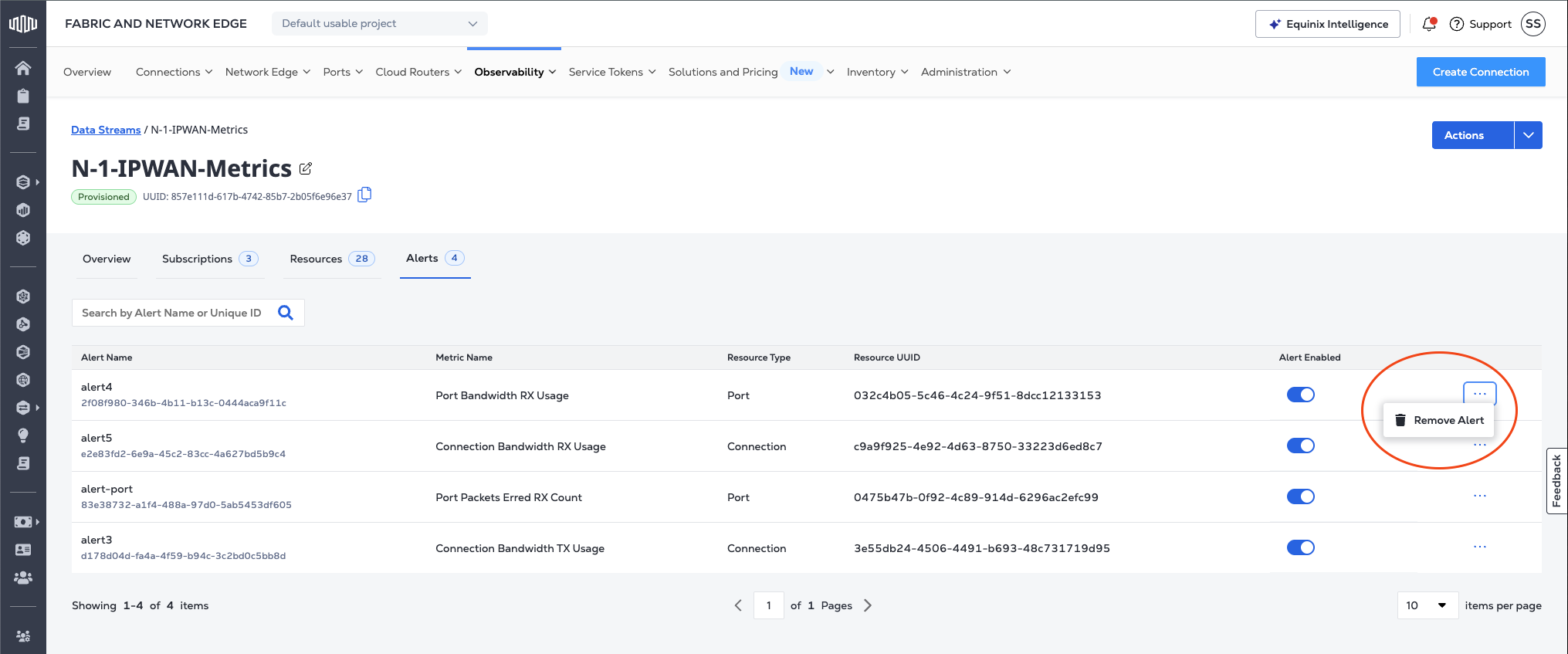
要删除告警,请向端点发送DELETE请求/fabric/v4/streams/{streamId}/alertRules/{alertRuleId}。
cURL 请求示例:
curl -X DELETE 'https://api.equinix.com/fabric/v4/streams/<streamId>/alertRules/<alertRuleId>' \
-H 'Content-Type: application/json' \
-H 'Authorization: Bearer <Bearer Token>'
示例回答:
{
    "href": "https://api.equinix.com/fabric/v4/streams/128cfe7c-e24f-4b1b-8a4f-680cd650c46c/alertRules/28da40d8-09bf-49f2-a02d-af34210f275e",
    "uuid": "28da40d8-09bf-49f2-a02d-af34210f275e",
    "type": "METRIC_ALERT",
    "name": "<alert_rule_name>",
    "description": "<alert_rule_name>",
    "state": "INACTIVE",
    "enabled": true,
    "metricName": "equinix.fabric.port.bandwidth_tx.usage",
    "resourceSelector": {
        "include": [
            "*/ports/<uuid>"
        ]
    },
    "windowSize": "PT15M",
    "operand": "ABOVE",
    "warningThreshold": "43000000",
    "criticalThreshold": "45000000",
    "changeLog": {
        "createdBy": "testuser",
        "createdDateTime": "2025-02-04T23:17:54.323427936Z"
    }
}