创建Palo Alto Networks VM 系列防火墙
如果您使用Panorama应用程序管理设备,则需要在设备创建过程中输入Panorama IP地址和验证密钥。仅10.1.12及更高版本支持全景图像。
Palo Alto Networks VM系列防火墙有三个部署选项:单个,冗余和群集。下述配置选项适用于单配置和冗余配置。群集配置选项位于创建群集VM系列防火墙时
连接选项
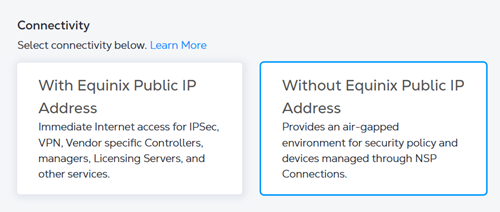
连接类型功能可用于Palo Alto Networks VM系列防火墙。此功能提供选项,以包括具有或不具有来自Equinix的公用IP地址的虚拟接口。在没有公用IP地址的情况下启动VNF的选项可解决可能需要将虚拟设备与Internet隔离的用例。然后,用户可以从其专用网络或虚拟连接管理设备。
下表总结了连接类型选项和两个选项之间的区别。
| 连接类型 | 使用Equinix公用IP地址 | 不使用 Equinix 公共 IP 地址 |
|---|---|---|
| 使用案例 | 此选项带有Equinix的公共IP地址,不需要额外的虚拟连接来管理虚拟设备。 | 此选项将删除源自Equinix的公用IP地址分配,并在创建设备后将VNF与互联网隔离。如果设备需要由Colo机架中运行的软件或通过专用虚拟连接进行管理,建议使用此选项。 |
| 互联网连接 | 来自Equinix的公用IP地址分配给以下接口并可从Internet访问:管理(管理),以太网1/1 (WAN)。 | 不包括来自Equinix的公用IP地址。此选项需要与网络服务提供商(NSP)或互联网服务提供商(ISP)建立单独的虚拟连接。有关详细信息,请参阅自带连接-远程光纤端口。 |
| 访问控制列表 | 创建访问控制列表 (ACL) 以限制到 VNF 管理 (MGMT) 或 WAN 接口的流量。 | ACL选项不可用。可以对来自任何专用虚拟连接的流量实施额外的补偿控制。 |
| SSH访问 | 使用以太网1/1 (WAN)接口进行SSH访问。您需要为SSH访问生成RSA公钥,并在设备创建工作流程中进行配置(强制)。 | 默认情况下无SSH访问。您需要为设备访问创建用户名。一个选项是生成用于SSH访问的RSA公钥并对其进行配置。通过NSP或ISP建立互联网连接。 |
| 设备可管理性 | 对于单个/冗余设备,管理(MGMT)默认映射到全景访问。使用"服务路由"功能重新映射到不同的接口。 | 首先需要将虚拟连接(通过 BYOC 选项)分配给管理 (MGMT) 接口,以便 Panorama 可访问单一和冗余部署。 |
| 许可证注册 | 在设备创建工作流程期间提供AuthCode。当虚拟设备到达Palo Alto Network许可证注册服务器时,验证码将自动注册。 | 在设备创建工作流程期间不需要验证代码。用户负责通过专用虚拟连接(在线许可证注册)或脱机模式许可证使用Internet访问来注册许可证。 |
在没有Equinix公有 IP 地址的情况下配置您的设备
如果在没有Equinix公用IP地址的情况下创建VM系列防火墙, 则VNF在WAN或管理界面上不提供任何公用IP地址。您负责配置许可证注册、覆盖网络配置和集群(可选)。
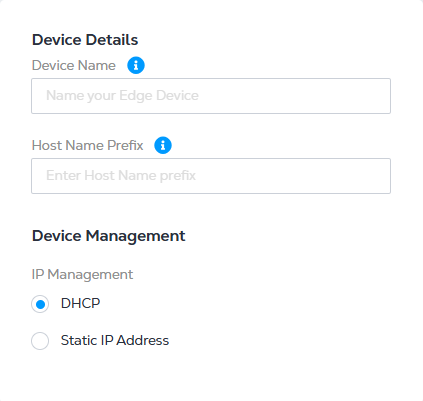
输入Device Details(设备详细信息)时,请选择以下IP地址选项之一:
- DHCP——一种网络管理协议,可自动分配 IP 地址。
- 静态 IP 地址 - 输入 IP 地址、子网掩码和默认网关。
管理界面配置
以下是管理接口设置的示例配置,仅供参考。
命令:
set deviceconfig system type static
set deviceconfig system ip-address x.x.x.x
set deviceconfig system netmask y.y.y.y
set deviceconfig system default-gateway z.z.z.z
许可证注册
您负责将许可证手动添加到设备。您应该已经拥有Palo Alto Networks客户支持门户(许可证门户)的访问权限,您可以在其中使用UUID和CPU-ID信息注册您的设备。使用门户中的许可证密钥在设备上添加许可证。许可证激活文档可从Palo Alto Networks文档中获得。
部署方案
情景1:从Colocation管理防火墙(脱机许可证注册),其中管理接口只能从连接到Colocation Space脱机许可证注册的网络访问。
- 在Network Edge门户中创建不带Equinix公用IP地址的VM系列防火墙VNF。
- 用你的用户名和密码登录到主要和次要的VNF控制台。
- 在第一个接口(管理接口)上创建从 VNF 到共置的虚拟连接。
- 为两个VNF的管理接口分配一个IP地址。
- 确认主机托管空间内设备的IP可达性。
- 使用SSH从主机托管空间的设备访问VNF。
- 确定VNF的CPU ID和UUID。
- 访问Palo Alto Networks客户支持门户(License portal),为VNFs生成两个相同的许可证。
- 将脱机模式许可证应用于两个VNF。
- _(可选)_您可以从Colocation空间中配置的全景管理软件管理VNF。
- 从剩余的接口创建到云服务提供商(CSP)的虚拟连接。
- 继续使用离线设备管理进行软件更新。
情景2:从NSP网络(联机许可证注册)管理防火墙,管理界面可从NSP虚拟连接或自带云平台连接接口访问。在线许可证注册。
- 在Network Edge门户中创建不带Equinix公用IP地址的VM系列防火墙VNF。
- 用你的用户名和密码登录到主要和次要的VNF控制台。
- 在第一个接口(管理接口)上创建一个从VNF到NSP的虚拟连接。
- 为两个VNF的管理接口分配一个IP地址。
- 确认NSP网络中设备的IP可达性。
- 使用SSH从NSP网络中的设备访问VNF。
- 访问Palo Alto Networks客户支持门户(License portal),为该VNF生成许可证和授权码。
- 将相同的授权代码应用于两个VNF。
- _(可选)_您可以从NSP网络中配置的全景管理软件管理VNF。
- 从剩余的接口创建与CSP的虚拟连接。
启用 FIPS 模式
默认情况下,Palo Alto Networks 虚拟防火墙设备上未启用 FIPS 模式,因此您需要启用它。
先决条件:
- 通过公共 IP 或Colo通过 GUI 和 SSH 访问防火墙的管理界面。
- 控制台访问虚拟设备。
- 未经许可的Palo Alto VM;启用 FIPS 后,您需要手动加载许可证。
- 设备配置的备份。
- 深入了解Palo Alto防火墙操作。
- 管理员密码需要采用 SHA256 加密。
- 设备在管理接口上必须可以使用 SSH。
- 对于 FIPS 模式,OTP 是强制性的。
-
通过控制台登录设备。
-
进入维护恢复工具(MRT)。设备将需要几分钟才能引导至MRT。
-
在MRT中,选择设置FIPS--CC模式。保留默认值,然后选择
Enable FIPS-CC Mode并按Enter键。目前不建议进行清洗。 -
重新启动设备。
-
通过 SSH 连接到设备并删除以下默认配置。
对于CLI ,登录时将显示以下消息。
**** FIPS-CC MODE ENABLED ****delete network ike crypto-profiles ike-crypto-profiles default encryption aes-128-cbcdelete network ike crypto-profiles ike-crypto-profiles default encryptionset network ike crypto-profiles ike-crypto-profiles default encryption aes-256-cbcdelete network ike crypto-profiles ike-crypto-profiles default dh-groupset network ike crypto-profiles ike-crypto-profiles default dh-group group19delete network ike crypto-profiles ipsec-crypto-profiles default esp encryptionset network ike crypto-profiles ipsec-crypto-profiles default esp encryption aes-256-cbcdelete network ike crypto-profiles ipsec-crypto-profiles default dh-groupcommit force -
登录到设备GUI。FIPS-CC模式应显示在初始登录页面上,并且始终显示在Web界面底部的状态栏中。
-
加载许可证。
request license fetch auth-code <auth-code>