Palo Alto Networks VNF 规格
许可
自带许可证(BYOL)产品需要有效许可证。您负责从Palo Alto Networks购买和管理您自己的许可证。要购买软件许可证,请与Palo Alto Networks销售代表或合作伙伴联系。
支持
BYOL许可证支持Palo Alto Networks。请联系您的Palo Alto Networks销售代表或合作伙伴以购买许可证和支持合同。
Palo Alto Networks – VM系列防火墙
| 2个核心 | 4 核 | 8个核心 | 16个核心 | |
|---|---|---|---|---|
| 内存 | 8 GB | 16 GB | 48 GB | 56 GB |
| 软件包 | 标准 | |||
| 支持的虚拟数据接口(默认/最大) | 10 / 10 | 10 / 19 | ||
| 系统保留接口 | 管理 | |||
| 可用许可证类型 | 自带 | |||
| 访问方法 | SSH Web控制台 | |||
| 图像版本 | 请参阅可用映像版本 | |||
| 受限的 CLI 命令 | 无 | |||
| 部署选项 | 单个 冗余 群集 |
设备管理
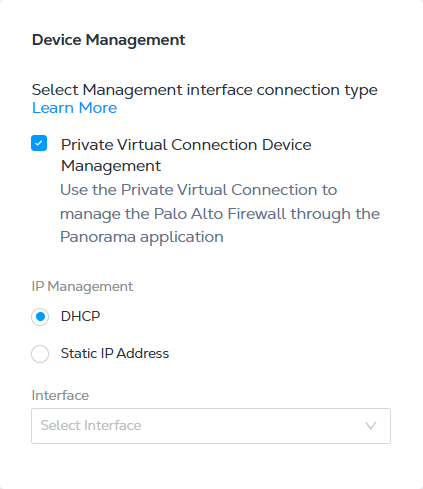
如果使用Equinix公用IP地址配置VM系列防火墙,则可以通过DHCP或静态IP配置管理接口。
输入Device Management (设备管理)选项时,请选择以下IP地址选项之一:
- DHCP——一种网络管理协议,可自动分配 IP 地址。
- 静态IP地址-输入IP地址,子网掩码,默认网关和接口。
部署类型
VM系列防火墙有三种部署类型可用。
| 部署类型 | 描述 |
|---|---|
| 单个 | 配置作为独立设备运行的单个设备。另一个设备可以与现有的单个设备配对(需要相同的资源配置),以形成本地冗余(单个城域网中的冗余)或地理冗余(每个设备在不同的城域网中运行)。有关更多信息,请参阅创建VM系列防火墙 |
| 冗余 | 配置两个防火墙设备。每个设备都单独运行,您负责以主动-主动方式配置这些设备。您可以选择在两个不同的城域中部署两个设备(推荐)以实现分布式体系结构或将两个设备保持在同一城域中。 |
| 群集 | 在单个城域中配置两个具有主动备用冗余的防火墙设备。(没有地理冗余选项可用。)有关更多信息,请参阅创建群集VM系列防火墙 |
VM系列防火墙柔性VCPU许可证支持
Network Edge支持固定和灵活的vCPU许可模式。灵活的vCPU许可证需要特定版本的Pan-OS。创建VM系列防火墙VNF时,您需要验证码(8或9位字母数字代码)。
使用BYOL选项配置VM系列NGFW时,用户需要在Equinix Fabric门户中的设备创建工作流程期间提供许可证令牌。许可证令牌也称为Auth Code (8或9位字母数字代码)。有关VM系列许可证类型的更多信息, 请参阅Palo Alto Networks文档。
生成一个认证码
通过在Palo Alto Networks客户支持门户中创建部署配置文件来生成授权代码。部署配置文件定义了可以根据您提供的点数分配和激活的NGFW和功能集的数量。本文档假定您已访问Palo Alto Networks客户支持门户并激活了点数。有关创建部署配置文件的详细信息, 请参阅Palo Alto Networks文档。
要配置Network Edge帕洛阿尔托网络VM系列VNF,您只需要AUTH代码。您不需要使用UUID,CPUID,vCPU数量和内存信息注册防火墙。
使用授权码
创建设备时,请在_许可证文件_(BYOL)字段中输入授权码。创建冗余或群集部署类型时,请使用与部署配置文件关联的验证码。例如,如果在同一部署配置文件中分配了足够的防火墙和VCPU核心,请对冗余或群集设备使用相同的验证码。如果您的部署配置文件没有分配足够的防火墙或VCPU核心,则可以使用通过单独的部署配置文件生成的不同验证码。
在_设备资源_部分中,选择适合您的部署配置文件CPU分配的资源类型。例如,如果您的部署配置文件仅分配了8个vCPU内核,并且您尝试选择16个内核/56 GB内存分配,授权码注册将失败。在这种情况下,您的可用资源选项将是2个内核,4个内核或8个内核。
在"软件版本"部分中,选择10.1.3或更高版本。灵活vCPU许可证仅支持Pan-OS 10.0.4及更高版本。如果选择Pan-OS 9.x.x,您的授权码注册将失败,并且您的序列号将未知。此外,当您使用CLI手动请求许可证时,您将看到一条错误消息Server Error : Failed to install license. Memory or vcpu is required for FLEX deployment profile to be applied on the device
当使用灵活的vCPU许可证时,请确保你的供应设备PAN-OS版本是10.0.4或以上。
完成设备创建后,您的Network Edge VNF将使用相应的AUTH代码实例化。系统会自动生成序列号并将其注册到Palo Alto Networks客户支持门户。您可以通过比较"Show System Info" CLI输出和Palo Alto客户支持门户上的Software NGFW Devices (软件NGFW设备)中显示的序列号来验证注册。请注意,在Equinix Fabric门户设备详细信息页面中使用的UUID与在Pan-OS中维护的UUID不同。
授权码问题故障排除
即使在VNF创建工作流程期间输入了无效的授权代码,门户仍会继续使用此代码并完成设备配置过程。根据部署类型,您将观察到不同的供应状态。
下表总结了Auth Code问题的潜在根本原因和接下来要采取的行动。
| 可能的根本原因 | 配置状态 | 后续步骤 |
|---|---|---|
| 认证码无效 | 单个或冗余设备配置状态显示已配置。但是,您的序列号将不会生成并注册到Palo Alto客户支持门户网站。要进行验证,请使用Device Details (设备详细信息show system info)> Tools (工具)中的Web控制台访问CLI控制台并使用检查序列号。如果使用无效的授权代码,序列号值将未知。 | 使用CLI命令request license获取auth-code <your_auth_code>从SSH或Web控制台手动触发验证码注册过程。提供有效的验证码后,您将在CLI控制台中看到VM Device License Installed (已安装VM设备许可证)消息。 |
| 主设备和辅助设备的验证码均无效。 主设备或辅助设备的验证码无效。 | 群集设备-_设备配置状态_显示License Error在两个群集设备上,_许可证状态_显示Registration Failed。 | 使用CLI命令request license获取auth-code <your_auth_code> from the SSH or Web Console to manually trigger the Auth Code registration process. Once you provide a valid Auth Code, you will see a VM Device License Installed message in the CLI console. You will see an Update the license file via the console to proceed message. Select the acknowledgment statement and click Confirm to bring both VNF instances to a Provisioned(已配置)状态。 |
| 两台设备的授权码都是有效的,但没有足够的点数来部署两个集群设备。 | 群集设备-_设备配置状态_显示License Error在两个群集设备上,_许可证状态_显示Registration Failed。 | 登录Palo Alto Networks客户支持门户并验证授权代码是否有足够的点数来部署两个VM系列防火墙。 |
停用您的Palo Alto Networks VM-系列VNF
如果要取消配置(删除) VNF,请确保从VNF取消激活许可证。您可能需要将Pan-OS配置为支持API密钥,以便与Palo Alto网络客户支持门户进行交互以取消激活。
您可以手动停用许可证。有关详细信息,请参阅帕洛阿尔托网络公司文档。
Palo Alto Networks–Prisma Airs.
- 有关发行说明,请参阅新功能- Prisma Airs.
- 有关文档,请参阅Prisma AirDoc。
| 4 核 | 8个核心 | 16个核心 | |
|---|---|---|---|
| 内存 | 16 GB | 48 GB | 56 GB |
| 软件包 | 标准 | ||
| 支持的虚拟数据接口(默认/最大) | 10 / 19 | ||
| 系统保留接口 | 管理 | ||
| 可用许可证类型 | 自带 | ||
| 访问方法 | SSH Web控制台 | ||
| 图像版本 | 请参阅可用映像版本 | ||
| 受限的 CLI 命令 | 无 | ||
| 部署选项 | 单个 冗余 |
Palo Alto Networks Prisma SD-WAN
| 2个核心 | 4 核 | 8个核心 | |
|---|---|---|---|
| 内存 | 8 GB | 8 GB | 32 GB |
| 软件包 | 虚拟离子(3103v) | 虚拟离子(3103v) 虚拟离子(3104v) | 虚拟离子(3103v) 虚拟离子(3104v) 虚拟离子(7108v) |
| 支持的虚拟数据接口 | 10 / 10 | ||
| 系统保留接口 | 控制器 端口1 (WAN1) 端口2 (WAN2) | ||
| 可用许可证类型 | 自带 | ||
| 访问方法 | SSH PRISMA编排器 | ||
| 图像版本 | 请参阅可用映像版本 | ||
| 供应商的吞吐量信息 | PRISMA WAN即时开机网络(ION)设备规格 | ||
| 供应商产品规格 | https://www.paloaltonetworks.com/sase/sd-wan.html |
创建Palo Alto Networks Prisma SD-WAN 设备
创建设备时,您需要指定:
- 许可证密钥 – 输入您的许可证密钥。
- 许可证密钥 – 输入您的秘密许可证短语。
SD-API设备可以使用Network Edge WAN启动。有关更多信息,请参阅Network Edge API–创建SD WAN设备