CiscoVNF 规格
Cisco许可
下表详细介绍了 Cisco VNF 在 Network Edge 上可用的许可类型。
| VNF Type | BYOL | Subscription |
|---|---|---|
| ASAv Firewall | Yes | No |
| FTD Virtual | Yes | No |
支持
下表显示 Equinix 和 Cisco 对您的 Cisco VNF 的支持责任。
| License Type | Equinix | Cisco |
|---|---|---|
| BYOL | Equinix supports Network Edge infrastructure specific topics, including VNF operation, license registration, connectivity issues, Network Edge service issues, etc. | Support needs to be purchased from your Cisco reseller along with the license. Contact Cisco directly for support. |
| Subscription | Equinix supports Network Edge infrastructure specific topics, including VNF operation, license registration, connectivity issues, Network Edge service issues, etc. | Open a Cisco TAC case in the Network Edge portal ONLY for IOX-XE related issues or configuration questions. Work directly with Cisco TAC without Equinix engagement. |
对于 BYOL 选项,您有责任从Cisco或其合作伙伴处获取Cisco支持。请联系Cisco销售代表或合作伙伴购买许可证和支持合同。
Cisco自适应安全虚拟设备
- Cisco Adaptive Security Virtual Appliance (ASAv) Data Sheet.
- Cisco Secure Firewall ASA Series Feature Licenses.
- Cisco ASA Series, 9.16(x) Release Notes.
| 2 Cores | 4 Cores | 8 Cores | |
|---|---|---|---|
| Memory | 4 GB | 8 GB | 16 GB |
| Software Package | ASAv10 | ASAv10 ASAv30 | ASAv10 ASAv30 ASAv50 |
| Virtual Data Interfaces Supported (Default/Max) | 10 / 10 | ||
| System Reserved Interfaces | Management 0/0 (MGMT) GigabitEthernet 0/1 (WAN) | ||
| Available License Type | BYOL | ||
| Access Methods | SSH (CLI) HTTPS (Web Console) | ||
| Image Version | See Available Image Versions | ||
| Restricted CLI Commands | None | ||
| Deployment Option | Single Redundant |
Cisco威胁防御虚拟防火墙
- Cisco Threat Defense Virtual (Formerly FTDv/NGFWv) Data Sheet.
- Cisco Secure Firewall Management Center Feature Licenses.
- Cisco Firepower Version 7.0 Release Notes.
| 4 Cores | 8 Cores | 12 Cores | |
|---|---|---|---|
| Memory | 8 GB | 16 GB | 24 GB |
| Software Package | FTDv5 FTDv10 FTDv20 | FTDv30 | FTDv50 |
| Virtual Data Interfaces Supported (Default/Max) | 10 / 10 | ||
| System Reserved Interfaces | Web-based Management (FMC, FDM or CDO) | ||
| Available License Type | BYOL | ||
| Access Methods | SSH (CLI) HTTPS (Web Console) | ||
| Image Version | See Available Image Versions | ||
| Restricted CLI Commands | None | ||
| Deployment Option | Single Redundant |
创建威胁防御虚拟防火墙设备
配置设备详细信息时,您将指定以下内容:
- 集群名称 - 如果您正在创建集群,请为集群命名。
- 设备名称 – 输入设备名称。如果要创建多个设备,则在设备名称后,主节点名称后会附加
-Node 0,辅助节点名称后会附加-Node 1。 - 设备管理 – 从以下选项中选择您的设备管理类型:
- 防火墙管理中心 (FMC) – 输入 FMC 的 IP 地址作为“控制器 IP 地址”,并输入“注册密钥”。注册密钥用于将设备注册到 FMC。
- Firepower 设备管理器 (FDM)
- Cisco防御协调器 (CDO)
连接选项
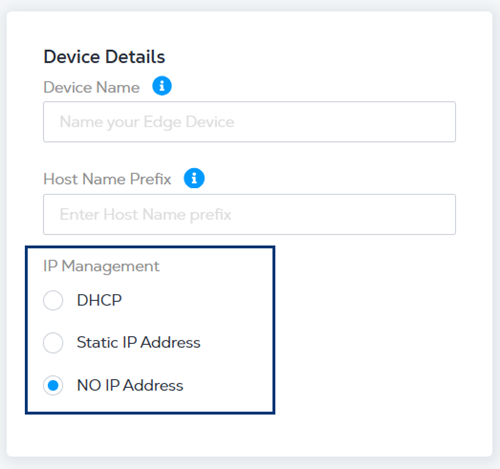
连接类型功能适用于 Cisco Threat Defense 虚拟防火墙 VNF 和 Cisco Catalyst 8000V。此功能允许用户选择是否包含来自 Equinix 的公网 IP 地址的虚拟接口。VNF 可以选择不分配公网 IP 地址,以满足虚拟设备需要与互联网隔离的需求。用户随后可以通过其私有网络或虚拟连接管理这些设备。
注意
仅在配置新设备时才可使用“连接类型”选项。在 2023.4 版本之前配置的设备无法启用此选项。
| Connectivity Type | With Equinix Public IP Address | Without Equinix Public IP Address |
|---|---|---|
| Use Cases | This option comes with Public IP Addresses from Equinix and does not require an additional Virtual Connection to manage the virtual device. | This option removes Equinix-sourced Public IP Address assignment and will segregate the VNF from the Internet after the device creation. If the device needs to be managed by software running in the Colo cage or through a private virtual connection, this option is recommended. |
| Internet Connectivity | Public IP addresses from Equinix are assigned to the following interfaces and accessible from the Internet: Management (MGMT), Ethernet 1/1 (WAN) | No public IP Address from Equinix included. This option requires a separate virtual connection from your Network Service Provider (NSP) or Internet Service Provider (ISP). See Bring Your Own Connection - Remote Fabric Port for more information. |
| Access Control List | Create an Access Control List (ACL) to limit traffic to the VNF Management (MGMT) or WAN interface. | The ACL option is not available. Additional compensating controls can be implemented for traffic from any private virtual connection. |
| SSH Access | Unlike the other VNF types, we do not provide username and RSA Public Key configuration settings for SSH access during the device creation workflow. Use console access from the device details page. | Unlike the other VNF types, we do not provide username and RSA Public Key configuration settings for SSH access during device creation workflow.Use console access from the device details page. |
| Device Manageability | During device creation, select the management type: FMC, FDM, or CDO. If you FMC select, you need to provide FMC’s IP Address and Registration Key. | A virtual connection (via the BYOC option) must first be assigned to the Management (MGMT) interface for FMC, FDM or CDO access. If you FMC select, you need to provide FMC’s IP Address and Registration Key. |
| License Registration | Manually register the license after the device is created. | Manually register the license after the device is created. You are responsible for registering the license using Internet access through a private virtual connection. |
| Clustering Setup | The cluster option is not available for this connectivity type. | Users are required to configure cluster devices manually. |
选择“无 Equinix 公网 IP 地址”连接类型时,VNF 将在 WAN 或管理接口上配置公网 IP 地址。您需要自行配置许可证注册、叠加网络配置和集群(可选)。
以下是管理接口设置的示例(仅供参考)命令。
configure network ipv4 manual <IP Address> <Mask> <Default Gateway>
Cisco Meraki vMX SD-WAN(测试版)
| 2 Cores | 4 Cores | |
|---|---|---|
| Memory | 4 GB | 16 GB |
| Software Package | vMX - Medium vMX - Large | |
| Virtual Data Interfaces Supported (Default) | 2 | |
| System Reserved Interfaces | ||
| Available License Type | BYOL | |
| Access Methods | SSH (CLI) HTTPS (Web Console) | |
| Image Version | See Available Image Versions | |
| Restricted CLI Commands | None | |
| Deployment Option | Single Redundant |
创建 Cisco Meraki vMX
在开始网络边缘设备部署流程之前:
- 在 Meraki 控制面板中创建帐户。
- 登录控制面板,创建一个新的组织和网络,选择安全设备作为网络类型。
- 选择所需的 Meraki vMX 设备尺寸。
- 在设备页面上,选择“生成身份验证令牌”以创建 Day-0 配置文件。
如何在没有 IP 地址的情况下配置 Cisco Meraki vMX
如果您创建 Meraki vMX 时未分配 Equinix 公共 IP 地址,则 VNF 将在 WAN 或管理接口上配置任何公共 IP 地址。
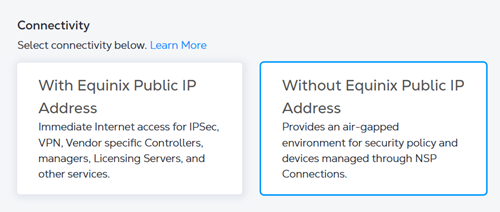
输入设备详细信息时,请选择以下 IP 地址选项之一:
- DHCP——一种网络管理协议,可自动分配 IP 地址。
- 静态 IP 地址 - 输入 IP 地址、子网掩码和默认网关。
- 无IP地址 - 将不会分配IP地址。