Aviatrix VNFs规格
许可
自带许可证(BYOL)产品需要有效许可证。您负责从Aviatrix购买和管理您自己的许可证。要购买软件许可证,请联系您的Aviatrix销售代表或合作伙伴。
支持
Aviatrix支持BYOL许可证。请联系您的Aviatrix销售代表或合作伙伴以购买许可证和支持合同。
Aviatrix Spoke Edge
| 2个核心 | 4 核 | 8个核心 | 16个核心 | |
|---|---|---|---|---|
| 内存 | 4 GB | 8 GB | 16 GB | 32 GB |
| 软件包 | 标准 | |||
| 支持的虚拟数据接口(默认/最大) | 3/3 | |||
| 系统保留接口 | Eth0 (WAN) Eth1 (LAN) Eth2 (管理- WAN) | |||
| 可用许可证类型 | 自带 | |||
| 访问方法 | SSH (CLI) 控制器GUI | |||
| 图像版本 | 请参阅可用映像版本* | |||
| 受限的 CLI 命令 | 无 | |||
| 部署选项 | 单个 冗余 |
* Aviatrix 6.9版限制为最多3个接口,并且需要额外的支持设备来实现第3层路由功能。这意味着,如果选择版本6.9,则需要通过DLG连接额外的支持设备(如路由器)才能连接到CSP。使用7.1版本时,将取消此要求。7.1 版本支持多个虚拟连接,接口数量最多可达 10 个,并在 WAN 接口上支持 BGP,以实现与 CSP 私有线路的连接。此版本需要 7.1 控制器。
Aviatrix Transit Edge
| 2个核心 | 4 核 | 8个核心 | 16个核心 | |
|---|---|---|---|---|
| 内存 | 4 GB | 8 GB | 16 GB | 32 GB |
| 软件包 | 标准 | |||
| 支持的虚拟数据接口(默认/最大) | 10/10 | |||
| 系统保留接口 | Eth0 (WAN) Eth1 (LAN) Eth2 (管理- WAN) | |||
| 可用许可证类型 | 自带 | |||
| 访问方法 | SSH (CLI) 控制器GUI | |||
| 图像版本 | 请参阅可用映像版本* | |||
| 受限的 CLI 命令 | 无 | |||
| 部署选项 | 单个 冗余 |
*此版本需要 7.1 控制器。
创建一个Aviatrix Edge 设备
创建 Aviatrix Spoke Edge Device 或 Aviatrix Transit Edge Device 时,请考虑以下特定于供应商的选项。
配置文件
-
Aviatrix辐条边缘设备需要引导配置文件(Aviatrix的默认配置文件),该文件必须在Aviatrix边缘控制器门户中生成。生成的文件称为
cloudinit ZTP.txt。 -
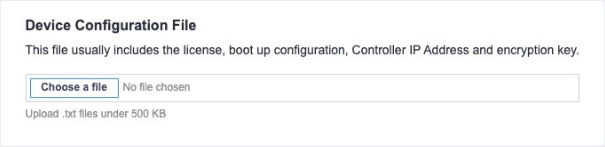
这两种类型的Aviatrix边缘设备都需要设备配置文件,其中包括许可证,引导配置,控制器IP地址和加密密钥。在**"设备配置文件"**部分中上传此文件。
旧版本
Aviatrix 6.9版限制为最多3个接口,并且需要额外的支持设备来实现第3层路由功能。这意味着,如果选择版本6.9,则需要通过DLG连接额外的支持设备(如路由器)才能连接到CSP。使用7.1版本时,将取消此要求。7.1 版本支持多个虚拟连接,接口数量最多可达 10 个,并在 WAN 接口上支持 BGP,以实现与 CSP 私有线路的连接。此版本需要 7.1 控制器。
连接选项
连接类型功能适用于Aviatrix Edge VNF。此功能提供选项,以包括具有或不具有来自Equinix的公用IP地址的虚拟接口。在没有公用IP地址的情况下启动VNF的选项可解决可能需要将虚拟设备与Internet隔离的用例。然后,用户可以从其专用网络或虚拟连接管理设备。
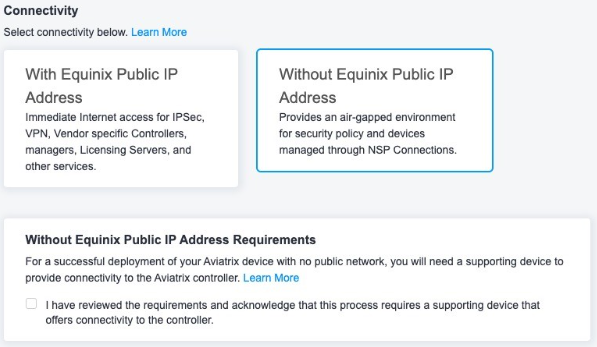
下表总结了选项以及两者之间的区别。
| 使用Equinix公用IP地址 | 没有Equinix公用IP地址 | |
|---|---|---|
| 使用案例 | 此选项带有Equinix的公共IP地址,不需要额外的虚拟连接来管理虚拟设备。 | 此选项将删除Equinix分配的公用IP地址分配,并在创建设备后将VNF与互联网隔离。此选项适用于设备需要由Colo笼中运行的软件或通过专用虚拟连接来管理的场景。 |
| 互联网连接类型 | Equinix的公用IP地址分配给接口并可从Internet访问。 用户还可以将Aviatrix设备连接到已具有互联网连接的支持设备(例如,另一台路由器VNF)。 | 不包括来自Equinix的公用IP地址。作为前提条件,需要首先创建支持设备(例如具有Equinix公用IP地址的路由器),同时创建设备链路组(DLG)。然后, 没有Equinix IP地址的Aviatrix边缘设备可以连接到DLG , 以便它可以立即连接到Aviatrix控制器。 |
| 访问控制列表 | 创建一个访问控制列表(ACL)来限制VNF接口的流量。 | ACL选项不可用。可以对来自任何专用虚拟连接的流量实施额外的补偿控制。 |
| 接口映射 | Eth0到Eth9 (总共10个接口)可用于具有Equinix IP地址的Aviatrix边缘设备。eth2专门保留为分配公用IP地址的WAN接口。 Eth0到Eth1,Eth3到Eth9可用于映射到DLG。eth0,Eth3到Eth9可以连接到CSP或虚拟连接。 | Eth0到Eth9 (总共10个接口)可用于没有Equinix IP地址的Aviatrix边缘设备。eth0到Eth9可用于映射到DLG。eth0,Eth2到Eth9可以连接到CSP或虚拟连接。 |
只有拥有Equinix公共 IP 地址才能上传 ACL 模板和额外的互联网带宽。
如果选择**"无Equinix公用IP地址**"类型,则需要通过支持设备提供互联网连接,该设备使用设备链接组(DLG)在24小时内连接到Aviatrix边缘设备。Aviatrix的cloudinit ZTP文件仅在生成后24小时内有效。如果Edge设备由于互联网不可用而无法在24小时内连接到Aviatrix控制器,则需要重新生成cloudinit ZTP文件并重新创建设备。