创建 SDWAN 设备

先决条件
身份验证-提交您的用户凭据,客户端ID和客户端机密以进行OAuth2身份验证。有关如何调用OAuth API以验证和验证凭据的说明,请参阅API身份验证。
步骤2:获取设备类型和帐户
致电获取设备类型
API,查找可在NE平台上启动的WAN设备。您将了解可用这些设备的Metros ()metroCode,可用内核数()core,软件包(packageCode和version)以及所有可能的许可和吞吐量选项。
如果您已经知道想要哪个设备,则可以跳过此步骤。
accountReferenceId拨打"获取帐户"{METRO} API,检查您的帐号(或)和您想要使用虚拟设备的Metro中的状态。出于计费原因,您必须在Metro中拥有一个帐户,您需要虚拟设备处于活动或待定状态。要了解如何创建帐户,请转到帐单帐户管理。
如果您是尝试为客户创建设备的经销商,则必须确保客户和您(经销商)的帐户均处于"活动"或"待定"状态。您的帐户将会收到账单,但是,您必须将客户的帐号发送至邮政API,以便为您的客户创建WAN设备。
如果您已经知道您的帐号(或accountReferenceId)和
状态,则可以跳过此步骤。
步骤3:配置许可证
目前,自带许可证 (BYOL) 是 SD-WAN 设备唯一可用的许可选项。 每个供应商的自带设备许可(BYOL)流程都各不相同。
要为Cisco WAN设备配置许可证,请执行以下操作:
- 在Cisco vManage 平台上生成引导文件。
- 要创建C8000V-SDWAN,请调用上载文件来上载Cisco引导文件。您将在响应中得到
fileUuid。您可以在创建有效负载字段中输入值day0TextFileId以创建虚拟C8000V-SDWAN设备。
要为Prisma设备配置许可证,请执行以下操作:
- 在Prisma Orchestrator上生成许可证密钥(离子密钥)和许可证密钥(密钥)。
- 调用Equinix创建设备API以创建Prisma WAN设备时,输入许可证密钥(离子密钥)和密钥(密钥)。
创建设备时,Fortinet设备不需要许可证。如果您有令牌,请
在字段中输入它licenseToken。要为Fortinet WAN设备配置许可证文件,请执行
以下操作:
- 在 Fortinet 门户上生成许可证文件。
- 通过调用Post License File(发布许可证文件)在Equinix门户上上传许可证文件。您将获得
fileId可用于创建虚拟WAN设备的。
要配置Versa设备,请在Versa director上创建VNF设备模板并记下序列号 。
您不需要许可证文件即可在Network Edge平台上配置 Aruba 设备。
要上传瞻博网络WAN的许可证,请执行以下操作:
- 在Juniper门户上生成许可证文件。
- 通过调用Post License File(发布许可证文件)在Equinix门户上上传许可证文件。您将获得
fileId可用于创建瞻博网络WAN设备的。
步骤4:供应商特定参数
每个WAN供应商都需要自己的参数集,而不是 步骤5中POST API定义中列出的常见参数。 在步骤中创建新设备时,请检查供应商的参数并传递vendorConfig{}对象中的参数 5.
思科 SD-WAN
| Cisco vendorConfig{}参数 | 必填 | 类型 | 示例 | 可能的值 | 说明 |
|---|---|---|---|---|---|
| 站点ID | 是的 | 字符串 | 12345 | 站点ID。对于思科WAN设备是必需的。站点标识是维普特拉覆盖网络中的一个特定物理位置,如分支机构或校园。 | |
| SystemIpAddress | 是的 | 字符串 | 192.168.1.5 | 系统IP地址。对于思科WAN设备是必需的。为每个Vedge路由器和vSmart控制器分配一个系统IP地址。它应该采用十进制四部分点分表示法,就像IPv4地址一样。 | |
| 主机名 | 有条件的 | 字符串 | SR-01 | 主机名。对于C8000V-SDWAN为必填项。 |
Palo Alto Networks PRISMA-SDWAN
| Palo Alto Networks vendorConfig{}参数 | 必填 | 类型 | 示例 | 可能的值 | 说明 |
|---|---|---|---|---|---|
| 许可证密钥(离子密钥) | 是的 | 字符串 | <license_key> | 许可证密钥(离子密钥)。对于Palo Alto Networks设备为必填。 | |
| 许可证密钥(密钥) | 是的 | 字符串 | ec68e425-f973-452e-a866-76be5844d0ba | 许可证密钥(密钥)。对于Palo Alto Networks设备为必填。 |
Versa VERSA_SDWAN
| Versa vendorConfig{}参数 | 必填 | 类型 | 示例 | 可能的值 | 说明 |
|---|---|---|---|---|---|
| 本地ID | 是的 | 字符串 | SDWAN-Branch@Versa.com | 分支机构的电子邮件地址。 | |
| 远程ID | 是的 | 字符串 | Controller-01-staging@Versa.com | 控制端的电子邮件地址。 | |
| 序列号 | 是的 | 字符串 | 12345 | 在Versa director上设置设备模板时,客户选择序列号。Versa director上的VERSA后期部署设备序列号应与此输入相匹配。 | |
| 控制器1 | 是的 | 字符串 | 54.219.248.29 | SD-WAN 控制器 1 的 IP 地址。 | |
| 控制器2 | 是的 | 字符串 | 54.177.220.115 | SD-WAN 控制器 2 的 IP 地址。 |
FortiGate FG-SDWAN *
| FortiGate vendorConfig{}参数 | 必填 | 类型 | 示例 | 可能的值 | 说明 |
|---|---|---|---|---|---|
| 管理员密码 | 是的 | 字符串 | 此口令9 | 密码。此密码至少应为6个字符,并且必须包含大写字母和数字。 | |
| 控制器1 | 是的 | 字符串 | 1.1.1.1 | 系统IP地址。对于FortiGate WAN设备是必需的。 |
*FortiGate SD-WAN 设备也需要主机名,但它不属于 vendorConfig 对象,而是直接传递的。 一个参数,以及其他参数,例如 deviceTypeCode、accountNumber 等。
Arista VELOCLOUD-SDWAN
| Arista vendorConfig{}参数 | 必填 | 类型 | 示例 | 可能的值 | 说明 |
|---|---|---|---|---|---|
| ActivationKey | 是的 | 字符串 | GJUK-JM2X-59BJ-样本 | 激活密钥。可在VeloCloud编排门户上使用。 | |
| controllerFqdn | 是的 | 字符串 | demo.velocloud.net | VeloCloud SD - WAN网关。在设备的ACL列表中,请提供与controllerFqdn关联的IP地址。 | |
| root口令 | 否 | 字符串 | 测试密码! | 设备的CLI密码。 |
HPE Aruba EDGECONNECT-SDWAN
| Aruba vendorConfig{}参数 | 必填 | 类型 | 示例 | 可能的值 | 说明 |
|---|---|---|---|---|---|
| 帐户名称 | 是的 | 字符串 | 帐户名称 | 帐户的名称。 | |
| 主机名 | 是的 | 字符串 | 我的主机名1 | 用于标识的主机名。这将作为FQDN包括在内,并确保可以从批准的来源访问设备。只允许使用a-z,A-Z,0-9和连字符(-)。必须以字母开头,以字母或数字结尾。长度应介于2-30个字符之间。例外情况- FTDv 2-14;Aruba 2-24。 | |
| 帐户密钥 | 是的 | 字符串 | 帐户密钥 | 帐户密钥。 | |
| 设备标签 | 否 | 字符串 | 设备标签 | 电器标签。 |
步骤5:创建SD WAN设备
| POST /ne/v1/devices | |
|---|---|
| 方法 | POST |
| URL 或端点 | /ne/v1/devices |
| 标题 | Authorization,Content-Type |
| 查询参数 | draft,draftUuid |
如果您想创建一个包含两个设备(主设备和备用设备)的冗余 SD-WAN 设备,请执行以下操作: 下列的:
-
设置
vendorConfig可选辅助对象的参数。- 在请求正文负载中为Cisco SD-WAN 提供两个 licenseFileId
- 为 CloudGenix 冗余提供两个许可证密钥(ION 密钥)和许可证密钥(密钥)。 请求正文有效负载中的设备
- 为冗余的 Arista VeloCloud SD-WAN Edge 设备提供两个激活密钥。
-
您的辅助设备可能具有不同的 ACL 模板、帐号、additionalBandwidth、metroCode 和通知。
-
如果您是尝试为客户创建冗余设备的经销商,请确保主要和辅助城域网位于同一个国家/地区。此外,主帐号和辅助帐号必须相同。经销商的帐户将被收取费用,但是,此API接受客户的帐号,以便为客户创建设备。上述限制是必要的,因为每个客户都与经销商的计费帐户相关联。
如果您没有所有必要的信息,您仍然可以将信息另存为草稿。 必须提供deviceTypeCode,AccountNumber/accountReferenceId和metroCode才能保存 草稿。
创建虚拟设备即表示您接受订单条款。致电获取订单条款以查看详细信息。
示例请求
创建冗余Cisco SD-WAN 设备的示例 curl 请求。
curl -X POST
https://api.equinix.com/ne/v1/devices?draft=false
-H 'Authorization: Bearer <token>'
-H 'Content-Type: application/json'
-d '
{
    "deviceTypeCode": "C8000V-SDWAN",
    "projectId": "XXXXX",
    "metroCode": "DC",
    "termLength": "1",
    "licenseMode": "BYOL",
    "packageCode": "DNA",
    "virtualDeviceName": "sroy-cisco-8v-controller",
    "notifications": [
        "test@equinix.com"
    ],
    "version": "17.09.01a",
    "interfaceCount": 10,
    "deviceManagementType": "SELF-CONFIGURED",
    "core": 4,
    "vendorConfig": {
        "systemIpAddress": "1.1.1.1",
        "siteId": "4567",
        "hostname": "SR-01"
    },
    "aclTemplateUuid": "3319e378-be2f-40e4-8e79-13ea2aed7a5f",
    "day0TextFileId": "917f2621-11d4-468f-9a09-af8fd66c0e57",
    "accountNumber": "201091",
    "secondary": {
        "metroCode": "DC",
        "notifications": [
            "test@equinix.com"
        ],
        "virtualDeviceName": "sroy-cisco-8v-controller-secondary",
        "additionalBandwidth": "100",
        "vendorConfig": {
            "systemIpAddress": "1.1.1.1",
            "siteId": "9886",
            "hostname": "SR-02"
        },
        "aclTemplateUuid": "3319e378-be2f-40e4-8e79-13ea2aed7a5f",
        "day0TextFileId": "dec1dee5-eba9-4187-a029-ae76341e8874",
        "accountNumber": "201091"
    },
    "additionalBandwidth": "100"
}
'
有关参数和选项的完整列表,请参见API参考。
示例响应
单个设备的示例响应202:已接受请求。
{
    "uuid": "74d8c6b6-3153-4271-9f0e-45bdc7094dec"
}
冗余设备的响应示例202:已接受请求。
{
    "uuid": "74d8c6b6-3153-4271-9f0e-45bdc7094dec",
    "secondaryUuid": "de5cf79b-3d16-4ccd-841b-3b68ecda2142"
}
如果出现“拒绝访问”的情况,联系人您当地的Equinix服务台以获取门户访问权限。
设备状态
创建WAN设备时,设备会在Equinix基础设施中通过各种状态转换。可以使用获取虚拟设备{uuid}API的"状态"响应属性来监视这些状态。在配置设备并应用许可证后,您可以创建与云服务提供商的连接。
| 虚拟设备状态 | 说明 |
|---|---|
INITIALIZING | Equinix目前正在预留资源和创建设备。 |
PENDING_ACCOUNT | 客户的帐户未获批准。帐户获得批准后,设备创建将继续。 |
PROVISIONING | 设备正在启动。 |
PENDING_ORDER | 此状态仅适用于从Siebel到NE的订单。客户需要登录Network Edge门户并提交待定订单。 |
PENDING_SIGNATURE | 客户尚未接受Network Edge条款。 |
CANCEL_ORDER | Siebel 发给 NE 的订购已取消。此状态仅适用于从Siebel发送至Network Edge的订单。 |
WAITING_FOR_PRIMARY | 辅助设备已就绪,但主设备未就绪。如果您已请求冗余设备,则可能会出现此状态。 |
WAITING_FOR_SECONDARY | 主设备已就绪,但辅助设备未就绪。如果您已请求冗余设备,则可能会出现此状态。 |
FAILED | 设备创建失败。 |
PROVISIONED | 设备已准备就绪。 |
DEPROVISIONING | Equinix接受了客户删除虚拟设备的请求。 |
DEPROVISIONED | 该设备已取消配置/删除。 |
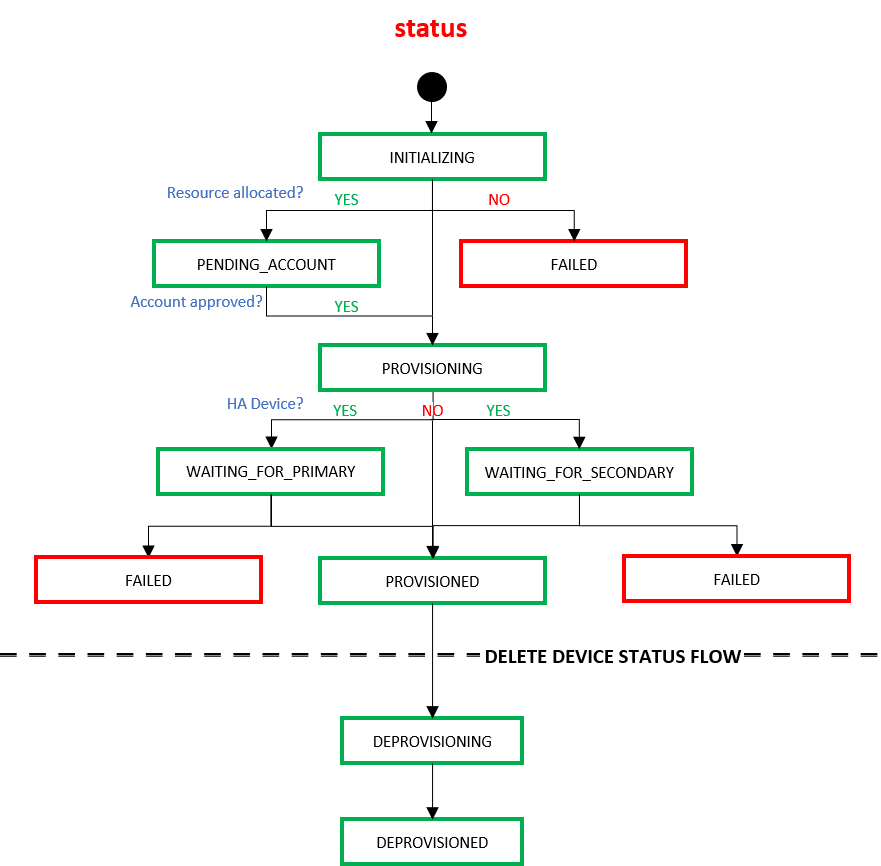
当最终用户使用Delete Virtual Devices API删除设备时,设备会在Equinix 基础结构中通过以下状态转换。
| 地位 | 描述 |
|---|---|
DEPROVISIONING | Equinix接受了客户删除虚拟设备的请求。 |
DEPROVISIONED | 该设备已取消配置/删除。 |