创建设备
先决条件
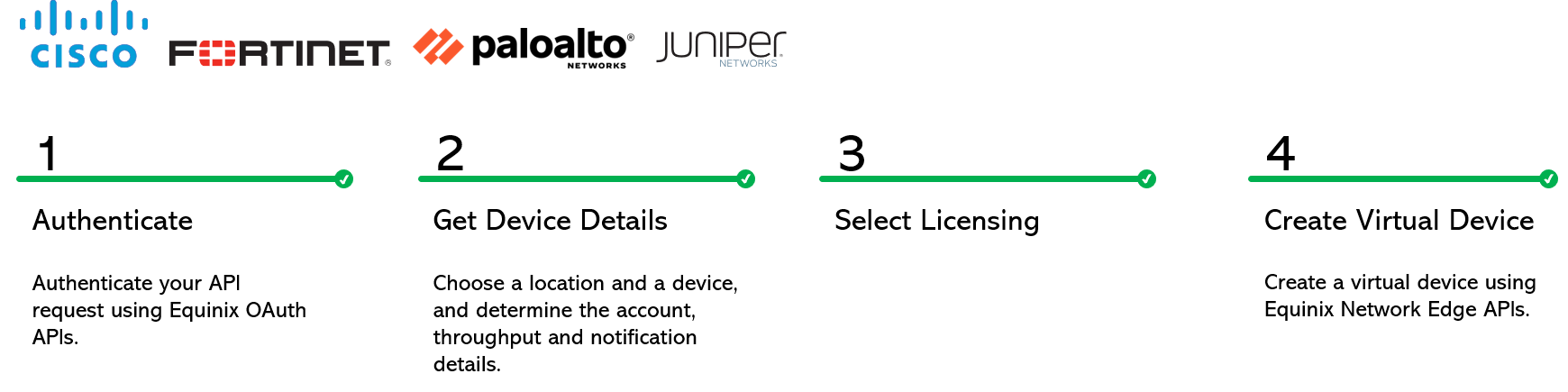
身份验证-提交您的用户凭据,客户端ID和客户端机密以进行OAuth2身份验证。有关如何调用OAuth API以验证和验证凭据的说明,请参阅API身份验证。
步骤2:获取设备详细信息
-
呼叫"获取设备类型"以了解您要在NE平台上启动的自配置设备(例如路由器或防火墙)。您将了解虚拟设备可用的城域地区,设备供应商,可用内核数量以及软件包及其版本。选择
deviceTypeCode,metroCode,core,packageCode和version。 -
调用"获取允许的接口"以找出所选Core允许的接口数量。您可以选择任何可用的设备接口作为
sshInterfaceId。否则,Equinix 将选择第一个可用的接口。 -
拨打"获取帐户{metro}",查看您的帐号(或
accountReferenceId)以及您需要使用虚拟设备的metro中的状态。出于计费原因,您必须在Metro中拥有一个帐户,您需要虚拟设备处于活动或待定状态。如果您没有帐户,请创建帐户。
如果您是尝试为客户创建设备的经销商,则必须确保客户和您(经销商)的帐户均处于"活动"或"待定"状态。您的帐户将收到账单,但是,您必须将客户的账号发送至API,以便为客户创建设备。
步骤3:许可选项
我们为大多数设备提供BYOL (自带许可)作为许可选项。上传许可证文件或代码/令牌/ID,具体取决于供应商提供的产品。对于Cisco 8000V,您可以使用订购许可选项。
-
Arista:我们不支持上传Arista设备的许可证。但是,您可以在创建设备后登录到设备以上传许可证,从而提高吞吐量。
-
Palo Alto和提供许可证令牌。在字段中输入许可证令牌
licenseToken。 -
瞻博网络提供许可证文件。要为瞻博网络设备自带许可证(BYOL),请使用许可证后文件上传许可证文件。您将获得可用于创建虚拟设备的文件ID。如果您有冗余瞻博网络设备,则可以对主设备和次设备使用相同的FileID。
-
Fortinet:创建设备时,Fortinet设备不需要许可证。如果您有令牌,请在字段中输入它
licenseToken。要为Fortinet设备配置许可证文件,必须执行以下操作:- 在 Fortinet 门户上生成许可证文件。
- 通过调用Post License File(发布许可证文件)在Equinix门户上上传许可证文件。您将获得
fileId可用于创建虚拟设备的。
- 登录设备检查您的许可证状态。
步骤4:创建自配置设备
| POST /ne/v1/devices | |
|---|---|
| 方法 | POST |
| URL 或端点 | /ne/v1/devices |
| 标题 | Authorization令牌,Content-Type |
| 查询参数 | draft,draftUuid |
要创建具有主设备和辅助设备的冗余设备:
- 设置次要对象的参数
- 如果您是尝试为客户创建冗余设备的经销商,请确保主要和辅助城域网位于同一个国家/地区。主要帐号和辅助帐号必须相同。尽管经销商的帐户将会收到账单,但此API接受客户的帐号,以便为客户创建设备。上述限制是必要的,因为每个客户都与经销商的计费帐户相关联。
- 对于 Cisco FTD 设备,主设备和辅助设备的管理类型必须相同。
创建虚拟设备即表示您接受订单条款。致电获取订单条款以查看详细信息。
要保存设备草稿,您必须提供deviceTypeCode,accountNumber或accountReferenceId,和metroCode。
示例请求
创建单个设备的示例 curl 请求。
curl -X
POST "https://api.equinix.com/ne/v1/devices?draft=false"
-H "content-type: application/json"
-H "Authorization: Bearer <token>"
-d '
{
    "metroCode": "SV",
    "deviceTypeCode": "VSRX",
    "agreeOrderTerms": true,
    "termLength": "1",
    "licenseMode": "BYOL",
    "packageCode": "STD",
    "virtualDeviceName": "Test-device-001-SROY",
    "notifications": [
        "test@equinix.com"
    ],
    "hostNamePrefix": "TC12",
    "aclDetails": [
        {
            "uuid": "fb2e69bb-cbd7-40c4-bc01-8bcc5fa741c2",
            "interfaceType": "WAN"
        }
    ],
    "accountNumber": "200541",
    "version": "23.2R1.13",
    "interfaceCount": 8,
    "deviceManagementType": "SELF-CONFIGURED",
    "core": 2,
    "userPublicKey": {
        "username": "userName",
        "keyName": "keyName"
    },
    "additionalBandwidth": "100"
}
'
创建冗余设备的 curl 请求示例。
curl -X
POST "https://api.equinix.com/ne/v1/devices?draft=false"
-H "content-type: application/json"
-H "Authorization: Bearer <token>"
-d '
{
    "metroCode": "DC",
    "deviceTypeCode": "C8000V",
    "agreeOrderTerms": true,
    "termLength": "1",
    "licenseMode": "BYOL",
    "packageCode": "network-advantage",
    "virtualDeviceName": "Test-device-001-SROY - primary",
    "notifications": [
        "test@equinix.com"
    ],
    "hostNamePrefix": "TC01",
        "aclDetails": [
        {
            "uuid": "fb2e69bb-cbd7-40c4-bc01-8bcc5fa741c2",
            "interfaceType": "WAN"
        }
    ],
    "accountNumber": "201148",
    "version": "17.06.06a",
    "interfaceCount": 10,
    "deviceManagementType": "SELF-CONFIGURED",
    "core": 2,
    "userPublicKey": {
        "username": "sroy",
        "keyName": "keyWIQzB"
    },
    "sshInterfaceId": "3",
    "channelPartner": "SDCI",
    "secondary": {
        "metroCode": "DC",
        "hostNamePrefix": "TC02",
        "notifications": [
            "test@equinix.com"
        ],
        "virtualDeviceName": "Test-device-002-SROY - secondary",
        "additionalBandwidth": "100",
            "aclDetails": [
        {
            "uuid": "fb2e69bb-cbd7-40c4-bc01-8bcc5fa741c2",
            "interfaceType": "WAN"
        }
    ],
        "accountNumber": "201148",
        "sshInterfaceId": "4"
    }
}
'
创建无互联网访问的 Cisco FTD 辅助设备的示例 curl 请求。
curl -X
POST "https://api.equinix.com/ne/v1/devices?draft=false"
-H "content-type: application/json"
-H "Authorization: Bearer <token>"
-d '
{
    "deviceTypeCode": "Cisco_NGFW",
    "licenseMode": "BYOL",
    "packageCode": "FTDv5",
    "virtualDeviceName": "NEAut-",
    "metroCode": "DC",
    "notifications": [
        "t@t.com"
    ],
    "hostNamePrefix": "test",
    "interfaceCount": 10,
    "deviceManagementType": "SELF-CONFIGURED",
    "core": 4,
    "version": "7.0.4-55",
    "vendorConfig": {
        "managementType": "FDM"
    },
    "connectivity": "PRIVATE",
    "secondary": {
        "hostNamePrefix": "test-123",
        "metroCode": "DC",
        "notifications": [
            "t@t.com"
        ],
        "virtualDeviceName": "test-secondary",
        "vendorConfig": {
            "managementType": "FDM"
        }
    }
}
'
有关参数和选项的完整列表,请参见API参考。
示例回复
单个设备的响应样本。第202章:已接受请求。
{
    "uuid": "74d8c6b6-3153-4271-9f0e-45bdc7094dec"
}
冗余设备的响应示例。第202章:已接受请求。
{
    "uuid": "74d8c6b6-3153-4271-9f0e-45bdc7094dec",
    "secondaryUuid": "de5cf79b-3d16-4ccd-841b-3b68ecda2142"
}
设备状态
通过调用获取虚拟设备{uuid}来监视设备的状态。您必须先配置设备并注册许可证,然后才能连接到云服务提供商。
| 虚拟设备"状态" | 说明 |
|---|---|
INITIALIZING | Equinix目前正在预留资源和创建设备。 |
PROVISIONING | 设备正在启动。 |
PENDING_ORDER | 订单已从Siebel发送到NE。客户需要登录NE门户并提交订单。 |
PENDING_SIGNATURE | 客户已签署线下接受NE条款的协议,但尚未接受条款。 |
CANCEL_ORDER | Siebel 发给 NE 的订购已取消。 |
WAITING_FOR_PRIMARY | 辅助设备已就绪,但主设备未就绪。仅当您创建了用于冗余的辅助设备时,才会显示此状态。 |
WAITING_FOR_SECONDARY | 主设备已就绪,但辅助设备未就绪。仅当您创建了用于冗余的辅助设备时,才会显示此状态。 |
FAILED | 设备创建失败。 |
PROVISIONED | 设备已准备就绪。 |
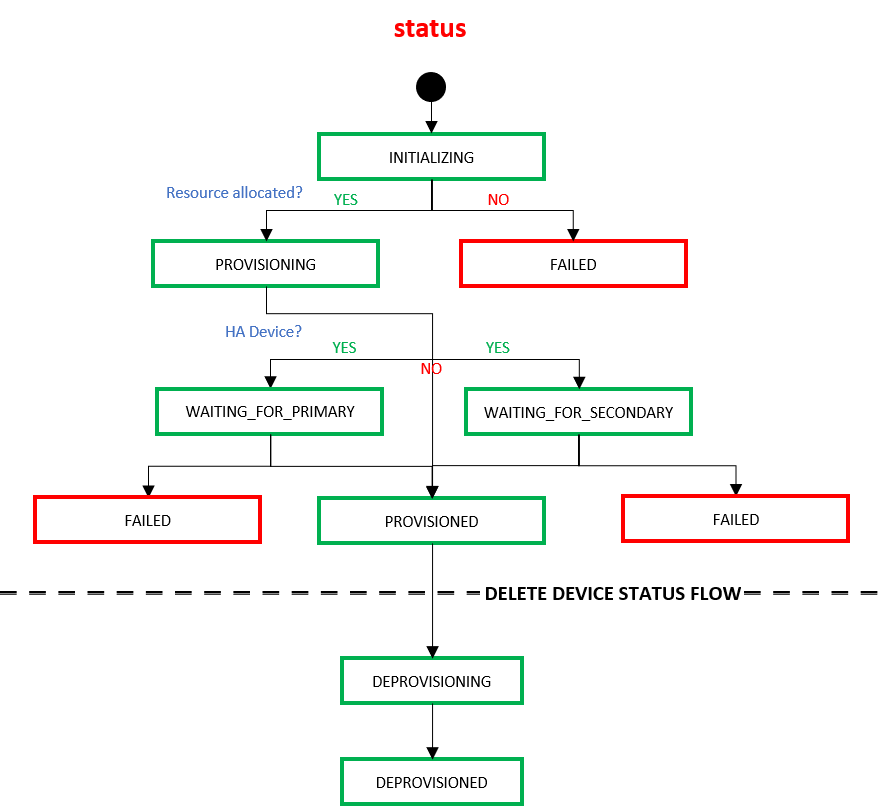
当最终用户使用Delete Virtual Devices API删除设备时,设备会在Equinix 基础结构中通过以下状态进行转换。
| /ne/v1/devices/{uuid} 下的虚拟设备“status” | 描述 |
|---|---|
| 取消置备 | Equinix 接受了客户删除虚拟设备的请求。 |
| 已取消置备 | 该设备已取消配置/删除。 |