将Network Edge设备连接到远程端口
使用Fabric API在Network Edge虚拟设备和远程Fabric端口之间建立未标记的连接。
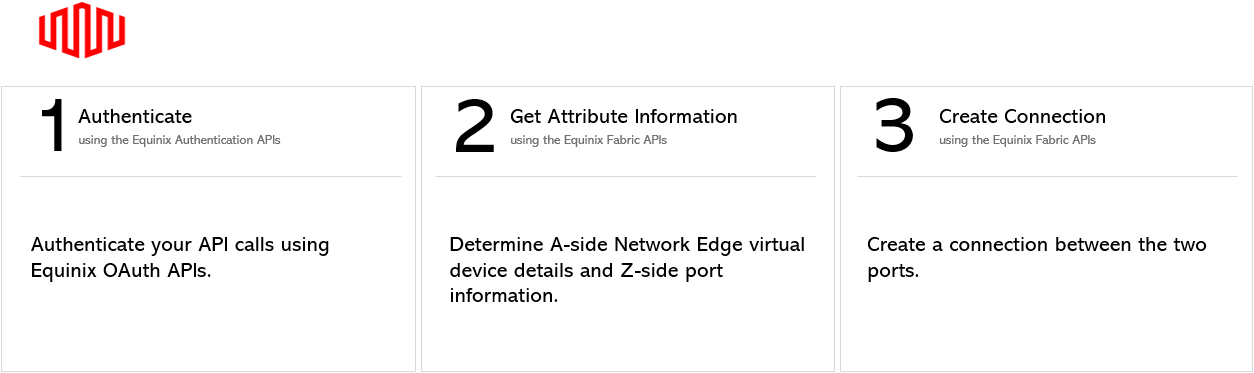
Fabric API 先决条件
-
身份验证 - 提交您的 OAuth2 用户凭据、客户端 ID 和客户端密钥 身份验证。有关如何调用OAuth API以验证和验证凭据的说明,请参阅API身份验证。
-
确定A侧信息。使用获取虚拟设备或获取虚拟设备{uuid}检索Network Edge设备信息。您可以在设备上为您的连接选择任何可用接口。但是,如果不指定接口,Equinix将选择接口。
-
使用获取所有端口API请求检索Equinix Fabric端口信息。
连接到未标记的远程端口
要创建从Network Edge设备到未标记流量的远程端口的连接,请向端点发送POST请求/fabric/v4/connections。在请求正文中指定连接的配置详细信息。
注意
您只能从Network Edge虚拟设备到远程端口创建单个未标记的连接。
| POST /fabric/v4/connections | |
|---|---|
| 方法 | POST |
| 端点 | /fabric/v4/connections |
| 标题 | Authorization,Content-Type |
| 路径参数 | 不适用 |
| 查询参数 | 不适用 |
| 身体参数 | type``name,,order bandwidth aSide,,zSide,project,notifications |
cURL 请求示例:
curl -X
POST 'https://api.equinix.com/fabric/v4/connections'
-H 'content-type: application/json'
-H 'authorization: Bearer <token>'
-d '{
    "type": "EVPL_VC",
    "bandwidth": 100,
    "redundancy": {
        "priority": "PRIMARY"
    },
    "name": "ConnectionName-1",
    "order": {
        "purchaseOrderNumber": "1-3232923"
    },
    "aSide": {
        "accessPoint": {
            "type": "VD",
            "virtualDevice": {
                "type": "EDGE",
                "uuid": "fd5342f3-d067-4683-a24f-be952279630b"
            },
            "interface": {
                "type": "NETWORK",
                "id": 45645
            }
        }
    },
    "zSide": {
        "accessPoint": {
            "type": "COLO",
            "port": {
                "uuid": "20d32a80-0d61-4333-bc03-707b591ae2f4"
            },
            "linkProtocol": {
                "type": "UNTAGGED"
            }
        }
    },
    "project": {
        "projectId": 567
    },
    "notifications": [
        {
            "type": "ALL",
            "emails": [
                "test@equinix.com",
                "test1@equinix.com"
            ]
        }
    ]
}'
请求正文中包含的参数特定于此示例。有关参数及其说明的完整列表, 请参见API参考。
连接到 DOT1Q 远程端口
要创建从Network Edge设备到dot1q远程端口的连接,请向端点发送POST请求/fabric/v4/connections。在请求正文中指定连接的配置详细信息。
cURL 请求示例:
curl -X
POST 'https://api.equinix.com/fabric/v4/connections'
-H 'content-type: application/json'
-H 'authorization: Bearer <token>'
-d '
{
    "type": "EVPL_VC",
    "bandwidth": 1000,
    "name": "vd to COLO",
    "aSide": {
    "accessPoint": {
        "type": "VD",
        "virtualDevice": {
        "type": "EDGE",
        "uuid": "20d32a80-0d61-4333-bc03-707b591ae2f4"
        },
        "interface": {
        "type": "NETWORK",
        "id": 45645
        }
    }
    },
    "zSide": {
    "accessPoint": {
        "type": "COLO",
        "port": {
        "uuid": "20d32a80-0d61-4333-bc03-707b591ae2f4"
        },
        "linkProtocol": {
        "type": "DOT1Q",
        "vlanTag": 300
        }
    }
    },
    "order": {
    "purchaseOrderNumber": "1-129105284100"
    },
    "notifications": [
    {
        "type": "ALL",
        "emails": [
        "test@equinix.com",
        "test1@equinix.com"
        ]
    }
    ]
}'
示例回答:
{
    "type": "EVPL_VC",
    "href": "https://api.equinix.com/fabric/v4/connections/c193c1c4-2c7e-472d-8c91-0283bc3b5a71",
    "uuid": "c193c1c4-2c7e-472d-8c91-0283bc3b5a71",
    "name": "ConnectionName-1",
    "state": "PROVISIONING",
    "operation": {
        "providerStatus": "NOT_AVAILABLE",
        "equinixStatus": "PROVISIONING"
    },
    "order": {
        "purchaseOrderNumber": "1-3232923"
    },
    "project": {
        "projectId": 567
    },
    "notifications": [
        {
            "type": "ALL",
            "emails": [
                "testqq@equinix.com"
            ]
        }
    ],
    "account": {
        "accountNumber": 270217,
        "orgId": 92287,
        "globalOrgId": "0016u000003JZ53AAG"
    },
    "changeLog": {
        "createdBy": "eqxnfvuser",
        "createdDateTime": "2022-03-22T23:14:23.546Z"
    },
    "bandwidth": 100,
    "redundancy": {
        "group": "79a0e626-55fe-4fe1-89a5-4d7ca52214db",
        "priority": "PRIMARY"
    },
    "isRemote": true,
    "direction": "INTERNAL",
    "aSide": {
        "accessPoint": {
            "interface": {
                "uuid": "bf8a606b-32b2-4a53-a450-6eabd7d9ccab",
                "id": 45645,
                "type": "CLOUD"
            },
            "type": "VD",
            "account": {
                "accountNumber": 270217,
                "orgId": 92287,
                "organizationName": "eqx-nfv",
                "globalOrgId": "0016u000003JZ53AAG"
            },
            "location": {
                "href": "https://api.equinix.com/fabric/v4/metros/DC",
                "region": "AMER",
                "metroName": "Ashburn",
                "metroCode": "DC"
            },
            "virtualDevice": {
                "href": "https://api.equinix.com/ne/v1/devices/fd5342f3-d067-4683-a24f-be952279630b",
                "uuid": "fd5342f3-d067-4683-a24f-be952279630b",
                "name": "ha-json",
                "type": "EDGE"
            }
        }
    },
    "zSide": {
        "accessPoint": {
            "type": "COLO",
            "account": {
                "accountNumber": 270224,
                "orgId": 92287,
                "organizationName": "eqx-nfv",
                "globalOrgId": "0016u000003JZ53AAG"
            },
            "location": {
                "href": "https://api.equinix.com/fabric/v4/metros/SY",
                "region": "APAC",
                "metroName": "Sydney",
                "metroCode": "SY"
            },
            "port": {
                "href": "https://api.equinix.com/fabric/v4/ports/c791f8cb-5d73-d730-8ce0-306a5c00a4ee",
                "uuid": "c791f8cb-5d73-d730-8ce0-306a5c00a4ee",
                "name": "eqx-nfv-SY1-L-Dot1q-BO-PRI-10G-JN-1147"
            },
            "linkProtocol": {
                "type": "DOT1Q"
            }
        }
    },
    "additionalInfo": []
}
响应有效负载包括在请求正文中定义的配置参数。有关可能的参数及其说明的完整列表, 请参见API参考。
连接到 QinQ 远程端口
要创建从Network Edge设备到QinQ远程端口的连接,请向端点发送POST请求/fabric/v4/connections。在请求正文中指定连接的配置详细信息。
cURL 请求示例:
curl -X
POST 'https://api.equinix.com/fabric/v4/connections'
-H 'content-type: application/json'
-H 'authorization: Bearer <token>'
-d '
{
    "type": "EVPL_VC",
    "bandwidth": 1000,
    "name": "vd to COLO",
    "aSide": {
    "accessPoint": {
        "type": "VD",
        "virtualDevice": {
        "type": "EDGE",
        "uuid": "20d32a80-0d61-4333-bc03-707b591ae2f4"
        },
        "interface": {
        "type": "NETWORK",
        "id": 45645
        }
    }
    },
    "zSide": {
    "accessPoint": {
        "type": "COLO",
        "port": {
        "uuid": "20d32a80-0d61-4333-bc03-707b591ae2f4"
        },
        "linkProtocol": {
        "type": "QINQ",
        "vlanSTag": 300,
        "vlanCTag": 400
        }
    }
    },
    "order": {
    "purchaseOrderNumber": "1-129105284100"
    },
    "notifications": [
    {
        "type": "ALL",
        "emails": [
        "test@equinix.com",
        "test1@equinix.com"
        ]
    }
    ]
}
'
监控您的连接
使用Get Specified Connection API端点监视连接状态。