快照和还原
本主题介绍快照和还原功能,该功能允许您为设备映像拍摄快照,然后通过使用备份重新配置映像来还原VNF。每个VNF最多允许3个快照。备份映像无法下载,并且只能在Network Edge基础架构中进行还原。
图像快照和恢复
成功创建快照和恢复系统需满足以下条件:
- 每个VNF只能将3个快照保存为备份。如果达到限制,则需要先删除旧备份,然后再创建新备份。
- 对于群集部署,每个节点将允许进行3次备份。需要同时备份两个节点。
- 还原功能需要删除当前VNF。如果在拍摄映像快照后删除任何资源(如连接和设备链接组),设备将不会恢复。
功能可用性取决于VNF类型和配置VNF的IBX。请参阅下表以查看您的VNF是否支持快照和还原功能。对于某些VNF,由于还原过程中内部标识符发生更改,您需要禁用许可证,然后重新注册。
| VNF 类型 | 快照和恢复支持 | 用户必须执行的操作 |
|---|---|---|
| 在 AM4、FR6、LD6、CH1、DA1、DC11、SV5、SG3、SY4 中配置的任何 VNF | 否 | 不适用 |
| Aruba EdgeConnect | 是的 | 无需执行任何操作 |
| Arista CloudEOS | 是的(自带设备) | 无需执行任何操作。VNF应在还原后保留许可证 |
| Arista VeloCloud SD-WAN 边缘 | 是的 | 无需执行任何操作 |
| Aviatrix Edge | 是的 | 无需执行任何操作 |
| BlueCat | 是的 | 无需执行任何操作 |
| 检查点防火墙 | 是的(自带设备) | 无需执行任何操作。VNF应在还原后保留许可证 |
| Cisco Catalyst 8000V(自主模式) | 是的(自带设备) | 用户恢复后应注销并重新注册智能许可证。 |
| Cisco Catalyst 8000V(控制器模式) | 是的(自带设备) | 用户恢复后应注销并重新注册智能许可证。 |
| 思科FTDv | 是的(自带设备) | 用户恢复后应注销并重新注册智能许可证。 |
| Cisco ASAv | 是的(自带设备) | 用户恢复后应注销并重新注册智能许可证。 |
| F5 | 是的 | 无需执行任何操作 |
| Fortinet FortiGate VFW / SD - WAN | 是的(自带设备) | 无需执行任何操作。VNF应在还原后保留许可证 |
| Infoblox NIOS | 是的 | 无需执行任何操作 |
| Infoblox 网格管理器 | 否 | 不适用 |
| 吉加蒙V系列 | 否 | 不适用 |
| Juniper vSRX | 是的(自带设备) | 无需执行任何操作。VNF应在还原后保留许可证 |
| NGINX Plus | 是的(订阅) | 无需执行任何操作。VNF应在还原后保留许可证 |
| Palo Alto Networks VM系列防火墙 | 是的(自带设备) | 用户恢复许可证后应注销并重新注册。 |
| Palo Alto Networks Prisma SD-WAN | 否 | 不适用 |
| Prisma SD-WAN | 否 | 不适用 |
| 检查点防火墙 | 是的(自带设备) | 无需执行任何操作。VNF应在还原后保留许可证 |
| 反之亦然 | 是的(自带设备) | 无需执行任何操作。VNF应在还原后保留许可证 |
| VyOS | 是的(订阅) | 无需执行任何操作。VNF应在还原后保留许可证 |
| Zscaler | 是的 | 无需执行任何操作 |
创建 VNF 映像快照
-
从_Network Edge (虚拟设备资源清册)菜单中,选择_Virtual Device Inventory(虚拟设备资源清册)。
-
选择要为其创建快照的设备,然后单击工具。
-
在_快照管理_卡中,单击创建快照。
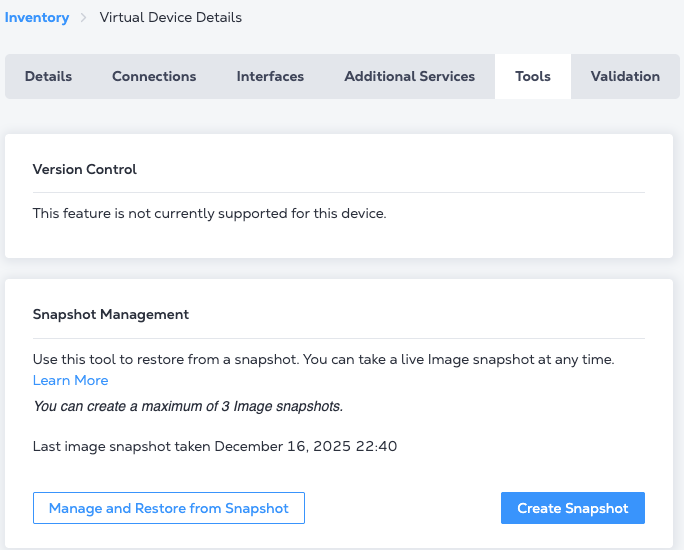
-
在Create Image Snapshot (创建映像快照)提示符中,输入此备份映像的名称,然后选择I意识到在此过程中设备操作将受到限制。请注意,完成快照的预计时间可能因VNF的大小而异。
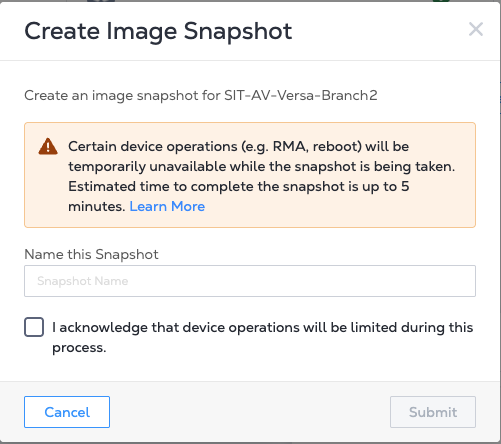
-
单击Submit (提交)以启动快照过程。此时将显示另一个提示,指示正在进行映像备份。单击Back to Device Detail (返回设备详细信息)或X关闭此提示。
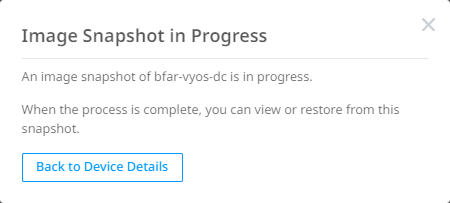
在Tools (工具)部分,Snapshot Management (快照管理)卡指示映像快照正在进行中,并显示估计完成时间。设备状态指示映像快照正在进行中。
-
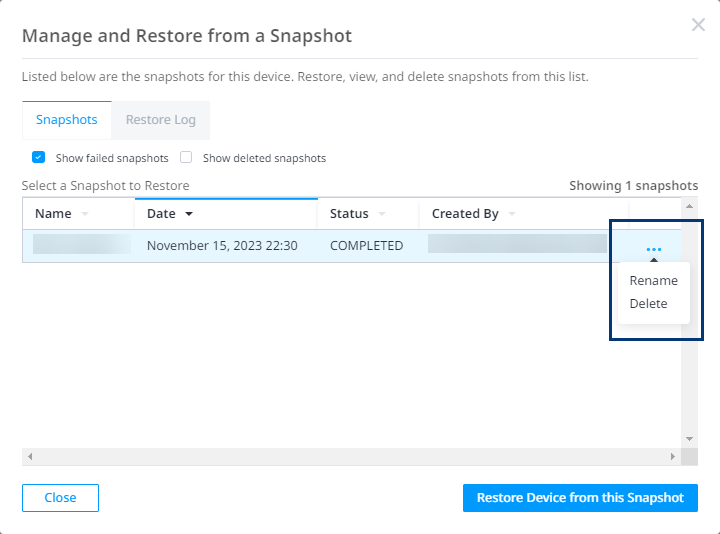
在快照管理卡中,单击从快照管理和还原以管理备份。
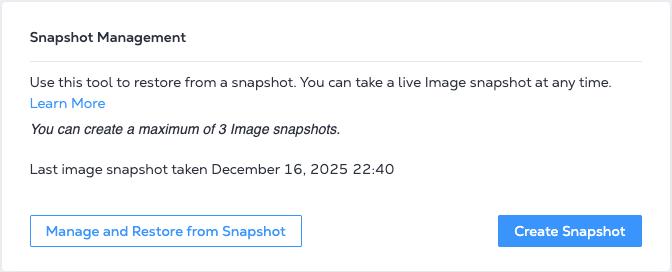
-
要重命名或删除快照,请选择图像,然后单击编辑图标进行选择。
恢复VNF
还原过程一旦开始,就无法撤消。我们建议您创建设备当前状态的备份,以防需要保存对VNF的任何更改。
-
从_Network Edge (虚拟设备资源清册)菜单中,选择_Virtual Device Inventory(虚拟设备资源清册)。
-
选择要从备份映像恢复的设备,然后单击工具。
-
在_快照管理_卡中,单击从快照管理和还原。将显示所有快照。
-
选择要用于还原的映像,然后单击"从此快照还原设备"。
-
在"还原前创建快照(推荐)"提示中单击"立即还原"。
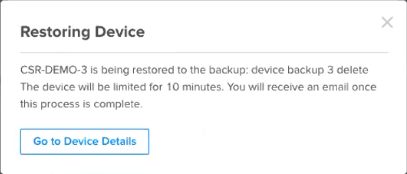
启动还原过程后,设备将在15至20分钟内停止运行。设备状态指示还原正在进行中。