设备链接组
设备链路组(DLG)是一种Network Edge服务,可将两个或更多虚拟设备作为一个组在多个城域网内或跨多个城域网连接。DLG通常用于服务链(将防火墙和路由器等多种设备类型连接在一起),主干或用于冗余目的。
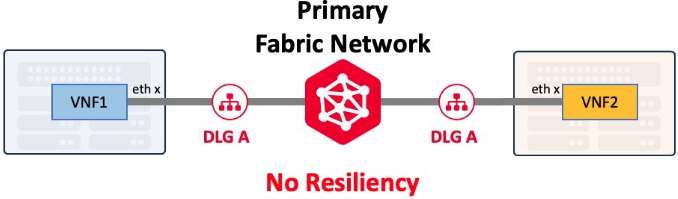
设备链接服务在用户可访问的两个或多个Network Edge设备之间创建一个第 2 层全网状局域网。
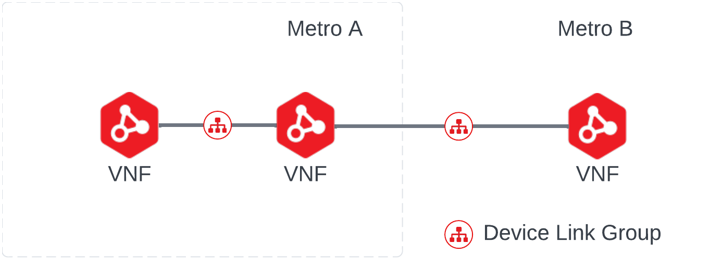
设备链接可以用来完成几个用例。
- 跨 Metros 将虚拟设备连接在一起,创建广域网或其他专用网络配置。
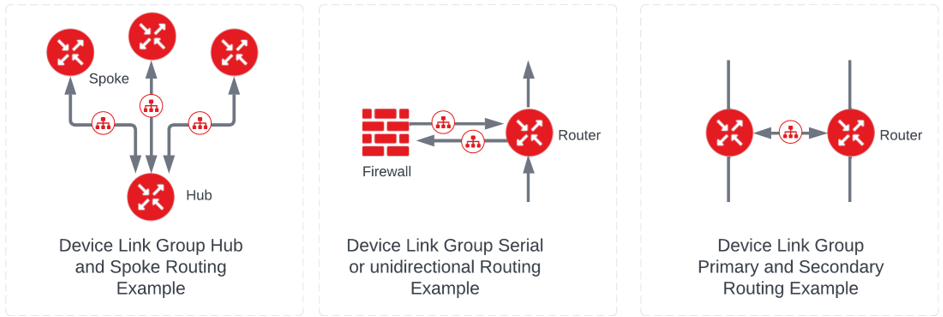
- 直接流量按顺序从一个设备引导到下一个设备,或将“服务链”项目连接在一起。
- 将冗余的设备连接在一起,利用相关协议进行同步。
设备链路仅建立第2层连接,不指定第3层的确切路由或流量。这必须通过接口协议的配置和其他需求来创建。
虽然设备链接是第 2 层结构,但 IP 寻址、全局 ASN 和其他一些步骤对于正确配置是必要的。
设备链接服务具有以下属性和规格:
| 数据要求 | 注释 | |
|---|---|---|
| 设备 | 虚拟设备名称 | 指定属于整个链接组的每个设备。单个DLG中允许的设备数量限制为29台设备。但是,路由存在实际限制,因此我们建议单个组的设备总数不要超过10-12个。 |
| 设备链接组名称 | 不能超过 50 个字符;必须是您账户的唯一字符。 | 通用组名,要求组内每台设备使用一个接口。 |
| 设备接口 | 组中的每台设备都需要一个专用于设备链接组的接口;系统会自动决定分配下一个可用接口。 | 一个设备可以属于多个组,但每个设备都在一个独立的接口上。 |
| IP地址池 | 此选项必须为IPv4并采用CIDR格式:仅限单个子网。创建DLG时,IP地址池是必填字段。 | IP地址可以是公有或私有地址,并且是用户定义的。将设备添加到池中时,将从子网为每个设备分配一个覆盖地址,直到子网用尽为止。耗尽后,设备链接不能接受其他设备。虽然大多数用户通常都有小组,但IP地址池一旦定义,就不能增强或添加到其中。我们建议您在小组中放置一个足够大的池,这样将来就不会有用尽的风险。 |
| IP地址 接口 | 需要使用设备CLI手动配置 IP 地址。 | 在添加设备时,会从定义的池或子网中为接口分配一个 IP 地址。 |
| 都市吞吐量/速度 | 从1-10000的整数 | 以Mbps为单位,这是进出都市的总的可能吞吐量。 |
| 全球ASN | 组中的每个设备都必须指定一个ASN来执行BGP对等。需要使用设备CLI手动配置全局ASN。 | 此全局ASN设置不是设备链接的唯一设置,但如果在将设备添加到组中时未创建任何其他服务或设置,则必须为该设备指定ASN。如果已为连接,VPN隧道或其他服务指定了全局ASN,则系统会自动使用该ASN。 |
要在多个设备之间创建设备链接,需要定义唯一的设备链接组。此组有一个常用名称,并且要求在属于该组的每个设备上使用一个接口。一个设备可以是多个组的一部分,但每个设备都位于一个离散接口上:
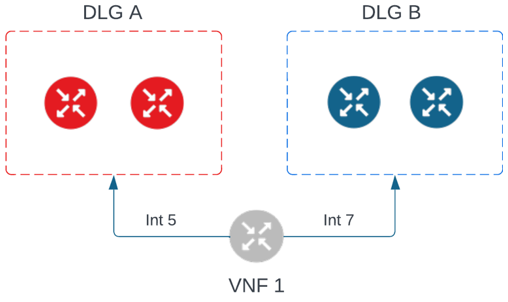
用户可以在每个城域中为每个设备链路组添加一个设备。流量使用Equinix Fabric使用的相同骨干网在地铁之间从一个设备传输到另一个设备。
可以使用Network Edge API创建设备链接。有关详细信息,请参阅Network Edge API–创建设备链接。
DLG 吞吐量考虑因素
进出城域网的流量作为每个城域网吞吐量的单一度量进行监控。了解这一点非常重要,以便用户可以设置设备链路以优化流量和覆盖预期路由。
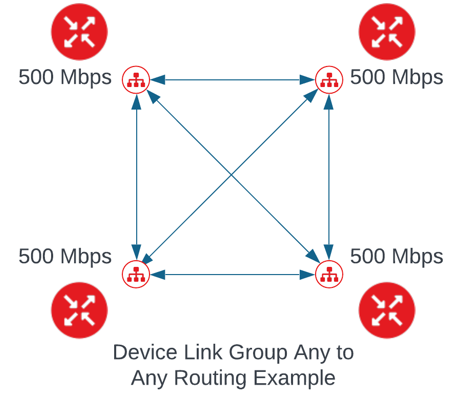
例如,在全网状设置中,用户通常在每个都会区中具有相同的吞吐量设置,如下所示:
另外,如果使用设备链接组的目的是建立集线器和辐条路由模式,用户可以添加吞吐量限制,如下所示:
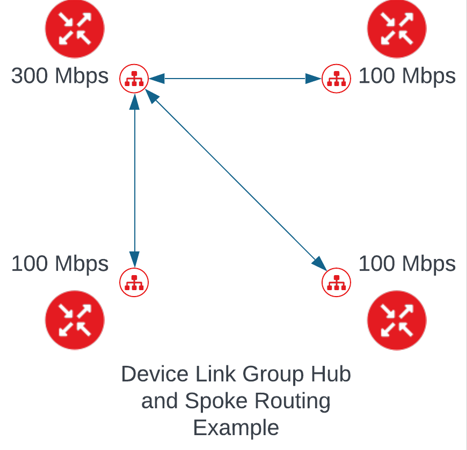
由于添加了允许每个城域网多个设备进入设备链路的功能,因此此设计和吞吐量设置变得至关重要。此配置仍为按城域网设置,而不是按设备吞吐量设置。在城域中,没有强制的吞吐量策略,但可能存在其他限制,例如设备本身的吞吐量,计算节点中的可用容量或与其他流量竞争的最大努力流量。
当流入或流出城域网的流量超过分配的流量时(例如路由设计或吞吐量),数据包会被丢弃,因为这是尽力服务。用户可以随时编辑和更改每个地铁允许的金额。
由于单个设备可以是多个设备链路的一部分,因此用户也可以使用它来覆盖某些用例的单向流量模式,例如过滤流量然后将其返回到另一台设备的防火墙。下图是一个示例:
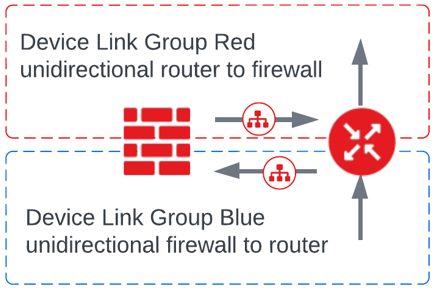
设备链接总是能够是双向的,这取决于用户创建的叠加路由规则。
设备链接和设备冗余
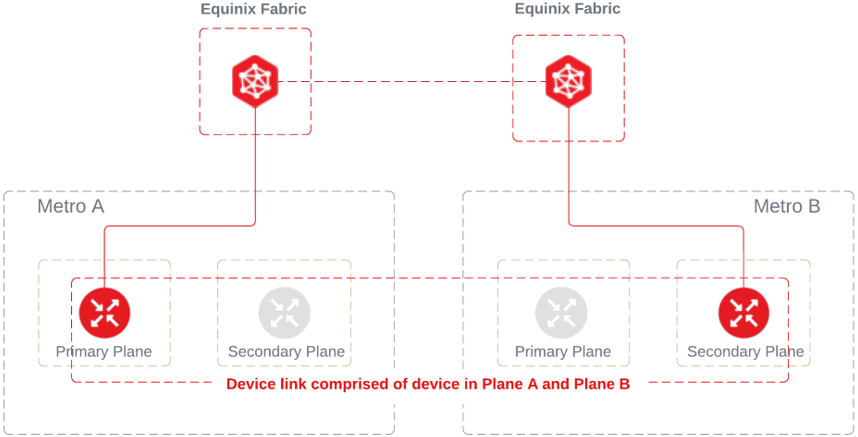
设备链路可以包含主设备和辅助设备的任意组合,这些设备也是冗余配对的一部分。即使组合不代表相同的线对也是如此。例如,设备链路理论上可以包括冗余对A的主设备和冗余对B的次设备
由于供应商的本机设置或当前配置,某些虚拟设备可能会受到限制,无法使用设备链接。系统会指示设备何时不符合设备链接的条件。以下是不允许使用虚拟设备的一些示例:
- 该设备没有可用的接口了
- 设备已属于同一个组(不能重复添加)。
- 已定义的原始客户池中没有额外的 IP 地址需要分配。
设备链路冗余
设备链路组(DLG)可以创建冗余或不创建冗余。了解如何创建冗余DLG以实现Network Edge服务更好的弹性体系结构非常重要。有关更多信息,请参阅设备链路弹性。