为Network Edge设备连接配置 BGP
边界网关协议(BGP)服务是服务提供商用于将数据传入和传出其云、网络和其他服务的最常用方法。BGP设置可以添加到与设备相关的任何连接上,一旦该连接启动并运行。
每个BGP实例中指定的设置会作为配置变更推送到与连接相关的接口上。
BGP服务具有以下属性。
| Values | Data Requirements | Notes | |
|---|---|---|---|
| Configure before launch | No | Can only be done after the connection is in provisioned state. | |
| Configure at launch | No | Can only be done after the connection is in provisioned state. | |
| Configure during lifecycle | Yes | Found on connection details once the connection has been provisioned. | |
| Optional or Required | Optional | Connections might not operate properly if some information is not entered here, but the system won’t force you to enter BGP information. Users can also enter manually on device directly. Some devices restrict or prevent BGP entry because it should be entered on the orchestration, GUI or software of the vendor. | |
| Local ASN | Required | Must be in numeric format and can be 2- or 4-byte, public or private. | Local refers to the virtual device or the customer side equipment or images. Some restricted or pre-reserved AS' applies. |
| Local IP Address | Required | Must be IPv4 address; can be public or private and must be part of same subnet as the local IP address; | Expressed in CIDR format so that the subnet can be matched with a remote IP address. |
| Remote ASN | Required | Must be in numeric format and can be 2- or 4-byte, public or private. | Remote refers to the cloud, network, or other Z-end location that the user connects their device to. |
| Remote IP Address | Required | Must be IPv4 address; can be public or private and must be part of same subnet as the remote IP address; | Expressed in CIDR format so that the subnet can be matched with a local IP address. |
| BGP Authentication Key | Optional | Can only be letters or numerals. Must not begin with a number. | Some limits are based on single vendor differences. If the user needs to enter BGP auth key outside of these rules and device supports the format, it can be done manually through CLI. |
| Connection | UUID; Required | Alphanumeric | On the portal, the connection UUID is assumed based on the currently active connection that user is viewing. |
| Provisioning Status | NA | Could include: Provisioning, Deprovisioning, Provisioned or Deprovisioned. | Not user-defined; indicates whether the configuration has been pushed or pulled successfully from the device following a user request to add, edit or delete it. |
| BGP State | N/A | Could include: Idle, Connect, Active, Open/Sent, Open/Confirm or Established. | Not user-defined; follows BGP industry standards; BGP is peering successfully when it's in an established state. |
| How many per connection? | 1 | N/A | |
| Delete fully? | No | Once created, the BGP settings can only be deleted completely by deleting the associated connection. | |
| Required same on secondary? | No |
将 BGP 服务添加到Equinix Fabric第 2 层连接后,您的设备可以与该连接另一端的等效设置建立对等连接,就像设置物理路由器一样。从您的设备到公有云提供商的典型连接设置可能如下所示:
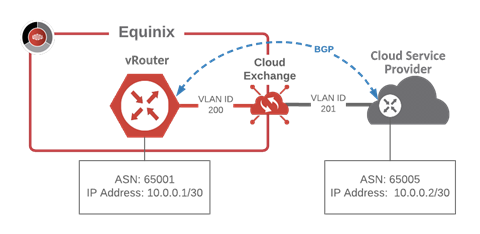
除非用户特别请求或配置自定义设置,否则与Equinix Fabric的所有连接都会从多个虚拟接口遍历单个 VRF。
有关典型设置和架构的更多信息,请参阅平台架构。
然后,这些不同的连接可以相互对等,或与其他接口上的会话对等(如向公共互联网或VPN隧道)。
除非在某些情况下特别限制,否则所有BGP设置都有这些共同属性。
- 任何允许的ASN都可以附加到公共或私人的IPv4地址空间上
- Equinix 不限制 ASN 和 IP 的组合,但第三方和提供商可以
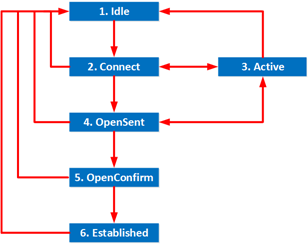
BGP服务会经历一系列的状态,这些状态符合RFC 4271定义的标准,但可能会有一些厂商特有的细微差别。这种状态转换与整个设备的状态不同,不应该与更广泛的故障相混淆。
虽然BGP会话可以循环通过所有七个标准阶段,但最值得注意的BGP状态是。
- 空闲 – 连接未主动对等
- 已建立 – 连接正在对等,路由表正在更新
- 失败 – 尝试对等或查找 ASN 失败,应删除或重试
如果你看到这里没有提到的,请咨询你的供应商指导或普通BGP教程,以了解更多细节和状态的可能性。
有些设备不支持RFC 7705中规定的多ASN。如果是这种情况,你不应该在你创建的所有设备连接中输入一个以上的ASN。如果你这样做,以前的ASN会立即覆盖到所有其他连接上。在可能的情况下,系统会警告你并防止你这样做,但一定要确保你咨询你的供应商和设备指导和规范。
当用户向冗余对添加连接时,系统会执行两个连接,但不会强制将BGP设置同时添加到两个连接中。用户需要知道,他们必须分别配置每个连接。虽然流量在一个或另一个上流动,如果两个都没有配置,解决方案就不会完整,其他系统或云环境可能会出现故障或报警,直到两个会话都建立起来。
在一个多余的情况下,用户也可以在CLI中进行定制。BGP服务不支持从门户或API中进行定制,但一个例子是BGP社区用于偏爱一条路由而不是另一条。请咨询您的供应商的指导,了解如何做到这一点以及相关的权衡因素。当直接在设备中进行定制时,Equinix 无法保证流量的流动。
向连接添加 BGP 对等体
要添加 BGP 会话,您必须与设备建立连接。建立至少一个连接后,请前往“连接清单”并选择该连接以查看连接详情并配置 BGP。
-
登录到Equinix客户门户并导航到网络边缘。
-
从“连接”菜单中,选择“连接清单”。
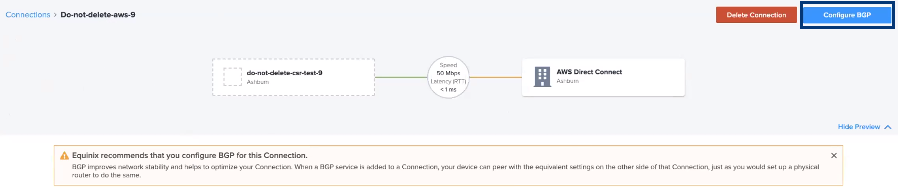
注意如果您的连接尚未配置 BGP 对等,则连接详细信息页面上将显示一条消息,表明Equinix建议向连接添加 BGP。
-
单击要添加 BGP 对等互连的连接。
-
在“连接详细信息”页面上,单击“配置 BGP”。
-
输入主要 BGP 信息:
- 本地ASN
- 本地 IP 地址 – 这是接口 IP 地址。
- 远程ASN
- 远程IP地址
- BGP认证密钥
-
点击提交。
冗余配置需要两个连接:主连接和辅助连接。您需要为这两个连接添加 BGP,才能使它们完全处于活动状态。
使用 API 建立 BGP 对等连接
可以使用网络边缘 API 建立 BGP 对等连接。有关详细信息,请参阅 网络边缘 API – BGP 和 网络边缘 API – 建立 BGP 对等连接。