Network Edge
网络边缘(NE)是一个允许客户部署和运行虚拟网络服务的平台, 在通用设备上而不是专用硬件上部署路由器、负载均衡器和防火墙等设备。
Network Edge用户可以:
- 选择一个适当的网络服务和/或供应商,以满足你当前或长期的需求。
- 选择适合您的组织的正确许可结构。您可以自带许可证,或在有条件的地方使用 Equinix 的托管订购服务。
- 用门户中的基本设置或API来配置设备。
- 在全球所需的 Equinix 位置部署设备。
- 创建与其他设备、其他 Equinix 服务(如 Equinix Fabric)的连接,或直接访问设备以实施其他配置,就像您访问任何其他网络设备一样。
网络边缘包括。
- 完全自动化的VNFs环境,以及行业领先的网络功能的易于订购和供应市场。
- 一个进入 Equinix Fabric 的预配置、服务就绪的虚拟端口,用于连接全球各地的云及软件服务提供商、合作伙伴以及您在 Platform Equinix 上的自有基础设施。
- 专用的 15Mbps 互联网连接,可通过 HTTPS、SSH(使用 Equinix 配置的部署选项时最多 5 个用户/设备)、IPSec VPN 或 SD-WAN 从任何地方访问和管理您的虚拟设备。
- 可公开路由的 IP 空间(/32 - 一个 IP 地址),可通过网络服务提供商 (NSP) 添加您自己注册的公共地址空间。Equinix Fabric 上有多个 NSP 可供连接。
该平台还有一个 Network Edge 设备,其中包括
- 所选设备的完整图像,带有供应商预装的操作系统。
- 一个设备许可证管理系统,支持你现有的许可证(自带许可证)或每月的订阅费用(随用随付)模式。
- VPN、SSH、访问控制列表(ACL)和其他基于门户的服务,以确保安全、直接访问你的设备。
一旦一个设备被激活,就把它作为任何连接的A端,就像一个物理端口。
网络边缘设备可部署在全球 32 个城域网位置。
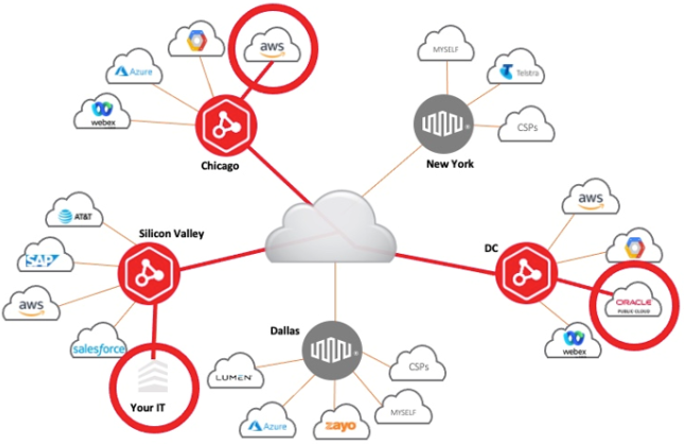
网络边缘组件
本主题概述了使用Network Edge服务时您将看到的主要组件。下文所述的所有组件均可通过客户门户进行配置。
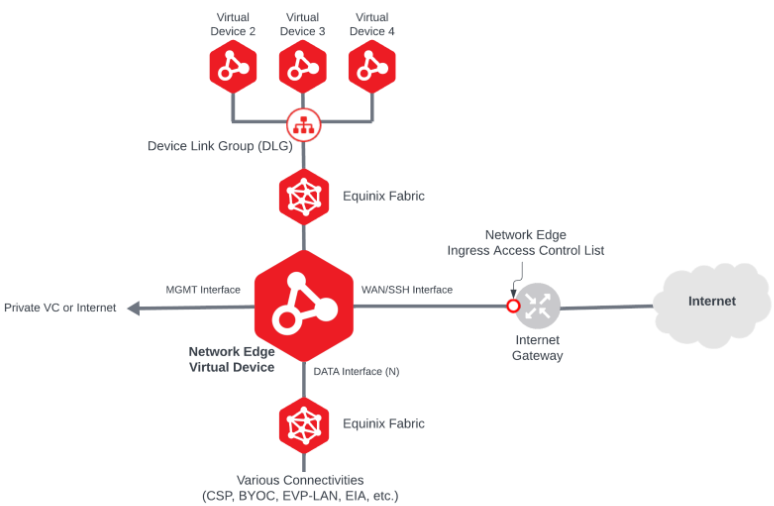
下表描述了 Network Edge 的主要组件。单击链接可了解有关各个组件的更多信息。
| Component | Description |
|---|---|
| Network Edge Virtual Devices | The main Virtualized Network Functions (VNFs) that Network Edge service offers. |
| Equinix Fabric | Network Edge connectivity is provided through Equinix Fabric virtual connections. |
| Device Link Group (DLG) | The Network Edge service that establishes connectivity between Network Edge virtual devices. |
| Virtual Connections | The connection enabled by Equinix Fabric service. Network Edge virtual devices can be connected to various Cloud Service Providers (CSPs), Network Service Providers via BYOC (bring your own connection), EAP-LAN network, Equinix Internet Access and more. |
| Internet Gateway | By default, 15 Mbps Internet connectivity is included in the Network Edge device. This connection is typically used to access the device using SSH protocol. The user can increase additional bandwidth for a fee. The WAN/SSH interface on the virtual device is used to connect to this Internet service. |
| Network Edge Ingress Access Control List (ACL) | Access Control Lists allow you to define and restrict traffic inbound to the Network Edge virtual device. By default, all traffic is disallowed except protocols required for bootstrapping purpose. |
| Management Interface | The Management interface is used in the Virtual Device. The implementation of the management interface and its connectivity type vary based on the vendor and device type. |
帐户/用户设置
-
设置账户并指定主管理员 – 在 Equinix 客户门户 (https://portal.equinix.com/) 中,新用户注册 Equinix Fabric 账户以订购网络边缘虚拟设备和 Equinix Fabric 远程端口。如果您是公司首位注册用户,则此门户账户将授予您主管理员账户访问权限。有关详细说明,请参阅 新用户 Equinix 客户门户访问。
-
设置访问权限 – 在 Equinix 客户门户 中,主管理员设置访问权限,以确定谁可以访问 Equinix 客户门户。有关详细说明,请参阅 管理网络边缘权限。
-
设置虚拟连接和设备权限 – 在 Equinix 客户门户 (https://portal.equinix.com/) 中,主管理员设置虚拟设备和连接权限,以确定哪些用户可以:
- 创建、修改和删除Network Edge设备。
- 创建、修改和删除Network Edge设备配置。
- 创建、修改和删除Network Edge设备连接。
有关详细说明,请参阅管理网络边缘用户帐户和权限。
-
设置新的计费账户 – 在 Equinix 客户门户 中,为每个目的地国家/地区设置计费账户。有关详细说明,请参阅 计费账户管理。
-
请查阅法律条款 – 在 Equinix 客户门户 中,查阅 Network Edge 的法律条款。要查看法律条款,请参阅 Network Edge 政策。