事件流
!!! 信息“通知”
Equinix Metal可观测性功能目前处于测试阶段,并非所有客户均可使用。此功能仅供评估和测试使用。此功能目前免费提供,且不在 SLA 的保障范围内。
您可以使用事件流近乎实时地监控来自Metal组织的特定事件和活动数据。事件流可以提供关键事件数据,帮助您了解和分析业务需求。这些事件包括:
- 帐户和组织事件
- 服务和计费事件
- 设备管理事件
- 网络管理活动
事件流仅对组织的所有者和管理员可见。
限制条件
目前,事件流仅支持将 Splunk 作为目标。可观测性流数据通过 Splunk HTTP 事件收集器 ("HEC") 接口发送到 Splunk。要接收可观测性流数据,您必须先在 Splunk 实例中配置 HTTP 事件收集器。我们建议创建一个专门用于接收可观测性流数据的收集器。
将可观测性流数据发送到 Splunk 受到以下限制:
- 为确保传输数据加密,仅允许使用 HTTPS 连接。不支持使用纯文本、不安全的 HTTP 连接将数据发送到 Splunk HEC。
- 所有可观察性流数据都作为 JSON 事件发送到 Splunk;不支持原始数据。
- JSON 事件将发送到标准
/services/collector/event端点;不支持其他端点 URL。 - JSON 事件将发送到创建 Splunk HTTP 事件收集器时配置的默认索引。不支持覆盖发送到 Splunk 的事件索引。
- 不支持索引器确认。
可观察性 API
如果您正在使用 Observability API,则应注意它与当前的 Equinix Metal API 之间的一些差异。
- 新的 API 端点
- 新的身份验证机制
首先,可观测性有自己的 API 端点,可以通过 https://observability.equinixmetal.net 访问。
其次,可观测性 API 具有身份验证机制,您需要使用 Equinix Metal API 密钥 交换一个有效期较短的 JSON Web 令牌 (JWT),该令牌用于所有可观测性请求的身份验证。令牌会在 5 分钟后过期。要获取 JWT,请向 iam.metalctrl.io/api-keys/exchange 端点发送 POST 请求。
curl -X POST \
-H "Authorization: bearer <API_TOKEN>" \
https://iam.metalctrl.io/api-keys/exchange
响应将是一个 JSON "access_token",您可以使用它来验证您对 Observability API 的请求。
{
"access_token": "eyJ....98"
}
可观察性 API 不接受Equinix Metal API 密钥进行身份验证。
创建事件流
- Console
- API
创建事件流,将服务器数据导出到 Splunk 进行存储和分析。要创建流,请执行以下操作:
-
前往[Equinix Metal Portal并输入您的凭据登录门户。
-
从“组织”下拉菜单中选择要创建事件流的组织。
-
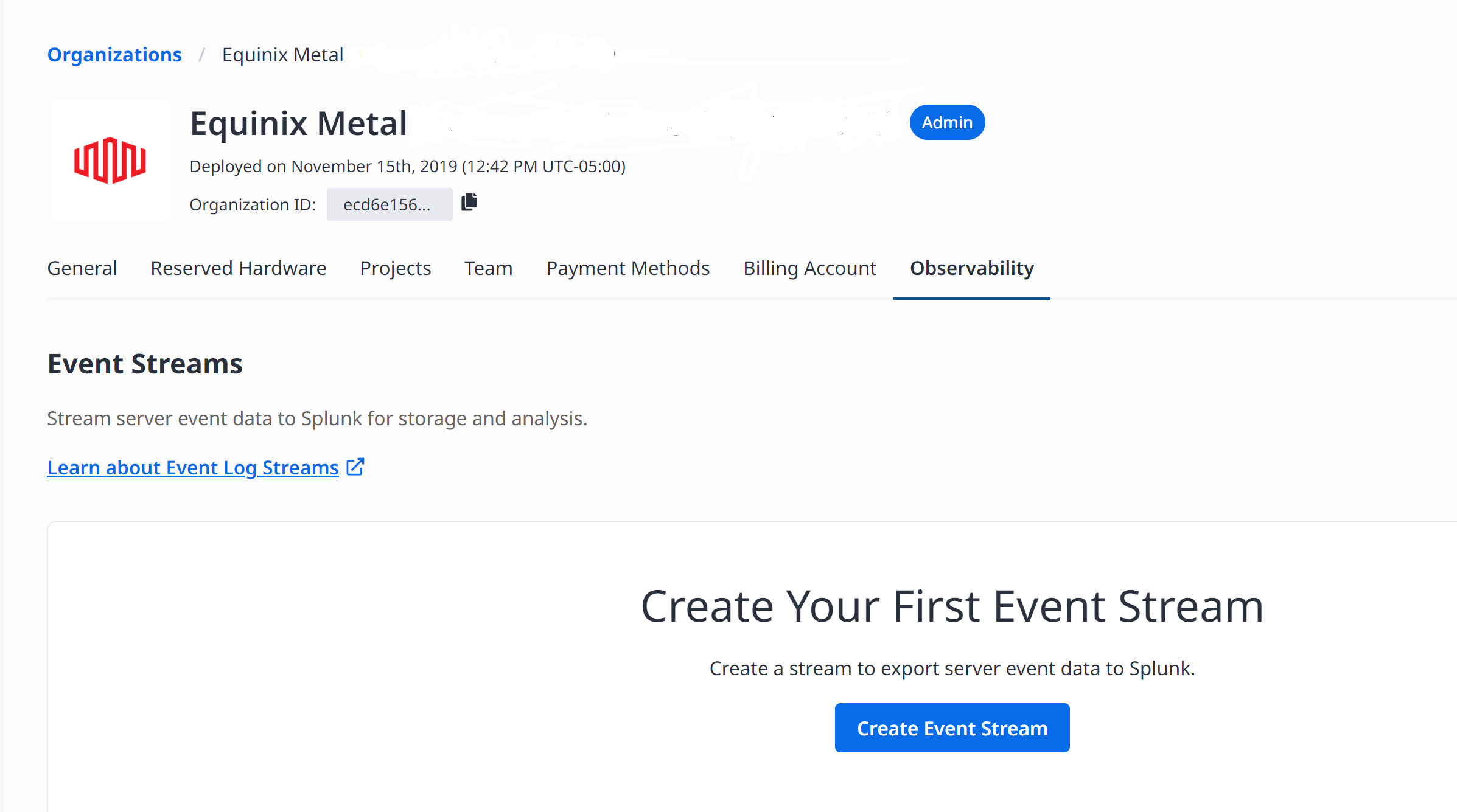
点击“可观测性”选项卡。
-
点击,创建事件流。
-
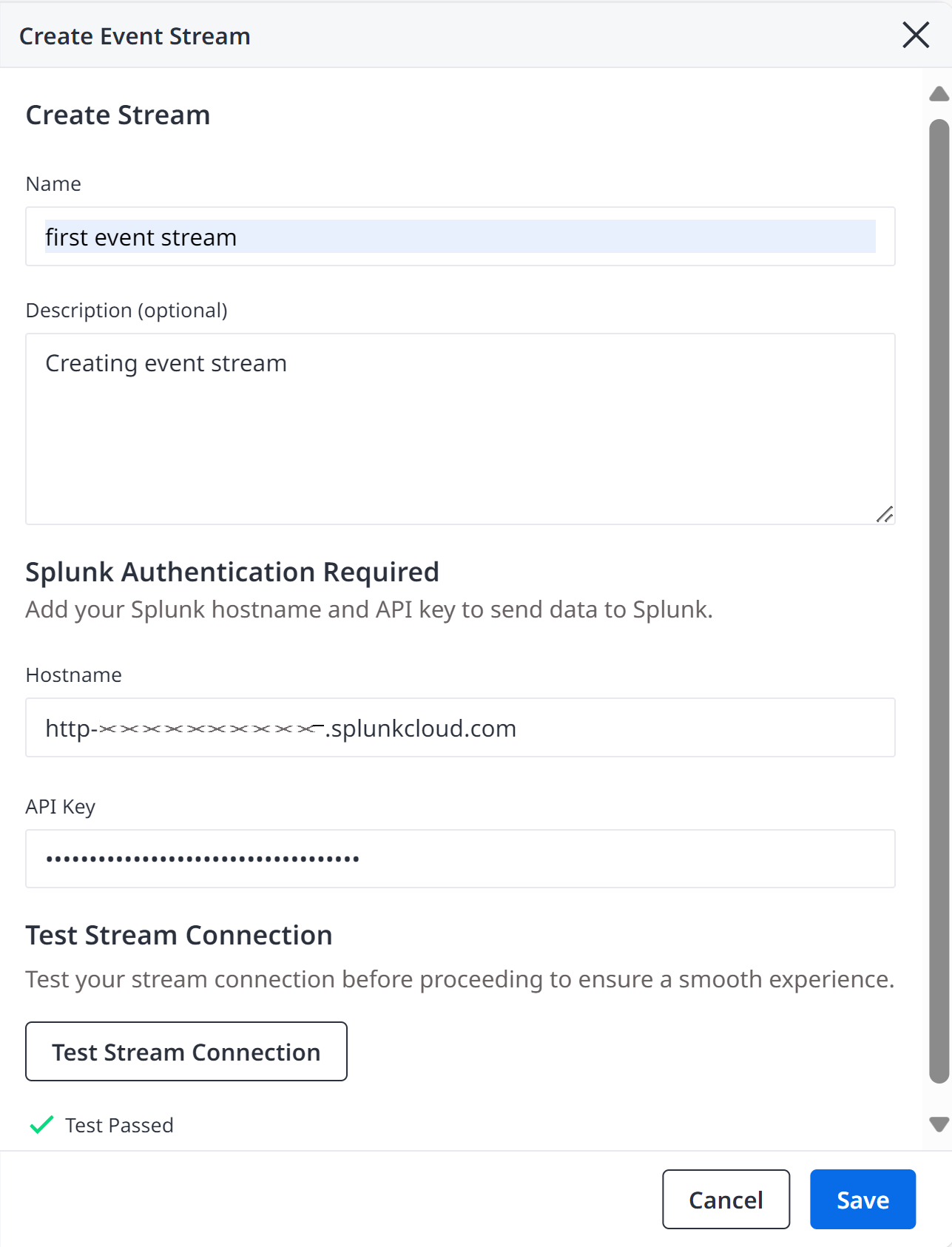
在“创建事件流”模态框中,在“名称”字段中输入一个易于理解的名称。
-
(可选)在描述字段中输入事件流的描述。
-
在提供的字段中输入您的 Splunk 主机名和 API 密钥,以将数据发送到 Splunk。
连接主机名应取自[HTTP事件收集器URI。主机名应指定为字符串,并可选择性地添加端口号后缀;有效值包括
http-inputs-my-org.splunkcloud.com或splunk.example.com:8443。API 密钥应为创建 Splunk HEC 端点时生成的 HTTP 事件收集器令牌。该令牌将以加密格式存储,只有发送可观测性流数据的工作线程才能解密。
您可以通过向 /v1/organizations/{org-id}/streams 端点发送 POST 请求来创建新流。
curl -X POST \
    -H "Content-Type: application/json" \
    -H "Authorization: bearer <API_TOKEN>" \
    "https://observability.equinixmetal.net/v1/organizations/{org-id}/streams" \
    -d '{
        "stream_name": "<string>",
        "description": "<string>",
        "connection": {,
             "type": "splunk",
             "api_key": "<string>",
             "hostname": "<string>"
    }
身体参数:
"org-id"(required) - The Metal organization ID that owns the stream."stream_name"(required) - Enter a name for this stream."description"(optional) - Include a description for a stream."connection"(required) - The connection parameters that define how data in an observability stream will be delivered to the customer.
测试流连接
- Console
- API
在将数据连接流式传输到 Splunk 之前,必须对其进行测试以确保其有效性。要测试流连接,请执行以下操作:
-
在“创建事件流”模态框中,如果您尚未输入 Splunk 主机名和 API 密钥,请在提供的字段中输入。
-
点击,测试流连接。
如果屏幕上显示“测试通过”消息,则表示连接有效。如果测试连接未通过,则会显示错误消息。您必须收到“测试通过”消息才能确保测试连接有效,从而可以将数据流传输到 Splunk。
-
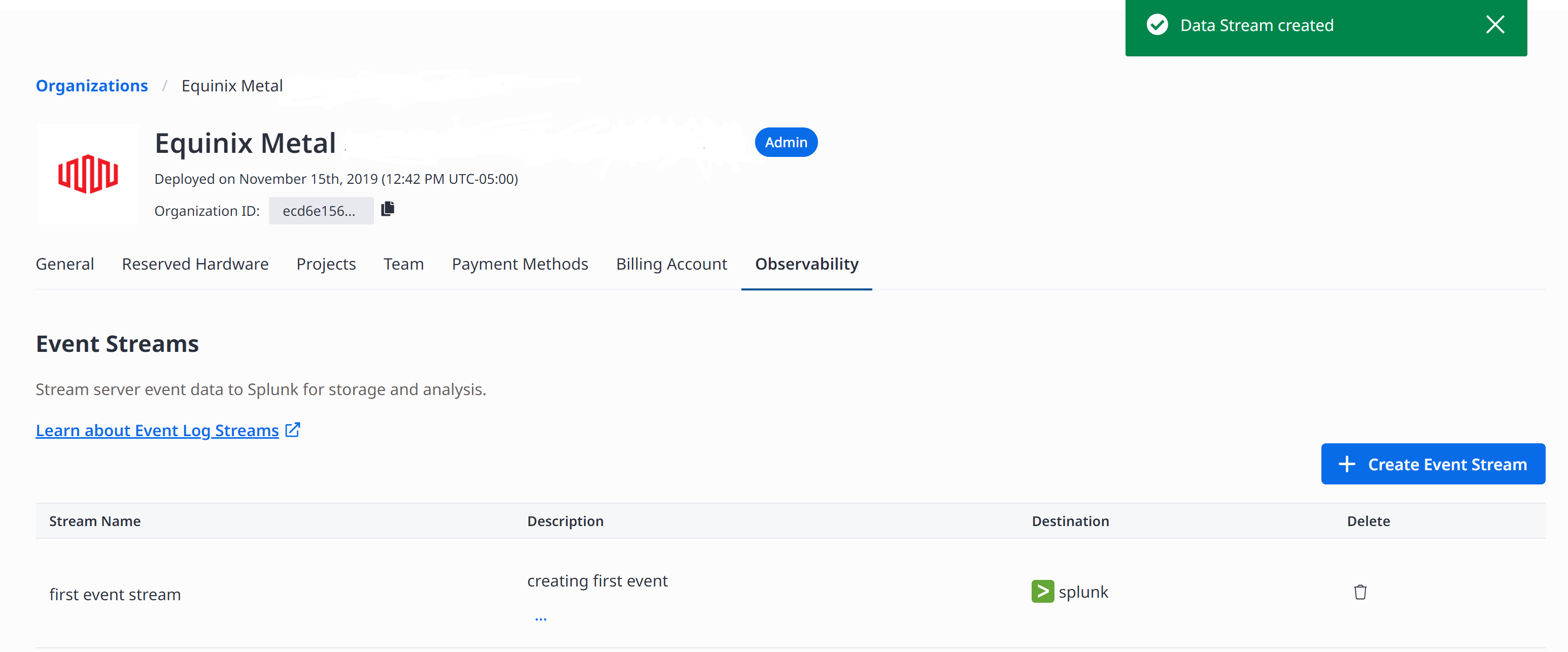
点击保存以保存事件流。 事件流保存在“可观测性”页面上的“事件流”表中。
你可以通过向 v1/organizations/{org-id}/connection/validate 端点发送 POST 请求来测试新的流连接。
curl -X POST \
    -H "Content-Type: application/json" \
    -H "Authorization: bearer <API_TOKEN>" \
    "https://observability.equinixmetal.net/v1/organizations/{org-id}/connection/validate \
    -d '{
             "type": "splunk",
             "api_key": "<string>",
             "hostname": "<string>"
    }
身体参数:
"type"(required) - The type of system to connect to. This determines the available parameters."api_key"(required) - The API key that will be used to authenticate the connection to the Splunk HTTP Event Collector. The API key will be stored encrypted."hostname"(required) - The hostname of the Splunk server to connect to with an optional port number suffix.
管理事件流
- Console
- API
在 Metal 控制台中创建事件流后,您可以从组织的“可观测性”选项卡管理事件流。
要获取为指定组织配置的所有可观测性流的列表,请向 /v1/organizations/{org-id}/streams 发送 GET 请求。%7Borg-id%7D~1streams/get)端点。
curl -X GET \
-H "Authorization: bearer <API_TOKEN>" \
"https://observability.equinixmetal.net/v1/organizations/{org-id}/streams"
要根据流的所有者和 ID 检索所提供流的配置详细信息,请向 /v1/organizations/{org-id}/streams/{stream-id} 端点发送 GET 请求。
curl -X GET \
-H "Authorization: bearer <API_TOKEN>" \
"https://observability.equinixmetal.net/v1/organizations/{org-id}/streams/{stream-id}"
要更新现有可观测性流的配置,请向 /v1/organizations/{org-id}/streams/{stream-id} 端点发送 PUT 请求。
注意:您不能使用此方法更新敏感字段(例如连接 API 密钥)的值;您必须删除该流并使用新值重新创建它。
curl -X PUT \
    -H "Content-Type: application/json" \
    -H "Authorization: bearer <API_TOKEN>" \
    "https://observability.equinixmetal.net/v1/organizations/{org-id}/streams/{stream-id} \
    -d '{
        "stream_name": "<string>",
        "description": "<string>",
        "connection": {
            "type": "splunk",
            "hostname": "<string>"
        }
    }'
删除事件流
- Console
- API
要停止流向 Splunk 实例的数据流,您可以删除事件流。要删除事件流,请执行以下操作:
-
在“事件流”表中,单击“删除”列中的垃圾桶图标。 删除事件流窗口出现。
-
在字段中输入删除,然后单击删除。
在 API 中,您可以通过向 /v1/organizations/{org-id}/streams/{stream-id} 端点发送 DELETE 请求来删除流。
curl -X DELETE -H "Authorization: bearer <API_TOKEN>" \
"https://observability.equinixmetal.net/v1/organizations/{org-id}/streams/{stream-id}"
一旦流被删除,它将立即停止从源接收新数据,但将继续传输正在传输的数据。所有正在传输的数据均已传输完毕后,该流将被删除,所有资源将被释放。
Splunk 事件元数据
可观测性服务会为发送到您的流的每个审计日志事件设置以下 Splunk 事件元数据 键:
time- The timestamp at which the event occurred, specified in seconds since the Unix epoch.source- All events will specify a source ofequinix.sourcetype- Audit log events will specify a source type oflog.fields- Additional fields for indexing as described below.
索引字段
除了上述标准 Splunk 元数据键之外,可观察性服务还会为发送到您的流的每个日志事件设置以下自定义索引字段。这些字段是可选的,如果不存在,则会被忽略。
level- A human-readable indication of the logging level, such asINFOorDEBUG.severity- A numeric severity level; higher numbers indicate more severe events (such as errors or violations).
Splunk 事件数据
发送到 Splunk HTTP 事件收集器(作为 "事件数据")的 event 键的内容是一个结构化的 JSON 文档,其中包含有关正在记录的事件的应用程序特定信息。
有关完整参考,请参阅Splunk 事件架构文档。
- Splunk Event - Example JSON
- Splunk Event - JSON Schema
{
"stream" : {
    "streamId" : "dce13c1d-0589-406b-af40-854156a0621e",
    "streamName" : "Example Stream"
},
"source" : {
    "category" : "audit",
    "type" : "api_request",
    "service" : "metal",
    "organizationId" : "99be473c-ee3c-4aeb-a678-eba3fdae7ca6",
    "projectId" : "99be473c-ee3c-4aeb-a678-eba3fdaebeef"

},
"schema" : "v1",
"timestamp" : "2024-04-16T14:58:21.442334Z",
"level" : "INFO",
"eventId" : "6910f03f-ec60-42fc-9e9d-c5f6af2f732d",
"event" : {
    "eventName" : "instance_provision_requested",
    "status" : "failed",
    "auth" : {
        "authType" : "user",
        "user" : {
            "userId" : "582865f9-904b-4061-b536-2420eb01ecdc",
            "userName" : "jdoe@equinix.com"
        },
        "role" : {
            "roleName" : "collaborator"
        }
    },
    "httpRequest" : {
        "host" : "api.equinix.com",
        "method" : "PUT",
        "path" : "/metal/v1/projects/99f8e7f1-fe4a-441a-ade9-687743f080f6",
        "scheme" : "http",
        "statusCode" : 200,
        "userAgent" : "metal-cli/metal equinix-sdk-go/0.30.0",
        "sourceIpAddress" : "111.111.111.11"
    }
}
}
{
"description" : "The customer-facing log format for the Equinix Observability Service.",
"type" : "object",
"properties" : {
    "stream" : {
    "description" : "Provides metadata about the observability stream that produced this log entry; can be used to differentiate data sources in situations where multiple streams are writing to the same destination.",
    "type" : "object",
    "properties" : {
        "streamId" : {
        "description" : "Unique identifier of the observability stream that produced this log entry.",
        "type" : "string",
        "format" : "uuid"
        },
        "streamName" : {
        "description" : "Name of the observability stream that produced this log entry.",
        "type" : "string",
        "examples" : [ "Example Stream" ]
        }
    },
    "required" : [ "streamId", "streamName" ],
    "title" : "Stream",
    "examples" : [ {
        "streamId" : "e55f79d4-0d8a-4460-a566-ff93af4f90e4",
        "streamName" : "Example Stream"
    } ]
    },
    "source" : {
    "description" : "Provides metadata about the source from which this log entry originated.",
    "type" : "object",
    "properties" : {
        "category" : {
        "description" : "Groups logs into high-level application categories.",
        "type" : "string",
        "enum" : [ "audit", "validation" ]
        },
        "type" : {
        "description" : "Differentiates types of log events withing a particular category.",
        "type" : "string",
        "enum" : [ "api_request", "validation_request" ]
        },
        "service" : {
        "description" : "Indicates the service that produced this log entry.",
        "type" : "string",
        "enum" : [ "metal" ]
        },
        "organizationId" : {
        "description" : "Indicates the customer Organization ID with which this log entry is associated.",
        "type" : "string",
        "format" : "uuid"
        },
        "projectId" : {
        "description" : "Indicates the customer Project ID with which this log entry is associated.",
        "type" : "string",
        "format" : "uuid"
        }
    },
    "required" : [ "category", "type", "service", "organizationId" ],
    "title" : "Source",
    "examples" : [ {
        "category" : "audit",
        "type" : "api_request",
        "service" : "metal",
        "organizationId" : "0e714017-6d9c-4dc5-828d-b8a156502496"
    } ]
    },
    "schema" : {
    "description" : "Indicates the schema version of this log entry.",
    "type" : "string",
    "enum" : [ "v1" ]
    },
    "timestamp" : {
    "description" : "The timestamp at which this log entry was produced, in ISO8601 format.",
    "type" : "string",
    "format" : "date-time",
    "examples" : [ "2024-04-16T14:58:21.442334Z" ]
    },
    "level" : {
    "description" : "A human-readable indication of the severity level of this log entry.",
    "type" : "string",
    "examples" : [ "INFO" ]
    },
    "eventId" : {
    "description" : "Unique identifier for this log event.",
    "type" : "string",
    "format" : "uuid"
    },
    "event" : {
    "description" : "The application-specific log event payload. In the future the specific format will vary based on the\n  source category and type, but for now we use a single log event schema.",
    "type" : "object",
    "properties" : {
        "eventName" : {
        "description" : "An application-provided name for the event. Event names should be fixed by the application\n  (i.e. should not vary based on request parameters) to enable filtering/querying by the customer, and should carry\n  meaning to the customer. In the case of API request logs, this would correspond to an operation name.",
        "type" : "string",
        "examples" : [ "project_updated", "instance_provision_requested" ]
        },
        "status" : {
        "description" : "An indication of the status associated with the event, e.g. request success/failure.",
        "type" : "string",
        "examples" : [ "success", "failed", "unauthorized" ]
        },
        "auth" : {
        "description" : "Provides authentication and authorization information about the principal associated with the\n  log event. In most cases, this will be the one who made the request.",
        "type" : "object",
        "properties" : {
            "authType" : {
            "description" : "Indicates the type of entity for the principal associated with the request.",
            "type" : "string",
            "enum" : [ "user" ]
            },
            "user" : {
            "description" : "Provides identifying information about the user associated with the log event.",
            "type" : "object",
            "properties" : {
                "userId" : {
                "description" : "Unique user identifier; this is an opaque system-assigned ID that is not expected to be recognizable to people.",
                "type" : "string",
                "examples" : [ "1bec4119-a889-4809-89e9-c4572dc002ec" ]
                },
                "userName" : {
                "description" : "Provides a more human-friendly display name for the user.",
                "type" : "string",
                "examples" : [ "jdoe@equinix.com" ]
                }
            },
            "required" : [ "userId", "userName" ],
            "title" : "User",
            "examples" : [ {
                "userId" : "1bec4119-a889-4809-89e9-c4572dc002ec",
                "userName" : "jdoe@equinix.com"
            } ]
            },
            "role" : {
            "description" : "Provides information about the role associated with the log event, which determines what permissions\n  are allowed. If the principal has access to multiple roles, this indicates the one they assumed when making the\n  request.",
            "type" : "object",
            "properties" : {
                "roleName" : {
                "description" : "The human-friendly display name for the role.",
                "type" : "string",
                "examples" : [ "collaborator" ]
                }
            },
            "required" : [ "roleName" ],
            "title" : "Role",
            "examples" : [ {
                "roleName" : "collaborator"
            } ]
            }
        },
        "required" : [ "authType", "user", "role" ],
        "title" : "AuthInfo",
        "examples" : [ {
            "authType" : "user",
            "user" : {
            "userId" : "1bec4119-a889-4809-89e9-c4572dc002ec",
            "userName" : "jdoe@equinix.com"
            },
            "role" : {
            "roleName" : "collaborator"
            }
        } ]
        },
        "httpRequest" : {
        "description" : "Provides details about the HTTP request associated with the log event, if there is one (for now, there\n  will always be one).",
        "type" : "object",
        "properties" : {
            "host" : {
            "description" : "The hostname to which the original HTTP request was made.",
            "type" : "string",
            "examples" : [ "api.equinix.com" ]
            },
            "method" : {
            "description" : "The HTTP request method.",
            "type" : "string",
            "examples" : [ "PUT" ]
            },
            "path" : {
            "description" : "The path portion of the original HTTP request URL.",
            "type" : "string",
            "examples" : [ "/metal/v1/projects/99f8e7f1-fe4a-441a-ade9-687743f080f6" ]
            },
            "scheme" : {
            "description" : "The HTTP request scheme",
            "type" : "string",
            "enum" : [ "http", "https" ]
            },
            "statusCode" : {
            "description" : "The HTTP status code that resulted from the processing of the request.",
            "type" : "integer",
            "examples" : [ 200 ]
            },
            "userAgent" : {
            "description" : "The user-agent that issued the request, as reported by the HTTP client.",
            "type" : "string",
            "examples" : [ "metal-cli/metal equinix-sdk-go/0.30.0" ]
            },
            "sourceIpAddress" : {
            "description" : "The IP address from which the HTTP request was sent.",
            "type" : "string",
            "examples" : [ "111.111.111.11" ]
            }
        },
        "required" : [ "host", "method", "path", "scheme", "statusCode", "userAgent", "sourceIpAddress" ],
        "title" : "HttpRequest",
        "examples" : [ {
            "host" : "api.equinix.com",
            "method" : "PUT",
            "path" : "/metal/v1/projects/99f8e7f1-fe4a-441a-ade9-687743f080f6",
            "scheme" : "https",
            "statusCode" : 200,
            "userAgent" : "metal-cli/metal equinix-sdk-go/0.30.0",
            "sourceIpAddress" : "111.111.111.11"
        } ]
        },
        "resource" : {
        "description" : "The resource associated with the request (for future use)",
        "type" : "object",
        "properties" : { },
        "examples" : [ { } ]
        },
        "request" : {
        "description" : "Detailed request parameters (for future use)",
        "type" : "object",
        "properties" : { },
        "examples" : [ { } ]
        },
        "response" : {
        "description" : "Detailed response body (for future use)",
        "type" : "object",
        "properties" : { },
        "examples" : [ { } ]
        }
    },
    "required" : [ "eventName", "status", "auth", "httpRequest" ],
    "title" : "Event",
    "examples" : [ {
        "eventName" : "project_updated",
        "status" : "unauthorized",
        "auth" : {
        "authType" : "user",
        "user" : {
            "userId" : "1bec4119-a889-4809-89e9-c4572dc002ec",
            "userName" : "jdoe@equinix.com"
        },
        "role" : {
            "roleName" : "collaborator"
        }
        },
        "httpRequest" : {
        "host" : "api.equinix.com",
        "method" : "PUT",
        "path" : "/metal/v1/projects/99f8e7f1-fe4a-441a-ade9-687743f080f6",
        "scheme" : "http",
        "statusCode" : 200,
        "userAgent" : "metal-cli/metal equinix-sdk-go/0.30.0",
        "sourceIpAddress" : "111.111.111.11"
        },
        "resource" : { },
        "response" : { }
    } ]
    }
},
"required" : [ "stream", "source", "schema", "timestamp", "level", "eventId", "event" ],
"title" : "LogEntry",
"examples" : [ {
    "stream" : {
    "streamId" : "b47f2eaf-d5c6-485c-a081-5d12333aa2e2",
    "streamName" : "Example Stream"
    },
    "source" : {
    "category" : "validation",
    "type" : "validation_request",
    "service" : "metal",
    "organizationId" : "a2337a57-4ad0-4708-abc6-c0973055c91e"
    },
    "schema" : "v1",
    "timestamp" : "2024-04-16T14:58:21.442334Z",
    "level" : "INFO",
    "eventId" : "e6de0ec4-027e-4733-aeb4-058c1fc53493",
    "event" : {
    "eventName" : "instance_provision_requested",
    "status" : "unauthorized",
    "auth" : {
        "authType" : "user",
        "user" : {
        "userId" : "1bec4119-a889-4809-89e9-c4572dc002ec",
        "userName" : "jdoe@equinix.com"
        },
        "role" : {
        "roleName" : "collaborator"
        }
    },
    "httpRequest" : {
        "host" : "api.equinix.com",
        "method" : "PUT",
        "path" : "/metal/v1/projects/99f8e7f1-fe4a-441a-ade9-687743f080f6",
        "scheme" : "http",
        "statusCode" : 200,
        "userAgent" : "metal-cli/metal equinix-sdk-go/0.30.0",
        "sourceIpAddress" : "111.111.111.11"
    },
    "response" : { }
    }
} ]
}