织物计费 织物虚拟连接
Fabric 计费 Fabric 虚拟连接用于将您的 Fabric 端口或Network Edge设备连接到Equinix Metal,无论是在同一城域内还是跨城域。用例包括将Network Edge设备用作Equinix Metal服务的路由器,或将Equinix Metal连接到跨城域的云服务提供商。所有使用费、Network Edge和虚拟设备费都将显示在您的Equinix Fabric帐户中。
注意:此功能将 Equinix Fabric 和 Network Edge 设备原有用户的共享端口功能替换为 Equinix Metal 基础架构。现有的共享端口互连将继续工作,并在门户和 API 中标记为“旧版”。
系统信息
-
每个 Fabric 虚拟连接可以是单个端口,也可以是一组冗余端口。建议使用冗余端口以实现一定程度的高可用性。单个端口无法保证正常运行时间。
-
每个 Fabric 虚拟连接都带有一条虚拟电路,可供您连接到 VLAN 或 VRF。如果您使用冗余端口,则每个端口都会有一条虚拟电路。
-
虚拟电路与 VLAN 的关系是 1:1。您只能将一个 VLAN 连接到一条虚拟电路,并且只能将一条虚拟电路连接到一个 VLAN。同一个 VLAN 不能连接到两个或多个虚拟电路。因此,如果您要设计具有主端口和辅助端口的高可用性,则需要为每个端口分配一个 VLAN,并且需要具有 VLAN 间路由或其他一些三层应用程序感知功能。
-
结构虚拟连接的最大带宽为 10 Gbps。
-
结构虚拟连接支持高达 9000 字节的最大传输单元 (MTU) 和巨型以太网帧。
出发地和目的地
| Origin | Destination | Supported |
|---|---|---|
| Fabric 上的任何物理端口(不在 服务配置文件 上) | Fabric 计费 Fabric VC | 是 |
| 单虚拟设备(不在服务配置文件中) | Fabric 计费 Fabric VC | 是 |
| 集群虚拟设备(网络边缘高可用性对) | 光纤通道计费光纤通道虚拟设备 | 无 |
| 金属带衬布VC | 带衬布VC | 无 |
请求 Fabric 计费 Fabric 虚拟连接
- Console
- CLI
- API
要申请 Fabric 虚拟连接,请打开项目的“互连”页面。单击“+ 申请新互连”。
在“互连类型”部分,单击“Fabric VC”下的下拉菜单,然后选择“Fabric Billed”。
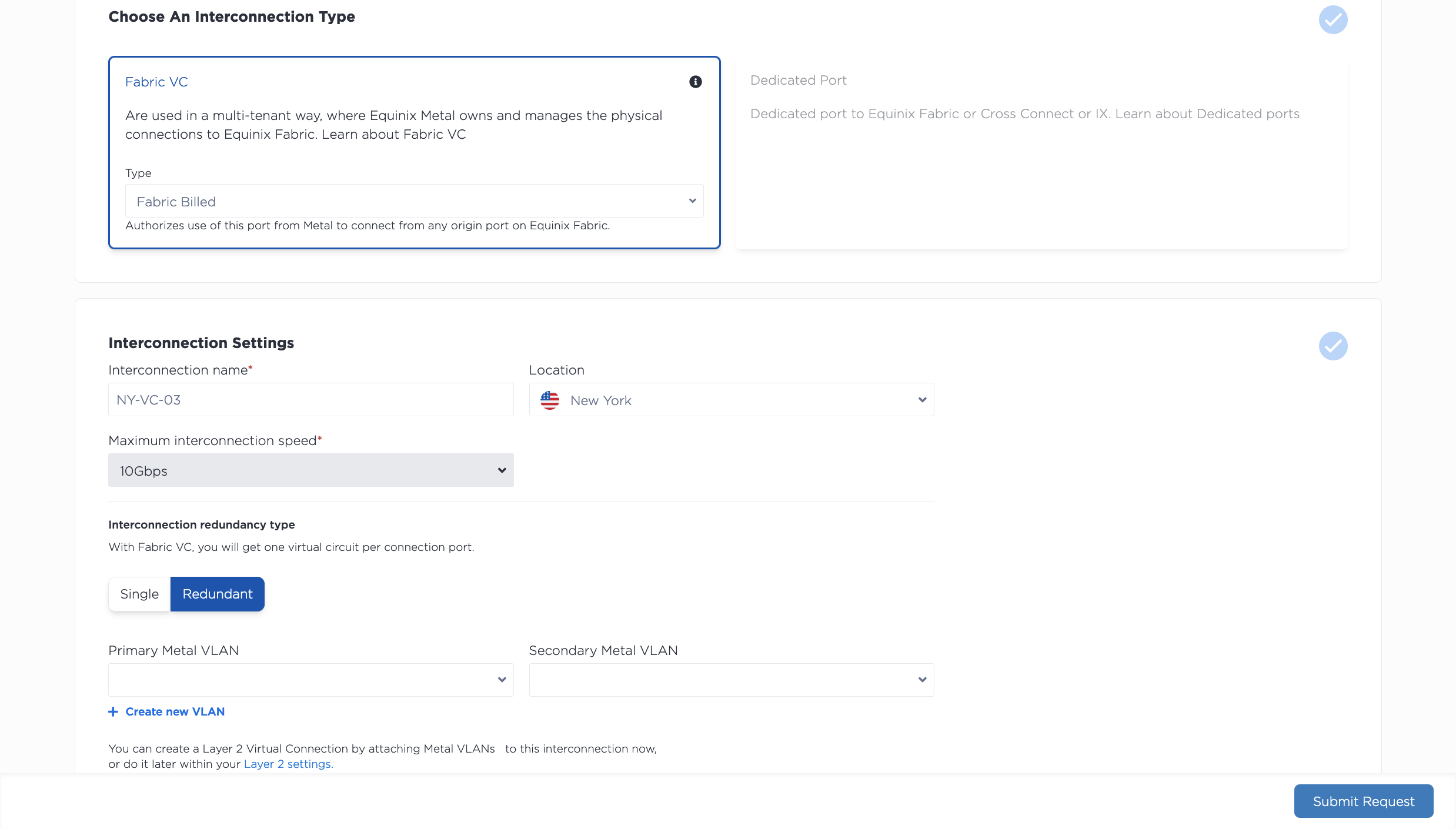
- 从下拉菜单中选择新连接的位置。您需要选择Equinix Metal服务器和 VLAN 所在的城市,或者您计划配置它们的城市。
- 为您的连接命名。
- 选择是否需要一组冗余端口。您将获得一个主端口和一个辅助端口,每个端口都带有一条虚拟电路,用于连接两个 VLAN,从而提供一定程度的冗余和高可用性。
- 最大互连速度默认设置为 10 Gbps。您将在 Fabric 门户中兑换服务令牌时选择实际连接速度。
接下来,选择将端口连接到 VLAN 还是 VRF。
-
如果您仅使用 VLAN,请选择要连接到端口的 VLAN。VLAN 必须与您的 Fabric VC 位于同一项目和位置。如果您没有任何符合条件的 VLAN,可以单击“+ 创建 VLAN”进行创建。同一个 VLAN 不能连接到两个或多个虚拟电路,因此如果您需要冗余端口,请为每个端口选择一个 VLAN。注意:创建 Fabric VC 后,您将无法更新或更改 VLAN。
-
如果您使用 VRF,请为您的端口选择 VRF。更多文档请参见互连 VRF页面。
请查看您的请求摘要。点击提交请求以获取您的z端服务令牌。
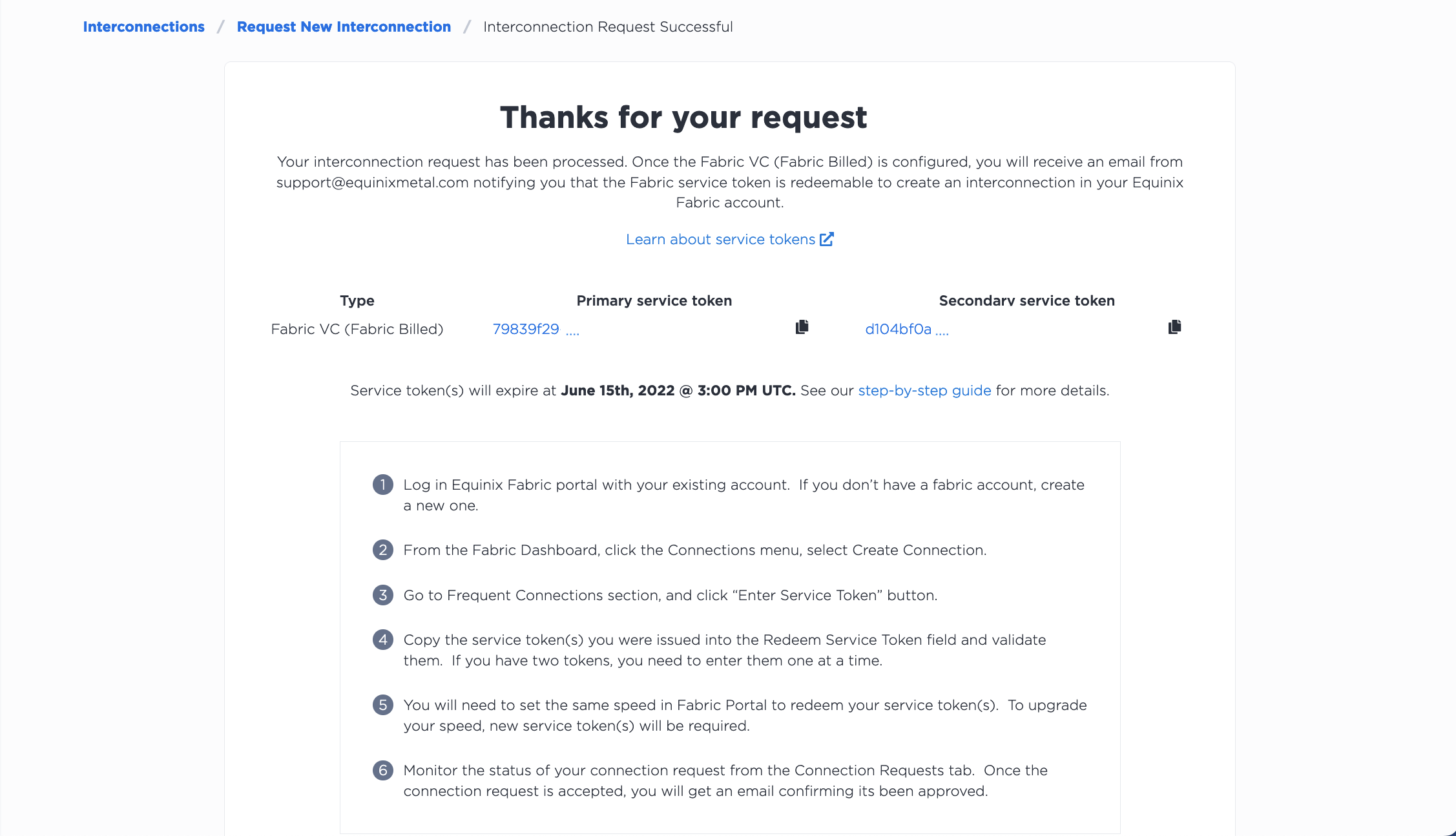
令牌有效期为 7 天。您还会收到一封包含令牌和到期信息的电子邮件。在“互连”页面上,您新请求的 Fabric 虚拟连接将显示在“待处理请求”选项卡中。
要在 CLI 中请求 Fabric 计费的 Fabric VC,请使用 metal interconnections create 命令。
metal interconnections create -p <project_id> -n <name> -m <metro> -r redundant -t shared -T z_side [--vlans <vlan_id>, <vlan_id> | --vrfs <vrf_uuid>, <vrf_uuid>]
选项:
-p,--project-id(必填)- 您的项目 UUID。-r,--redundancy- 选择primary或redundant。如果您选择冗余连接,您将获得一个主端口和一个辅助端口来连接 VLAN 或 VRF,从而提高连接的冗余性和高可用性。-T,--service-token-type(必填)- 请求 Fabric 计费的 Fabric 虚拟连接时,此参数为必填项。请将值设置为z_side。-t,--type(必填)- 请求 Fabric 计费的 Fabric 虚拟连接时,此参数为必填项。请将值设置为"shared"。--vlan"- 用于连接的 VLAN ID 列表。如果选择冗余连接,列表中的第一个 VLAN 将用于主端口,第二个 VLAN 将用于备用端口。同一个 VLAN 不能连接到两个端口;请为每个端口指定不同的 VLAN。注意:如果使用 VLAN,则vlan选项为必填项。如果使用 VRF,则此字段为空。创建 Fabric VC 后,您将无法修改 VLAN。--vrfs- 用于连接的 VRF 列表。如果选择冗余连接,列表中的第一个 VRF 将用于主端口,第二个 VRF 将用于备用端口。如果主端口和备用端口位于同一个 VRF 中,则这两个 VRF 可以相同。注意:如果使用 VRF,则vrfs选项为必填项。如果使用 VLAN,则此字段为空。
注意:可以使用 "vlans" 字段或 "vrfs" 字段。它们互斥,必须至少使用其中一个。
发送请求会生成您的 Z 端服务令牌。令牌包含在响应对象中。如果您请求了冗余连接,则会收到两个令牌。
要通过 API 请求连接,请向 /projects/{project_id}/connections 端点发送 POST 请求。如果您要将 VLAN 连接到此 Fabric VC,请在请求正文中使用 "vlans" 参数。如果您正在使用 VRF,请在请求正文中使用 vrfs 参数。
curl -X POST \
-H "Content-Type: application/json" \
-H "X-Auth-Token: <API_TOKEN>" \
"https://api.equinix.com/metal/v1/projects/{project_id}/connections" \
-d '{
    "name": "<string>",
    "description": "<string>",
    "contact_email": "<string>",
    "metro": "<metro_slug>",
    "type": "shared",
    "service_token_type": "z_side",
    "redundancy": "redundant",
    "vlans": [ <integer>, <integer> ]
}'
身体参数:
"name"(必填)- 新的 Fabric 虚拟连接的名称。"description"(可选) - 您的 Fabric 虚拟连接的易懂描述。"contact_email"- 用于互连相关通信和通知的首选电子邮件地址。使用项目 API 密钥时为必填项。使用用户 API 密钥时为可选,默认为您的用户电子邮件地址。"metro"(必填)- Fabric Virtual Connection 所在的都会区。"type"(必填)- 请求 Fabric 计费的 Fabric 虚拟连接时,此参数为必填项。请将值设置为"shared"。"service_token_type"(必填)- 请求 Fabric 计费的 Fabric 虚拟连接时,此参数为必填项。请将值设置为z_side。"redundancy"(必填)- 选择“primary”或“redundant”。如果选择冗余连接,则会获得一个主端口和一个辅助端口,用于连接 VLAN 或 VRF,从而提高连接的冗余性和高可用性。"vlans"- 用于连接的 VLAN ID 列表。如果选择冗余连接,列表中的第一个 VLAN 将用于主端口,第二个 VLAN 将用于备用端口。同一个 VLAN 不能连接到两个端口;请为每个端口指定不同的 VLAN。注意:如果使用 VLAN,则"vlans"字段为必填项。如果使用 VRF,则此字段为非必填项。创建 Fabric VC 后,您将无法修改 VLAN。"vrfs"- 用于连接的 VRF 列表。如果选择冗余连接,列表中的第一个 VRF 将用于主端口,第二个 VRF 将用于备用端口。如果主端口和备用端口位于同一个 VRF 中,则这两个 VRF 可以相同。注意:如果使用 VRF,则"vrfs"字段为必填项。如果使用 VLAN,则此字段为非必填项。
注意:可以使用 "vlans" 字段或 "vrfs" 字段。它们互斥,必须至少使用其中一个。
发送请求会生成您的 z 端服务令牌。这些令牌包含在响应的 "service_tokens" 对象中。如果您请求的是冗余连接,则会收到两个令牌。
"service_tokens": [
    {
    “id”: "ff0cf4dc-a897-426d-9621-14e5b985058f",
    “role”: "primary",
    “state”: "inactive",
        “max_allowed_speed”: 10000000000,
    “service_token_type”: "z_side",
    “expires_at”: "2019-09-30T20:22:20",
    }
],
令牌将在 7 天后过期。您还会收到一封包含服务令牌和过期信息的电子邮件。在此期间,您可以通过向 /connections/{connection_id} 端点发送 GET 请求来查看您的请求并检索令牌。
curl -X GET -H 'X-Auth-Token: $API_TOKEN' \
"https://api.equinix.com/metal/v1/connections/{connection_id}"
兑换 Z 端服务令牌
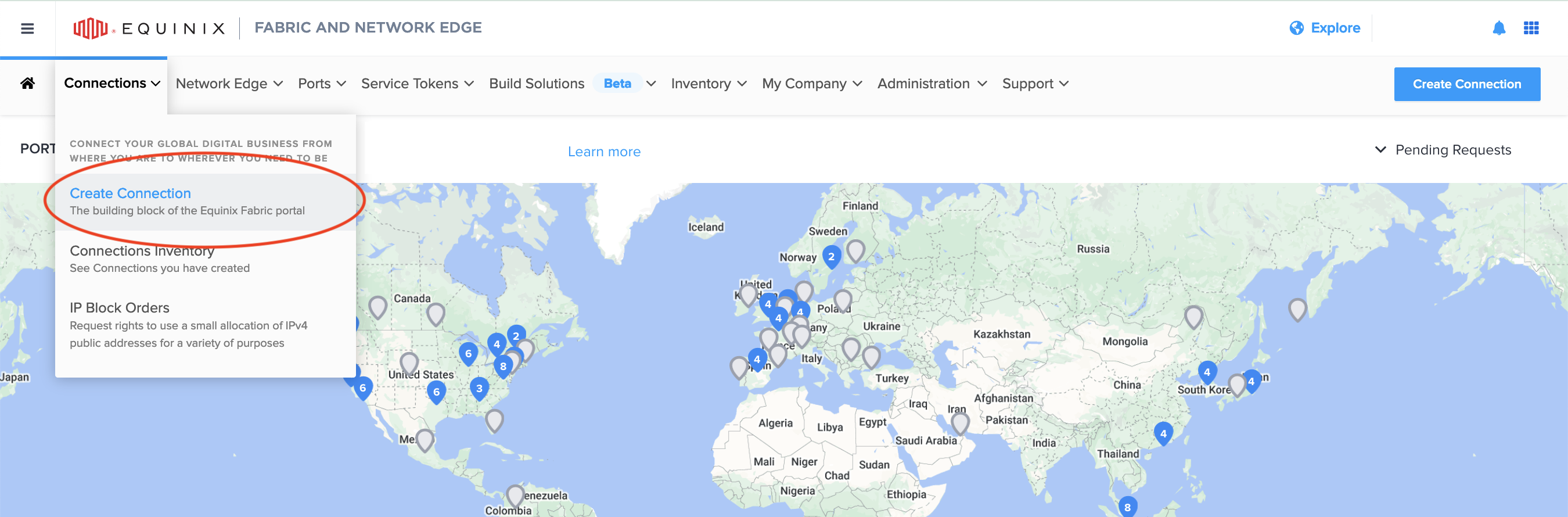
要兑换您的令牌,请登录 Equinix Fabric 门户,然后从“连接”下拉菜单中单击“创建连接”。
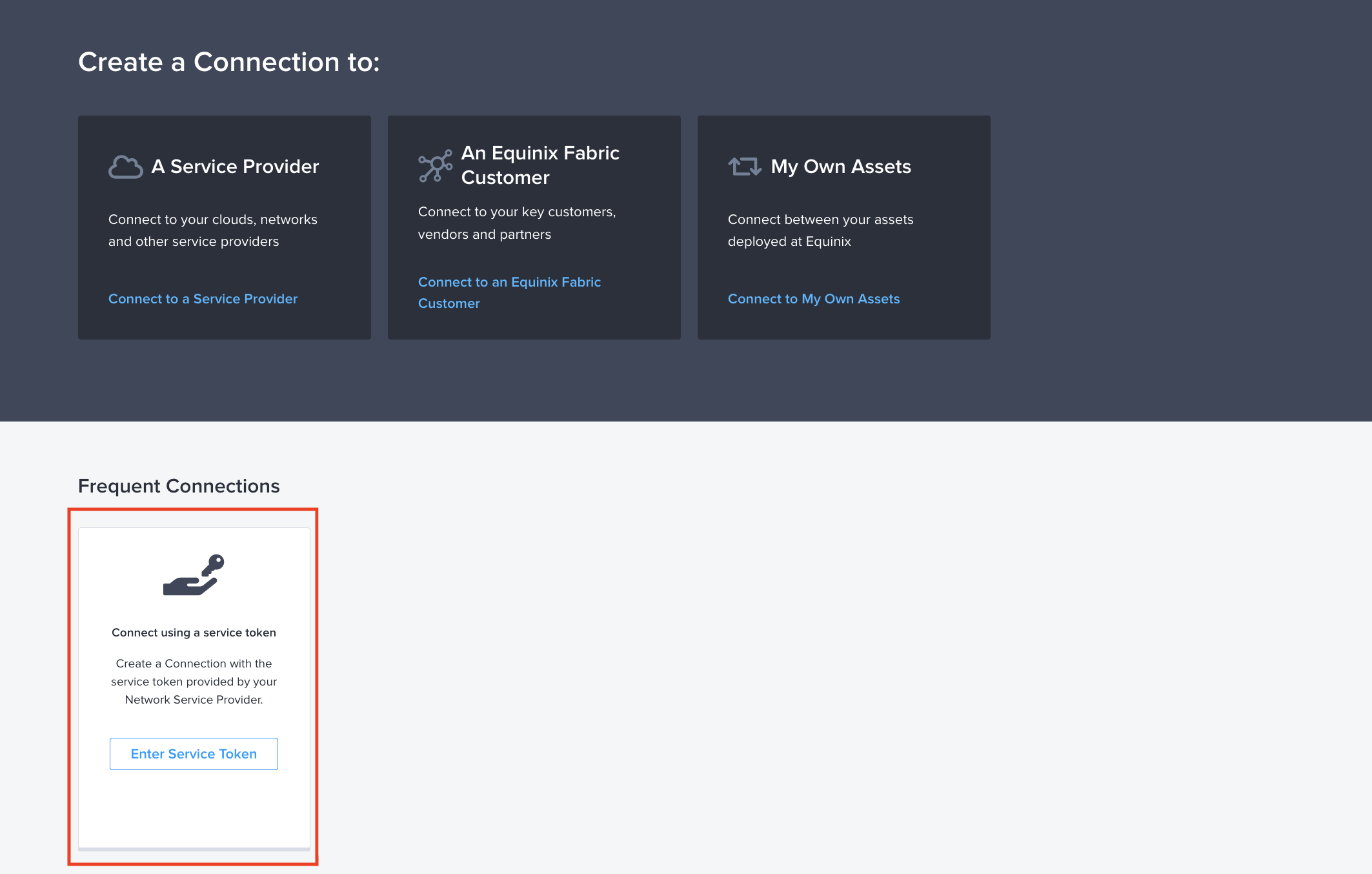
在“常用连接”下,选择“使用服务令牌连接”磁贴,然后单击“输入服务令牌”。
在对话框中,将您的令牌粘贴到“输入服务令牌”字段中,然后单击“验证”。
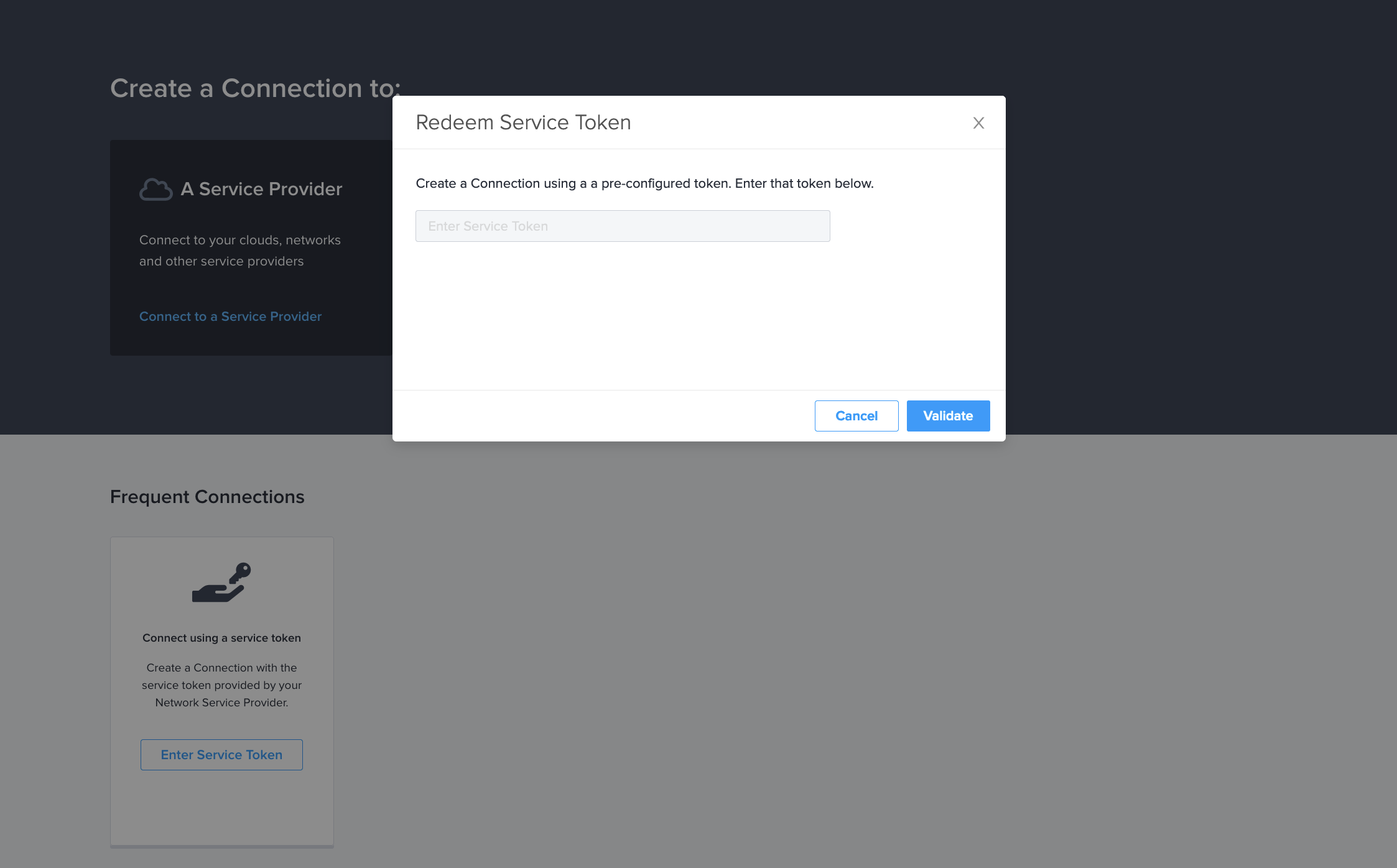
确认令牌的详细信息正确后,点击兑换以兑换您的令牌并完成与 Fabric 的连接设置。
旧版连接 - 如果您之前在 Equinix Metal 上使用过共享端口,则可能使用过 Fabric Token 字段来兑换令牌并设置连接。如果您已有旧版连接,它们将继续正常工作。如果您有未兑换的旧版令牌,则无法再在 Equinix Fabric 上兑换这些令牌。您需要申请新的服务令牌,并按照新的步骤在 Fabric 中兑换它们。
配置源
现在,您可以继续在 Fabric 门户中设置连接。由于您已兑换预配置的服务令牌, Equinix Metal将自动设置为连接的目标,并由您选择源。
首先,选择连接源的位置。这通常是虚拟设备,但也可以是您自己的Equinix Fabric端口之一。虚拟设备或端口可以位于任何城域网内。
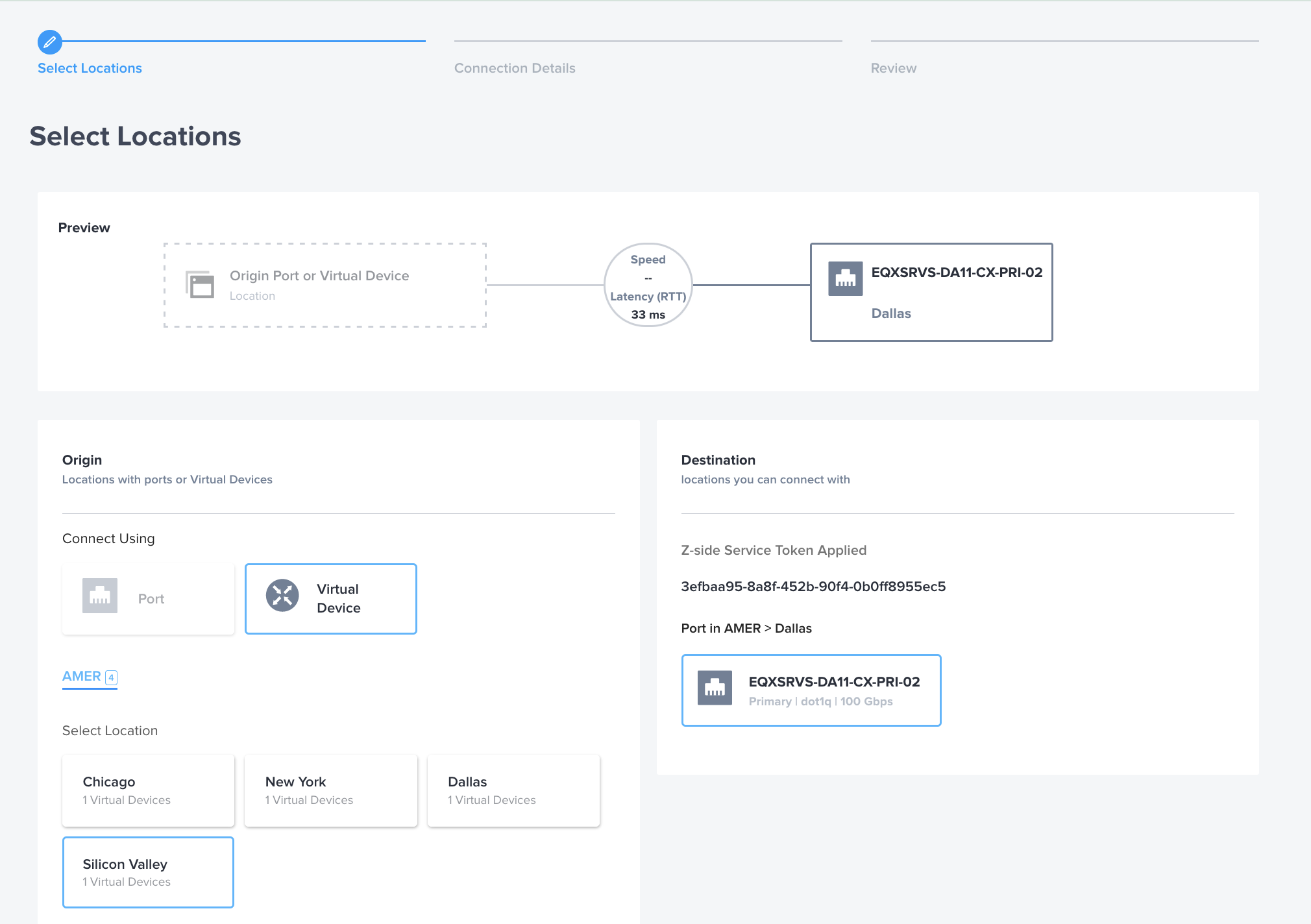
如果您使用的是虚拟设备,请选择设备类型和连接类型。目前,不支持冗余设备和集群。
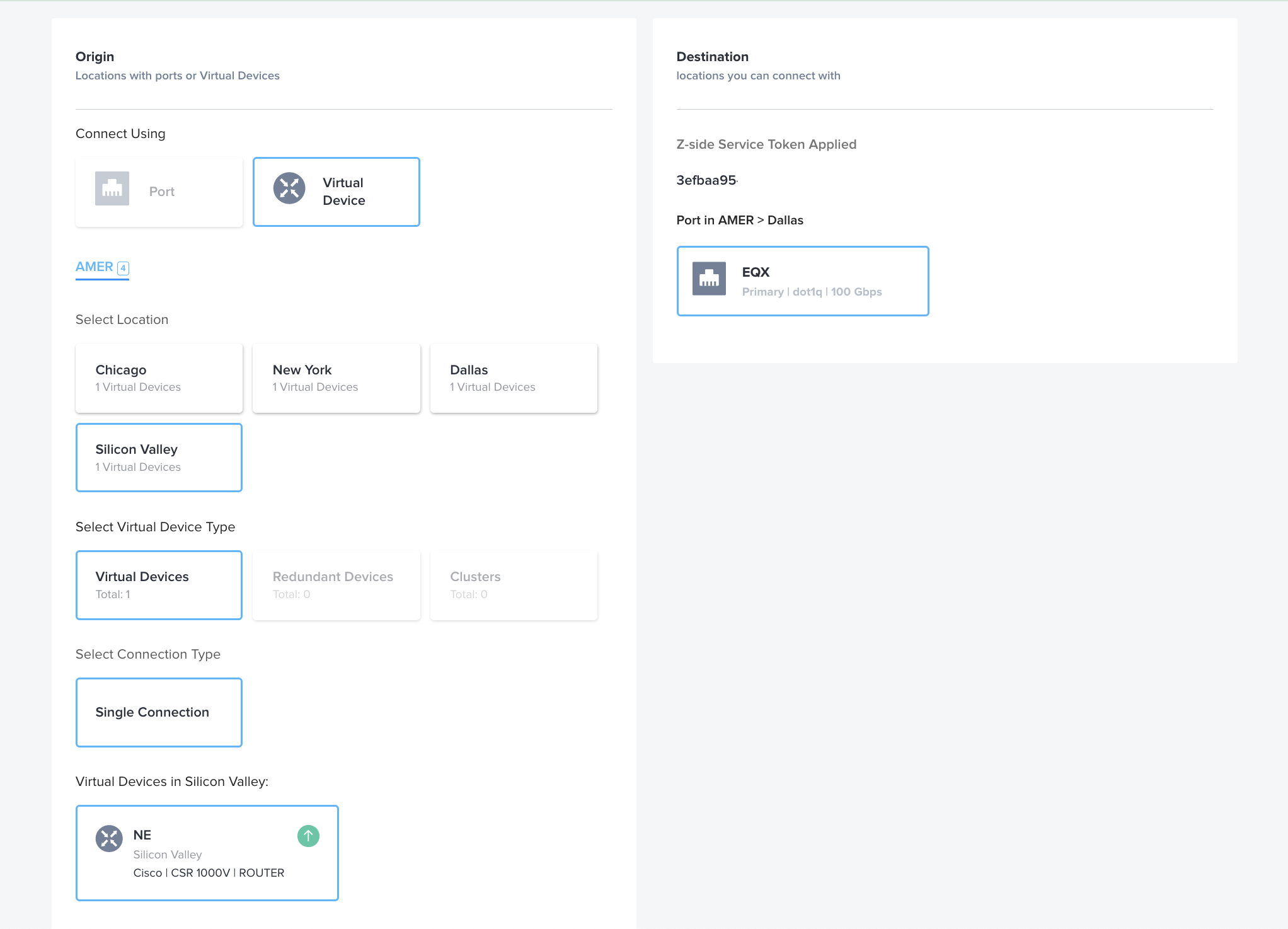
在“连接详情”页面,为您的虚拟连接指定一个易于识别的名称,指定要连接的虚拟设备上的接口(如有必要),如果您的组织出于计费目的需要采购订单号,请在此处指定。z 侧 VLAN 由服务令牌自动分配,无需与 Equinix Metal 上的 VLAN ID 匹配。
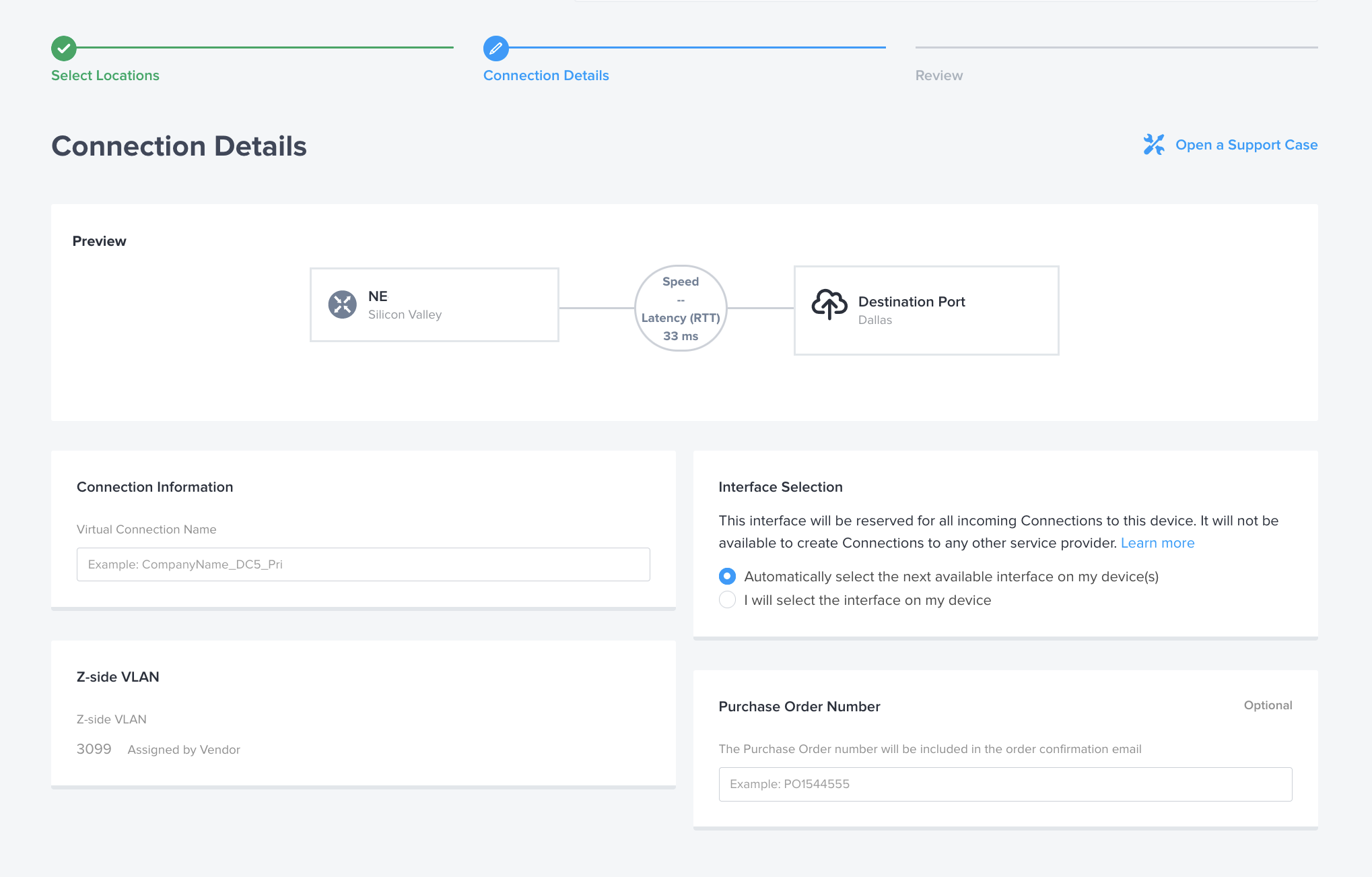
接下来,设置连接速度。Equinix Equinix Metal会设置 Fabric 虚拟连接的最大速度 - Fabric 计费速度为 10 Gbps。请从 Fabric 速度选项和定价中进行选择。
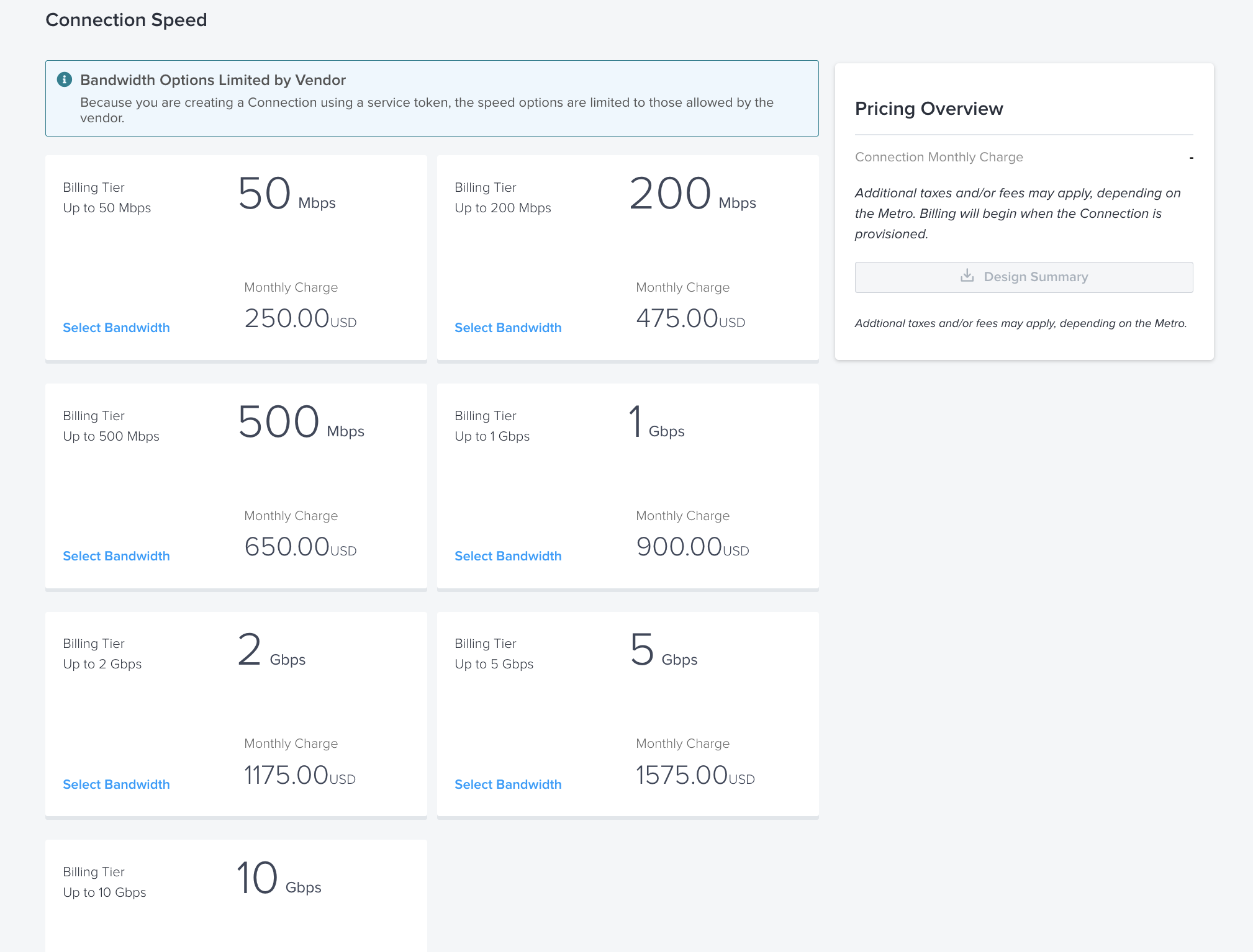
最后一页是确认页面,您可以在这里查看您的选择并进行修改。准备好下单后,点击“提交订单”。这将在后台启动 Fabric 和 Equinix Metal 之间的连接设置过程,该过程最多可能需要 10 分钟才能完成。
如果您因重复连接而收到两个代币,请务必重复上述步骤以兑换第二个代币。
如果需要检索令牌,它们位于“互连请求”选项卡中。单击要获取令牌的互连旁边的“管理”按钮。
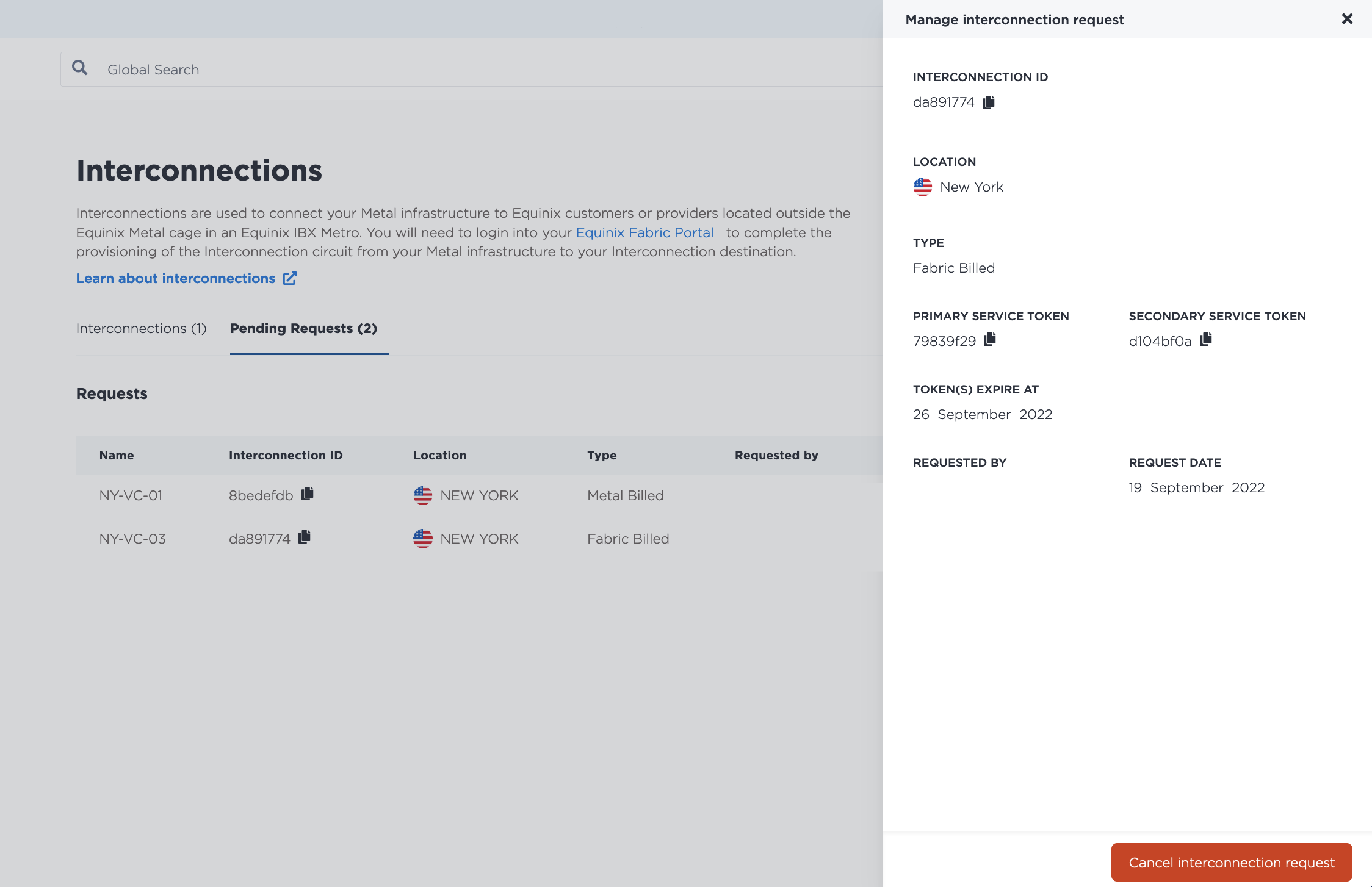
管理结构虚拟连接
- Console
- CLI
- API
一旦 Fabric 和 Equinix Metal 之间建立了互连,它将出现在您项目的 互连 页面的 Fabric VC 部分中,状态为 Active。
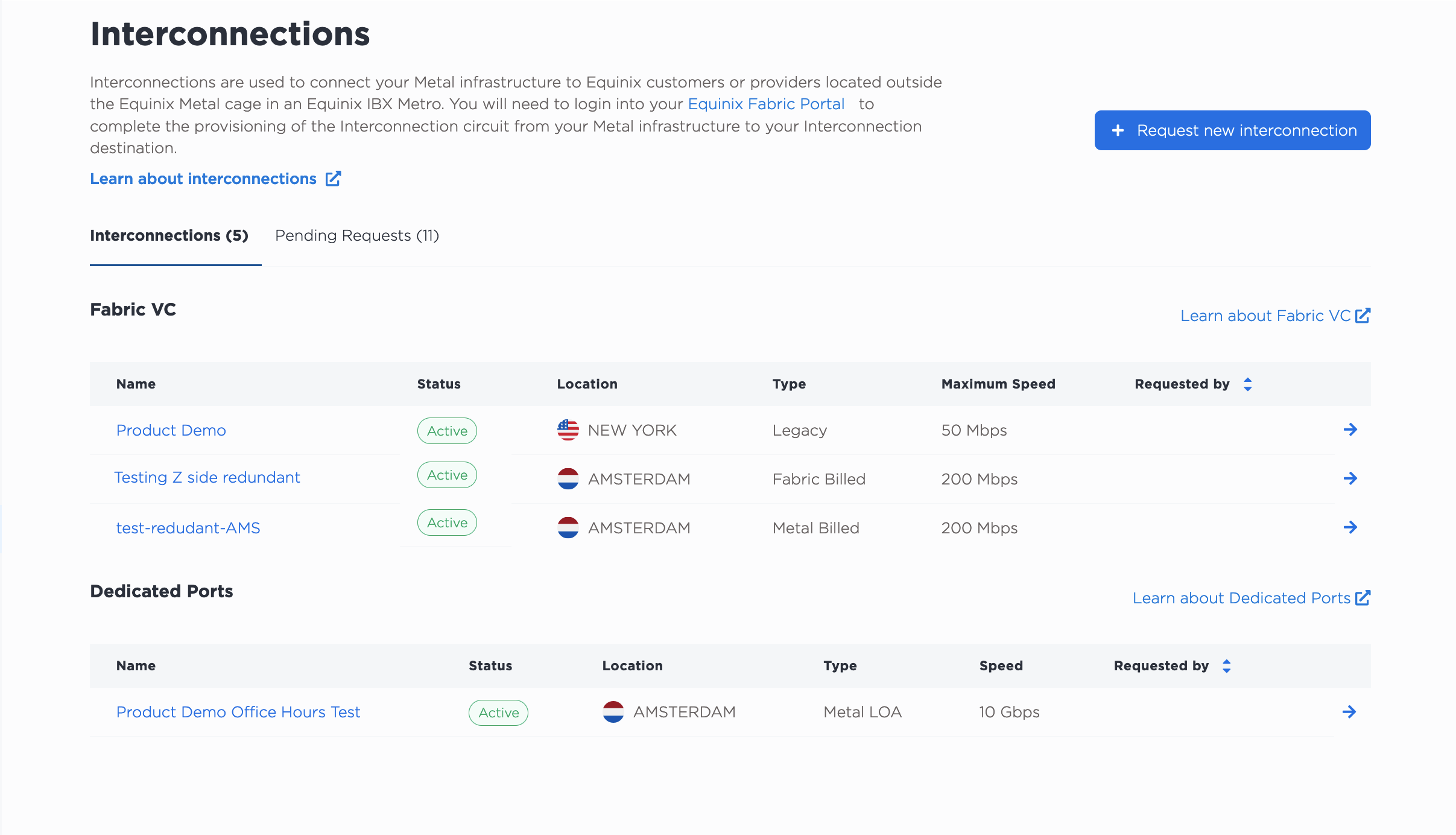
- Fabric Billed Fabric Virtual Connections 的类型为 Fabric Billed。
- 金属计费结构虚拟连接的类型为_金属计费_。
- 设置为“共享端口”的互连以类型“传统”表示。
请注意,专用端口是在组织级别进行管理的,因此如果您的组织中有任何专用端口,它们也会出现在“专用端口”部分中。
点击互连的名称,即可进入其“概览”页面,其中包含详细视图以及主端口和辅助端口配置的摘要。
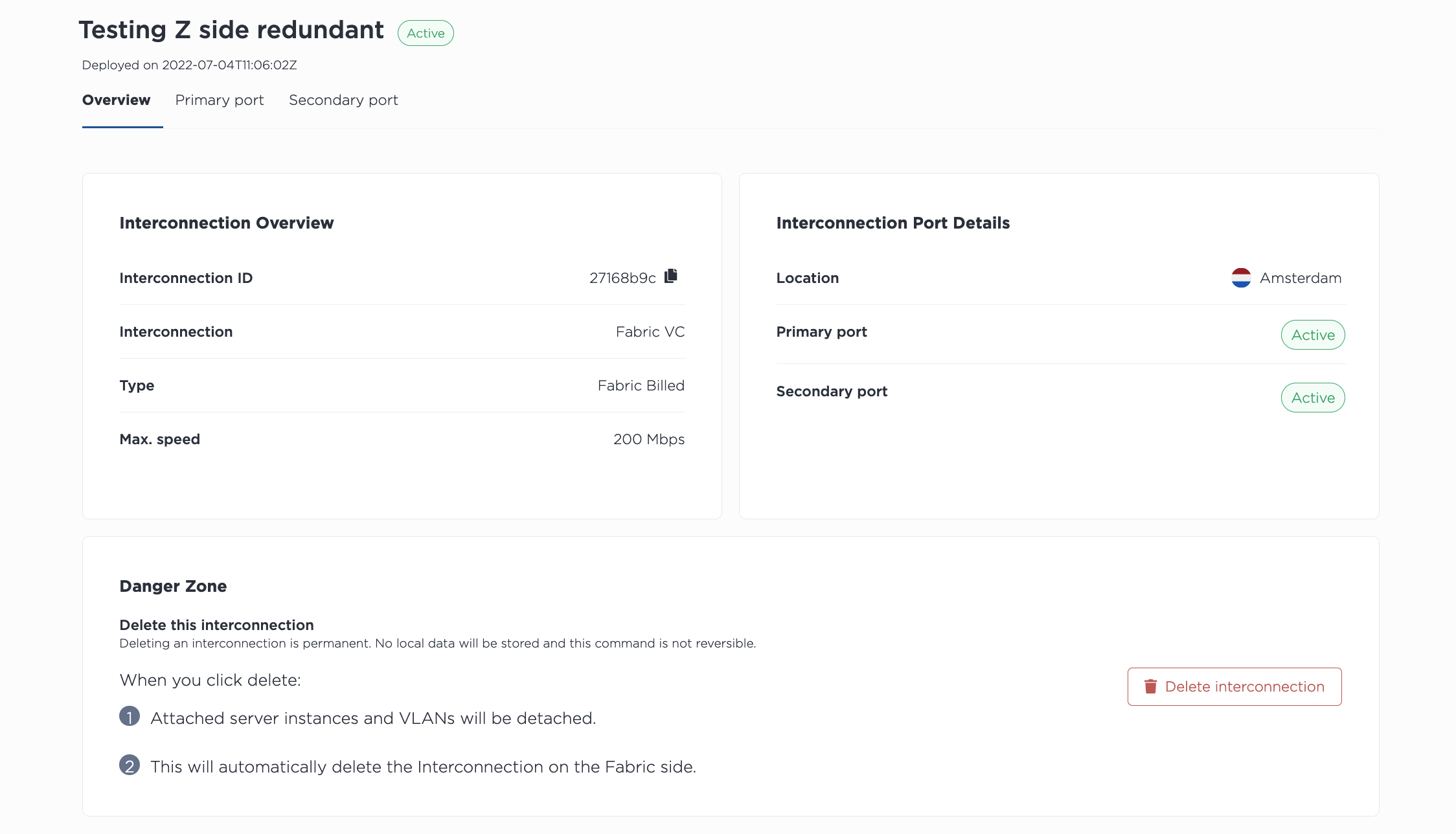
点击“主端口”或“辅助端口”将显示端口的状态和配置。
使用 metal interconnections get 命令列出项目的所有互连,包括 Fabric 计费的 Fabric 虚拟连接。使用 -p 或 --project_id 指定项目。
metal interconnections get -p <project_id>
注意:专用端口在组织级别进行管理,并在组织内的项目之间共享。如果您的组织中存在任何专用端口,它们也会显示在响应中。
使用 metal interconnections get 命令获取特定 Fabric 虚拟连接的详细信息,通过其 UUID 和 -i 或 --connID 指定 Fabric 虚拟连接。
metal interconnections get -i <fabric_vc_uuid>
要更新 Fabric 虚拟连接,请使用 metal interconnections update 命令。Fabric 虚拟连接的 UUID 为必填项。所有其他字段均为可选,可以单独更新。
metal interconnections update -i <fabric_vc_uuid> -n <name> -d <description> -r <redundant|primary> -e <e-mail> --tags="<tag1>,<tag2>"
选项:
-i,--id(必填)- 互连的 UUID。-e,--contactEmail- 添加或更新 Fabric Virtual Connection 的电子邮件联系人。-n,--name- 更新名称。-d,--description- 添加或更新描述。-r,--redundancy- 更新到primary将移除一个辅助端口,而更新到redundant将添加一个辅助端口。-t,--tags- 添加或更新标签。
要列出项目中的所有互连,请向 /organizations/{organization_id}/connections 端点发送 GET 请求,并在请求路径中筛选对项目的响应。
注意:专用端口在组织级别进行管理,并在组织内的项目之间共享。如果您的组织中存在任何专用端口,它们也会显示在响应中。
curl -X GET -H 'X-Auth-Token: <API_TOKEN>' \
https://api.equinix.com/metal/v1/organizations/{organization_id}/connections?project={project_id}
要获取 Fabric Billed Fabric VC 的详细信息,请向 /connections/{connection_id} 端点发送 GET 请求,并在请求路径中指定 UUID。
curl -X GET -H 'X-Auth-Token: <API_TOKEN>' \
https://api.equinix.com/metal/v1/connections/{connection_id}
您可以使用此信息通过向 /connections/{connection_id} 端点发送 PUT 请求来管理和更新 Fabric Billed Fabric VC。请在请求正文中指定要更改的内容。所有字段均为可选,因此可以单独更新。
curl -X PUT \
-H "Content-Type: application/json" \
-H "X-Auth-Token: <API_TOKEN>" \
"https://api.equinix.com/metal/v1/connections/{connection_id}" \
-d '{
    "contact_email": "<string>",
    "description": "<string>",
    "name": "<string>",
    "redundancy": "<string>",
    "tags": [
        "<string>"
    ]
}'
身体参数:
"contact_email"- 添加或更新 Fabric Virtual Connection 的电子邮件联系人。"name"- 更新名称。"description"- 添加或更新描述。"redundancy"- 更新到"primary"将移除一个辅助端口,而更新到"redundant"将添加一个辅助端口。- “标签”——添加或更新标签。
您还可以获取互连的端口信息。
要获取 Fabric Billed Fabric VC 的端口列表,请向 /connections/{connection_id}/ports 端点发送 GET 请求。
curl -X GET -H 'X-Auth-Token: <API_TOKEN>' \
https://api.equinix.com/metal/v1/connections/{connection_id}/ports
要获取端口的详细信息,请向 /connections/{connection_id}/ports/{id} 端点发送 GET 请求。
curl -X GET -H 'X-Auth-Token: <API_TOKEN>' \
https://api.equinix.com/metal/v1/connections/{connection_id}/ports/{id}
虚拟电路
每个端口(主端口和辅助端口)都有一个可连接 VLAN 或 VRF 的虚拟电路。
如果您使用 VLAN,您的虚拟电路将连接到您指定的 VLAN。这些 VLAN 无法修改或更改。如果您需要具有不同 VLAN 的 Fabric VC,则必须拆除并重新创建 Fabric VC。
注意:如果您之前通过控制台或 API 在虚拟电路上添加、删除或更改过 VLAN,则这些选项在2024年2月29日之后将不可用。发送到 /virtual-circuits/{id} 端点的更新 (PUT) 请求的响应中将包含一个“日落”标头。但对于2024年3月1日之前配置的、处于“等待客户 VLAN”状态的 Fabric VC,则存在例外情况。
如果您正在使用 VRF,则您的虚拟电路的状态将显示为“等待对等详细信息”。
配置 VRF
- Console
- API
如果您在虚拟电路中使用 VRF,请单击三横线菜单打开“管理对等连接详细信息”窗格。填写所需信息。
您可以在此处从 VRF IP 地址范围中指定一个子网,该子网将用于寻址 VRF 和虚拟电路的远端。系统将自动为该子网创建 IP 地址预留。
更详细的文档可在 VRF for Interconnections 页面上找到。
点击更新虚拟电路。
如果有冗余端口,请在辅助端口上重复此过程。
要使用 VRF 的对等连接详细信息更新虚拟电路,请向 /virtual-circuits/{vrf_virtual_circuit_id} 端点发送 PUT 请求。
您可以在此处从 VRF IP 地址范围中指定一个子网,该子网将用于寻址 VRF 和虚拟电路的远端。系统将自动为该子网创建 IP 地址预留。
对于 IPv4 子网:
curl -X PUT \
-H "Content-Type: application/json" \
-H "X-Auth-Token: <API_TOKEN>" \
"https://api.equinix.com/metal/v1/virtual-circuits/{vrf_virtual_circuit_id}" \
-d '{
    "peer_asn": <integer>,
    "subnet": "<subnet>",
    "metal_ip": "<ip_address>",
    "customer_ip": "<ip_address>”,
    "md5": "<string>"
}'
对于 IPv6 子网:
curl -X PUT \
-H "Content-Type: application/json" \
-H "X-Auth-Token: <API_TOKEN>" \
"https://api.equinix.com/metal/v1/virtual-circuits/{vrf_virtual_circuit_id}" \
-d '{
    "peer_asn": <integer>,
    "subnet_ipv6": "<subnet>",
    "metal_ipv6": "<ip_address>",
    "customer_ipv6": "<ip_address>”,
    "md5": "<string>"
}'
更详细的文档可在 VRF for Interconnections 页面上找到。
删除结构虚拟连接
删除 Fabric 虚拟连接是永久性的。删除连接后,所有连接的 VLAN 都将被断开,从 Fabric 到服务器的流量也将被切断。
从Equinix Metal端删除 Fabric 计费虚拟连接会自动删除 Fabric 中的连接。如果您从 Fabric 门户删除该连接, Equinix Metal端也会自动清理该连接。这是一个异步过程,最多可能需要 3 分钟才能完成。
删除连接前,请务必停止流量,并清理与该连接相关的所有资源。在从Metal或 Fabric 门户删除连接之前执行此操作,可确保该连接被完全删除并停止计费。
- Console
- CLI
- API
在“互连”页面的连接列表中,单击要删除的 Fabric 虚拟连接的名称。
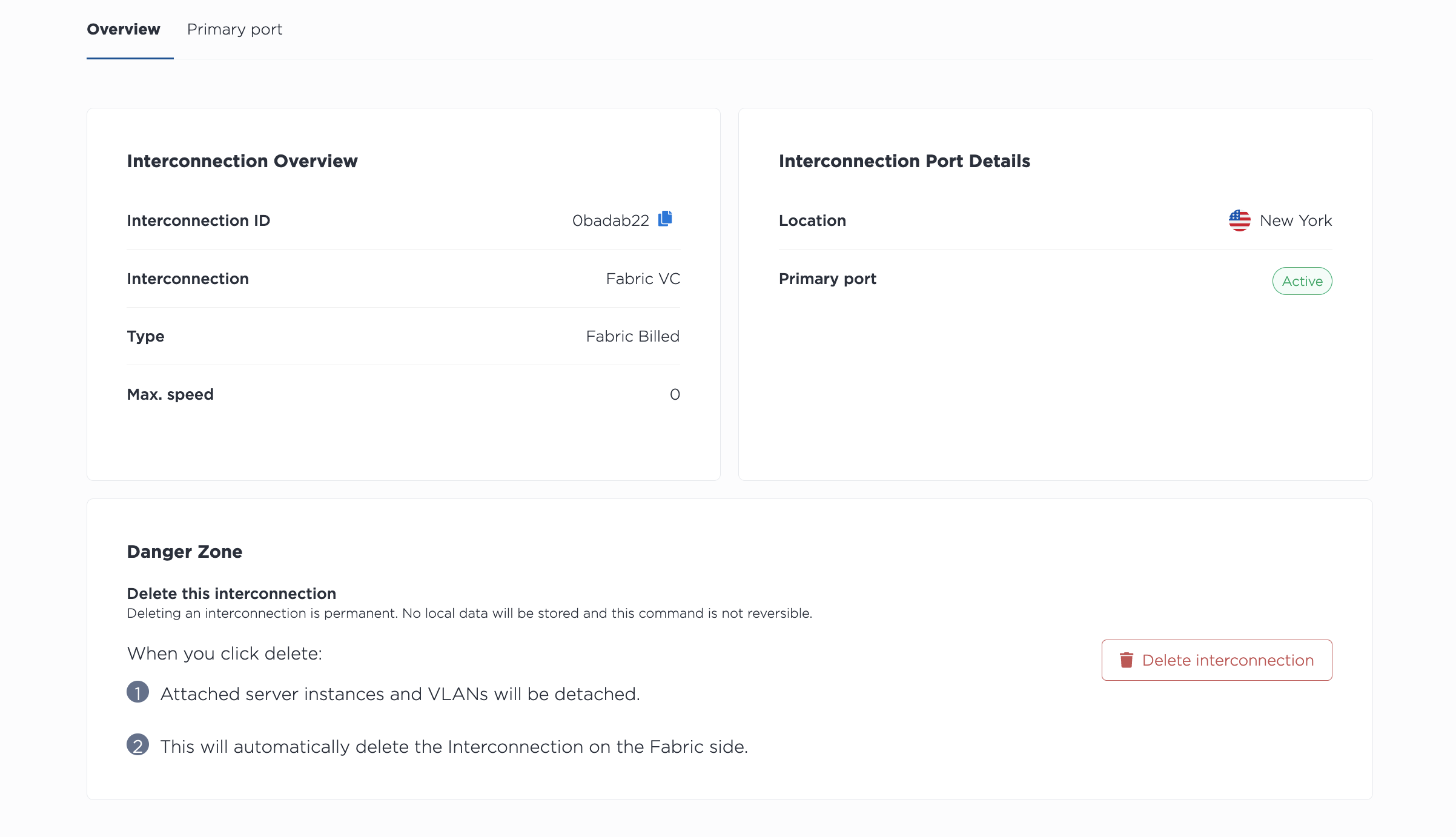
单击“删除互连”以永久删除 Fabric 虚拟连接。
要删除 Fabric 虚拟连接,请使用 metal interconnections delete 命令。使用 -i 或 --id 指定 Fabric 虚拟连接的 UUID。要跳过确认步骤,请使用 -f 或 --force。
metal interconnections delete -i <uuid> -f
要从 API 中删除 Fabric 虚拟连接,请向 /connections/{connection_id} 端点发送 DELETE 请求,并在路径中指定端口的 ID。
curl -X DELETE -H 'X-Auth-Token: <API_TOKEN>' \
https://api.equinix.com/metal/v1/connections/{id}
发送请求将永久删除该连接。