专用端口
Equinix Metal™ 互连的一种选择是通过专用端口,在这种模式下,您将管理处理流量的 Equinix Fabric 物理端口。如果符合以下条件,请使用此选项:
- 您希望成为Equinix Fabric上的云服务提供商,以便其他Equinix客户可以连接到您在Equinix Metal上的托管服务。
- 您正在将Equinix Metal连接到Equinix中的同地基础设施。
- 您正在通过 Cross-Connect 建立连接。
一般事实 -
- 专用端口支持高达 9000 字节的最大传输单元 (MTU) 和巨型以太网帧。
- 专用端口还支持 VLAN 堆叠(或标签堆叠)和 专用隧道模式,以便您可以从 Equinix Metal 服务器实例发送和接收双标签数据包。
- 专用端口允许与同一城域内的专用端口位于同一组织内的任何项目中的任何 VLAN 连接到其虚拟电路。
- 专用端口在Equinix Metal上计费,设置费用为一次性费用 (NRC),使用费用为每月定期费用 (MRC)。任何相关的 Fabric 端口费用或 Cross Connect 费用都将显示在您的Equinix Fabric或Equinix客户账户中,与您的Equinix Metal发票分开。
- 专用端口可以使用虚拟路由和转发 (VRF)。更多信息请参见互连 VRF 页面。
请求专用端口
- Console
- CLI
- API
要申请专用端口,请打开“互连”页面。如果您的组织或项目中已有任何项目拥有 Fabric 虚拟连接或专用端口,您将能够在此页面上看到它们。
点击**+ 申请新的互联**。
对于“选择互连类型”,请选择“专用端口”。
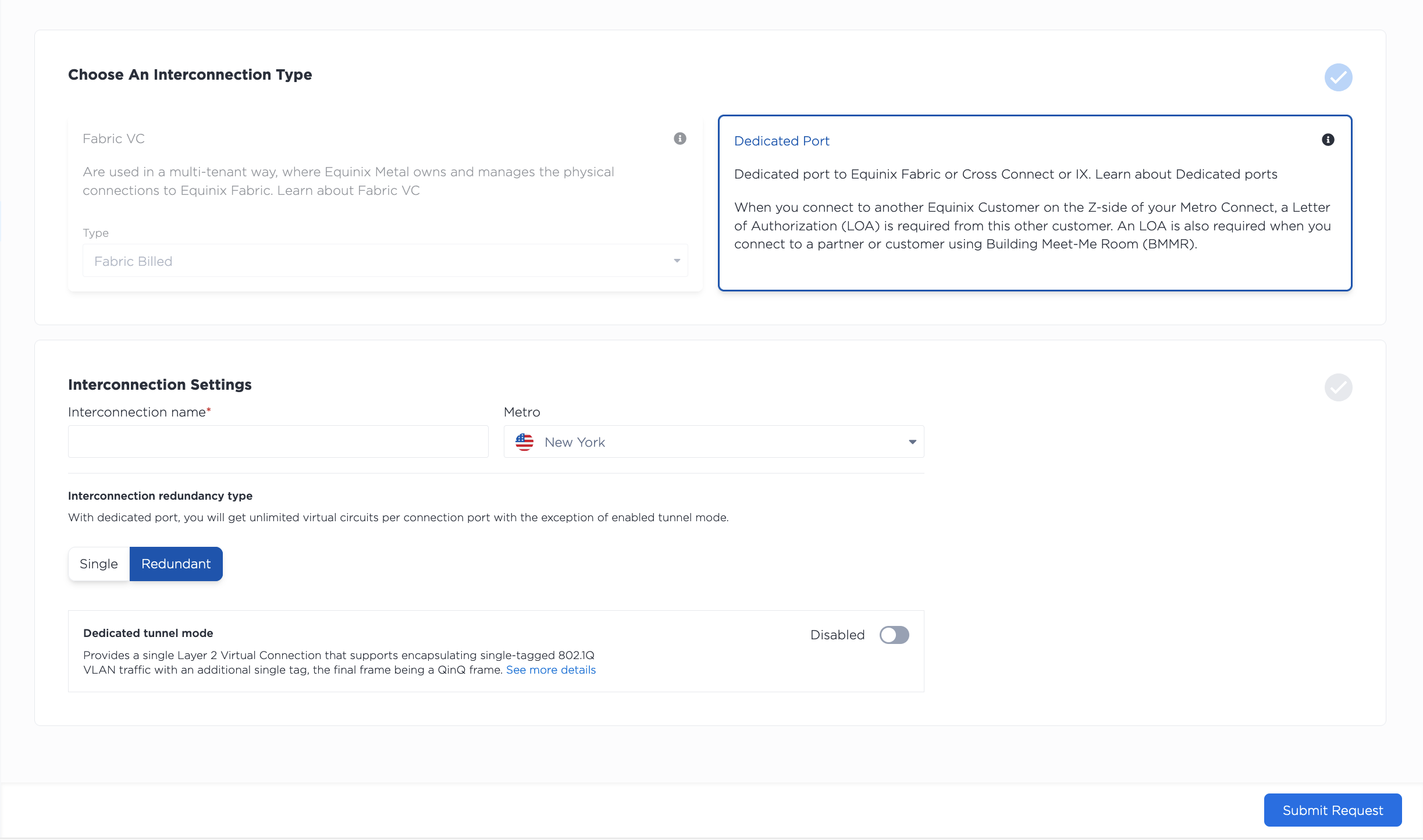
- 从下拉菜单中选择新连接的位置。您需要选择Equinix Metal基础设施所在的城市,或您计划配置该基础设施的城市。
- 为您的连接命名。
- 选择冗余连接还是单连接。如果选择冗余连接,您将获得一个主端口和一个辅助端口,用于连接虚拟电路和 VLAN,从而实现一定程度的冗余和高可用性。
接下来,有一个开关可以启用专用隧道模式。在配置时启用此模式是可选的。您可以在已配置的专用端口上启用和禁用专用隧道模式。
请查看您的请求摘要。点击提交请求以完成您的专用端口请求并将其提交给 Equinix Metal 支持团队。
提交请求后,它将移至“待处理请求”选项卡。请注意,专用端口的作用域限定在组织级别。特定项目中任何专用端口的请求都将对该项目所属的组织可见。
要在 CLI 中请求专用端口,请使用 metal interconnections create 命令。
metal interconnections create -p <project_id> -n <name> -m <metro> -r redundant -t dedicated
选项:
-p,--project-id(必填)- 您的项目 UUID。-n,--name(必填)-专用端口的名称。-m,--metro(必填)- 您请求专用端口的 都会区 的 UUID 或都会区代码。请指定您的Equinix Metal基础架构已部署的都会区 ,或您计划部署基础架构的 Metro。-r,--redundancy(必填)- 选择primary或redundant。如果选择冗余连接,则会获得一个主端口和一个辅助端口,从而提高连接的冗余性和高可用性。-t,--type(必填)- 要请求专用端口,请使用dedicated。
要查看 CLI 支持的选项的完整列表,请参阅 CLI 参考 页面。
要通过 API 请求连接,请向 /projects/{project_id}/connections 端点发送 POST 请求。
curl -X POST \
-H "Content-Type: application/json" \
-H "X-Auth-Token: <API_TOKEN>" \
"https://api.equinix.com/metal/v1/projects/{project_id}/connections" \
-d '{
    "name": "<string>",
    "description": "<string>",
    "contact_email": "<string>",
    "metro": "<metro_code>",
    "type": "dedicated",
    "redundancy": "redundant"
}'
身体参数:
"name"(必填)- 连接名称。"description"(可选)- 连接的易懂描述。"contact_email"- 用于互连相关通信和通知的首选电子邮件地址。使用项目 API 密钥时为必填项。使用用户 API 密钥时为可选,默认为您的用户电子邮件地址。"metro"(必填)- 您请求专用端口的 都会区 的 UUID 或都会区代码。请指定您的Equinix Metal基础架构已部署的都会区 ,或您计划部署基础架构的 Metro。"type"(必填)- 要请求专用端口,请设置为"dedicated"。"redundancy"(必填)- 选择"primary"或"redundant"。如果选择冗余连接,则会获得一个主端口和一个辅助端口,从而提高连接的冗余性和高可用性。
完整的参数列表请参见API 参考。
授权书
申请专用端口时,您需要指定端口和Equinix Metal基础设施所在的城市。在每个城市中, Equinix Metal在特定的 IBX 中设有网络入口, Metal端的连接将根据表格(按字母顺序排列)终止于该城市。
| 地铁 | 金属入口匝道位置 |
|---|---|
| 阿姆斯特丹 | AM2 |
| 亚特兰大 | AT1 |
| 芝加哥 | CH2 |
| 达拉斯 | DA11 |
| 都柏林 | DB3 |
| 法兰克福 | FR5 |
| 赫尔辛基 | HE7 |
| 香港 | HK2 |
| 伦敦 | LD7 |
| 洛杉矶 | LA1 |
| 马德里 | MD2 |
| 曼彻斯特 | MA5 |
| 墨尔本 | ME2 |
| 墨西哥城 | MX2 |
| 迈阿密 | MI1 |
| 米兰 | ML5 |
| 蒙特利尔 | MT1 |
| 孟买 | MB2 |
| 纽约 | NY5 |
| 大阪 | OS3 |
| 巴黎 | PA4 |
| 圣保罗 | SP4 |
| 西雅图 | SE2 |
| 首尔 | SL1 |
| 硅谷 | SV5 |
| 新加坡 | SG3 |
| 斯德哥尔摩 | SK2 |
| 悉尼 | SY4 |
| 东京 | TY2 |
| 多伦多 | TR2 |
| 华盛顿特区 | DC1 |
因此, Equinix Metal授权书 (LOA) 将从Equinix Metal网络入口所在的IBX发出。该 IBX 可能与您的托管服务器或Metal基础设施不在同一个IBX上,但位于同一个城域网内。
这一点需要注意,因为例如,如果您要订购一个Fabric 端口,则需要使用 LOA 中的 IBX 位置。
支持人员将在后台为您设置必要的端口并将 LOA 发送到您的电子邮件地址。
如果您对 LOA 和远程端口感兴趣,请查看 Equinix 文档中的连接虚拟和物理环境。
建立联系
Equinix Metal上的专用端口有多种用例,因此继续设置连接所采取的步骤取决于您将如何使用它。
如果您要设置专用端口以通过 Equinix Fabric 连接,则需要 为 Equinix Fabric 配置专用端口。
如果您要设置专用端口以连接到您自己的 Equinix IBX 托管基础设施或不是 Fabric 上目标的第三方 NSP,则您需要通过 Equinix 客户门户 继续完成 Cross-Connect 的订购流程。
无论您通过 Cross-Connect 还是 Equinix Fabric 提交订单,系统都会创建一个工单,IBX 技术人员将根据订单和 LOA 完成安装。安装完成后,您将收到端口订单完成的电子邮件通知。您需要将此订单完成邮件转发至 support@equinixmetal.com。此步骤必须完成。如果您未将此完成邮件转发至 Equinix Metal,您的订单将无法继续进行。
安装注意事项: Equinix Metal配置为A侧, Equinix Fabric配置为Z侧。
管理专用端口
- Console
- CLI
- API
专用端口建立后,它将出现在项目的“互连”页面上。请注意,专用端口是在组织级别管理的,因此它们将显示在您组织的任何项目中。
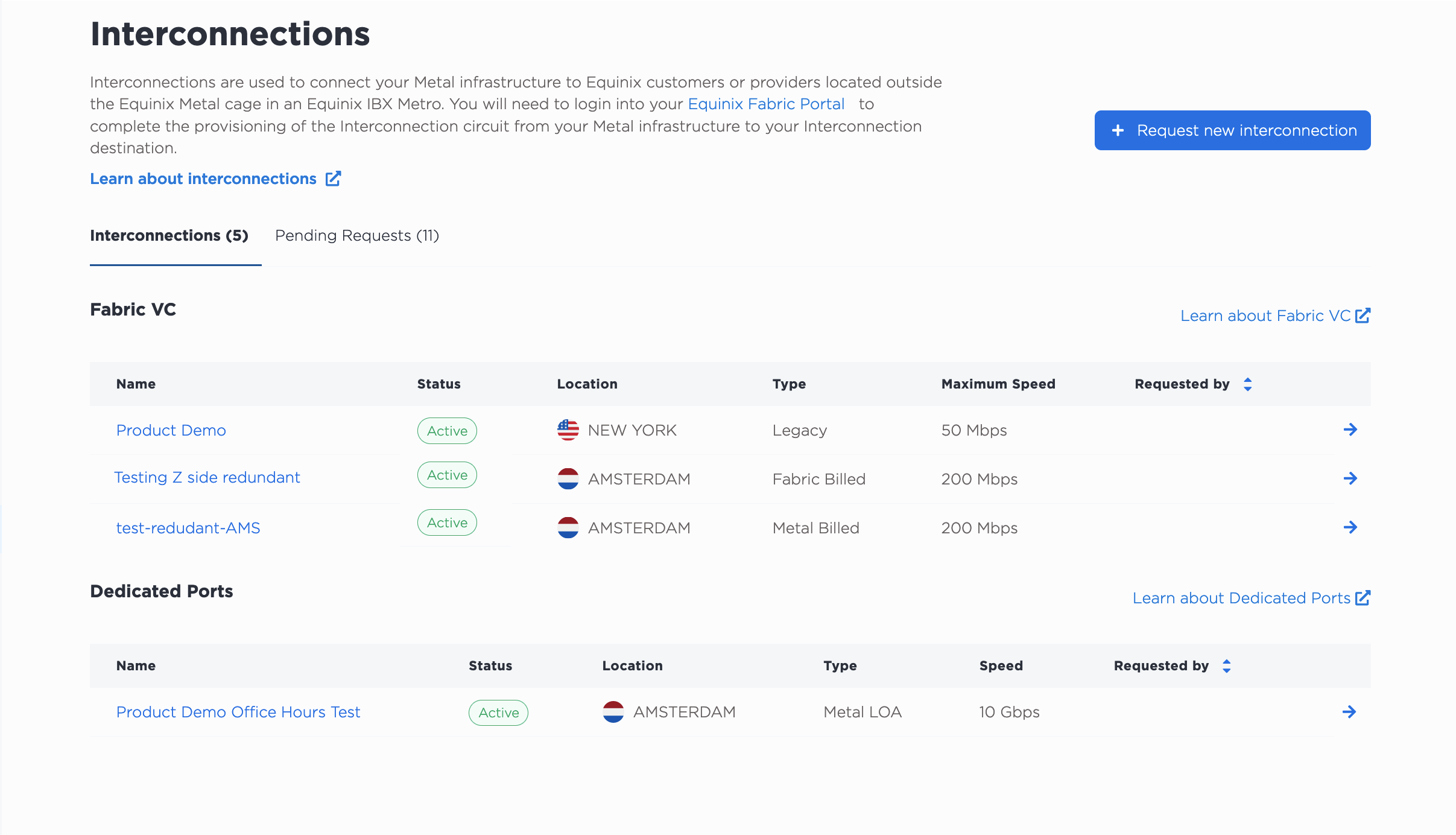
点击专用端口将进入其“概览”页面,其中包含主端口和辅助端口配置的详细信息和摘要。点击“主端口”和“辅助端口”选项卡,即可查看端口的详细信息。
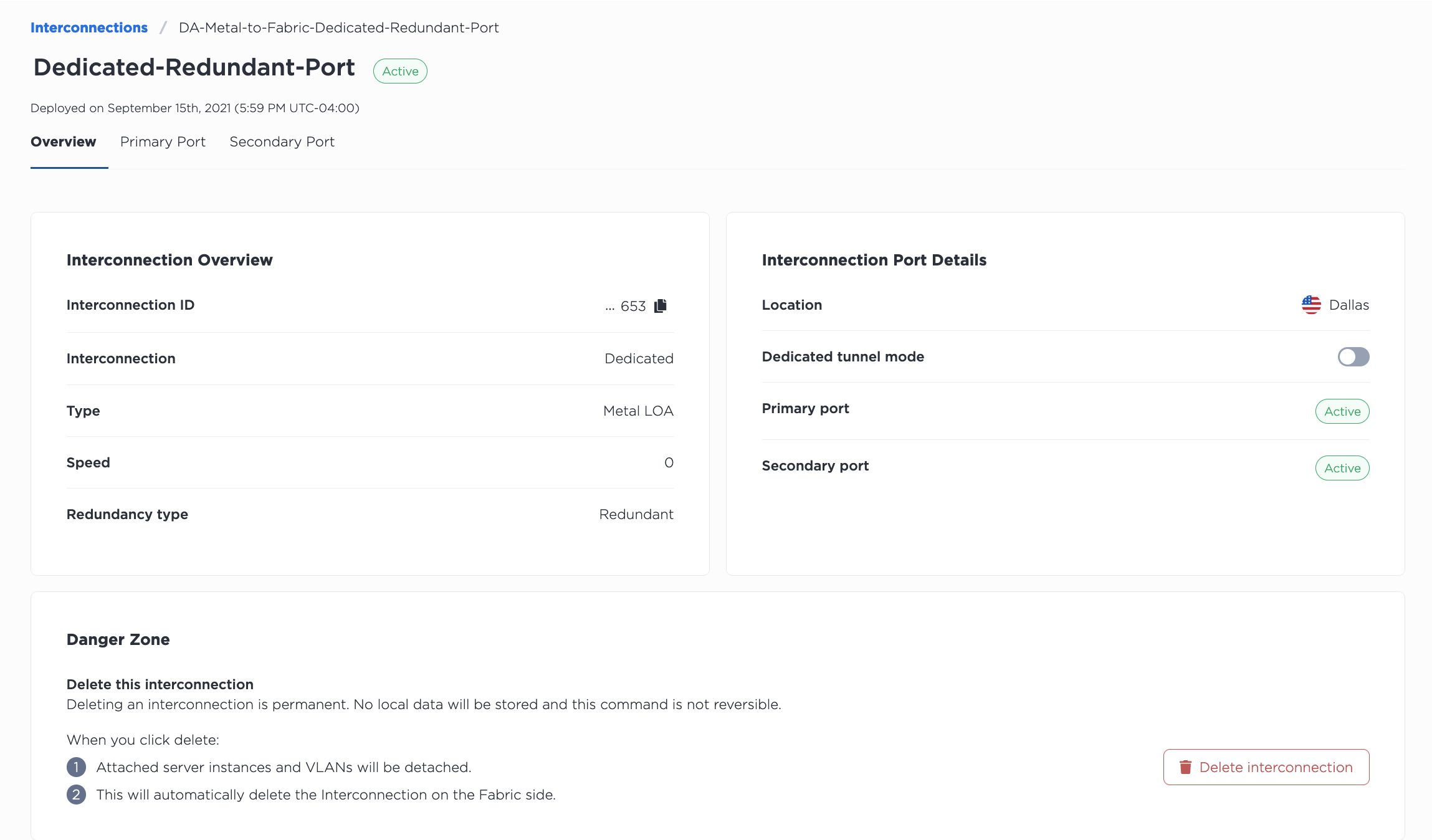
使用 metal interconnections get 命令列出项目的所有互连,包括专用端口。使用 -p 或 --project_id 指定项目。
metal interconnections get -p <project_id>
使用 metal interconnections get 命令获取特定专用端口的详细信息,通过专用端口的 UUID 和 -i 或 --connID 指定专用端口。
metal interconnections get -i <dedicated_port_uuid>
要更新专用端口,请使用 metal interconnections update 命令。专用端口的 UUID 为必填项。所有其他字段均为可选,因此可以单独更新。
metal interconnections update -i <dedicated_port_id> -n <name> -d <description> -r <redundant|primary> -m <standard|tunnel> -e <E-mail> --tags="<tag1>,<tag2>"
选项:
-i,--id(必填)- 互连的 UUID。-e,--contactEmail- 添加或更新专用端口的电子邮件联系人。-n,--name- 更新名称。-d,--description- 添加或更新描述。-r,--redundancy- 更新到primary将移除一个辅助端口,而更新到redundant将添加一个辅助端口。-m,--mode- 通过将模式更新为standard或tunnel来启用和禁用 专用隧道 模式。-t,--tags- 添加或更新标签。
要列出项目中的所有互连,请向 /organizations/{organization_id}/connections 端点发送 GET 请求,并在请求路径中筛选对项目的响应。
curl -X GET -H 'X-Auth-Token: <API_TOKEN>' \
https://api.equinix.com/metal/v1/organizations/{organization_id}/connections?project={project_id}
要获取专用端口的详细信息,请向 /connections/{connection_id} 端点发送 GET 请求,并在请求路径中指定 UUID。
curl -X GET -H 'X-Auth-Token: <API_TOKEN>' \
https://api.equinix.com/metal/v1/connections/{connection_id}
您可以使用此信息通过向 /connections/{connection_id} 端点发送 PUT 请求来管理和更新专用端口。请在请求正文中指定要更改的内容。所有字段均为可选,因此可以单独更新。
curl -X PUT \
-H "Content-Type: application/json" \
-H "X-Auth-Token: <API_TOKEN>" \
"https://api.equinix.com/metal/v1/connections/{connection_id}" \
-d '{
    "contact_email": "<string>",
    "description": "<string>",
    "name": "<string>",
    "redundancy": "<string>",
    "mode": "<standard>",
    "tags": [
        "<string>"
    ]
}'
身体参数:
"contact_email"- 添加或更新专用端口的电子邮件联系人。"name"- 更新名称。"description"- 添加或更新描述。"redundancy"- 更新到"primary"将移除一个辅助端口,而更新到"redundant"将添加一个辅助端口。"mode"- 通过将模式更新为"standard"或"tunnel"来启用和禁用 专用隧道 模式。- “标签”——添加或更新标签。
您还可以获取专用端口的各个端口的信息。
要获取端口列表,请向 /connections/{connection_id}/ports 端点发送 GET 请求。
curl -X GET -H 'X-Auth-Token: <API_TOKEN>' \
https://api.equinix.com/metal/v1/connections/{connection_id}/ports
要获取端口的详细信息,请向 /connections/{connection_id}/ports/{id} 端点发送 GET 请求。
curl -X GET -H 'X-Auth-Token: <API_TOKEN>' \
https://api.equinix.com/metal/v1/connections/{connection_id}/ports/{id}
创建和管理虚拟电路
专用端口物理就绪后,Equinix Metal 控制台会显示端口状态为“已激活”。您可以在 Equinix Metal 控制台中创建虚拟电路,并将 VLAN 或 VRF 附加到这些电路。
- Console
- API
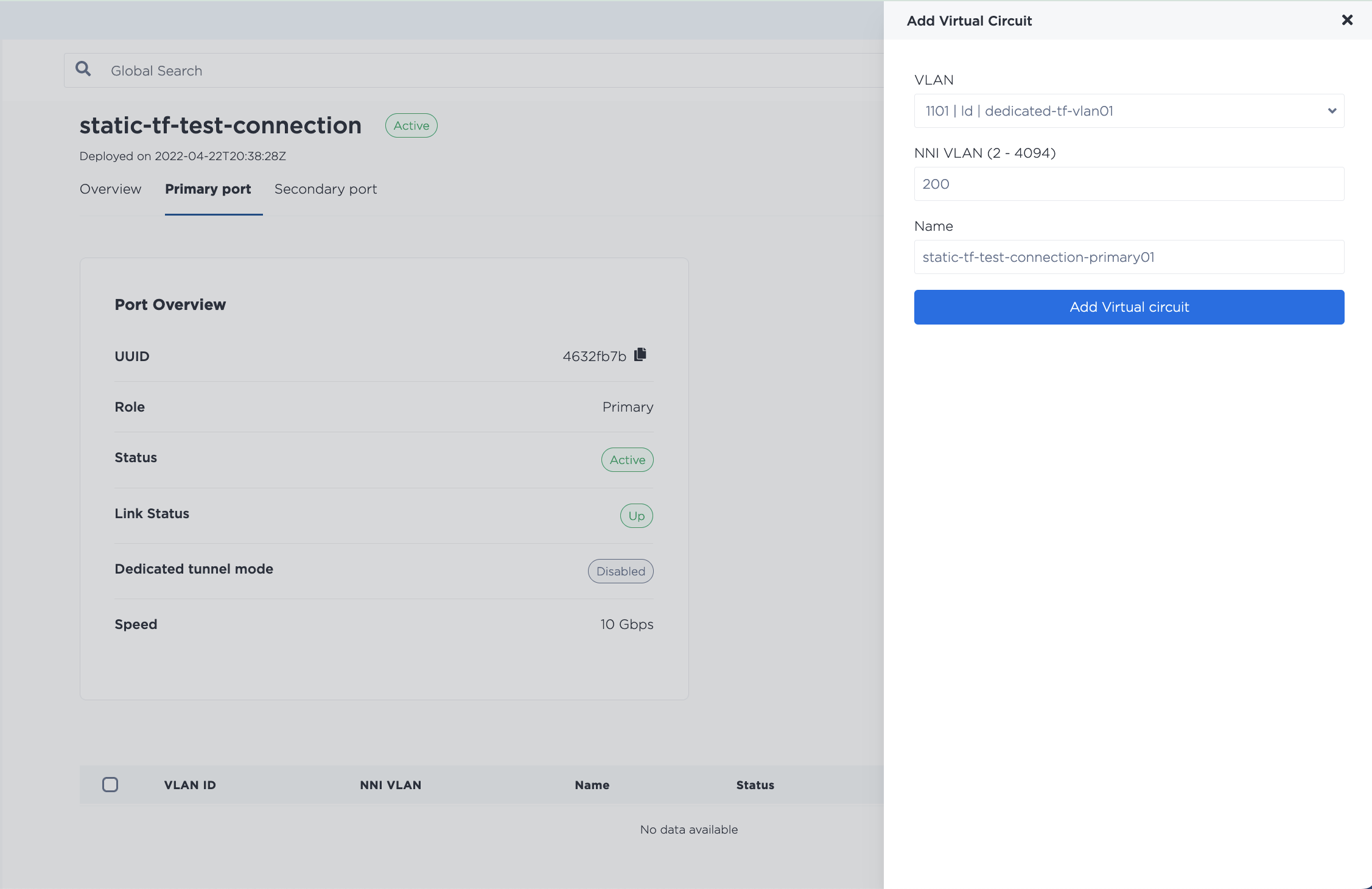
在专用端口的“概览”中,选择“主端口”选项卡。
点击**+添加虚拟电路**创建虚拟电路。选择要附加的是VLAN还是VRF。
如果您使用 VLAN,请选择要与虚拟电路关联的 VLAN,并为其指定一个 NNI VLAN 编号(2 到 4094 之间的整数)。每条虚拟电路都需要有一个唯一的 NNI VLAN 编号。
注意:VLAN 必须与专用端口位于同一城域网内,但不必位于同一项目中。专用端口属于组织级范围。您可以连接组织中任何项目的 VLAN,只要它们位于同一城域网内即可。
如果您使用专用端口的默认模式,则可以添加多条虚拟电路来连接多个 VLAN。虽然每个端口可以有多条虚拟电路,但虚拟电路与 VLAN 的关系是 1:1。您只能将一个 VLAN 连接到一条虚拟电路,并且只能将一条虚拟电路连接到一个 VLAN。
如果您使用 VRF,请从下拉菜单中选择要附加到此虚拟连接的 VRF,并填写所需信息。您需要在此处指定对等信息——即 VRF IP 地址范围内的子网,该子网将用于寻址 VRF 和虚拟电路的远端。系统将自动为此子网创建 IP 地址预留。有关使用专用端口配置 VRF 的更多详细信息,请参阅互连 VRF。
要创建新的虚拟电路,请向 /connections/{connection_id}/ports/{port_id}/virtual-circuits 端点发送 POST 请求。
如果您使用 VLAN,请在请求正文中使用“vnid”。
curl -X POST \
-H "Content-Type: application/json" \
-H "X-Auth-Token: <API_TOKEN>" \
"https://api.equinix.com/metal/v1/connections/{connection_id}/ports/{port_id}/virtual-circuits" \
-d '{
    "description": "<string>",
    "name": "<string>",
    "nni_vlan": <integer>,
    "vnid": "<string>",
    "tags": [
        "<string>"
    ]
}'
请求字段
"name"(必填)- 连接名称。"description"(可选)- 连接的易懂描述。"nni_vlan"- (必填)- 介于2和4094之间的整数。请记住,如果您要连接到 Fabric 上的目标,则 NNI VLAN 必须与 Fabric 侧的 VLAN 匹配。"vnid"- (可选)- 要连接到虚拟电路的 VLAN 的 VLAN ID 或 UUID。如果省略,则创建虚拟电路,其状态为“等待客户 VLAN”。注意: VLAN 必须与专用端口位于同一都会区,但不必位于同一项目中。专用端口的作用域限定在组织级别。只要位于同一都会区,您就可以连接组织内任何项目的 VLAN。如果您使用默认模式的专用端口,则可以添加多个虚拟电路来连接多个 VLAN。虽然每个端口可以有多个虚拟电路,但虚拟电路与 VLAN 之间的关系是 1:1 的。一个虚拟电路只能连接一个 VLAN,一个虚拟电路也只能连接一个 VLAN。"tags"- (可选) - 要用作 VC 标识符的字符串或字符串数组。
如果您使用的是 VRF,则需要在此处指定对等连接信息——即 VRF IP 地址范围中的子网,用于寻址 VRF 和虚拟电路的远端。此子网的 IP 地址预留将自动创建。
对于 IPv4 子网:
curl -X POST \
-H "Content-Type: application/json" \
-H "X-Auth-Token: <API_TOKEN>" \
"https://api.equinix.com/metal/v1/connections/{connection_id}/ports/{port_id}/virtual-circuits" \
-d '{
    "project_id": "<UUID>",
    "name": "<string>",
    "description": "<string>",
    "subnet": "<subnet>",
    "customer_ip": "<ip_address>",
    "metal_ip": "<ip_address>",
    "nni_vlan": <integer>,
    "peer_asn": <integer>,
    "md5": "<string>",
    "vrf": "<UUID>"
}'
对于 IPv6 子网:
curl -X POST \
-H "Content-Type: application/json" \
-H "X-Auth-Token: <API_TOKEN>" \
"https://api.equinix.com/metal/v1/connections/{connection_id}/ports/{port_id}/virtual-circuits" \
-d '{
    "project_id": "<UUID>",
    "name": "<string>",
    "description": "<string>",
    "subnet_ipv6": "<subnet>",
    "customer_ipv6": "<ip_address>",
    "metal_ipv6": "<ip_address>",
    "nni_vlan": <integer>,
    "peer_asn": <integer>,
    "md5": "<string>",
    "vrf": "<UUID>"
}'
有关使用专用端口配置 VRF 的更多文档,请参阅 互连 VRF 页面。
如果您希望在主端口上创建更多虚拟电路,请重复此过程。如果您有冗余端口,请在辅助端口上也重复此过程。
更新虚拟电路
- Console
- API
端口上的虚拟电路列在专用端口的“主端口”或“辅助端口”选项卡中。
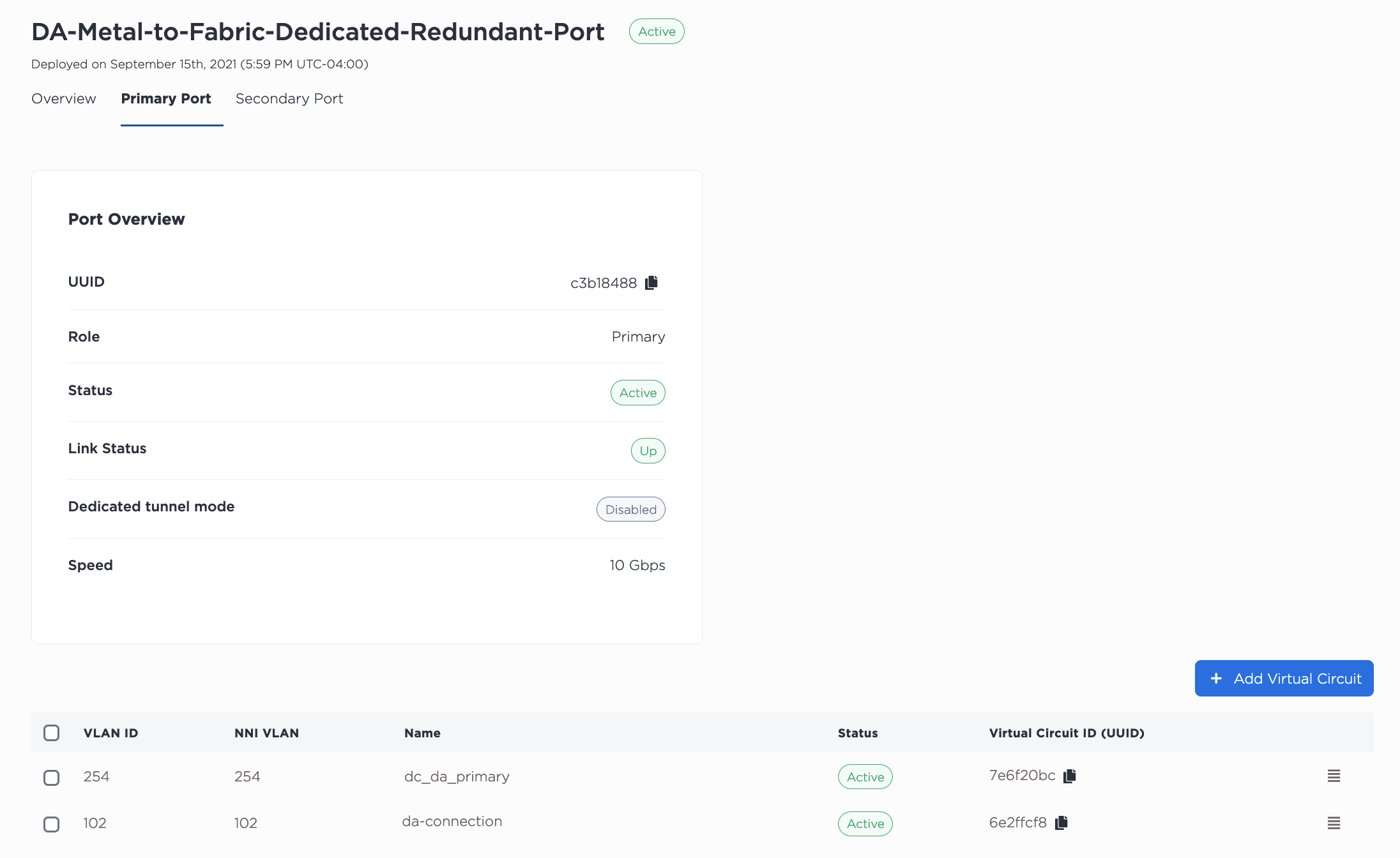
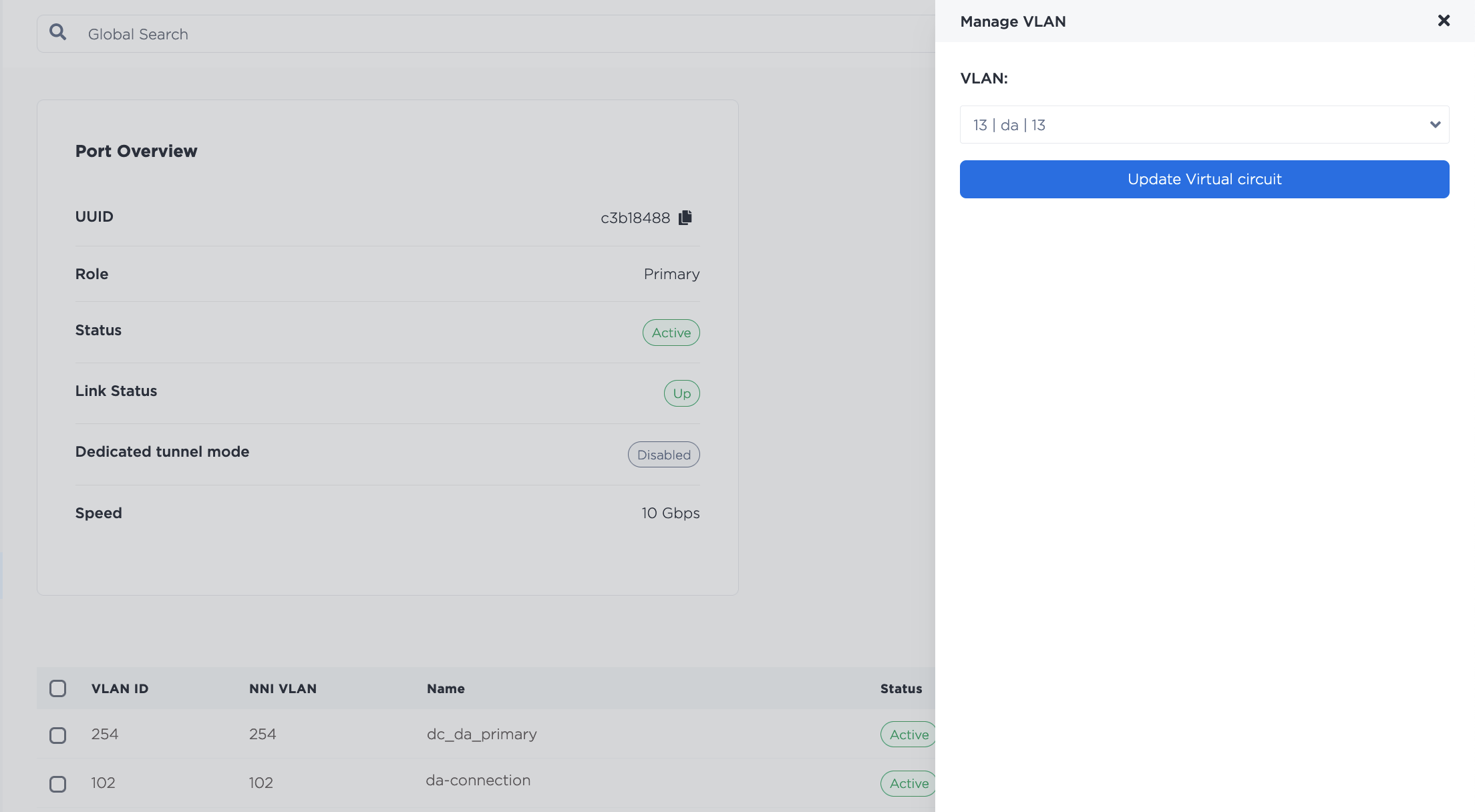
要更改连接到虚拟电路的 VLAN,请单击三横线菜单打开“管理 VLAN”窗格。从下拉列表中选择新的 VLAN,然后单击“更新虚拟电路”。
VRF 列在“虚拟电路 - VRF”部分。单击三横线菜单打开“管理对等连接详细信息”窗格。
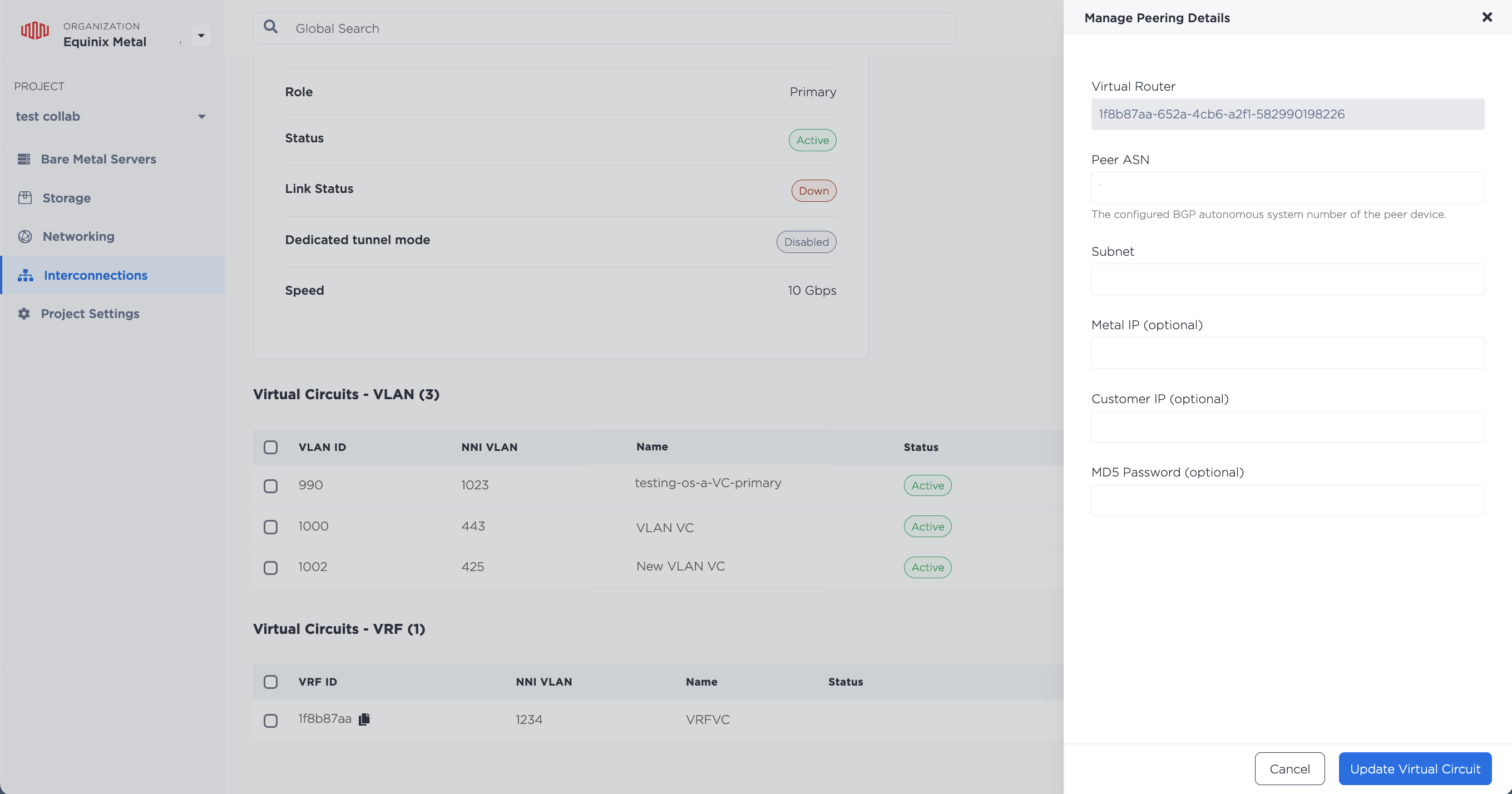
填写新的对等互联信息,然后单击更新虚拟电路。
要获取连接到端口的虚拟电路列表,请向 /connections/{connection_id}/ports/{port_id}/virtual-circuits 端点发送 GET 请求。
curl -X GET -H 'X-Auth-Token: <API_TOKEN>' \
https://api.equinix.com/metal/v1/connections/{connection_id}/ports/{port_id}/virtual-circuits
您可以通过向 /virtual-circuits/{id} 端点发送 PUT 请求来更新虚拟电路。例如,要更改 VLAN,请在请求正文中指定新的 VLAN ID。
curl -X PUT \
-H "Content-Type: application/json" \
-H "X-Auth-Token: <API_TOKEN>" \
"https://api.equinix.com/metal/v1/virtual-circuits/{id}" \
-d '{
    "vnid": "<string>"
}'
要更新 VRF,请在请求正文中使用您想要更新的字段。所有字段均为可选字段,因此可以单独更新。
curl -X PUT \
-H "Content-Type: application/json" \
-H "X-Auth-Token: <API_TOKEN>" \
"https://api.equinix.com/metal/v1/virtual-circuits/{id}" \
-d '{
    "name": "<string>",
    "description": "<string>",
    "subnet": "<subnet>",
    "customer_ip": "<ip_address>",
    "metal_ip": "<ip_address>",
    "peer_asn": <integer>,
    "md5": "<string>"
}'
删除 VLAN 和虚拟电路
如果需要将 VLAN 从虚拟电路中分离,请选择该 VLAN,然后从“操作”菜单中单击“取消关联 VLAN”。从虚拟电路中移除 VLAN 并不会将其删除。

要删除虚拟电路,您应该首先删除所有附加的 VLAN。
- Console
- API
删除所有 VLAN 后,选择要删除的虚拟电路,然后从“操作”下拉菜单中单击“删除”。
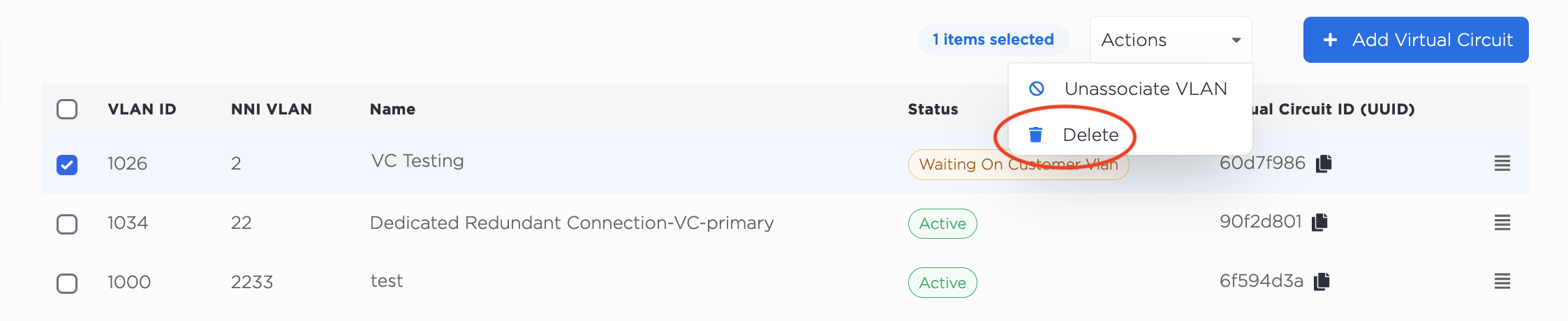
移除所有 VLAN 后,向 /virtual-circuits/{id} 端点发送 DELETE 请求,并在请求路径中指定虚拟电路的 UUID。
curl -X DELETE -H 'X-Auth-Token: <API_TOKEN>' \
https://api.equinix.com/metal/v1/virtual-circuits/{id}
专用隧道模式
专用隧道模式提供单条虚拟电路,支持将单标签 802.1Q VLAN 流量封装在附加的单标签中。外层标签用于识别和隔离来自不同 VLAN 的流量;内层标签则保留原始帧的标签。
这使您可以通过连接到虚拟电路的单个 VLAN 传递来自多个 VLAN 的流量,同时隔离并保留多个不同封装 VLAN 的流量的标识。
请考虑以下有关专用隧道模式的内容:
- 启用专用隧道模式会将端口限制为只有一个虚拟电路。
- 虚拟电路的 NNI VLAN 编号是自动分配的。
- Console
- API
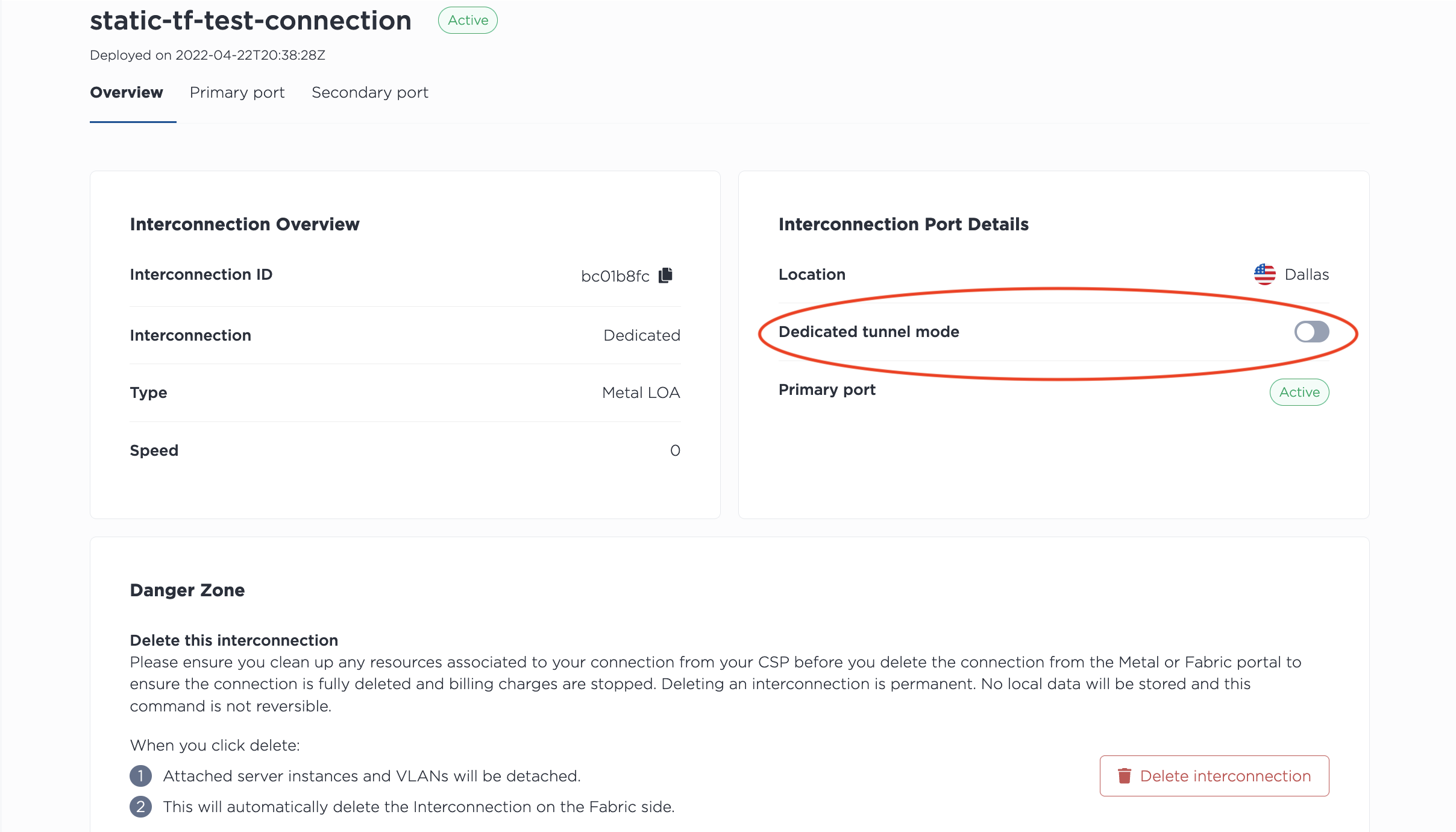
要以专用隧道模式设置虚拟连接,请单击连接的“概览”中“专用隧道”选项旁边的切换开关。
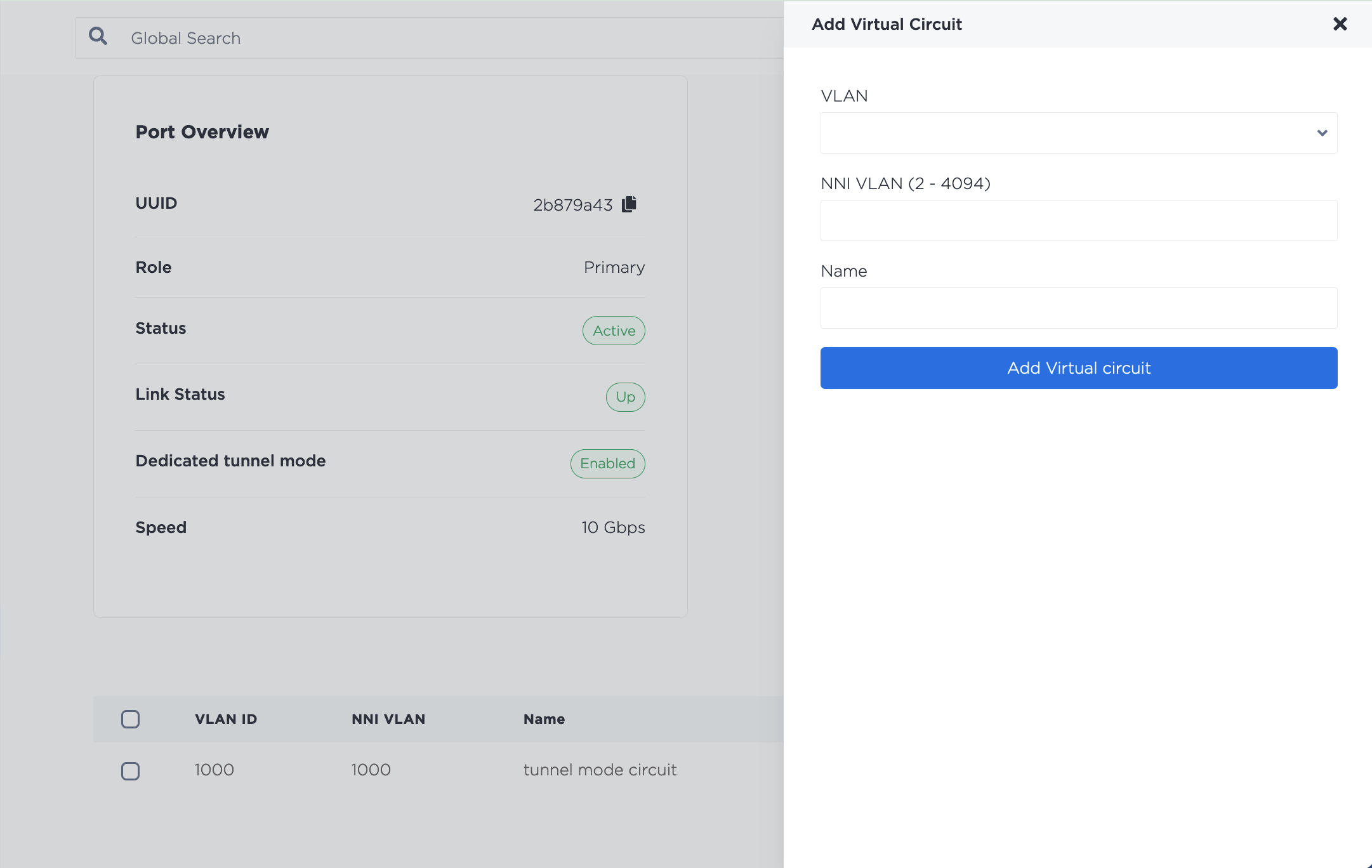
然后在每个端口(主端口、辅助端口或两者)上,单击“创建虚拟电路”。从下拉列表中选择要连接到虚拟电路的 VLAN,并为虚拟电路命名。单击“+ 添加虚拟电路”。
如果您当前已将虚拟电路连接到端口,则无法启用或禁用专用隧道模式。更改模式之前,必须先移除所有虚拟电路。
在 API 中,您可以通过向 /connections/{connection_id} 端点发送 PUT,并在请求正文中将 mode 字段设置为 "tunnel",来启用现有端口上的专用隧道。
curl -X PUT \
    -H "Content-Type: application/json" \
    -H "X-Auth-Token: <API_TOKEN>" \
    "https://api.equinix.com/metal/v1/connections/{connection_id}" \
    -d '{
        "mode": "tunnel"
    }'
如果省略 mode 字段,则默认为 "standard"。
您可以通过向 /connections/{connection_id} 端点发送 GET 来检查连接的模式。
curl -X GET -H 'X-Auth-Token: <API_TOKEN>' https://api.equinix.com/metal/v1/connections/{connection_id}
要禁用专用隧道模式,请将 PUT 发送到 /connections/{connection_id} 端点,并在请求正文中将 mode 字段设置为 "standard"。
curl -X PUT \
    -H "Content-Type: application/json" \
    -H "X-Auth-Token: <API_TOKEN>" \
    "https://api.equinix.com/metal/v1/connections/{connection_id}" \
    -d '{
        "mode": "standard"
    }'
如果您当前已将虚拟电路连接到端口,则无法启用或禁用专用隧道模式。更改模式之前,必须先移除所有虚拟电路。
服务器上的 VLAN 配置
专用隧道模式仅支持外部 VLAN 标签以太网类型为 0x8100 的帧。这意味着,当您配置服务器以处理专用隧道 VLAN 上的流量时,必须指定协议。例如,在 Linux 中将 VLAN 1007 和 1234 分配给端口 (bond0) 时:
ip link add link bond0 bond0.1007 type vlan proto 802.1q id 1007
ip link add link bond0.1007 bond0.1007.1234 type vlan proto 802.1q id 1234
删除专用端口
删除专用端口是永久性的。删除连接后,所有连接的 VLAN 都将被断开,通过此连接往返于服务器的流量也将被切断。
删除前请务必停止流量,并清理与连接相关的所有资源。在删除Equinix Metal中的专用端口之前执行此操作可确保连接被完全删除并停止计费。从Equinix Metal端删除专用端口会自动删除 Fabric 中的连接。
- Console
- CLI
- API
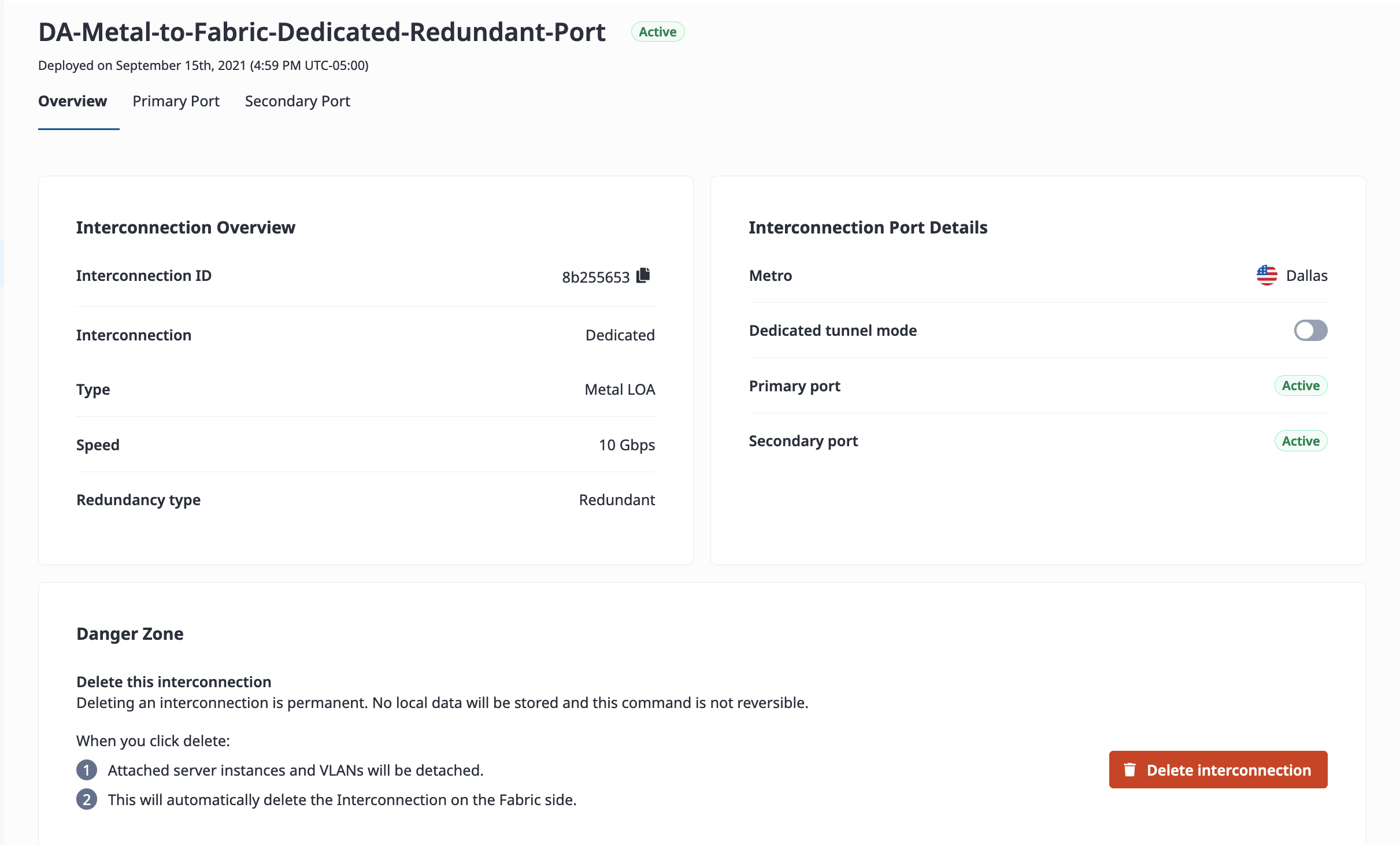
在“互连”页面的专用端口列表中,单击要删除的专用端口的名称。
单击“删除互连”以永久删除 Fabric 虚拟连接。
要删除专用端口,请使用 metal interconnections delete 命令。使用 -i 或 --id 指定专用端口的 UUID。要跳过确认步骤,请使用 -f 或 --force。
metal interconnections delete -i <dedicated_port_uuid> -f
要从 API 中删除专用端口,请向 /connections/{connection_id} 端点发送 DELETE 请求,并在路径中指定专用端口的 ID。
curl -X DELETE -H 'X-Auth-Token: <API_TOKEN>' \
https://api.equinix.com/metal/v1/connections/{id}