监控 BGP
在项目中启用 BGP 并启动会话后,项目的 BGP 页面和服务器的 BGP 页面都会显示有关活动会话和已学习路由的信息。
BGP项目现状
- Console
- CLI
- API
您的项目“网络”部分的“BGP”页面包含以下内容:
- 启用哪种类型的 BGP:本地还是全局。
- ASN:本地 BGP 为 65000,全局 BGP 为您自己的 ASN。
- MD5 密码(如果您设置了)。
- 包含项目中所有服务器的所有 BGP 会话的表。
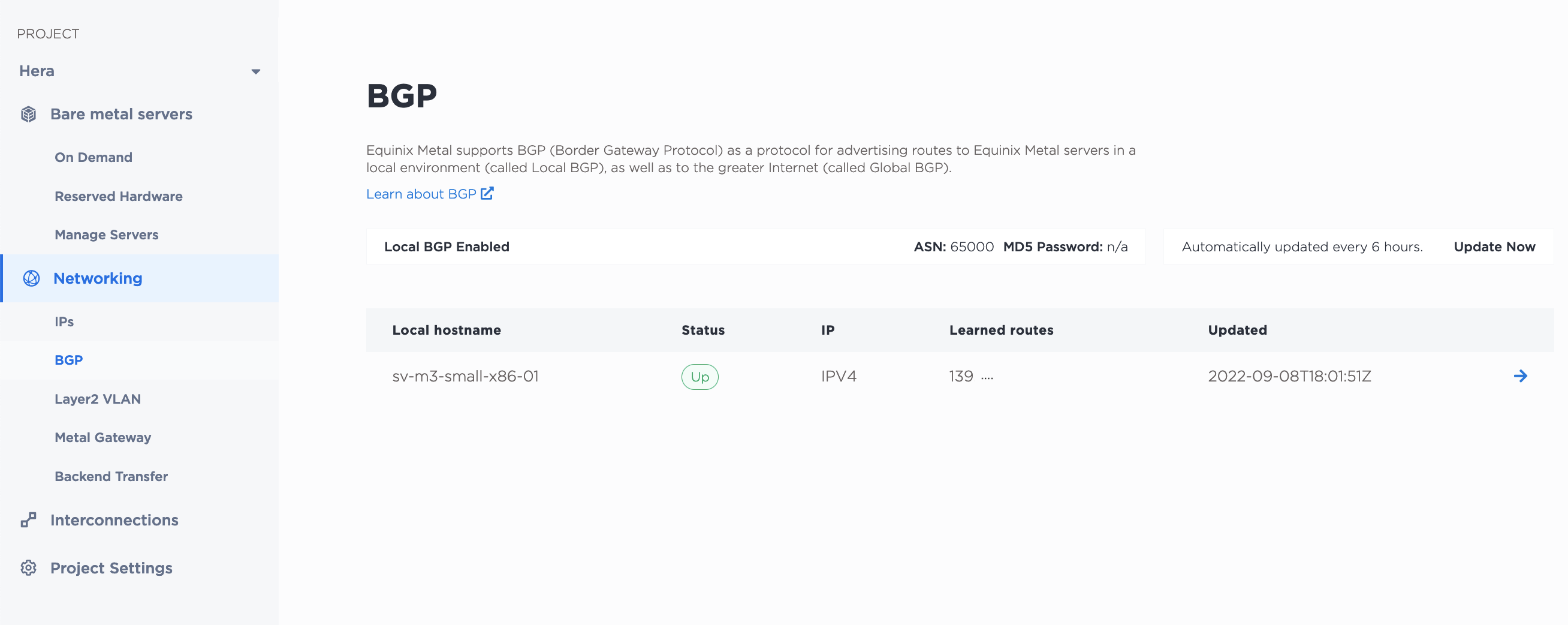
该表格列出了每台服务器的会话详情,包括会话状态和上次更新时间。会话状态每六小时自动更新一次,但您也可以点击“立即更新”按钮手动更新所有会话的状态。
单击会话条目旁边的箭头,即可从服务器的 BGP 页面查看和管理 BGP 会话。
您可以通过 metal project bgp-config 命令获取项目的 BGP 配置。
metal project bgp-config -p <project_id>
您可以使用 metal project bgp-sessions 命令获取项目中所有服务器上的所有 BGP 会话列表。
metal project bgp-sessions -p <project_id>
在 API 中,通过向 /projects/{id}/bgp-config 端点发送 GET 请求来检索项目的 BGP 配置和会话信息。
curl -X GET -H "Content-Type: application/json" -H "X-Auth-Token: <API_TOKEN>" "https://api.equinix.com/metal/v1/projects/{id}/bgp-config"
如果您只想获取项目中的会话列表及其详细信息,请向 /projects/{id}/bgp/sessions 端点发送 GET 请求。
curl -X GET -H "Content-Type: application/json" -H "X-Auth-Token: <API_TOKEN>" "https://api.equinix.com/metal/v1/projects/{id}/bgp/sessions"
BGP 会话状态
- Console
- API
在服务器的“BGP”选项卡中,表格提供了此服务器上 IPv4 和 IPv6 会话的 BGP 会话信息,包括已学习路由列表、当前会话状态以及上次更新时间。状态每六小时自动更新一次,但您也可以单击“立即更新”按钮手动更新状态。
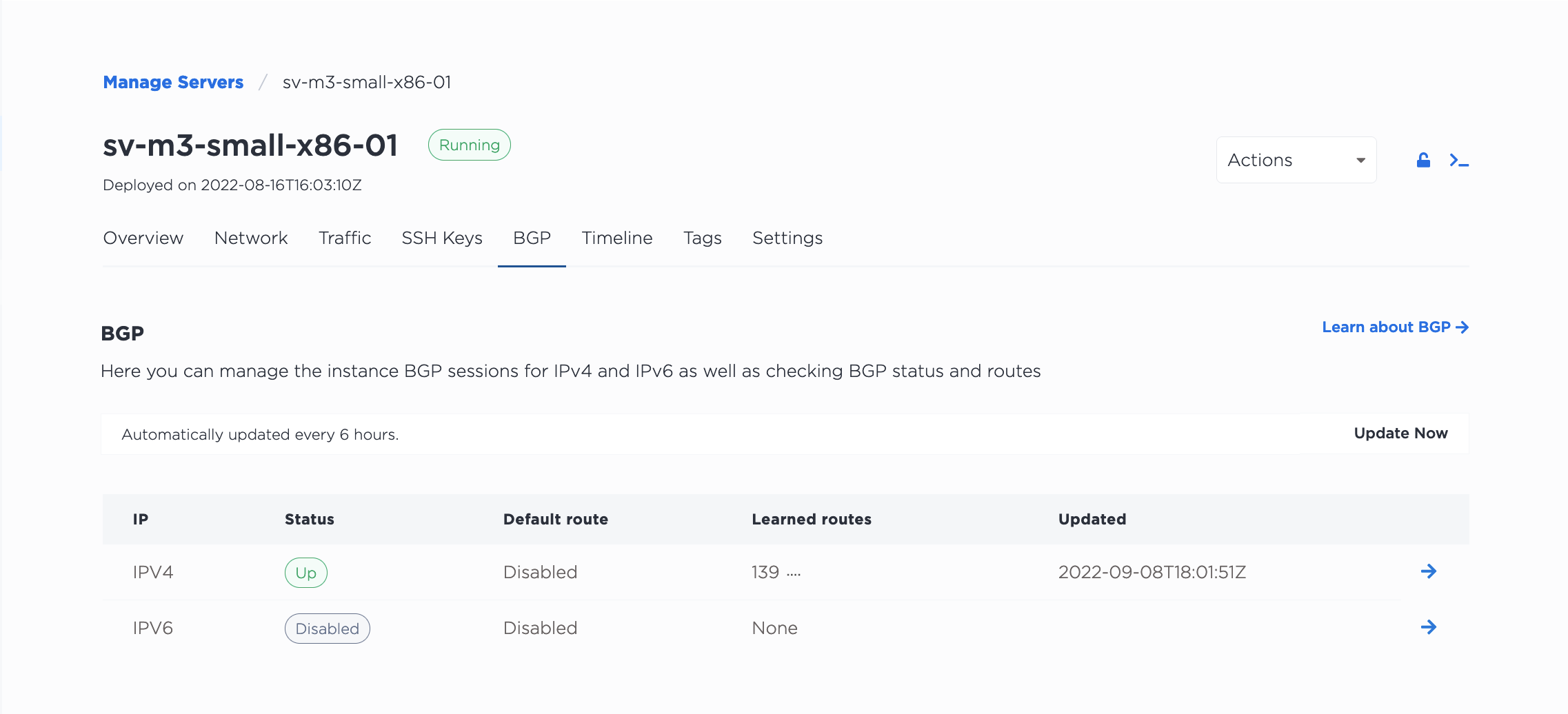
点击会话条目旁边的“管理”按钮,即可打开“激活 BGP”面板。使用切换开关可以启用或禁用此服务器上的 BGP 会话。使用“默认路由”切换开关可以将其设置为默认路由。
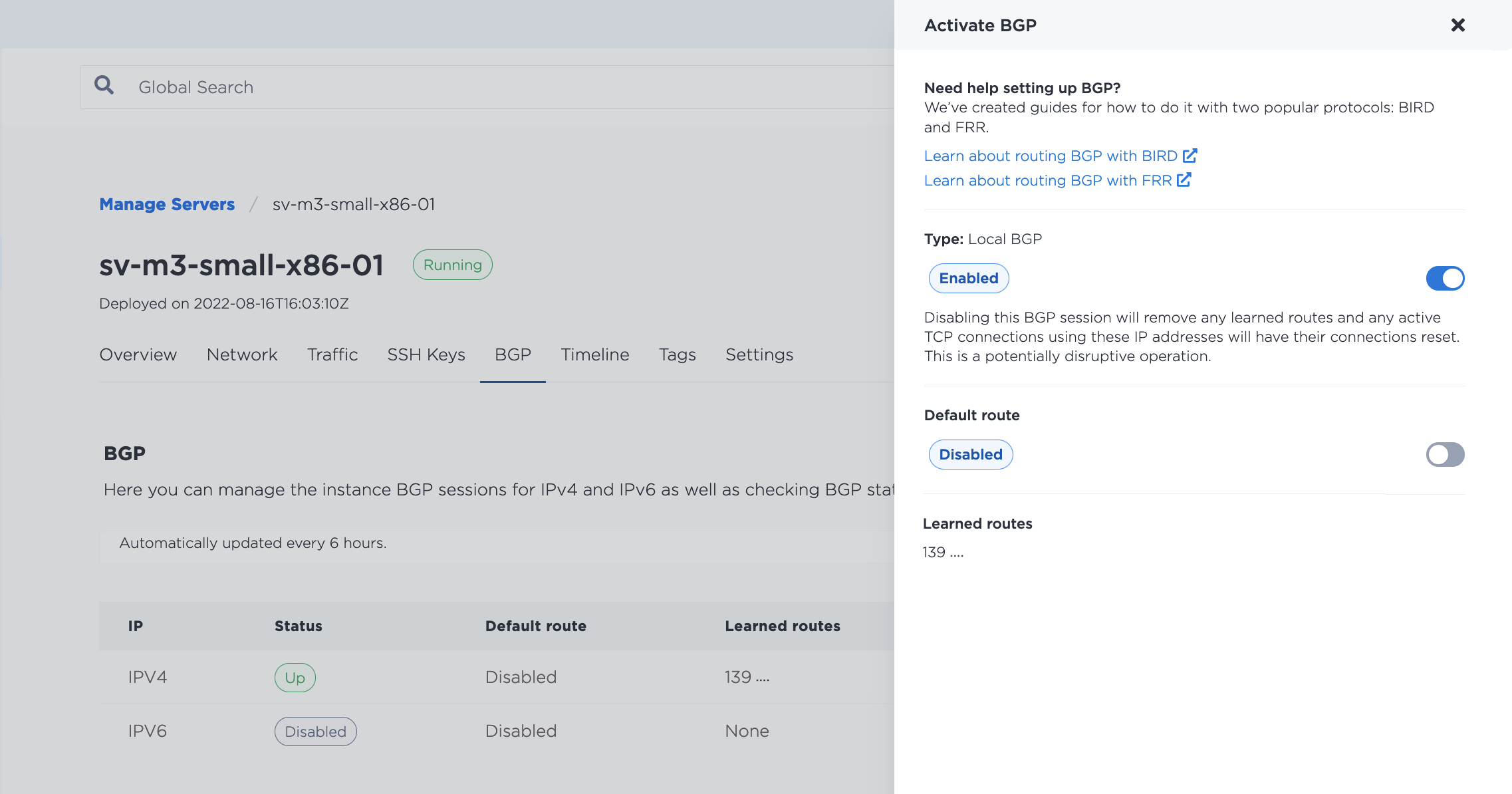
禁用 BGP 会话会删除已学习的路由并重置所有打开的连接。禁用会话前请务必谨慎。禁用 BGP 不会删除服务器上的任何 BGP 配置;如果需要,您可以重新启用会话,并在不更改服务器配置的情况下恢复发布路由。如果重新启用,会话可能需要 5-10 分钟才能建立。
要使服务器上的所有会话都运行,请向 /devices/{id}/bgp/sessions 端点发送 GET 请求。
curl -X GET -H "Content-Type: application/json" -H "X-Auth-Token: <API_TOKEN>" "https://api.equinix.com/metal/v1/devices/{id}/bgp/sessions"
要获取与特定 BGP 会话相关的信息,请向 /bgp/sessions/{id} 端点发送 GET 请求。
curl -X GET -H "Content-Type: application/json" -H "X-Auth-Token: <API_TOKEN>" "https://api.equinix.com/metal/v1/bgp/sessions/{id}"
要获取会话的邻居数据,请向 /devices/{id}/bgp/neighbors 端点发送 GET 请求。
curl -X GET -H "Content-Type: application/json" -H "X-Auth-Token: <API_TOKEN>" "https://api.equinix.com/metal/v1/devices/{id}/bgp/neighbors"
可能的会话状态
每个 BGP 会话都有可能的状态为 Disabled、Up、Down、Partial 或 Unknown。
Disabled- 如果您已在项目中启用 BGP,但尚未发起 BGP 会话,则项目的 BGP 页面上将显示“已禁用”状态。例如,您可能有一个会话正在通告 IPv4 地址,但没有通告 IPv6 地址。此时,IPv4 会话状态为Up,IPv6 会话状态为Disabled。Up- BGP 会话已建立。Equinix Equinix Metal路由器正在接收您通告的 IP 地址并学习到您服务器的路由。在Equinix IBX中,此状态还表示 BGP 会话在两个路由器上均处于活动状态。Down- BGP 会话已断开。可能是您尚未配置主机,或者配置中的某些内容存在问题。如果您已检查过主机配置,请尝试禁用并重新建立 BGP 会话,等待 5-10 分钟,会话即可恢复正常。如果会话仍然断开,请联系人支持。Partial- 如果您的服务器位于Equinix IBX交换机中,并且 BGP 会话仅在两台路由器中的一台上建立,则状态为Partial。这可能表示其中一台路由器正在维护。此状态应该是暂时的,但如果持续存在,请联系人支持。Unknown- 会话启用后,在会话建立过程中,其状态会显示为“未知”。通常需要 5-10 分钟才能更新状态。如果状态长时间显示为“未知”,请尝试点击“立即更新”按钮手动更新。