图书馆
库允许使用带有图像和模板的目录来协助在云上部署新的虚拟机和vApps。
EHC目录
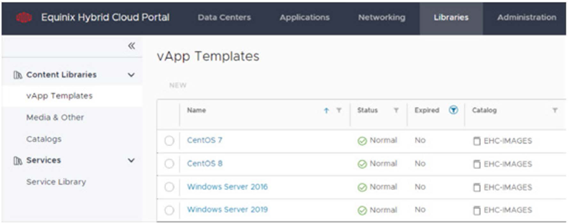
EHC门户网站通过一个名为EHC-IMAGES的共享目录,提供一个带有Equinix默认支持和批准的操作系统主要模板的列表。
模板可从库->内容库-> vApp模板访问。
注意
支持的操作系统版本:Equinix在EHC-Images目录中提供当前版本和最多两个以前版本。
本地目录
本地目录是一个可选的功能,需要使用本地云配额的存储容量来分配模板,在这里你可以通过共享目录复制图像或在生产中通过vApps创建你自己的自定义图像。
要创建一个本地目录:
-
访问库->内容库->目录。
-
在右侧的仪表板上,单击新建。
-
输入以下细节。
命名 输入新目录的名称。示例:CustomerName_Catalog。 描述 (可选)为目录输入一个描述。 在特定的存储策略上进行预置 我们建议根据合同模式(即用于部署虚拟机的操作系统磁盘映像的同一卷),使用专用或按需VDC的默认VHD存储策略。因此,新vApp的部署或新映像的创建将在本地执行。但是,对于其他存储策略的使用没有限制。 -
单击确定,然后等待新编目变为可用。
上传您自己的图片
如果客户希望将自己的图像(OVA ISO、OVF 等)上传到创建的本地目录,他们将需要开具一张票,以便Equinix团队可以分析该图像并将其导入混合云。
您可以随时申请新的图片和风味。审批取决于操作系统是否处于供应商支持生命周期内并通过Equinix混合云兼容性检查。