通知偏好设置
使用此程序可确保您收到重要更新、自定义接收的通知以及关闭任何不需要的通知。
有关如何在门户中查看通知的信息,请参阅通知中心。
通知类型
可选择的方案包括:
| Notification Type | Description | Permissions Needed |
|---|---|---|
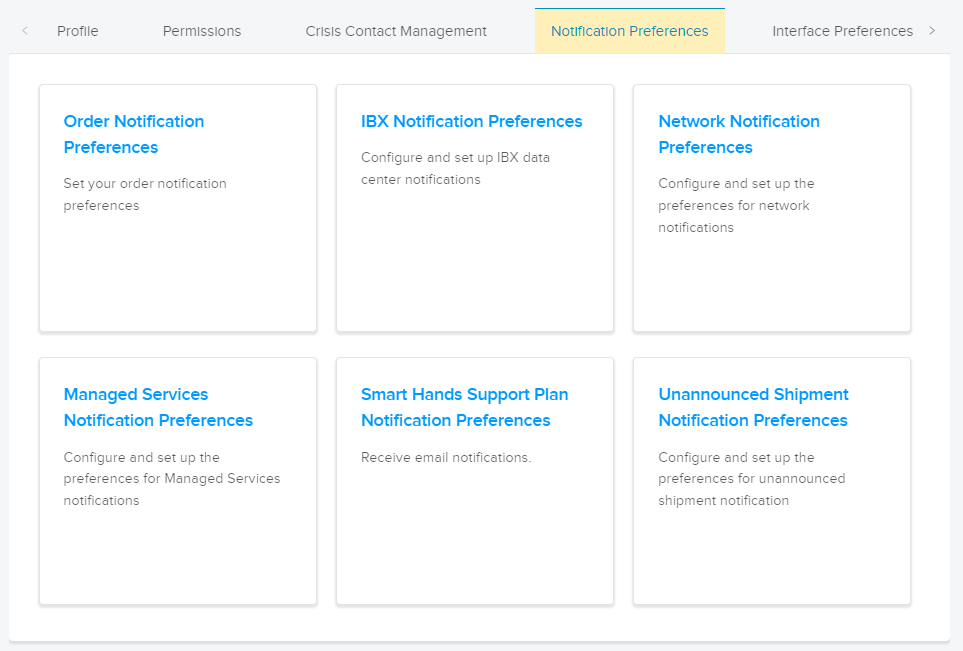
| Order Notification Preferences | Receive email notifications for Order Received, Order Scheduled, Order Completed, and Order Modified events. | n/a |
| IBX Notification Preferences | Receive notifications for IBX Maintenance events, IBX Incidents, IBX Security Incidents, and IBX Advisories. Note: Smart View notifications (for alerts and maintenance events) are managed in Equinix Smart View. For details, see the Equinix Smart View documentation. | IBX Services Notifications permissions |
| Network Notification Preferences | Receive notifications for Network Maintenance events and Network Incidents. | IBX Services Notifications permissions |
| Managed Services Notification Preferences | Receive notifications for Managed Services IBX Maintenance events, Managed Services Network Maintenance events, and Managed Services Incidents. | IBX Services Notifications permissions |
| Smart Hands Support Plan Notification Preferences | Receive email notifications about the usage of your Monthly Support Plan Hours and Prepaid Support Plan Hours. | Smart Hands Support Plan permission |
| Unannounced Shipment Notification Preferences | Receive email notifications when unannounced shipments arrive at your IBXs. | IBX Services Notifications permissions |
| Virtual Asset Notification Preferences | Receive notifications about Fabric and Network Edge virtual assets. | Virtual Asset Notification permission |
| IBX Policy Violation Notification Preferences | Receive notifications about violations of IBX policies (such as enforcement of our combustible materials policy and our airflow management policy). At least two administrators in your organization must be configured to receive IBX policy violations. Note: If a violation is not corrected within the allotted time, a billable Smart Hands order is created automatically. IBX technicians will correct the issue, and your company will incur a Smart Hands fee. | IBX Services Notifications permissions |
重要提示: 如果任何通知偏好设置选项呈灰色,则表示您没有接收这些通知的权限。请联系您公司客户门户管理员申请权限,或参阅权限页面。
更新您的通知偏好设置
如需在Customer Portal中更改您的通知偏好设置:
-
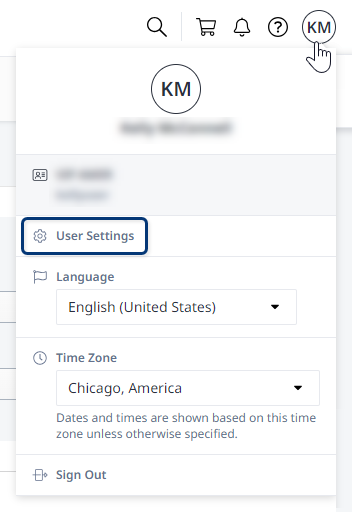
点击全局个人资料标题中的用户名,然后选择用户设置。

-
点击“通知偏好设置”选项卡,然后选择一个类别。

-
选择您想要接收的通知类型。
部分类别仅支持电子邮件通知。其他类别则可以选择接收电子邮件、短信和/或语音通知。
注意中国大陆的手机不支持语音通知功能。
-
点击提交保存更改。
重复以上步骤,设置其他通知类别的偏好设置。