跳至内容

Fabric Geo Zones

Fabric Geo Zones gives you control over where traffic is allowed to travel across the Equinix Fabric Network. Select an approved geographic or jurisdictional boundary for a supported virtual connection, and Fabric Geo Zone routing ensures that eligible paths remain within that boundary.

Fabric Geo Zones are designed to support sovereignty for Data in Transit by making routing boundaries technically enforced and immutable for the life of the connection.

Fabric Geo Zones do not rely on best-effort routing policy or manual operational intervention. Routing scope is enforced through predefined network controls that limit eligible paths to the selected Geo Zone. Failover and optimization remain inside the selected Geo Zone and traffic is blocked if no compliant path is available.

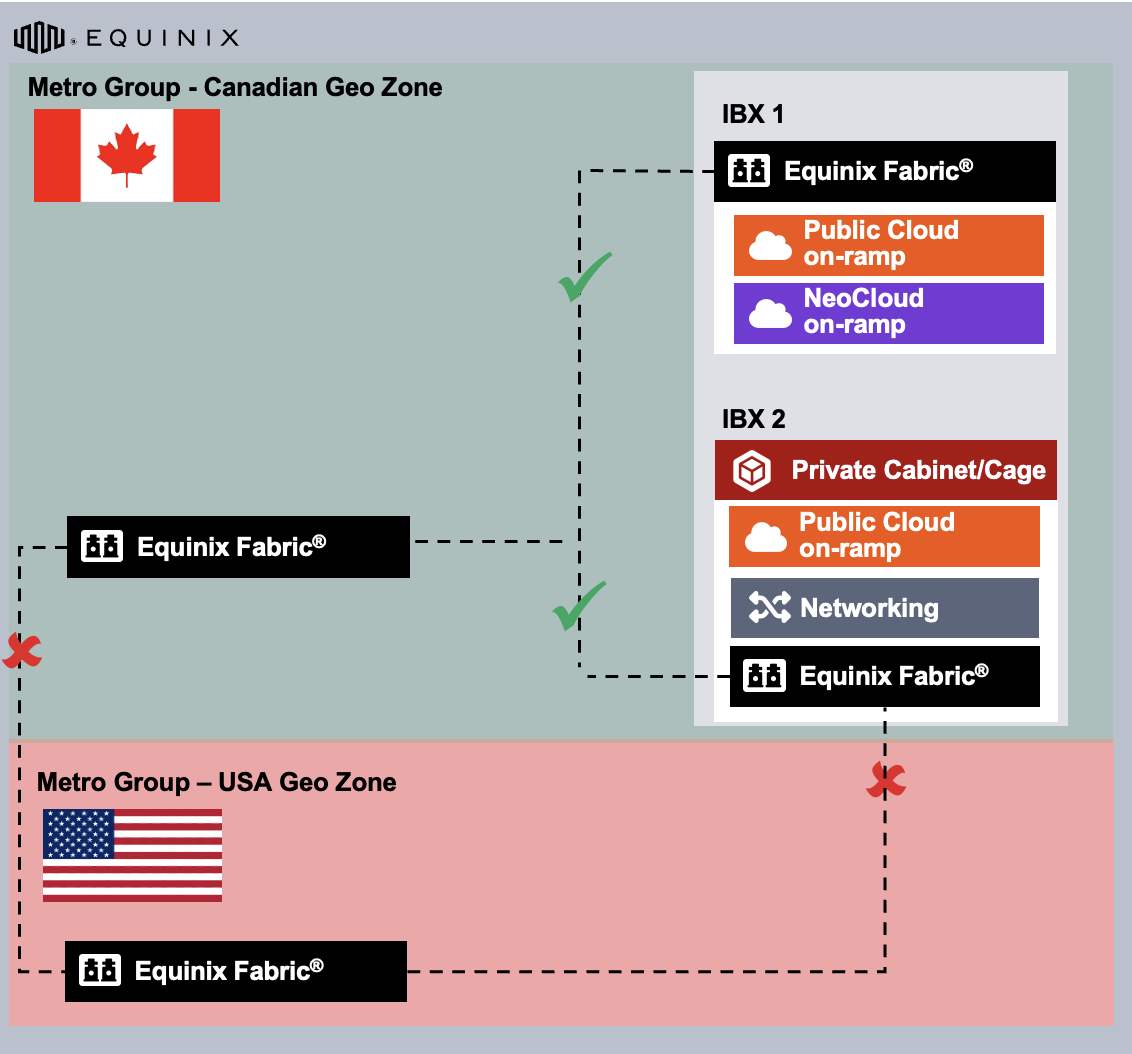
Geo Zone Example

Key Capabilities

With Fabric Geo Zones, you can:

  • Keep traffic within a predefined country, region, or jurisdictional boundary.
  • Support sovereignty requirements for Data in Transit.
  • Reduce the risk of unintended cross-border routing across the Equinix Fabric Network.
  • Apply routing scope at connection creation.
  • Rely on a fixed boundary for the lifetime of the connection.
  • Preserve routing boundaries during optimization, failover, and network events.

Use Cases

  • Multicloud Connectivity - Fabric Geo Zones constrain the Equinix Fabric Network portion of cloud-to-cloud paths to an approved Geo Zone.

    This pattern is useful when you need to connect:

    • Applications in one CSP to data services in another CSP.
    • Security or inspection services across cloud environments.
    • Analytics platforms and shared enterprise services.
    • Regional cloud workloads that must preserve sovereignty for Data in Transit.
  • Artificial Intelligence and Data Pipeline Containment - Fabric Geo Zones constrain supported interconnection paths across the Equinix Fabric Network when sensitive AI or data pipeline traffic moves between approved environments such as:

    • data lakes
    • training environments
    • inference platforms
    • Graphics Processing Unit (GPU) providers
    • model repositories
    • feature stores
    • and enterprise applications.
  • Financial Services Sovereign Routing - Fabric Geo Zones apply routing boundaries that remain fixed for the life of the connection to financial systems requiring strong control over where traffic travels between internal and external systems, where the path between those systems can become part of the compliance and risk model.

  • Hybrid Cloud and On-Premises Connectivity - Fabric Geo Zones extend sovereignty controls where hybrid architectures include on-premises data centers, colocated infrastructure, CSP environments, NSP services, SaaS platforms, and partner networks. Cross-environment traffic can't take non-obvious routes across the Equinix Fabric Network.

  • Sovereign Cloud and Public Sector Connectivity - Public sector, sovereign cloud, or policy-driven workloads require strict routing boundaries as these environments may include government workloads, public sector applications, regulated citizen services, sovereign cloud platforms, approved partner ecosystems, and mission-critical digital services. Fabric Geo Zones constrain supported interconnection paths between sovereign cloud, customer-managed, and partner environments across the Equinix Fabric Network.

  • Healthcare and Life Sciences Connectivity - Fabric Geo Zones constrain supported interconnection paths that connect electronic health record systems, clinical applications, imaging platforms, research environments, genomics platforms, analytics services, insurance systems, and partner networks. Use this pattern when sensitive healthcare, clinical, research, or life sciences traffic moves between environments across the Equinix Fabric Network.

Example: In-Country Routing

Most networks give you control over endpoints. Fabric Geo Zones add control over the Equinix Fabric Network path between supported endpoints.

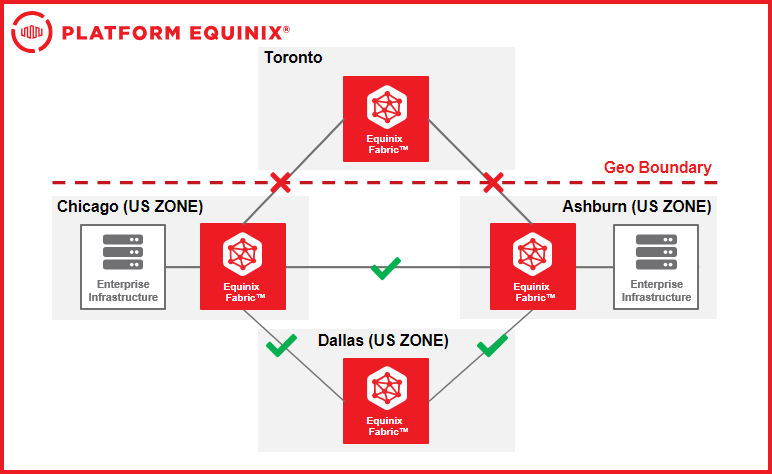
For example, you may create a virtual connection between two locations in the United States and apply a United States Geo Zone.

With that Geo Zone applied:

  • Traffic is constrained to approved paths inside the United States.
  • The Equinix Fabric Network can optimize and reroute traffic only within that boundary.
  • Paths that would leave the United States are not eligible for that connection.
  • If no valid in-country path is available, traffic is dropped rather than routed outside the United States.

This behavior supports routing control within the selected geographic boundary for Data in Transit across the Equinix Fabric Network.

Geo Zone Example

Connection Endpoints and Availability

Fabric Geo Zones can be applied to supported virtual connections across the Equinix Fabric Network. Supported endpoint and connection types may vary by geography, service availability, and connection configuration.

Common connection endpoints include:

  • Fabric Ports
  • Cloud Service Providers (CSPs)
  • Service Provider Connections

Fabric Geo Zones control the Equinix Fabric Network portion of the supported connection. It does not control routing or data handling inside Cloud Service Provider (CSP), Network Service Provider (NSP), Software as a Service (SaaS), application, or customer-managed environments.

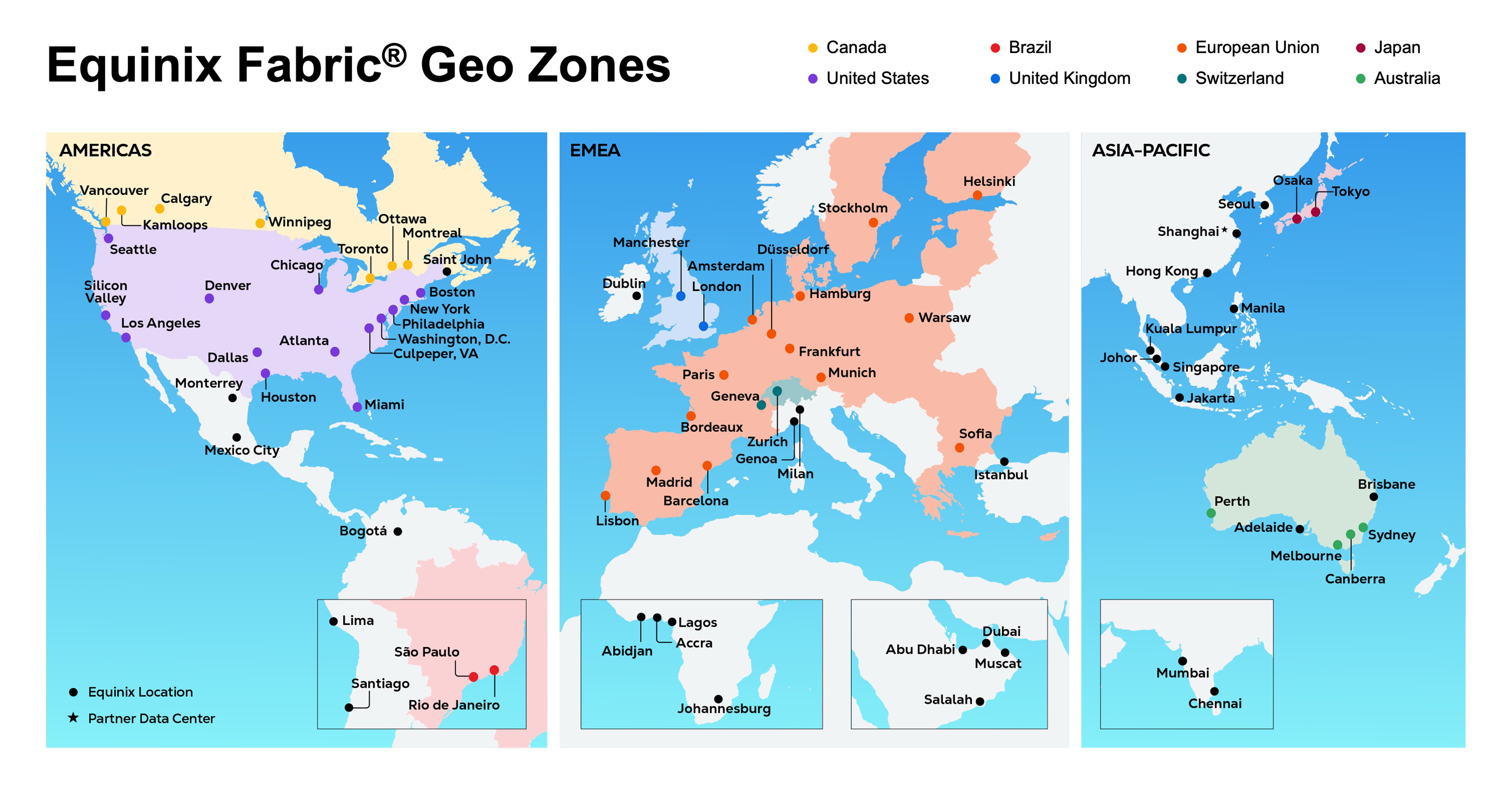
Fabric Geo Zones are available in preview in supported geographies, including:

  • United States
  • Canada
  • Brazil
  • United Kingdom
  • Switzerland
  • Japan
  • Australia

Geo Zone Locations

注意

For virtual connections within India, Geo Zone routing constraints are enabled by default, ensuring traffic remains within the country’s boundaries without requiring user action.

Creating a Geo Zone Connection

Fabric Geo Zone routing constrains supported virtual connections to an approved geographic or jurisdictional boundary across the Equinix Fabric Network. Fabric Geo Zone routing increases control by reducing routing choice. Your network architecture designs must therefore be planned around sufficient in-zone diversity.

Fabric Geo Zone routing intentionally prevents any path outside the approved Geo Zone from being used for the scoped connection. This means availability must come from paths, endpoints, and recovery designs that exist inside the approved Geo Zone.

Planning Assumptions

Fabric Geo Zone routing should be treated as a hard routing constraint, not a routing preference.

  • Only paths inside the selected Geo Zone are eligible.
  • Paths outside the approved Geo Zone are unavailable by design.
  • Path optimization occurs only within the approved Geo Zone.
  • Routing scope changes require connection replacement.
  • The Equinix Fabric Network operates as pure transit and does not store, inspect, or process customer payload data.

For critical workloads, avoid a single constrained connection unless the application can tolerate loss of connectivity. Pair Geo Zone routing controls with redundant in-zone architecture, tested failure behavior, and clear operational ownership.

Selecting a Fabric Geo Zone

When creating a supported Fabric Connection, select the Geo Zone that defines where traffic is allowed to travel across the Equinix Fabric Network.

A Geo Zone may represent an approved country or regional boundary and becomes the routing scope for that connection.

The routing scope determines:

  • Which Equinix Fabric Network locations are eligible.
  • Which Equinix Fabric Network links are eligible.
  • Which paths can be computed.
  • Which failover paths can be used.
  • Which paths are excluded from the connection.

Enabling Fabric Geo Zones for Virtual Connections

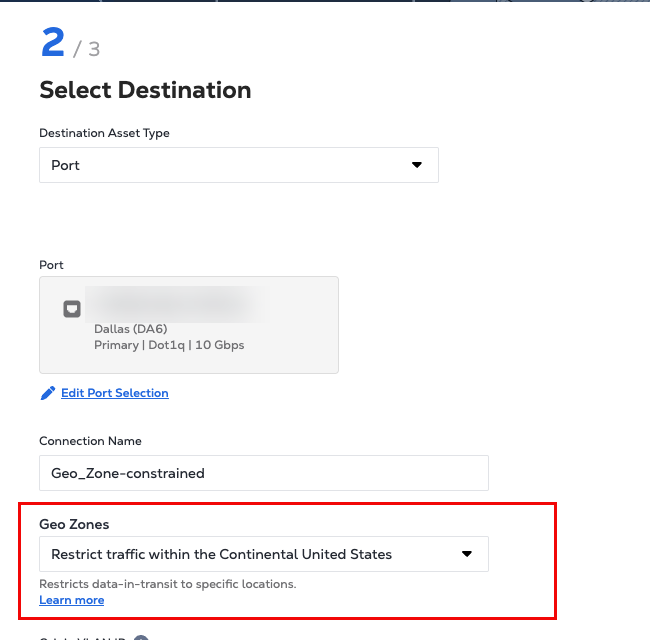
Fabric Geo Zones can be applied during supported virtual connection creation.

When creating a supported connection:

  1. Confirm that the connection endpoints are eligible for Geo Zone routing.
  2. Select the option to constrain traffic within an approved country, region, or jurisdiction.
  3. Choose the applicable Geo Zone.
  4. Create the virtual connection.

After the connection is created, the selected Geo Zone becomes fixed for that connection.

The routing scope cannot be modified, expanded, or overridden after creation. If a different routing scope is required, create a new connection with the required Geo Zone and migrate traffic as appropriate.

Geo Zone Selection

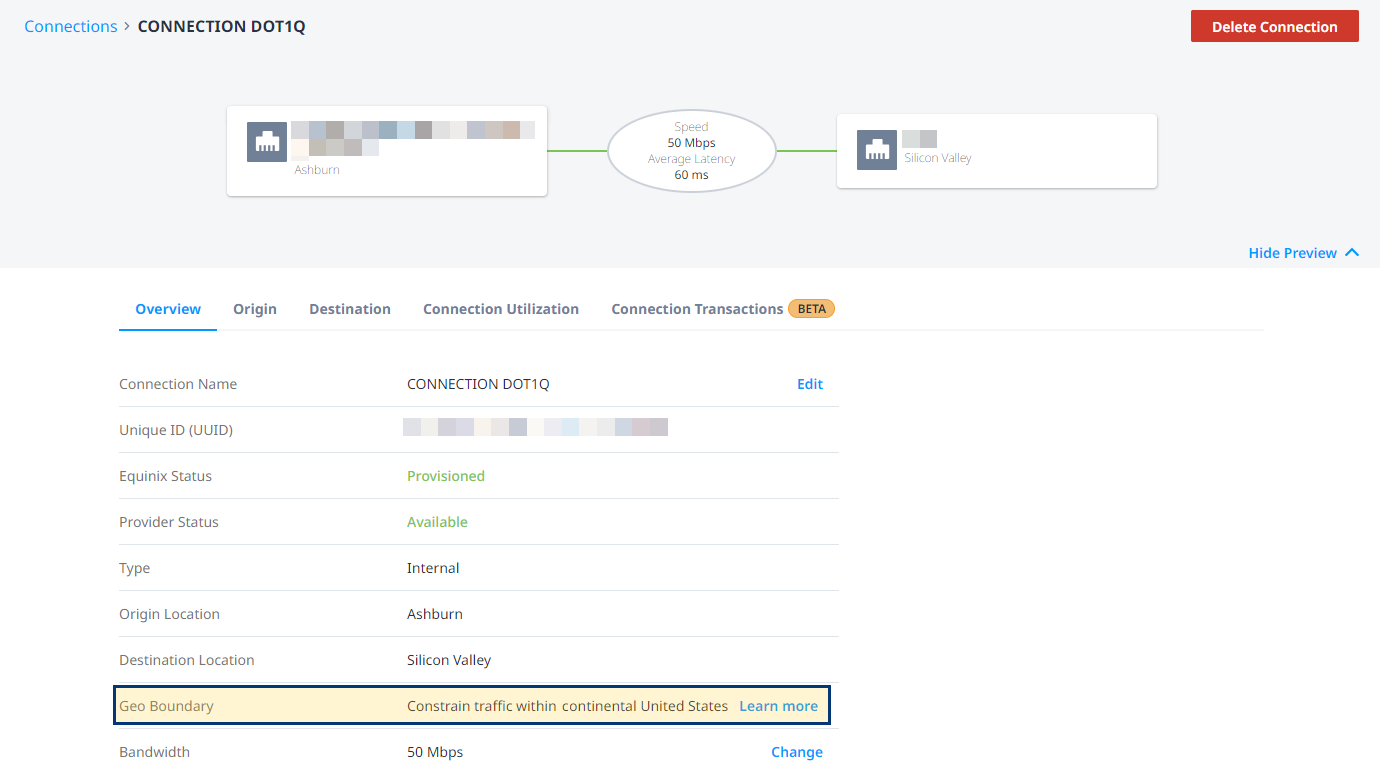
After the connection is created, you can view the connection and selected Geo Zone details in the Connections Inventory.

Geo Zone Connection Details

Geo Zone Routing Behavior

For supported virtual connections, you select a geographic or jurisdictional routing scope, known as a Geo Zone.

Fabric Geo Zone routing constrains Equinix Fabric Network paths for that connection to the selected Geo Zone. It does not express a routing preference. It limits which paths are eligible for that connection.

If a path is outside the selected Geo Zone, it is not eligible for that connection.

Instead of computing paths across the full network topology, Fabric Geo Zone routing computes paths using only the portion of the Equinix Fabric Network constraining path computation before paths are selected. Out-of-zone paths are excluded before they can become candidates.

The routing process ensures that:

  • The eligible routing graph is constrained before path computation.
  • Only approved nodes and links are considered.
  • Out-of-zone paths are not evaluated as candidates.
  • Installed forwarding paths remain aligned to the selected Geo Zone.

During normal operation, Fabric Geo Zone routing allows the Equinix Fabric Network to operate dynamically within the selected boundary.

The Equinix Fabric Network may:

  • Optimize traffic paths.
  • Reroute traffic during network events.
  • Balance traffic across eligible paths, where supported.
  • Maintain reachability using approved in-zone paths.

However, every routing decision remains constrained to the selected Geo Zone

Fabric Geo Zone routing does not allow runtime optimization to introduce a path outside the approved boundary.

What Happens During a Network Event

Fabric Geo Zone routing preserves the selected boundary during network events.

If a link, node, or path becomes unavailable, the Equinix Fabric Network attempts to reroute traffic using another compliant path inside the selected Geo Zone.

During a network event, Fabric Geo Zone routing follows this behavior:

  • If a valid in-zone path exists, traffic can be rerouted inside the selected Geo Zone.
  • If no valid in-zone path exists, traffic is dropped.
  • Traffic is not rerouted outside the selected Geo Zone.

Responsibility Model

To create a clear trust boundary, you define where traffic is allowed to travel. The Equinix Fabric Network enforces that boundary for the supported connection.

You are responsible for:

  • Creating supported Fabric Connections.
  • Selecting the appropriate Geo Zone.
  • Authorizing users who can create or delete scoped connections.
  • Designing application and network architecture for the selected routing scope.
  • Planning redundancy inside the approved boundary.
  • Configuring connected environments consistently with sovereignty requirements.
  • Managing controls inside customer-owned networks, CSP networks, NSP networks, SaaS platforms, and applications.

The Equinix Fabric Network is responsible for:

  • Enforcing the selected Geo Zone for the scoped connection.
  • Restricting eligible paths to approved in-zone nodes and links.
  • Optimizing and rerouting only within the selected Geo Zone.
  • Dropping traffic if no compliant path exists.
  • Maintaining the selected routing boundary for the connection lifecycle.
  • Preventing operational changes that would expand or relax the selected routing boundary for a live connection.

For more information see our Shared Responsibility Model.

Service Level Agreement Considerations

Fabric Geo Zones may affect availability depending on the selected geography and the customer’s redundancy design.

Because Fabric Geo Zone routing constrains traffic to approved in-zone paths, there may be fewer alternate paths available during network failures or maintenance. If no compliant path exists inside the selected Geo Zone, traffic is dropped rather than routed outside the boundary.

Customers should review redundancy requirements, workload criticality, and route-planning guidance before enabling Fabric Geo Zones for workloads.

For more information, see the Equinix Fabric Product Policy.

此页面有帮助吗?