以 E-access 形式连接
无需管理连接的 C 标签信息即可访问 Equinix Fabric 上的网络服务。
先决条件
-
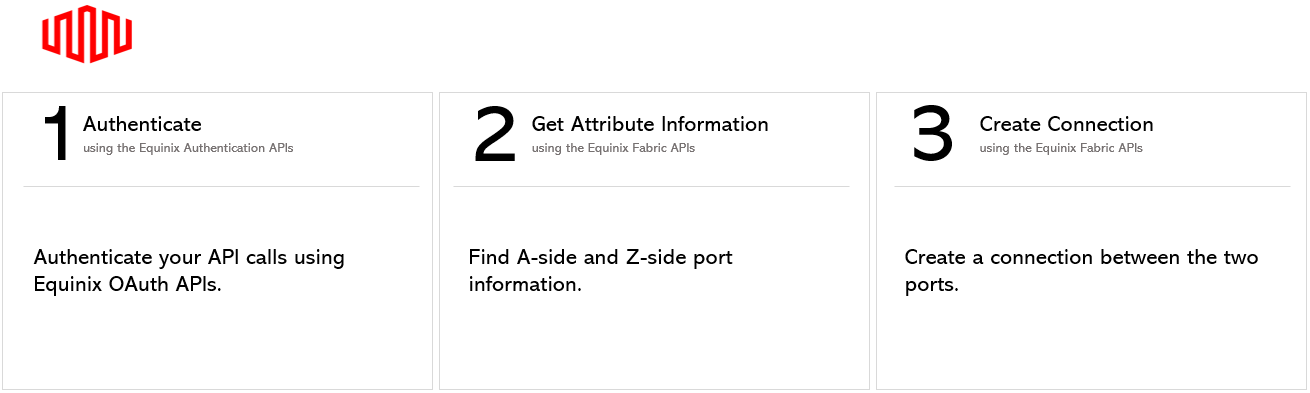
身份验证 - 请提交您的用户凭据、客户端 ID 和客户端密钥以进行 OAuth2 身份验证。有关如何调用 OAuth API 来验证和确认您的凭据的说明,请参阅API 身份验证。
-
使用 获取所有端口 端点获取相关端口信息。具体来说,端口需要满足以下条件:
- 聚合来自不同客户端的流量的端口必须使用QINQ封装。
- 聚合来自不同客户端流量的端口只能分配给其他
ACCESS_EPL_VC类型的连接。 - 客户端端口必须是 EPL 端口,除非处于“DEPROVISIONED”状态,否则不能分配给任何其他连接。
创建连接 - QINQ端口到EPL端口
要从 QINQ 端口创建到 EPL 端口的 e-access 连接,请向 /fabric/v4/connections 端点发送 POST 请求。在请求正文中指定连接的配置详细信息。
| POST /fabric/v4/connections | |
|---|---|
| Method | POST |
| Endpoint | /fabric/v4/connections |
| Headers | Authorization, Content-Type |
| Path Parameters | Not applicable |
| Query Parameters | Not applicable |
| Body Parameters | type, name, order, redundancy, bandwidth, aSide, zSide, project, notifications |
要在生产环境中安全地验证此请求而不创建连接,请参阅生产环境中的测试(API 试运行)。
示例 cURL 请求:
curl -X
POST 'https://api.equinix.com/fabric/v4/connections'
-H 'content-type: application/json'
-H 'authorization: Bearer <token>'
-d '{
    "type": "ACCESS_EPL_VC",
    "name": "Conn-1",
    "order": {
        "purchaseOrderNumber": "1-129105284100"
    },
    "bandwidth": 50,
    "redundancy": {
        "priority": "PRIMARY"
    },
    "aSide": {
        "accessPoint": {
            "type": "COLO",
            "port": {
                "uuid": "3312101f-5bd0-43d5-b21a-d442b35816a5"
            },
            "linkProtocol": {
                "type": "QINQ",
                "vlanSTag": 1001
            }
        }
    },
    "zSide": {
        "accessPoint": {
            "type": "COLO",
            "port": {
                "uuid": "ca655bb1-cca0-ca01-75e0-306a5c00ae38"
            }
        }
    },
    "project": {
        "projectId": 568
    },
    "notifications": [
        {
            "type": "ALL",
            "emails": [
                "test@equinix.com"
            ]
        }
    ]
}'
请求正文中包含的参数仅适用于此示例。有关参数及其说明的完整列表,请参阅API 参考。
示例响应:
{
    "type": "ACCESS_EPL_VC",
    "href": "https://api.equinix.com/fabric/v4/connections/eb45d323-5281-44dc-842b-c19a15ac837f",
    "uuid": "eb45d323-5281-44dc-842b-c19a15ac837f",
    "name": "Conn-1",
    "state": "PROVISIONING",
    "operation": {
        "providerStatus": "NOT_AVAILABLE",
        "equinixStatus": "PROVISIONING"
    },
    "order": {
        "purchaseOrderNumber": "1-129105284100",
        "billingTier": "Up to 50 Mbps"
    },
    "notifications": [
        {
            "type": "ALL",
            "emails": [
                "test@equinix.com"
            ]
        }
    ],
    "project": {
        "projectId": 568
    },
    "account": {
        "accountNumber": 272235,
        "orgId": 91604,
        "globalOrgId": "0016u000003JZ6HAAW"
    },
    "changeLog": {
        "createdBy": "EPL-account01-user",
        "createdDateTime": "2022-03-26T11:07:47.325Z"
    },
    "bandwidth": 50,
    "redundancy": {
        "group": "5c0e9384-aa79-4ec9-b7a2-557f8c307292",
        "priority": "PRIMARY"
    },
    "isRemote": false,
    "direction": "INTERNAL",
    "aSide": {
        "accessPoint": {
            "type": "COLO",
            "account": {
                "accountNumber": 272235,
                "orgId": 91604,
                "organizationName": "EPL-account01",
                "globalOrgId": "0016u000003JZ6HAAW"
            },
            "location": {
                "href": "https://api.equinix.com/fabric/v4/metros/DA",
                "region": "AMER",
                "metroName": "Dallas",
                "metroCode": "DA"
            },
            "port": {
                "href": "https://api.equinix.com/fabric/v4/ports/3312101f-5bd0-43d5-b21a-d442b35816a5",
                "uuid": "3312101f-5bd0-43d5-b21a-d442b35816a5",
                "name": "272235-DA1-CX-Primary-01"
            },
            "linkProtocol": {
                "type": "QINQ",
                "vlanSTag": 689,
                "vlanCTag": 0
            }
        }
    },
    "zSide": {
        "accessPoint": {
            "type": "COLO",
            "account": {
                "accountNumber": 272235,
                "orgId": 91604,
                "organizationName": "EPL-account01",
                "globalOrgId": "0016u000003JZ6HAAW"
            },
            "location": {
                "href": "https://api.equinix.com/fabric/v4/metros/DA",
                "region": "AMER",
                "metroName": "Dallas",
                "metroCode": "DA"
            },
            "port": {
                "href": "https://api.equinix.com/fabric/v4/ports/ca655bb1-cca0-ca01-75e0-306a5c00ae38",
                "uuid": "ca655bb1-cca0-ca01-75e0-306a5c00ae38",
                "name": "EPL-account01-DA1-NL-EPL-STD-SEC-10G-NK-28"
            },
            "linkProtocol": {
                "type": "UNTAGGED"
            }
        }
    }
}
响应有效负载包含在请求正文中定义的配置参数。有关所有可用参数及其说明的完整列表,请参阅API 参考。
创建连接 - EPL端口到QINQ端口
要从 EPL 端口创建到 QINQ 端口的 e-access 连接,请向 /fabric/v4/connections 端点发送 POST 请求。在请求正文中指定连接的配置详细信息。
示例 cURL 请求:
curl -X
POST 'https://api.equinix.com/fabric/v4/connections'
-H 'content-type: application/json'
-H 'authorization: Bearer <token>'
-d '{
    "type": "ACCESS_EPL_VC",
    "name": "Conn-1",
    "order": {
        "purchaseOrderNumber": "1-129105284100"
    },
    "bandwidth": 50,
    "redundancy": {
        "priority": "PRIMARY"
    },
    "aSide": {
        "accessPoint": {
            "type": "COLO",
            "port": {
                "uuid": "a867f685-41b0-1b07-6de0-320a5c00abdd"
            }
        }
    },
    "zSide": {
        "accessPoint": {
            "type": "COLO",
            "port": {
                "uuid": "20d32a80-0d61-4333-bc03-707b591ae2f4"
            },
            "linkProtocol": {
                "type": "QINQ",
                "vlanSTag": 1001
            }
        }
    },
    "project": {
        "projectId": 568
    },
    "notifications": [
        {
            "type": "ALL",
            "emails": [
                "test@equinix.com",
                "test@equinix.com"
            ]
        }
    ]
}'
请求正文中包含的参数仅适用于此示例。有关参数及其说明的完整列表,请参阅API 参考。
监控连接
使用 Get 指定连接 端点来监控连接状态。