API - 连接到 Google Cloud Platform
使用 Fabric 端口、Fabric Cloud Router 或服务令牌与 Google Cloud Partner Interconnect 建立直接的第 2 层连接。
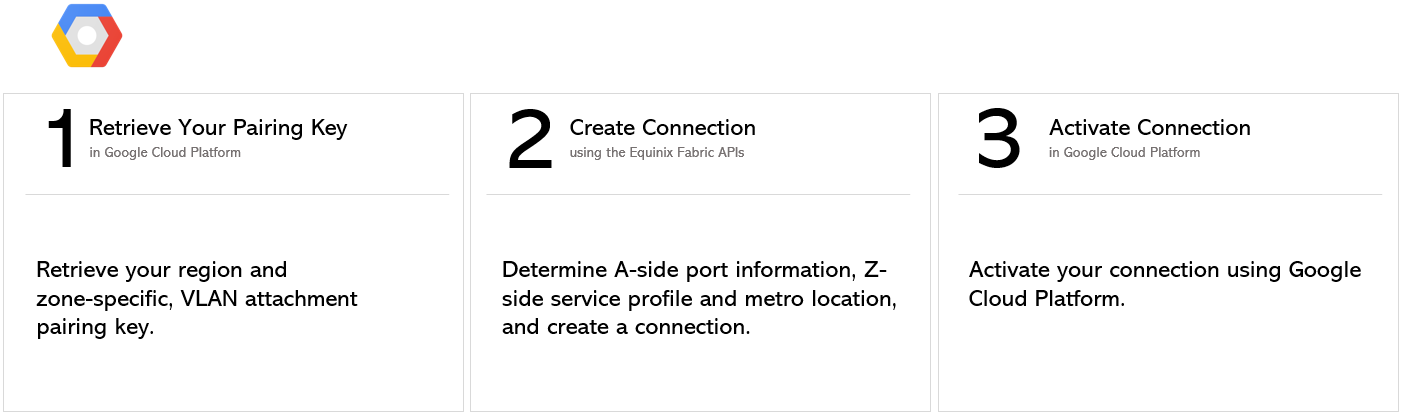
有关从Network Edge虚拟设备连接的说明, 请参阅Network Edge至Google云平台。
先决条件
-
身份验证 - 提交您的 OAuth2 用户凭据、客户端 ID 和客户端密钥 验证。有关如何致电OAuth API以验证和验证您的凭据的说明,请参阅API验证。
-
确定A侧信息。以下任一项:
- 使用获取所有端口API请求检索您的Equinix Fabric端口信息。
或
- 确定您的Fabric Cloud Router信息。向端点发送请求
/fabric/v4/routers/search,以检查可用的云路由器POST。您需要路由器的UUID。
或
- 通过向端点发送请求
/fabric/v4/serviceTokens来检索A端服务令牌GET。您需要令牌的UUID。A端令牌提供配置连接A端的相关信息。
-
选择Z侧都会区位置。使用获取所有都会区API请求查找Equinix Fabric可用的所有都会区并确定目标位置。
-
确定Google Cloud合作伙伴互连服务配置文件信息。有关您应选择的服务配置文件的更多信息,请参见“概述”页面。
- 区域1 -
bd4570e2-d792-4a00-87f5-3bde040cdcd7 - 区域2 -
b97dacca-abe6-4e8c-8be1-fcdd1be1defe
- 区域1 -
-
验证您的授权密钥。向端点发送
POST请求/fabric/v4/connections/validate,以验证您的配对密钥是否可用于在给定都会区创建与所选服务配置文件的连接。
从 DOT1Q 端口连接
要创建从您的Dot1q端口到Google Cloud Partner互连的连接,请向端点发送POST请求/fabric/v4/connections。连接type为EVPL_VC。
在对象中提供您的端口信息aSide,包括:
accessPoint.typeASCOLO- 将您的端口UUID提供给
port.uuid - 设置
linkProtocol.type为DOT1Q - 将VLAN ID提供给
linkProtocol.vlanTag
在对象中提供您的GCP详细信息和位置详细信息zSide,包括:
- 设置
accessPoint.type为SP。 - 设置
profile.type为L2_PROFILE。 - 在中指定您要连接的服务配置文件
profile.uuid。 - 在中指定您要连接的Equinix都会区位置
location.metroCode。 - 设置
authenticationKey为Google Cloud颁发的配对密钥。
确保:
- 如果您正在创建连接,其中
redundancy配对密钥以结尾/1,且您使用的是PRIMARYGoogle云合作伙伴互连区域1服务配置文件UUIDbd4570e2-d792-4a00-87f5-3bde040cdcd7。 - 如果您正在创建连接,其中
redundancy配对密钥以结尾/2,且您使用的是SECONDARYGoogle Cloud合作伙伴互连区域2服务配置文件UUIDb97dacca-abe6-4e8c-8be1-fcdd1be1defe。 - 如果您要创建冗余连接,请发送两个 API 请求,每个冗余优先级一个请求。
在请求正文中指定任何其他连接配置详情。参数及其说明的完整列表,请参见API参考手册。
cURL 请求示例:
POST 'https://api.equinix.com/fabric/v4/connections'
-H 'content-type: application/json'
-H 'authorization: Bearer <token>'
-d '{
  "type": "EVPL_VC",
  "name": "<connection_name>",
  "bandwidth": <connection_speed>,
  "redundancy": {
    "priority": "<redundancy_code>"
  },
  "aSide": {
    "accessPoint": {
      "type": "COLO",
      "port": {
        "uuid": "<port_uuid>"
      },
      "linkProtocol": {
        "type": "DOT1Q",
        "vlanTag": <vlan_id>
      }
    }
  },
  "zSide": {
    "accessPoint": {
      "type": "SP",
      "profile": {
        "uuid": "<gcp_service_profile_uuid>"
      },
      "location": {
        "metroCode": "<metro_code>"
      },
      "authenticationKey": "<gcp_pairing_key>",
      "sellerRegion": "<gcp_region>"
    }
  },
  "order": {
    "purchaseOrderNumber": "<po_number>"
  },
  "notifications": [
    {
      "type": "ALL",
      "emails": [
        "<contact_email>",
        "<contact_email>"
      ]
    }
  ]
}'
从 QINQ端口连接
要创建从QinQ端口到Google Cloud Partner互连的连接,请向端点发送POST请求/fabric/v4/connections。连接type为EVPL_VC。
在对象中提供您的端口信息aSide,包括:
accessPoint.typeASCOLO- 将您的端口UUID提供给
port.uuid - 设置
linkProtocol.type为QINQ - 向提供内部标记ID
linkProtocol.vlanCTag - 向提供外部标记ID
linkProtocol.vlanSTag
在对象中提供您的GCP详细信息和位置详细信息zSide,包括:
- 设置
accessPoint.type为SP。 - 设置
profile.type为L2_PROFILE。 - 在中指定您要连接的服务配置文件
profile.uuid。 - 在中指定您要连接的Equinix都会区位置
location.metroCode。 - 设置
authenticationKey为Google Cloud颁发的配对密钥。
确保:
- 如果您正在创建连接,其中
redundancy配对密钥以结尾/1,且您使用的是PRIMARYGoogle云合作伙伴互连区域1服务配置文件UUIDbd4570e2-d792-4a00-87f5-3bde040cdcd7。 - 如果您正在创建连接,其中
redundancy配对密钥以结尾/2,且您使用的是SECONDARYGoogle Cloud合作伙伴互连区域2服务配置文件UUIDb97dacca-abe6-4e8c-8be1-fcdd1be1defe。 - 如果您要创建冗余连接,请发送两个 API 请求,每个冗余优先级一个请求。
在请求正文中指定任何其他连接配置详情。参数及其说明的完整列表,请参见API参考手册。
cURL 请求示例:
POST 'https://api.equinix.com/fabric/v4/connections'
-H 'content-type: application/json'
-H 'authorization: Bearer <token>'
-d '{
  "type": "EVPL_VC",
  "name": "<connection_name>",
  "bandwidth": <connection_speed>
  "redundancy": {
    "priority: "<priority_code>"
  },
  "aSide": {
    "accessPoint": {
      "type": "COLO",
      "port": {
        "uuid": "<port_uuid>"
      },
      "linkProtocol": {
        "type": "QINQ",
        "vlanCTag": <vlan_id>,
        "vlanSTag": <vlan_id>
      }
    }
  },
  "zSide": {
    "accessPoint": {
      "type": "SP",
      "profile": {
        "uuid": "<gcp_service_profile_uuid>"
      },
      "location": {
        "metroCode": "<metro_code>"
      },
      "authenticationKey": "<gcp_pairing_key>",
      "sellerRegion": "<gcp_region>"
    }
  },
  "order": {
    "purchaseOrderNumber": "<po_number>"
  },
  "notifications": [
    {
      "type": "ALL",
      "emails": [
        "<contact_email>",
        "<contact_email>"
      ]
    }
  ]
}'
从Fabric Cloud Router连接
要创建从Fabric Cloud Router到AWS的连接,请向端点发送POST请求/fabric/v4/connections。连接type为IP_VC。
在对象中定义Fabric Cloud RouteraSide,包括:
- 设置
accessPoint.type为CLOUD_ROUTER。 - 设置
router.uuid为路由器的UUID。
在对象中提供您的GCP详细信息和位置详细信息zSide,包括:
- 设置
accessPoint.type为SP。 - 设置
profile.type为L2_PROFILE。 - 在中指定您要连接的服务配置文件
profile.uuid。 - 在中指定您要连接的Equinix都会区位置
location.metroCode。 - 设置
authenticationKey为Google Cloud颁发的配对密钥。
确保:
- 如果您正在创建连接,其中
redundancy配对密钥以结尾/1,且您使用的是PRIMARYGoogle云合作伙伴互连区域1服务配置文件UUIDbd4570e2-d792-4a00-87f5-3bde040cdcd7。 - 如果您正在创建连接,其中
redundancy配对密钥以结尾/2,且您使用的是SECONDARYGoogle Cloud合作伙伴互连区域2服务配置文件UUIDb97dacca-abe6-4e8c-8be1-fcdd1be1defe。 - 如果您要创建冗余连接,请发送两个 API 请求,每个冗余优先级一个请求。
在请求正文中指定任何其他连接配置详情。参数及其说明的完整列表,请参见API参考手册。
cURL 请求示例:
POST 'https://api.equinix.com/fabric/v4/connections'
-H 'content-type: application/json'
-H 'authorization: Bearer <token>'
-d '{
  "type": "IP_VC",
  "name": "<connection_name>",
  "bandwidth": <connection_speed>
  "redundancy": {
    "priority: "<priority_code>"
  },
  "aSide": {
    "accessPoint": {
      "type": "CLOUD_ROUTER",
      "router": {
        "uuid": "<cloud_router_uuid>"
      }
    }
  },
  "zSide": {
    "accessPoint": {
      "type": "SP",
      "profile": {
        "uuid": "<gcp_service_profile_uuid>"
      },
      "location": {
        "metroCode": "<metro_code>"
      },
      "authenticationKey": "<gcp_pairing_key>",
      "sellerRegion": "<gcp_region>"
    }
  },
  "order": {
    "purchaseOrderNumber": "<po_number>"
  },
  "notifications": [
    {
      "type": "ALL",
      "emails": [
        "<contact_email>",
        "<contact_email>"
      ]
    }
  ]
}'
使用服务令牌进行连接
要使用A侧服务令牌建立连接至AWS,请向端点发送POST请求/fabric/v4/connections。连接type为EVPL_VC。
在对象中提供服务令牌UUIDaSide。服务令牌提供建立连接所需的所有其他必要信息。
在对象中提供您的GCP详细信息和位置详细信息zSide,包括:
- 设置
accessPoint.type为SP。 - 设置
profile.type为L2_PROFILE。 - 在中指定您要连接的服务配置文件
profile.uuid。 - 在中指定您要连接的Equinix都会区位置
location.metroCode。 - 设置
authenticationKey为Google Cloud颁发的配对密钥。
确保:
- 如果您正在创建连接,其中
redundancy配对密钥以结尾/1,且您使用的是PRIMARYGoogle云合作伙伴互连区域1服务配置文件UUIDbd4570e2-d792-4a00-87f5-3bde040cdcd7。 - 如果您正在创建连接,其中
redundancy配对密钥以结尾/2,且您使用的是SECONDARYGoogle Cloud合作伙伴互连区域2服务配置文件UUIDb97dacca-abe6-4e8c-8be1-fcdd1be1defe。 - 如果您要创建冗余连接,请发送两个 API 请求,每个冗余优先级一个请求。
在请求正文中指定任何其他连接配置详情。参数及其说明的完整列表,请参见API参考手册。
cURL 请求示例:
POST 'https://api.equinix.com/fabric/v4/connections'
-H 'content-type: application/json'
-H 'authorization: Bearer <token>'
-d '{
  "type": "EVPL_VC",
  "name": "<connection_name>",
  "bandwidth": <connection_speed>
  "redundancy": {
    "priority: "<priority_code>"
  },
  "aSide": {
    "serviceToken": {
      "uuid": "20d32a80-0d61-4333-bc03-707b591ae2f4"
    }
  },
  "zSide": {
    "accessPoint": {
      "type": "SP",
      "profile": {
        "uuid": "<gcp_service_profile_uuid>"
      },
      "location": {
        "metroCode": "<metro_code>"
      },
      "authenticationKey": "<gcp_pairing_key>",
      "sellerRegion": "<gcp_region>"
    }
  },
  "order": {
    "purchaseOrderNumber": "<po_number>"
  },
  "notifications": [
    {
      "type": "ALL",
      "emails": [
        "<contact_email>",
        "<contact_email>"
      ]
    }
  ]
}'
监控连接状态
向端点发送GET监控连接状态的请求fabric/v4/connections/{connectionId}。
equinixStatus参数值 | providerStatus属性值 | Google状态 | 描述 |
|---|---|---|---|
PROVISIONING | PROVISIONING | 连接请求尚未发送给 Google。 | |
PROVISIONED | PENDING_APPROVAL | 正在等待服务提供商。 | 连接正在等待确认。 |
PROVISIONED | PROVISIONING | 需要激活 -> 需要配置边界网关协议 (BGP)。 | 连接正在建立中。 |
PROVISIONED | PROVISIONED | 待定 -> 可用 | 客户端已接受连接。 |
激活连接
使用Google云平台激活虚拟连接。有关如何使用Google云平台控制台激活连接的说明,请参阅Google云文档。