API - 连接到 AWS Direct Connect
使用Fabric和AWS Direct Connect在您的IBX Colocated资产与Amazon Web Services (AWS)资源之间建立直接的第2层连接。使用API从端口,Network Edge设备或Fabric Cloud Router创建连接。
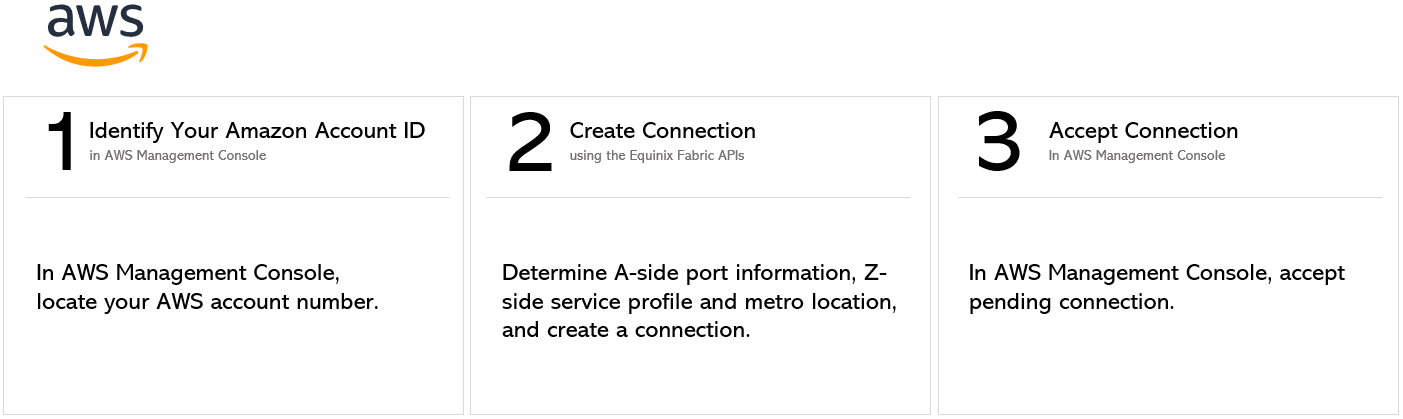
如果您有AWS提供的服务令牌,请参阅使用服务令牌连接到目标。
API 先决条件
-
身份验证 - 提交您的 OAuth2 用户凭据、客户端 ID 和客户端密钥 验证。有关如何致电OAuth API以验证和验证您的凭据的说明,请参阅API验证。
-
确定A侧信息。以下任一项:
- 向端点发送请求
/fabric/v4/ports,以确定您的Equinix Fabric端口信息GET。端口UUID和链路协议类型(Dot1q或QinQ),
或
- 通过向端点发送请求
/fabric/v4/serviceTokens来检索A端服务令牌GET。您需要令牌的UUID。A端令牌提供配置连接A端的相关信息。
或
- 确定您的Network Edge设备信息。向端点发送请求
/ne/v1/devices,以检查可用的虚拟设备和集群GET。您需要设备UUID。向端点发送GET请求/ne/v1/devices/{device_id}以获取设备详情。您可以在设备上选择任何可用接口进行连接。如果不指定接口,连接将自动分配给下一个可用接口。
或
- 确定您的Fabric Cloud Router信息。向端点发送请求
/fabric/v4/routers/search,以检查可用的云路由器POST。您需要路由器的UUID。
- 向端点发送请求
-
识别AWS Direct Connect服务配置文件和位置信息。您应该选择哪种服务配置文件的详细信息,请参见AWS Direct Connect概述页面。
- AWS Direct Connect UUID -
69ee618d-be52-468d-bc99-00566f2dd2b9 - AWS Direct Connect大容量UUID -
de55ca94-df3b-4680-845f-6f7093f76bef - AWS Direct Connect冗余UUID -
8b5cbdbd-53da-4d37-9bfc-cc988eb522f1 - AWS Direct Connect -高容量冗余-
ed48616a-c182-40b4-a462-a78ba812e961
要查找位置信息,请使用其中一个AWS Direct Connect服务配置文件IDS向端点发送
GET请求/fabric/v4/serviceProfiles/{service_profile_ID}。metros响应中的对象包含Equinix都会区及其关联的AWS区域列表。您需要两者才能建立连接。 - AWS Direct Connect UUID -
-
识别并验证您的亚马逊账户ID。登录 AWS 管理控制台并找到您的账号。有关如何查找账号的说明,请参阅AWS文档。向端点发送
POST请求/fabric/v4/connections/validate,以验证您的AWS账户ID是否可用于在给定都会区创建与选定服务配置文件的连接。
从 DOT1Q端口连接
要创建从您的Dot1q端口到AWS的连接,请向端点发送POST请求/fabric/v4/connections。连接type为EVPL_VC。
在对象中提供您的端口信息aSide,包括:
accessPoint.typeASCOLO- 将您的端口UUID提供给
port.uuid - LinkProtocol.type AS
DOT1Q - 将VLAN ID提供给
linkProtocol.vlanTag
在对象中提供您的AWS Direct Connect详细信息和位置详细信息zSide,包括:
- 设置
accessPoint.type为SP。 - 设置
profile.type为L2_PROFILE。 - 在中指定您要连接的AWS服务配置文件
profile.uuid。 - 在中指定您要连接的Equinix都会区位置
location.metroCode。 - 在中指定与Equinix都会区关联的AWS区域
sellerRegion。此信息可从端点找到/fabric/v4/serviceProfiles/{service_profile_ID}。请参阅API先决条件端点。有关详细信息,请参阅API先决条件。 - 设置
authenticationKey为您的AWS账户ID。
redundancy在请求正文中指定任何其他连接配置详情,包括bandwidth和。参数及其说明的完整列表,请参见API参考手册。
cURL 请求示例:
curl -X
POST 'https://api.equinix.com/fabric/v4/connections'
-H 'content-type: application/json'
-H 'authorization: Bearer <token>'
-d '{
  "type": "EVPL_VC",
  "name": "<your_connection_name>",
  "bandwidth": <connection_speed>,
  "redundancy": {
    "priority": "<redundancy_code>"
  },
  "aSide": {
    "accessPoint": {
      "type": "COLO",
      "port": {
        "uuid": "<port_uuid>"
      },
      "linkProtocol": {
        "type": "DOT1Q",
        "vlanTag": <vlan_ID>
      }
    }
  },
  "zSide": {
    "accessPoint": {
      "type": "SP",
      "profile": {
        "type": "L2_PROFILE",
        "uuid": "<service_profile_uuid>"
      },
      "location": {
        "metroCode": "<equinix_metro_code>"
      },
      "sellerRegion": "<aws_region_name>",
      "authenticationKey": "<amazon_account_ID>"
    }
  },
  "project": {
    "projectId": "<project_uuid>"
  },
  "notifications": [
    {
      "type": "ALL",
      "emails": [
      "<contact_email>"
      ]
    }
  ]
}'
从 QINQ端口连接
要建立从QinQ端口到AWS的连接,请向端点发送POST请求/fabric/v4/connections。连接type为EVPL_VC。
在对象中提供您的端口信息aSide,包括:
- 设置
accessPoint.type为COLO - 将您的端口UUID提供给
port.uuid linkProtocol.typeASQINQ- 向提供内部标记ID
linkProtocol.vlanCTag - 向提供外部标记ID
linkProtocol.vlanSTag
在对象中提供您的AWS Direct Connect详细信息和位置详细信息zSide,包括:
- 设置
accessPoint.type为SP。 - 设置
profile.type为L2_PROFILE。 - 在中指定您要连接的AWS服务配置文件
profile.uuid。 - 在中指定您要连接的Equinix都会区位置
location.metroCode。 - 在中指定与Equinix都会区关联的AWS区域
sellerRegion。此信息可从端点找到/fabric/v4/serviceProfiles/{service_profile_ID}。请参阅API先决条件端点。有关详细信息,请参阅API先决条件。 - 设置
authenticationKey为您的AWS账户ID。
redundancy在请求正文中指定任何其他连接配置详情,包括bandwidth和。参数及其说明的完整列表,请参见API参考手册。
cURL 请求示例:
curl -X
POST 'https://api.equinix.com/fabric/v4/connections'
-H 'content-type: application/json'
-H 'authorization: Bearer <token>'
-d '{
  "type": "EVPL_VC",
  "name": "<your_connection_name>",
  "bandwidth": <connection_speed>,
  "redundancy": {
    "priority": "<redundancy_code>"
  },
  "aSide": {
    "accessPoint": {
      "type": "COLO",
      "port": {
        "uuid": "<port_uuid>"
      },
      "linkProtocol": {
        "type": "QINQ",
        "vlanCTag": <inner_tag_ID>,
        "vlanSTag": <outer_tag_ID>
      }
    }
  },
  "zSide": {
    "accessPoint": {
      "type": "SP",
      "profile": {
        "type": "L2_PROFILE",
        "uuid": "<service_profile_uuid>"
      },
      "location": {
        "metroCode": "<equinix_metro_code>"
      },
      "sellerRegion": "<aws_region_name>",
      "authenticationKey": "<amazon_account_ID>"
    }
  },
  "project": {
    "projectId": "<project_uuid>"
  },
  "notifications": [
    {
      "type": "ALL",
      "emails": [
      "<contact_email>"
      ]
    }
  ]
}
使用服务令牌进行连接
要使用A侧服务令牌建立连接至AWS,请向端点发送POST请求/fabric/v4/connections。连接type为EVPL_VC。
在对象中提供服务令牌UUIDaSide。服务令牌提供建立连接所需的所有其他必要信息。
在对象中提供您的AWS Direct Connect详细信息和位置详细信息zSide,包括:
- 设置
accessPoint.type为SP。 - 设置
profile.type为L2_PROFILE。 - 在中指定您要连接的AWS服务配置文件
profile.uuid。 - 在中指定您要连接的Equinix都会区位置
location.metroCode。 - 在中指定与Equinix都会区关联的AWS区域
sellerRegion。此信息可从端点找到/fabric/v4/serviceProfiles/{service_profile_ID}。请参阅API先决条件端点。有关详细信息,请参阅API先决条件。 - 设置
authenticationKey为您的AWS账户ID。
redundancy在请求正文中指定任何其他连接配置详情,包括bandwidth和。参数及其说明的完整列表,请参见API参考手册。
cURL 请求示例:
curl -X
POST 'https://api.equinix.com/fabric/v4/connections'
-H 'content-type: application/json'
-H 'authorization: Bearer <token>'
-d '{
  "type": "EVPL_VC",
  "name": "<your_connection_name>",
  "bandwidth": <connection_speed>,
  "redundancy": {
    "priority": "<redundancy_code>"
  },
  "aSide": {
    "serviceToken": {
      "uuid": "20d32a80-0d61-4333-bc03-707b591ae2f4"
    }
  },
  "zSide": {
    "accessPoint": {
      "type": "SP",
      "profile": {
        "type": "L2_PROFILE",
        "uuid": "<service_profile_uuid>"
      },
      "location": {
        "metroCode": "<equinix_metro_code>"
      },
      "sellerRegion": "<aws_region_name>",
      "authenticationKey": "<amazon_account_ID>"
    }
  },
  "project": {
    "projectId": "<project_uuid>"
  },
  "notifications": [
    {
      "type": "ALL",
      "emails": [
      "<contact_email>"
      ]
    }
  ]
}
从Network Edge设备连接
要建立从Network Edge设备到AWS的连接,请向端点发送POST请求/fabric/v4/connections。连接type为EVPL_VC。
在对象中定义您的Network Edge设备aSide,包括:
accessPoint.typeasVDvirtualDevice.typeASEDGEvirtualDevice.uuid设备的UUID
在对象中提供您的AWS Direct Connect详细信息和位置详细信息zSide,包括:
- 设置
accessPoint.type为SP。 - 设置
profile.type为L2_PROFILE。 - 在中指定您要连接的AWS服务配置文件
profile.uuid。 - 在中指定您要连接的Equinix都会区位置
location.metroCode。 - 在中指定与Equinix都会区关联的AWS区域
sellerRegion。此信息可从端点找到/fabric/v4/serviceProfiles/{service_profile_ID}。请参阅API先决条件端点。有关详细信息,请参阅API先决条件。 - 设置
authenticationKey为您的AWS账户ID。
redundancy在请求正文中指定任何其他连接配置详情,包括bandwidth和。参数及其说明的完整列表,请参见API参考手册。
cURL 请求示例:
curl -X
POST 'https://api.equinix.com/fabric/v4/connections'
-H 'content-type: application/json'
-H 'authorization: Bearer <token>'
-d '{
  "type": "EVPL_VC",
  "name": "<your_connection_name>",
  "bandwidth": <connection_speed>,
  "redundancy": {
    "priority": "<redundancy_code>"
  },
  "aSide": {
    "accessPoint": {
      "type": "VD",
      "virtualDevice": {
        "type": "EDGE",
        "uuid": "<device_uuid>"
      }
    }
  },
  "zSide": {
    "accessPoint": {
      "type": "SP",
      "profile": {
        "type": "L2_PROFILE",
        "uuid": "<service_profile_uuid>"
      },
      "location": {
        "metroCode": "<equinix_metro_code>"
      },
      "sellerRegion": "<aws_region_name>",
      "authenticationKey": "<amazon_account_ID>"
    }
  },
  "project": {
    "projectId": "<project_uuid>"
  },
  "notifications": [
    {
      "type": "ALL",
      "emails": [
      "<contact_email>"
      ]
    }
  ]
}'
从Fabric Cloud Router连接
要创建从Fabric Cloud Router到AWS的连接,请向端点发送POST请求/fabric/v4/connections。连接type为IP_VC。
在对象中定义Fabric Cloud RouteraSide,包括:
- 设置
accessPoint.type为CLOUD_ROUTER。 - 设置
router.uuid为路由器的UUID。
在对象中提供您的AWS Direct Connect详细信息和位置详细信息zSide,包括:
- 设置
accessPoint.type为SP。 - 设置
profile.type为L2_PROFILE。 - 在中指定您要连接的AWS服务配置文件
profile.uuid。 - 在中指定您要连接的Equinix都会区位置
location.metroCode。 - 在中指定与Equinix都会区关联的AWS区域
sellerRegion。此信息可从端点找到/fabric/v4/serviceProfiles/{service_profile_ID}。请参阅API先决条件端点。有关详细信息,请参阅API先决条件。 - 设置
authenticationKey为您的AWS账户ID
cURL 请求示例:
curl -X
POST 'https://api.equinix.com/fabric/v4/connections'
-H 'content-type: application/json'
-H 'authorization: Bearer <token>'
-d '{
  "type": "IP_VC",
  "name": "<your_connection_name>",
    "bandwidth": <connection_speed>,
    "redundancy": {
      "priority": "<redundancy_code>"
    },
  "aSide": {
    "accessPoint": {
      "type": "CLOUD_ROUTER",
      "router": {
        "uuid": "<cloud_router_uuid>"
      }
    }
  },
  "zSide": {
    "accessPoint": {
      "type": "SP",
      "profile": {
        "type": "L2_PROFILE",
        "uuid": "<service_profile_uuid>"
      },
      "location": {
        "metroCode": "<equinix_metro_code>"
      },
      "sellerRegion": "<aws_region_name>",
      "authenticationKey": "<amazon_account_ID>"
    }
  },
  "project": {
    "projectId": "<project_uuid>"
  },
  "notifications": [
    {
      "type": "ALL",
      "emails": [
      "<contact_email>"
      ]
    }
  ]
}'
监控连接状态
向端点发送GET监控连接状态的请求fabric/v4/connections/{connection_id}。
equinixStatus属性值 | providerStatus属性值 | AWS Direct Connect州 | 描述 |
|---|---|---|---|
PROVISIONING | PROVISIONING | 连接请求尚未发送到 AWS。 | |
PROVISIONED | PENDING_APPROVAL | 订购 -> 已请求 | 该连接等待确认。 |
PROVISIONED | PROVISIONING | 待定 | 连接正在建立中。 |
PROVISIONED | PROVISIONED | 待定 -> 可用 | 连接已成功。 |