将 Fabric 云路由器连接到 Metal VLAN
在您的 Fabric Cloud Router 和 Metal Interconnection 之间建立直接第 2 层连接。
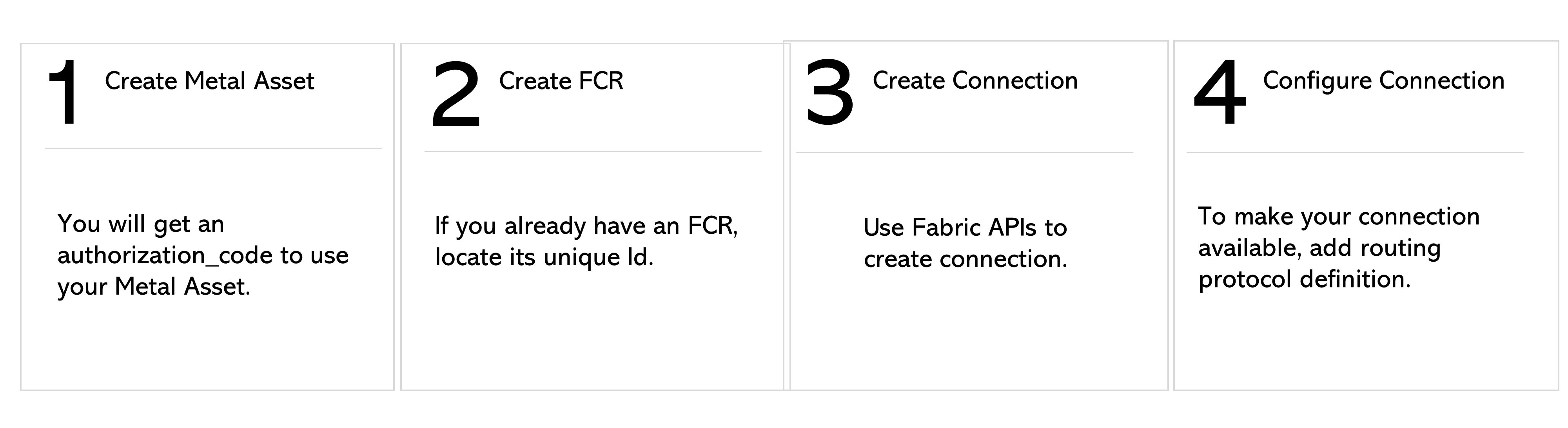
创建Metal互连
在 Metal API 中,向 /organizations/{organization_id}/connections 端点发送 POST 请求,并使用 SharePortVCVlanCreateInput 参数。将 type 指定为 shared_port_vlan,并在 vlans 数组中指定 Fabric 云路由器连接的 Metal VLAN。
响应中包含一个“authorization_code”,您在创建连接时需要用到它。
获取您的Fabric Cloud Router
如果您已经拥有 Fabric 云路由器,可以通过向 /fabric/v4/routers/{routerId} 端点发送 GET 请求来查找它,或者使用 /fabric/v4/routers/search 端点搜索一个。
如果您还没有 Fabric Cloud Router,您可以创建一个。
创建连接
要创建连接,请向 /fabric/v4/connections 端点发送 POST 请求。在 aSide: accessPoint 对象中指定您的 Fabric 云路由器。在 zSide: accessPoint 对象中指定您的 Metal 互连。
| POST /fabric/v4/connections | |
|---|---|
| Method | POST |
| Endpoint | /fabric/v4/connections |
| Headers | Authorization, Content-Type |
| Path Parameters | Not applicable |
| Query Parameters | Not applicable |
| Body Parameters | type, name, order, bandwidth, project, redundancy, aSide, zSide, notifications |
以下示例 curl 请求用于从您的 FCR 创建主连接 金属互连:
curl -X
POST 'https://api.equinix.com/fabric/v4/connections'
-H 'content-type: application/json'
-H 'authorization: Bearer <token>'
-d '
{

    "type": "IP_VC",
    "name": "fcr2metal",
    "bandwidth": 50,
    "aSide": {
        "accessPoint": {
            "type": "CLOUD_ROUTER",
            "router": {
                "uuid": "< fcr uuid >"
            }
        }
    }
    ,
    "zSide": {
        "accessPoint": {
            "type": "METAL_NETWORK",
            "authenticationKey":"<key >"
        }
    },
    "notifications": [
        {
        "type": "ALL",
        "emails": [ "x@x.com"
            ]
        }

    ]
}'
示例 curl 请求用于创建从 FCR 到具有两个 VLAN 的Metal互连的辅助连接:
curl -X
POST 'https://api.equinix.com/fabric/v4/connections'
-H 'content-type: application/json'
-H 'authorization: Bearer <token>'
-d '
{

    "type": "IP_VC",
    "name": "fcr2metal",
    "bandwidth": 50,
    "redundancy": {
        "group": "82f0b34c-3994-4c8a-81ff-7063faa7a9e2",
        "priority": "SECONDARY"
    },
    "aSide": {
        "accessPoint": {
            "type": "CLOUD_ROUTER",
            "router": {
                "uuid": "< fcr uuid >"
            }
        }
    },
    "zSide": {
        "accessPoint": {
            "type": "METAL_NETWORK",
            "authenticationKey":" < key >"
        }
    },
    "notifications": [
        {
        "type": "ALL",
        "emails": [ "x@x.com"
            ]
        }

    ]
}'
可用参数的完整列表可在API 参考中找到。
向 /fabric/v4/connections/{connectionId} 端点发送 GET 请求以监控连接状态。
equinixStatus attribute values | providerStatus attribute values | Description |
|---|---|---|
PENDING_INTERFACE_CONFIGURATION | NOT_AVAILABLE | You need to configure the connection. |
PROVISIONED | AVAILABLE | Connection is provisioned and available. |
配置连接
创建并验证连接后,请使用路由协议 API 端点配置连接,以创建路由协议定义并将其添加到连接中。您必须至少添加直接路由协议的详细信息才能完成连接配置。BGP 路由协议允许您连接到连接到 VLAN 的服务器。