API - 连接到 Google 云端平台
使用 Fabric 端口、Fabric Cloud Router 或服务令牌与 Google Cloud Partner Interconnect 建立直接的第 2 层连接。
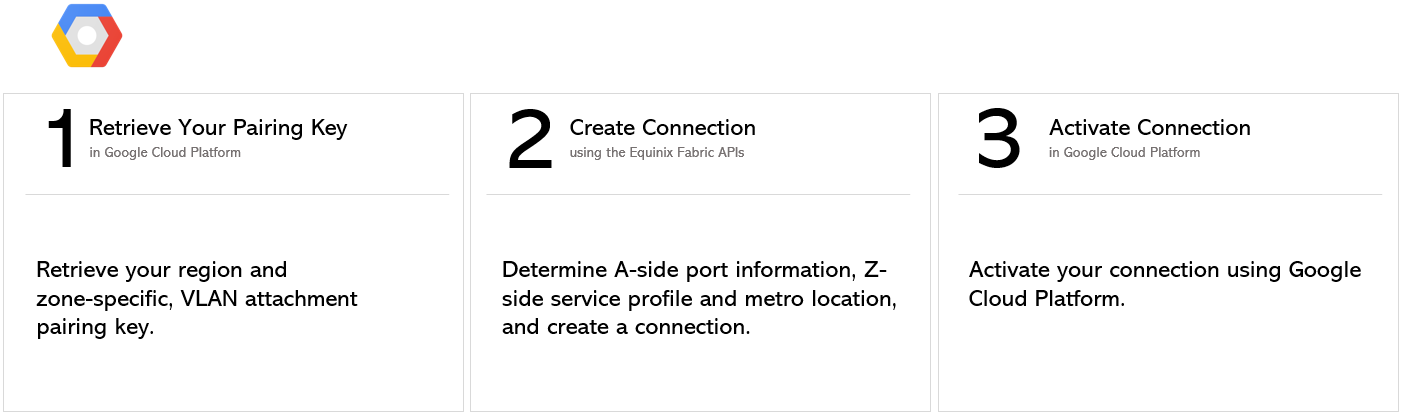
有关从网络边缘虚拟设备进行连接的说明,请参阅网络边缘到 Google Cloud Platform。
先决条件
-
身份验证 - 提交您的 OAuth2 用户凭据、客户端 ID 和客户端密钥 身份验证。请参阅API身份验证以获取有关如何调用OAuth API来验证和认证您的凭据的说明。
-
确定您的 A 面信息。您可以:
- 使用 Get All Ports API 请求检索 Equinix Fabric 端口信息。
或者
- 确定您的 Fabric 云路由器信息。通过向
/fabric/v4/routers/search端点发送POST请求来检查可用的云路由器。您需要路由器的 UUID。
或者
- 要获取您的 A 端服务令牌,请向
/fabric/v4/serviceTokens端点发送GET请求。您需要令牌的 UUID。A 端令牌提供配置连接 A 端所需的必要信息。
-
选择 Z 侧地铁站点。使用 Get All Metros API 请求查找所有 Equinix Fabric 可用的地铁站点,并确定目的地位置。
-
确定 Google Cloud Partner Interconnect 服务配置文件信息。有关应选择哪个服务配置文件的更多信息,请参阅概述页面。
- 区域 1 -
bd4570e2-d792-4a00-87f5-3bde040cdcd7 - 区域 2 -
b97dacca-abe6-4e8c-8be1-fcdd1be1defe
- 区域 1 -
-
验证您的授权密钥。向
/fabric/v4/connections/validate端点发送POST请求,以验证您的配对密钥是否可用于在给定的 metro 中创建与所选服务配置文件的连接。
从 DOT1Q 端口连接
要从您的 DOT1Q 端口创建到 Google Cloud Partner Interconnect 的连接,请向 /fabric/v4/connections 端点发送 POST 请求。连接类型为 EVPL_VC。
请在 aSide 对象中提供您的端口信息,包括:
accessPoint.type作为COLO- 将端口的 UUID 提供给
port.uuid - 将“linkProtocol.type”设置为“DOT1Q”
- 向
linkProtocol.vlanTag提供 VLAN ID
请在 zSide 对象中提供您的 GCP 详细信息和位置详细信息,包括:
- 将
accessPoint.type设置为SP。 - 将
profile.type设置为L2_PROFILE。 - 在
profile.uuid中指定要连接的服务配置文件。 - 在
location.metroCode中指定您要连接的 Equinix Metro 位置。 - 将
authenticationKey设置为 Google Cloud 颁发的配对密钥。
确保:
- 如果您创建的连接中“冗余”为“PRIMARY”,配对密钥以“/1”结尾,并且您使用的是 Google Cloud Partner Interconnect Zone 1 服务配置文件 UUID“bd4570e2-d792-4a00-87f5-3bde040cdcd7”。
- 如果您创建的连接中“冗余”为“SECONDARY”,配对密钥以“/2”结尾,并且您使用的是 Google Cloud Partner Interconnect Zone 2 服务配置文件 UUID“b97dacca-abe6-4e8c-8be1-fcdd1be1defe”。
- 如果您正在创建冗余连接,请发送两个 API 请求,每个冗余优先级一个。
请在请求正文中指定任何其他连接配置详细信息。有关参数及其说明的完整列表,请参阅API 参考。
示例 cURL 请求:
POST 'https://api.equinix.com/fabric/v4/connections'
-H 'content-type: application/json'
-H 'authorization: Bearer <token>'
-d '{
  "type": "EVPL_VC",
  "name": "<connection_name>",
  "bandwidth": <connection_speed>,
  "redundancy": {
    "priority": "<redundancy_code>"
  },
  "aSide": {
    "accessPoint": {
      "type": "COLO",
      "port": {
        "uuid": "<port_uuid>"
      },
      "linkProtocol": {
        "type": "DOT1Q",
        "vlanTag": <vlan_id>
      }
    }
  },
  "zSide": {
    "accessPoint": {
      "type": "SP",
      "profile": {
        "uuid": "<gcp_service_profile_uuid>"
      },
      "location": {
        "metroCode": "<metro_code>"
      },
      "authenticationKey": "<gcp_pairing_key>",
      "sellerRegion": "<gcp_region>"
    }
  },
  "order": {
    "purchaseOrderNumber": "<po_number>"
  },
  "notifications": [
    {
      "type": "ALL",
      "emails": [
        "<contact_email>",
        "<contact_email>"
      ]
    }
  ]
}'
从 QINQ端口连接
要从您的 QINQ 端口创建到 Google Cloud Partner Interconnect 的连接,请向 /fabric/v4/connections 端点发送 POST 请求。连接类型为 EVPL_VC。
请在 aSide 对象中提供您的端口信息,包括:
accessPoint.type作为COLO- 将端口的 UUID 提供给
port.uuid - 将“linkProtocol.type”设置为“QINQ”
- 将内部标签 ID 提供给
linkProtocol.vlanCTag - 将外部标签 ID 提供给
linkProtocol.vlanSTag
请在 zSide 对象中提供您的 GCP 详细信息和位置详细信息,包括:
- 将
accessPoint.type设置为SP。 - 将
profile.type设置为L2_PROFILE。 - 在
profile.uuid中指定要连接的服务配置文件。 - 在
location.metroCode中指定您要连接的 Equinix Metro 位置。 - 将
authenticationKey设置为 Google Cloud 颁发的配对密钥。
确保:
- 如果您创建的连接中“冗余”为“PRIMARY”,配对密钥以“/1”结尾,并且您使用的是 Google Cloud Partner Interconnect Zone 1 服务配置文件 UUID“bd4570e2-d792-4a00-87f5-3bde040cdcd7”。
- 如果您创建的连接中“冗余”为“SECONDARY”,配对密钥以“/2”结尾,并且您使用的是 Google Cloud Partner Interconnect Zone 2 服务配置文件 UUID“b97dacca-abe6-4e8c-8be1-fcdd1be1defe”。
- 如果您正在创建冗余连接,请发送两个 API 请求,每个冗余优先级一个。
请在请求正文中指定任何其他连接配置详细信息。有关参数及其说明的完整列表,请参阅API 参考。
示例 cURL 请求:
POST 'https://api.equinix.com/fabric/v4/connections'
-H 'content-type: application/json'
-H 'authorization: Bearer <token>'
-d '{
  "type": "EVPL_VC",
  "name": "<connection_name>",
  "bandwidth": <connection_speed>
  "redundancy": {
    "priority: "<priority_code>"
  },
  "aSide": {
    "accessPoint": {
      "type": "COLO",
      "port": {
        "uuid": "<port_uuid>"
      },
      "linkProtocol": {
        "type": "QINQ",
        "vlanCTag": <vlan_id>,
        "vlanSTag": <vlan_id>
      }
    }
  },
  "zSide": {
    "accessPoint": {
      "type": "SP",
      "profile": {
        "uuid": "<gcp_service_profile_uuid>"
      },
      "location": {
        "metroCode": "<metro_code>"
      },
      "authenticationKey": "<gcp_pairing_key>",
      "sellerRegion": "<gcp_region>"
    }
  },
  "order": {
    "purchaseOrderNumber": "<po_number>"
  },
  "notifications": [
    {
      "type": "ALL",
      "emails": [
        "<contact_email>",
        "<contact_email>"
      ]
    }
  ]
}'
从Fabric Cloud Router连接
要从 Fabric 云路由器创建到 AWS 的连接,请向 /fabric/v4/connections 端点发送 POST 请求。连接类型为 IP_VC。
在 aSide 对象中定义 Fabric 云路由器,包括:
- 将
accessPoint.type设置为CLOUD_ROUTER。 - 将
router.uuid设置为路由器的 UUID。
请在 zSide 对象中提供您的 GCP 详细信息和位置详细信息,包括:
- 将
accessPoint.type设置为SP。 - 将
profile.type设置为L2_PROFILE。 - 在
profile.uuid中指定要连接的服务配置文件。 - 在
location.metroCode中指定您要连接的 Equinix Metro 位置。 - 将
authenticationKey设置为 Google Cloud 颁发的配对密钥。
确保:
- 如果您创建的连接中“冗余”为“PRIMARY”,配对密钥以“/1”结尾,并且您使用的是 Google Cloud Partner Interconnect Zone 1 服务配置文件 UUID“bd4570e2-d792-4a00-87f5-3bde040cdcd7”。
- 如果您创建的连接中“冗余”为“SECONDARY”,配对密钥以“/2”结尾,并且您使用的是 Google Cloud Partner Interconnect Zone 2 服务配置文件 UUID“b97dacca-abe6-4e8c-8be1-fcdd1be1defe”。
- 如果您正在创建冗余连接,请发送两个 API 请求,每个冗余优先级一个。
请在请求正文中指定任何其他连接配置详细信息。有关参数及其说明的完整列表,请参阅API 参考。
示例 cURL 请求:
POST 'https://api.equinix.com/fabric/v4/connections'
-H 'content-type: application/json'
-H 'authorization: Bearer <token>'
-d '{
  "type": "IP_VC",
  "name": "<connection_name>",
  "bandwidth": <connection_speed>
  "redundancy": {
    "priority: "<priority_code>"
  },
  "aSide": {
    "accessPoint": {
      "type": "CLOUD_ROUTER",
      "router": {
        "uuid": "<cloud_router_uuid>"
      }
    }
  },
  "zSide": {
    "accessPoint": {
      "type": "SP",
      "profile": {
        "uuid": "<gcp_service_profile_uuid>"
      },
      "location": {
        "metroCode": "<metro_code>"
      },
      "authenticationKey": "<gcp_pairing_key>",
      "sellerRegion": "<gcp_region>"
    }
  },
  "order": {
    "purchaseOrderNumber": "<po_number>"
  },
  "notifications": [
    {
      "type": "ALL",
      "emails": [
        "<contact_email>",
        "<contact_email>"
      ]
    }
  ]
}'
使用服务令牌进行连接
要使用 A 端服务令牌创建与 AWS 的连接,请向 /fabric/v4/connections 端点发送 POST 请求。连接类型为 EVPL_VC。
将您的服务令牌 UUID 提供给 aSide 对象。服务令牌提供建立连接所需的所有其他信息。
请在 zSide 对象中提供您的 GCP 详细信息和位置详细信息,包括:
- 将
accessPoint.type设置为SP。 - 将
profile.type设置为L2_PROFILE。 - 在
profile.uuid中指定要连接的服务配置文件。 - 在
location.metroCode中指定您要连接的 Equinix Metro 位置。 - 将
authenticationKey设置为 Google Cloud 颁发的配对密钥。
确保:
- 如果您创建的连接中“冗余”为“PRIMARY”,配对密钥以“/1”结尾,并且您使用的是 Google Cloud Partner Interconnect Zone 1 服务配置文件 UUID“bd4570e2-d792-4a00-87f5-3bde040cdcd7”。
- 如果您创建的连接中“冗余”为“SECONDARY”,配对密钥以“/2”结尾,并且您使用的是 Google Cloud Partner Interconnect Zone 2 服务配置文件 UUID“b97dacca-abe6-4e8c-8be1-fcdd1be1defe”。
- 如果您正在创建冗余连接,请发送两个 API 请求,每个冗余优先级一个。
请在请求正文中指定任何其他连接配置详细信息。有关参数及其说明的完整列表,请参阅API 参考。
示例 cURL 请求:
POST 'https://api.equinix.com/fabric/v4/connections'
-H 'content-type: application/json'
-H 'authorization: Bearer <token>'
-d '{
  "type": "EVPL_VC",
  "name": "<connection_name>",
  "bandwidth": <connection_speed>
  "redundancy": {
    "priority: "<priority_code>"
  },
  "aSide": {
    "serviceToken": {
      "uuid": "20d32a80-0d61-4333-bc03-707b591ae2f4"
    }
  },
  "zSide": {
    "accessPoint": {
      "type": "SP",
      "profile": {
        "uuid": "<gcp_service_profile_uuid>"
      },
      "location": {
        "metroCode": "<metro_code>"
      },
      "authenticationKey": "<gcp_pairing_key>",
      "sellerRegion": "<gcp_region>"
    }
  },
  "order": {
    "purchaseOrderNumber": "<po_number>"
  },
  "notifications": [
    {
      "type": "ALL",
      "emails": [
        "<contact_email>",
        "<contact_email>"
      ]
    }
  ]
}'
监控连接状态
向 fabric/v4/connections/{connectionId} 端点发送 GET 请求以监控连接状态。
equinixStatus parameter values | providerStatus attribute values | Google Status | Description |
|---|---|---|---|
PROVISIONING | PROVISIONING | Connection request has not been sent to Googleyet. | |
PROVISIONED | PENDING_APPROVAL | Waiting for service provider. | Connection waiting for acceptance. |
PROVISIONED | PROVISIONING | Activation needed -> Border Gateway Protocol (BGP) configuration required. | Connection establishment in progress. |
PROVISIONED | PROVISIONED | Pending -> availability | Connection accepted by client. |
激活连接
使用 Google Cloud Platform 激活虚拟连接。有关如何使用 Google Cloud Platform 控制台激活连接的说明,请参阅 Google Cloud 文档。