Geração de um relatório de contato em caso de crise
Para verificar se os contatos foram atribuídos para funções de gestão de crises, segurança física e segurança da informação, você pode gerar um Relatório de contato de crise. Este relatório mostra se as informações de contato estão disponíveis em caso de emergências ou ameaças aos data centers da IBX.
-
Faça login no Portal do Cliente .
dicaEsse relatório pode ser executado na Central de Relatórios ou na tela Gerenciamento de Usuários.
-
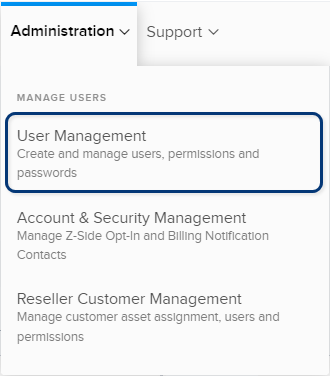
No menu Administração, escolha Gerenciamento de Usuários .
-
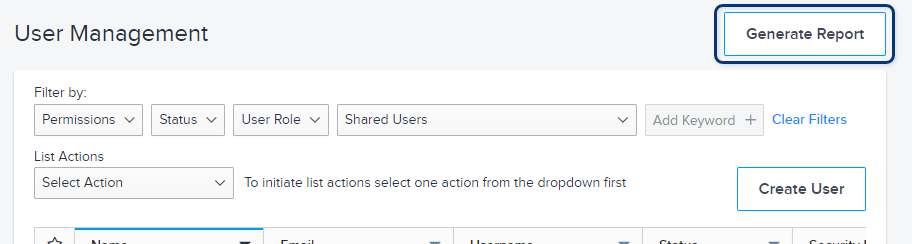
Na tela Gerenciamento de Usuários, clique em Gerar Relatório.
-
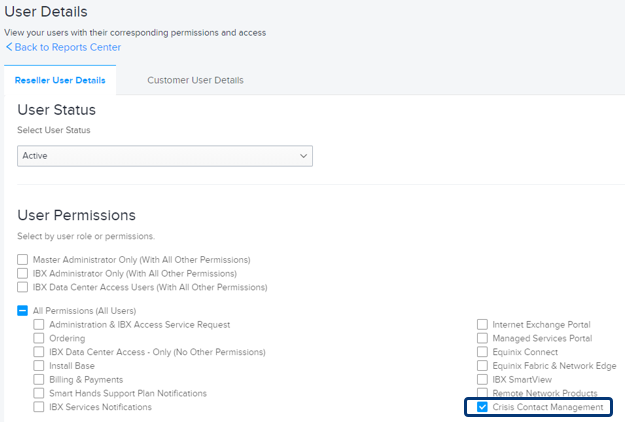
Na tela Detalhes do usuário, selecione Detalhes do usuário do revendedor ou Detalhes do usuário do cliente . Se você selecionar Detalhes do usuário do cliente , selecione uma ou mais contas.
-
Em Status do usuário , selecione o status do usuário a ser incluído no relatório:
- Ativo
- Desativado
- Não ativado
- Encerrado
observaçãoAs contas de usuário encerradas são permanentemente desativadas, enquanto as contas de usuário desativadas podem ser reativadas posteriormente (se necessário).
-
Na seção Permissões do Usuário , selecione Gerenciamento de Contatos de Crise .
O relatório gerado fornece informações detalhadas de contato para todas as três funções de contato de crise. Você pode classificar o relatório por regiões, locais do IBX, contas e outros detalhes do perfil.
Nota: Para alterar seus contatos de crise, consulte Contatos de Gestão de Crises .