Dispositivo Virtual de Segurança Adaptativa Cisco
- Data sheet do Cisco Adaptive Security Virtual Appliance (ASAv) .
- Cisco Secure Firewall ASA Series Feature Licenses.
- Cisco ASA Series, Notas de versão 9,16(x) .
Opções de licenciamento
Tipos de implementação
- Dispositivo único
- Dispositivos redundantes
Opções de conectividade
- Com um endereço IP público
Especificações do Cisco Adaptive Security Virtual Appliance
| Recursos do dispositivo | 2 núcleos - 4 GB 4 núcleos - 8 GB 8 núcleos - 16 GB |
| Pacote de software | Padrão |
| Interfaces suportadas (padrão/máx) | 10/10 |
| Interfaces reservadas do sistema | Gestão 0/0 (GERENCIAMENTO) Ethernet 0/1 (WAN) |
| Tipo de licença disponível | BYOL |
| Métodos de acesso | SSH (CLI) HTTPS (console da Web) |
| Versão da imagem | Consulte Versões de imagem disponíveis |
| Conectividade | Com endereço IP público Equinix |
| RMA | Compatível |
| Instantâneo | Compatível |
| Redimensione | Compatível |
Traga sua própria licença
Se você estiver trazendo sua própria licença (BYOL), as seguintes etapas de criação de dispositivo serão aplicadas:
-
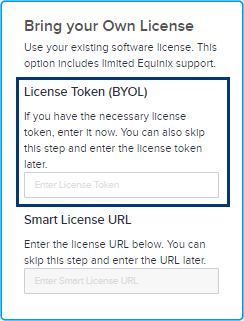
Você pode inserir seu token de licença durante o processo de criação do dispositivo. Depois de inserir o token de licença, seu dispositivo virtual será provisionado com a licença com base no token fornecido. Se você não fornecer informações de token, seu dispositivo virtual ainda será provisionado, mas você precisará registrar manualmente sua licença no servidor inteligente usando seu token de licença após o dispositivo virtual ser provisionado.
-
Como alternativa, você pode inserir o URL da licença Smart. Você deve ter uma conta Cisco válida para concluir este processo. Para obter um token Cisco Smart License, siga as instruções na documentação da Cisco .
Para obter um token de licença Cisco Smart:
- Faça login no Cisco Smart Software Manager (CSSM) com as credenciais da sua conta Cisco.com.
- Localize a seção Contas virtuais > Inventário para criar um novo token.
- O token recém-criado aparecerá na lista de tokens. Clique no token para ver os detalhes e copiar a string do token.
Para registrar o novo token no seu dispositivo, acesse a CLI do dispositivo e insira um comando para registrar o token.
license smart register idtoken <your_token_string>Para verificar o registro do seu token, digite um comando como:
show license statusSe você encontrar quaisquer problemas ou precisar de etapas mais detalhadas, consulte o Guia do administrador do Cisco DNA Center ou contate o suporte da Cisco.