Preferências de notificação
Use este procedimento para garantir que você receba atualizações importantes, para personalizar as notificações recebidas e para desativar as notificações desnecessárias.
Para obter informações sobre como exibir notificações no portal, consulte Central de Notificações .
Tipos de notificação
As opções estão disponíveis para:
| Tipo de notificação | Descrição | Permissões necessárias |
|---|---|---|
| Preferências de notificação de Pedidos | Receba notificações por e-mail para eventos Pedido recebido, Pedido programado, Pedido concluído e Pedido modificado. | N/D |
| Preferências de notificação do IBX | Receba notificações para eventos de Manutenção IBX, Incidentes IBX, Incidentes de Segurança IBX e Avisos IBX. Nota: As notificações do Smart View (para alertas e eventos de manutenção) são gerenciadas no Equinix Smart View. Para obter detalhes, consulte a documentação do Equinix Smart View . | Permissões de Notificações de serviços geridos |
| Preferências de notificação da rede | Receba notificações para eventos de Manutenção de Rede e Incidentes de Rede. | Permissões de Notificações de serviços geridos |
| Preferências de Notificação de Serviços Gerenciados | Receba notificações para eventos de Manutenção IBX dos Serviços Gerenciados, eventos de Manutenção de Rede de Serviços Gerenciados e incidentes de Serviços Gerenciados. | Permissões de Notificações de serviços geridos |
| Preferências nas notificações do Smart Hands Support Plan | Receba notificações por e-mail sobre o uso das horas do Plano de suporte mensal e das horas do Plano de suporte pré-pago. | Permissões do plano de suporte Smart Hands |
| Preferências de notificação de envio sem aviso prévio | Receba notificações por e-mail quando remessas não anunciadas chegarem aos seus IBXs. | Permissões de Notificações de serviços geridos |
| Preferências de Notificação relativa aos ativos virtuais | Receba notificações sobre ativos virtuais Fabric e Network Edge. | Permissão para notificações relativas aos ativos virtuais |
| Preferência de Notificação de Violação de Política do IBX | Receba notificações sobre violações das políticas IBX (como a aplicação de nossa política de materiais combustíveis e nossa política de gerenciamento de fluxo de ar). Pelo menos dois administradores em sua organização devem ser configurados para receber violações de política IBX. **Nota: ** Se uma violação não for corrigida dentro do tempo previsto, um pedido faturável do Smart Hands será criado automaticamente. Os técnicos IBX corrigirão o problema e sua empresa incorrerá em uma taxa Smart Hands. | Permissões de Notificações de serviços geridos |
Importante: Se qualquer um dos blocos Preferências de notificação estiver esmaecido, isso indica que você não tem permissões para receber essas notificações. Entre em contato com o administrador do Portal do Cliente da sua empresa para solicitar permissões ou consulte a páginaPermissões.
Atualizando suas preferências de notificação
Para alterar suas preferências de notificação no Portal do Cliente:
-
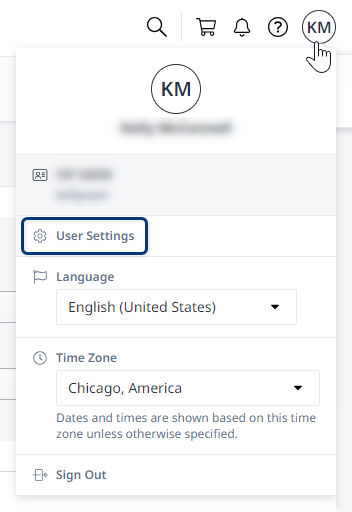
Clique em seu nome de usuário no cabeçalho do perfil global e selecione Configurações do usuário.
-
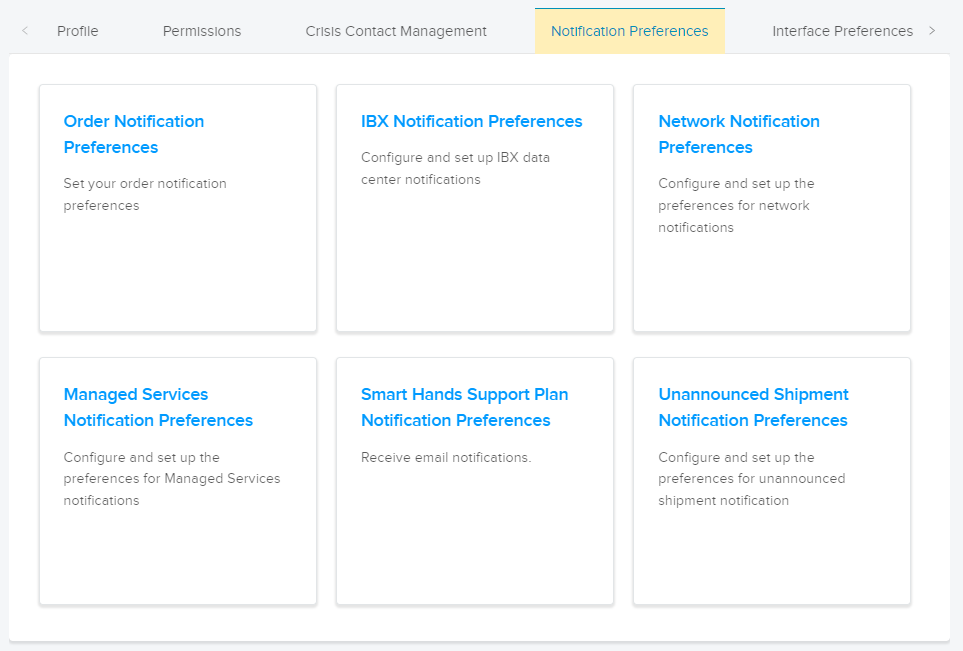
Clique na guia Preferências de notificação e selecione uma categoria.
-
Escolha o(s) tipo(s) de notificações que deseja.
Para algumas categorias, você só pode receber notificações por e-mail. Para outros, você pode optar por receber e-mails, SMS (mensagens de texto) e/ou notificações de voz.
observaçãoNotificações de voz não são suportadas para telefones na China.
-
Clique em "Enviar" para confirmar as alterações.
Repita essas etapas para definir suas preferências para outras categorias de notificação.