Equinix Precision Time FAQs
Timing Sources, Availability, Security, and Resiliency
Are Precision Time systems exposed to public networks?
The Precision Time infrastructure is maintained in highly secured IBX data centers inside secure cages. There is no exposure to the outside world or accessibility to Public Networks. Also, Precision Time services are offered to users over the highly secure, dedicated, private Equinix Fabric network which also has no exposure to public networks or internets. In addition, Precision Time services are offered over private IP address spaces defined by RFC 1918.
Who has access to our timing infrastructure?
Because the Precision Time infrastructure is maintained in highly secured IBX data centers inside secure cages, there is no exposure to the outside world or accessibility to Public Networks. Also, access is minimized because the Precision Time services are offered over private IP address spaces defined by RFC 1918.
All Precision Time infrastructure has complete access control, which is available to only a limited number of authorized personnel.
Given our multi-tenancy architecture, how do we ensure that our customers cannot impact or connect to each other?
Each customer's service connection is isolated by a private network namespace which is connected to an individual VLAN ID. The VLAN provides isolation during the transport over Equinix Fabric. All our users' virtual connections on Fabric are isolated by VLAN.
I don't want to connect to London. And due to latency, I can't use the LD (London) service location for a FR (Frankfurt) connection. We measure latency in ms or less. Can I get service locally from FR?
Yes, in the EMEA region, you can choose either LD or FR as your service location.
Latency is not a big factor in the accuracy of time. Any delay in network transit is accounted for. However, for a user who is located in Frankfurt, it makes sense to use the local Precision Time service that is sourced from Frankfurt.
Authentication and Authorization
What is Auth0 integration? (Applies only to Equinix non-federated users.)
Auth0 is now integrated with Equinix Precision Time, adding authentication support for non-federated user identities. This provides an additional layer of security and integration when accessing various Equinix portals and products.
After I enter my credentials, I do not see the Equinix Precision Time home page.
Your browser cache could be the problem. Clear your browser cache and try again. If login or authorization issues persist, raise a support ticket through your local Equinix Service Desk.
Networking
Can I build redundancy across two ports, so that Equinix Fabric Port A goes to Timing Server 1 and Equinix Fabric Port B goes to Timing Server 2?
No, a single connection always goes to both time servers:
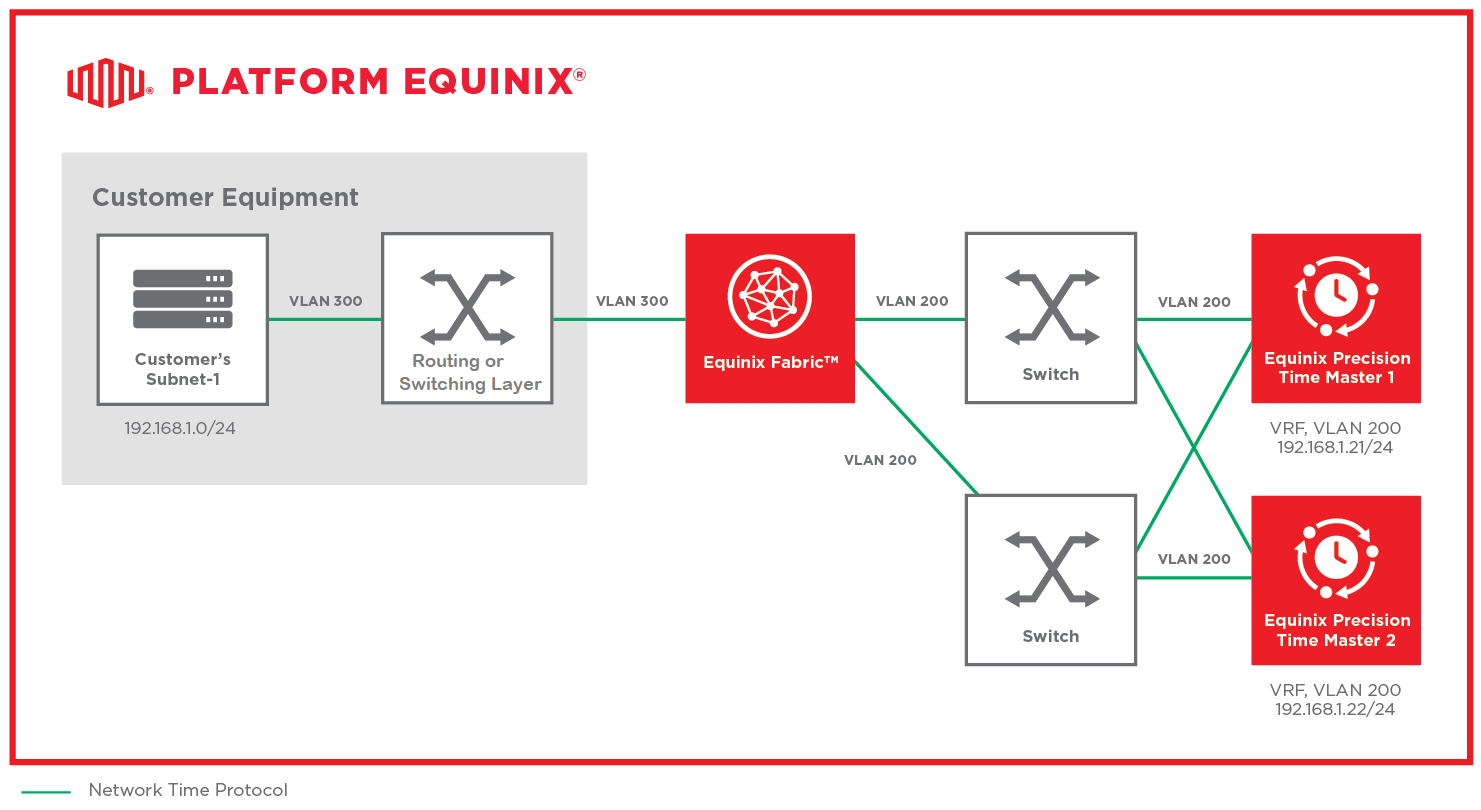
Why are we seeing Spanning Tree issues and not achieving the required level of redundancy that we are getting with the service?
Equinix Fabric does not support Spanning Tree Protocol (STP) on Fabric switches. Fabric ports are not enabled with STP. Hence, Equinix Precision Time doesn't currently support Active/Standby connectivity.
Can Precision Time provide a smaller subnet than /24?
For PTP with the Standard service tier, only these subnets (netmask) values are allowed:
- /28 (255.255.255.240)
- /29 (255.255.255.248)
- /30 (255.255.255.252)
For PTP with the Enterprise service tier, only these subnets (netmask) values are allowed:
- /26 (255.255.255.192)
- /27 (255.255.255.224)
- /28 (255.255.255.240)
- /29 (255.255.255.248)
- /30 (255.255.255.252)
For NTP with the Standard service tier, only these subnets (netmask) values are allowed:
- /22 (255.255.252.0)
- /23 (255.255.254.0)
- /24 (255.255.255.0)
- /25 (255.255.255.128)
- /26 (255.255.255.192)
- /27 (255.255.255.224)
- /28 (255.255.255.240)
- /29 (255.255.255.248)
- /30 (255.255.255.252)
For NTP with the Enterprise service tier, only these subnets (netmask) values are allowed:
- /21 (255.255.248.0)
- /22 (255.255.252.0)
- /23 (255.255.254.0)
- /24 (255.255.255.0)
- /25 (255.255.255.128)
- /26 (255.255.255.192)
- /27 (255.255.255.224)
- /28 (255.255.255.240)
- /29 (255.255.255.248)
- /30 (255.255.255.252)
Is the Precision Time service available only through Equinix Fabric? Or is it also available through other Equinix connectivity products?
The Precision Time service is available in all locations where Equinix Fabric or Network Edge is offered with support for local or remote connectivity options. Currently, Precision Time does not support any other connectivity mechanisms.
One VLAN is included in my monthly recurring charge (MRC). Must I pay extra for the 1G port?
You must have an Equinix Fabric port. If you don’t already have one available to use, you must order a Fabric port separately. This is a prerequisite for ordering Equinix Precision Time.
Is it possible for a reseller to use a single Equinix Fabric port to serve multiple Precision Time customers?
Yes, it is possible. Technically, one port can serve multiple connections. In the case of a reseller, this port can belong to the reseller, and each connection on it can belong to different sub-customer.
Timing and Synchronization
How accurate is Equinix Precision Time?
Accuracy is measured as the maximum divergence between the time delivered by the service and Coordinated Universal Time (UTC). The highest level of timing accuracy is achieved when clients connect to Precision Time from assets located within the same metro as the timing service. Remote connection accuracy may vary slightly.
The Equinix Precision Time team has set up their own global service level agreement (SLA) monitoring platform which continuously monitors the SLA levels for Precision Time service locations. We also extensively check or take feedback from our customers to ensure they are meeting Accuracy SLA numbers. Based on our own Global SLA monitoring data and feedback from customers, the typical accuracy for synchronization levels achieved by real users is:
- NTP – 30-100 microseconds or less, for the 99.9th percentile, depending on the network performance at every level
- PTP – 1-10 microseconds or less, for the 99.9th percentile, depending on the network performance at every level
How does EPT handle the leap second every few years?
We have timing-specialized equipment where we get leap second information updates from the IANA twice a year.
Why is the mean path delay so high (hundreds of microseconds)?
The Precision Time service is provided over Equinix Fabric, which is a "non-PTP aware" network. You might see a mean path delay in the order of microseconds or milliseconds (in certain metros). However, both PTP and NTP account for the mean-path delay and control the synchronization precisely.
Why does the mean path delay vary so much from one sample to the next? Does this suggest network congestion or path asymmetry?
The Precision Time service is provided over Equinix Fabric, which is a "non-PTP aware" network. Jitter conditions can keep changing on the Fabric. Therefore, you might see a mean path delay that varies a lot, compared to when you connect through a non-Fabric network.
Why is Ping/ICMP recovery delayed during NTP/PTP redundancy-failover?
Test simulation to explain the delay in Ping/ICMP recovery:
A single device (TOR) was used on the user side during failover testing. The device had a bonded/aggregated interface (two physical ports) with an Active/Standby configuration. The test NTP client was connected to the TOR device. Failover was simulated only on the user side.

Ping/ICMP recovery results with NTP:
- The NTP sync failure time is directly proportional to Ping/ICMP recovery time, which averages ~2.5 seconds.
- The ping recovery delay on a redundant ECX connection without Multicast is the result of the ARP Reachable timeout.
- The recovery time depends on the side which issued the traffic, ICMP ping. We tested ECX failover with the ping issued from the client, A-side, and from the time server, Z-side.
Here are the formulas for Total Recovery Time calculation, with the timelines defined:
-
Trm – Total recovery time (in seconds) when the ping was issued from the time server.
-
Trc – Total recovery time (sec) when the ping was issued from the client. This is not dependent on ARP caching, but it's also part of the Trm time.
-
ARPt – ARP cache time to expire at the moment when failover happened. Could be up to 38 sec for the Ping application. (38 seconds = 30 Base_Reachable_Time + 5 Delay + 3 x Probe)
-
TORt – Failover time on the TOR device, client’s A-Side. Could be up to 2 sec, and depends on the moment when failover happened. (This is the switchover time on the client router from primary connection to secondary connection, or the other way around. (1 second to detect failure + 1 second to failover)
Other considerations:
- DOWN to UP interface transition time plus MAC learning time.
- Enabled STP also adds additional time during the transitory states: listening, learning, and forwarding.
- Equinix Fabric doesn't support STP and recommends disabling STP on the device port connected to ECX.
-
ECXt – Time for MAC learning on the ECX side during failover, 1 to X sec.
-
EPT_Switch – Time for MAC learning on Arista switches, up to 1 sec.
Trc = TORt + ECXt + EPT_Switch
Trm = ARPt on the time server, for the case when ARPt on server > Trc as calculated above.
Trm = Tc for the case when ARPt< Trc.
How does the client-server handshake work for PTP and NTP?
PTP and NTP both support the User Datagram Protocol (UDP).
- The typical UDP ports for PTP traffic are 319 (Event Message) and 320 (General Message).
- The official UDP port for NTP (used by ntpd and ntpdate) is 123.
What's the difference between the software timestamp feature and the hardware timestamp?
Hardware timestamping is used to synchronize the PTP hardware clock to the time server clock. With this feature, packets are timestamped before they enter the kernel or user space. This avoids any delays caused by kernel or user space processing. PTP works best with the hardware time stamping support on NIC.
Software timestamping is used to synchronize the system clock to the server clock. This approach is used mainly by NTP.
Does Precision Time NTP use leap smearing, slewing, or leap second correction?
Precision Time NTP uses leap second correction, with leap seconds applied directly by the Precision Time timing appliances.
Precision Time Protocol (PTP)
Does Equinix Precision Time support multicast configurations?
Precision Time provides end-to-end PTP support from the grandmaster clock to the client for multicast configurations. Equinix Precision Time supports multicast with redundant servers to ensure auto-failover and auto-fallback.
Can I specify the PTP domain number in Equinix Precision Time?
Users can now set their PTP domain in the PTP Advanced Configurations settings in the portal. New connections default to Domain 0. (Previously, the default PTP domain setting was 30.)
The Equinix Precision Time PTP service (default domain 30) indicates that it's driven by an internal oscillator. However, there’s no indication that this PTP service is traceable to UTC. Is this intentional? Or can this be configured or updated on the Equinix side?
Equinix Precision Time was initially launched with a pre-set domain value of 30, mainly so that it could be differentiated from the user’s own PTP equipment, which is probably already using domain 0. The selection of domain 30 doesn’t indicate any lack of traceability.
Our service includes redundant GNSS feeds at multiple locations, so traceability isn’t an issue. Each metro that provides the service has GNSS servers (with Rb oscillators) in two separate buildings, connected via White Rabbit, and sent to Timing Servers which drive the timing feeds that our users receive over Equinix Fabric.
Since the launch of Equinix Precision Time, we‘ve provided users the ability to change the domain and priority fields, packet rates, and receive time in PTP/TAI or ARB/UTC timescales. (Some of our users might still be using domain 30, though.)
Is Equinix Precision Time compliant with SMPTE 2110-10?
Yes, Equinix Precision Time is compliant with SMPTE 2110-10 / PTP IEEE 1588.
Are priority settings available in Equinix Precision Time?
You can use the following Equinix Precision Time (EPT) server settings to set up the client-side priorities and clockClass:
- EPT Server Priority1 – 128
- EPT Server Priority2 – 128
- EPT Server clockClass – 13
Is the TTL setting available in Equinix Precision Time?
Equinix Precision Time uses the default TTL setting, which is 64 for multicast PTP packets. Refer to the setting in PTP which controls this TTL. However, the TTL setting is not set explicitly.
Is any of the additional equipment in the path not "PTP aware”?
The Precision Time service is provided over Equinix Fabric, which is a "non-PTP aware" network.
What are some PTP clients that I can use in a Linux system?
You can use a variety of PTP tools for Linux systems. The most common tools:
- ptp4l
- ptpd
- sfptpd (requires Solarflare NIC)
- Domain Time II (Greyware)
- Timebeat
What are some basic settings for a PTP client?
See the Sample Configurations for basic PTP client settings.
What is the SLA threshold for PTP service?
Accuracy SLA – 50 microseconds or less, depending on the network architecture and other factors in the deployment. Typically, the accuracy is up to 5-10 microseconds. If you consume service locally within the same metro, the accuracy might be up to 1-2 microseconds.
The accuracy SLA applies to local connections. Accuracy for remote connections may vary slightly.
Availability SLA
| SLA | Requirements to Meet SLA | Comments |
|---|---|---|
| 99.9% | You must have and use at least one Fabric port. | You can choose to connect to any available service location as described in Service Locations. |
| 99.999% | You must use two separate Fabric ports created on primary and secondary Fabric networks. You must create two separate Precision Time service connections using each Fabric port. | For each of your service connections, you can choose to connect to any available service location as described in Service Locations. Connecting to two different service locations will help achieve an additional level of geo-redundancy. |
How do I know if my server NIC supports PTP?
See Prerequisites for information about NIC server support.
Network Time Protocol (NTP)
Does Precision Time support an NTP authentication mechanism (like NTS or MD5)?
Precision Time service is provided through a private, secure, and dedicated interconnection within virtual routing and forwarding (VRF) to two private Equinix servers. An authentication mechanism is not necessary, although MD5 support is available for NTP Enterprise configurations.
Is a 1G port sufficient, or do I need a 10G port for my Precision Time service?
A 1 Gbps port is sufficient. Precision Time connections have a low bandwidth requirement.
What are some NTP clients that I can use in a Linux system?
You can use a variety of NTP tools for Linux systems. The most common tools:
- ntpd
- chronyd
- ntpdate
What are some basic settings for an NTP client?
See the Sample Configurations for basic NTP client settings.
Why does my NTP client show the RefID value as null or blank?
Stratum 1 NTP servers put their time source (such as GPS) in the RefID field, but Equinix Precision Time (EPT) controls the time a bit differently than a standard Stratum 1 server. EPT manages the traceable time sync outside the NTP service. This means that EPT doesn’t have a refclock, even though its time is in sync.
This means EPT achieves better redundancy through the White Rabbit feeds that synchronize our Timing Servers that provide the service. Also, EPT can isolate the services going to each EPT user to ensure that their traffic is kept private. The null RefID is just a side effect of that.
A null or blank RefID doesn’t affect the quality of the service in any way.
What is the SLA threshold for NTP service?
-
Accuracy SLA – Equinix Precision Time does not guarantee any SLA for NTP service. However, the service is typically accurate up to 1-10 milliseconds, depending on the network implementation.
-
Availability SLA
| SLA | Requirements to Meet SLA | Comments |
|---|---|---|
| 99.9% | You must have and use at least one Fabric port or virtual device. | You can choose to connect to any available service location as described in Service Locations. |
| 99.999% | You must use two separate Fabric ports, or virtual devices, created on primary and secondary Fabric networks. You must create two separate Precision Time service connections using each Fabric port or virtual device. | For each of your service connections, you can choose to connect to any available service location as described in Service Locations. Connecting to two different service locations will help achieve an additional level of geo-redundancy. |
What is the stratum level of your NTP servers?
Stratum Level 1 – directly synchronized to highly accurate reference clocks.
Do you support IPv4 and IPv6 connectivity?
Equinix Precision Time currently supports IPv4 connectivity only; IPv6 connectivity is not available at this time. Support for IPv6 may be evaluated in the future based on customer demand and platform capabilities.
Observability
Does Equinix Precision Time offer any kind of monitoring or alert notification?
Yes, for support purposes, Precision Time now monitors performance and collects data from both the Timing Server and Service Level Objective (SLO) monitoring servers in remote IBX data centers. Alerts are generated and can be sent to support teams for analysis, when requested through a Support case. Alarms are triggered when SLO thresholds are breached, or when outages threaten Precision Time performance, so that potential problems can be addressed before they become issues.
Support
I need technical support. How do I open a Support Case?
For technical issues, you can open a Support Case in the Customer Portal. The status of existing tickets can be checked in Support > Support Case History on the Customer Portal. See Support for more information.