# F5 VNFs Specifications
## F5 Licensing[](#f5-licensing "Direct link to F5 Licensing")
This table details the licensing types available on Network Edge for F5 VNFs.
| VNF Type | BYOL | Subscription |
| -------------------------------------- | ---- | ------------ |
| NGINX Plus Load Balancer | No | Yes |
| Distributed Cloud - Customer Edge (CE) | Yes | No |
| BIG-IP Local Traffic Manager | Yes | No |
## F5 Support[](#f5-support "Direct link to F5 Support")
F5 VNFs on Network Edge require you to have an account at MyF5. For any issue related to F5 NGINX or F5 Distributed Cloud - Customer Edge (CE), use your MyF5 account to open a case and troubleshoot the issue. F5 Premium support is bundled in the NGINX Plus License on Network Edge.
* Access to [MyF5](https://account.f5.com/myf5)
## F5 NGINX Plus Load Balancer[](#f5-nginx-plus-load-balancer "Direct link to F5 NGINX Plus Load Balancer")
This diagram illustrates components involved in when F5 NGINX running on Network Edge platforms.
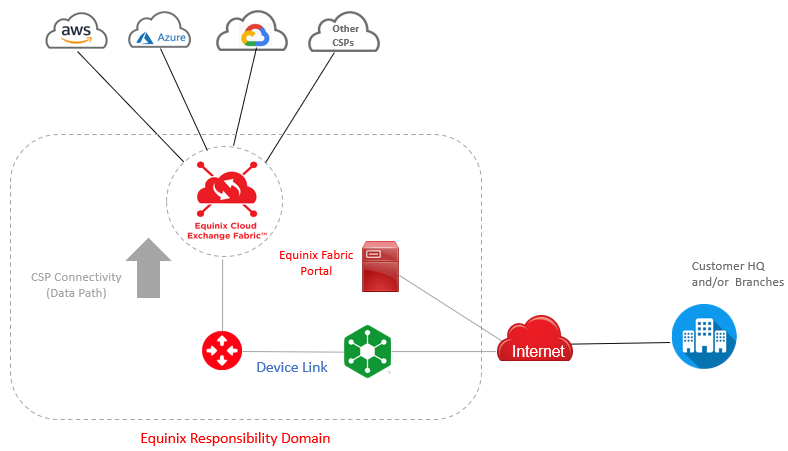
### NGINX Support Responsibilities[](#nginx-support-responsibilities "Direct link to NGINX Support Responsibilities")
This table lists common F5 NGINX Plus load balancer issues and indicates the supporting party.
| Issue Type | Support |
| ---------------------------------------------------------------------------------------------- | -------------------- |
| Network Edge device life cycle (ordering, provisioning, deprovisioning, Network Edge services) | Equinix Support Team |
| CSP connectivity through Equinix Fabric | Equinix Support Team |
| Equinix Internet Access connectivity | Equinix Support Team |
| Controller log in & password issues | F5 Support team |
| Device discovery in controller | F5 Support team |
| OS updates and version upgrades | F5 Support team |
| Controller usability and feature related questions | F5 Support team |
| Help with application GUI | F5 Support team |
| Load balancer application | F5 Support team |
* [F5 NGINX Product Data Sheets](https://www.nginx.com/resources/datasheets/)
* [F5 NGINX Documentation](https://docs.nginx.com/nginx/)
* [F5 NGINX Plus Release Note (R26)](https://docs.nginx.com/nginx/releases/#nginxplusrelease-26-r26)
* [AskF5 NGINX Plus Knowledge Center](https://support.f5.com/csp/knowledge-center/software/NGINX)
### NGINX Specifications[](#nginx-specifications "Direct link to NGINX Specifications")
| | 2 Cores | 4 Cores | 8 Cores |
| ----------------------------------------------- | ------------------------------------------------------------------------------------------------------------- | ------- | ------- |
| Memory | 4 GB | 8 GB | 16 GB |
| Software Package | Standard | | |
| Virtual Data Interfaces Supported (Default/Max) | 10 / 10 | | |
| System Reserved Interfaces | Interface 1 (Single deployment)
Interface 10 (Single, Redundant, Cluster deployment) | | |
| Available License Type | Subscription | | |
| Access Methods | SSH
Web Console | | |
| Image Version | See [Available Image Versions](https://docs.equinix.com/network-edge/vendors-devices/ne-certified-vnfs.md#f5) | | |
| Restricted CLI Commands | None | | |
| Deployment Options | Single
Redundant
Cluster | | |
### Creating an F5 NGINX Load Balancer[](#creating-an-f5-nginx-load-balancer "Direct link to Creating an F5 NGINX Load Balancer")
When creating a F5 NGINX Load Balancer consider the following vendor-specific options.
* Before creating an F5 device, you need an account at MyF5 to complete the process. Create your support account at . F5 Premium support is bundled in the image running on the VNF. For more information, see [Shared Support Model for F5 NGNIX](https://docs.equinix.com/network-edge/support-terms/ne-shared-responsibility.md#shared-support-model-for-f5-ngnix).
* F5 NGINX Plus functions as a load balancer and it is typically used in conjunction with a router or firewall. After provisioning is completed, use *Device Link* to connect NGINX Plus to a routing function. See [Device Link](https://docs.equinix.com/network-edge/device-link/ne-device-link.md) for more information.
## F5 Distributed Cloud - Customer Edge (CE)[](#f5-distributed-cloud---customer-edge-ce "Direct link to F5 Distributed Cloud - Customer Edge (CE)")
* [F5 Distributed Cloud - Customer Edge Product Data Sheets](https://www.f5.com/resources/datasheets)
* [F5 Distributed Cloud - Customer Edge Documentation](https://docs.cloud.f5.com/docs-v2)
### Distributed Cloud - Customer Edge (CE) Specifications[](#distributed-cloud---customer-edge-ce-specifications "Direct link to Distributed Cloud - Customer Edge (CE) Specifications")
| | 8 Cores | 16 Cores |
| ----------------------------------------------- | ------------------------------------------------------------------------------------------------------------- | -------- |
| Memory | 32 GB | 64 GB |
| Software Package | Standard | |
| Virtual Data Interfaces Supported (Default/Max) | 8 / 8 | |
| Available License Type | BYOL | |
| Access Methods | SSH
Web Console | |
| Image Version | See [Available Image Versions](https://docs.equinix.com/network-edge/vendors-devices/ne-certified-vnfs.md#f5) | |
| Restricted CLI Commands | None | |
| Deployment Options | Single
Redundant | |
### Creating an F5 Distributed Cloud - Customer Edge (CE) VNF[](#creating-an-f5-distributed-cloud---customer-edge-ce-vnf "Direct link to Creating an F5 Distributed Cloud - Customer Edge (CE) VNF")
* Before creating an F5 device, you need an account at MyF5 to complete the process. Create your support account at . F5 Premium support is bundled in the image running on the VNF.
* Network Edge supports the creation of single and redundant F5 Distributed Cloud - Customer Edge (CE) devices. To deploy a cluster, use the F5 orchestrator after the devices are created in Network Edge. You must have a minimum of 3 devices in the cluster, and all of the devices must be created in the same metro. Once the devices are created, it can take up to 60 minutes for the cluster to be provisioned.
## F5 BIG-IP Local Traffic Manager[](#f5-big-ip-local-traffic-manager "Direct link to F5 BIG-IP Local Traffic Manager")
* [F5 BIG-IP Data Sheets](https://cdn.sanity.io/media-libraries/mlg6Zwp8Ejtd/files/containers/3EaRK9B4dhcbdfqX2qJeuVCjYnz/f5-big-ip-ltm-data-sheet.pdf)
* [F5 BIG-IP Documentation](https://my.f5.com/manage/s/tech-documents)
### BIG-IP Local Traffic Manager Specifications[](#big-ip-local-traffic-manager-specifications "Direct link to BIG-IP Local Traffic Manager Specifications")
| | 2 Cores | 4 Cores | 8 Cores |
| ----------------------------------------------- | ------------------------------------------------------------------------------------------------------------- | ------- | ------- |
| Memory | 4 GB | 8 GB | 16 GB |
| Software Package | Standard | | |
| Virtual Data Interfaces Supported (Default/Max) | 10 / 10 | | |
| Available License Type | BYOL | | |
| Access Methods | SSH
Web Console | | |
| Image Version | See [Available Image Versions](https://docs.equinix.com/network-edge/vendors-devices/ne-certified-vnfs.md#f5) | | |
| Restricted CLI Commands | None | | |
| Deployment Options | Single
Redundant | | |
### Creating an F5 BIG-IP Local Traffic Manager[](#creating-an-f5-big-ip-local-traffic-manager "Direct link to Creating an F5 BIG-IP Local Traffic Manager")
* Before creating an F5 device, you need an account at MyF5 to complete the process. Create your support account at . F5 Premium support is bundled in the image running on the VNF.
* Network Edge supports the creation of single and redundant F5 BIG-IP devices. To deploy a cluster, use the F5 orchestrator after the devices are created in Network Edge. You must have a minimum of 3 devices in the cluster, and all of the devices must be created in the same metro. Once the devices are created, it can take up to 60 minutes for the cluster to be provisioned.
**Connectivity Options**
The default connectivity option for the device is Without Equinix Public IP Address. The option to have a VNF come up without a public IP address addresses the use case where the virtual device may need to be isolated from the Internet. You can then manage the devices from their private network or virtual connection.
When entering the Device Details, select one of the following IP address options:
* DHCP – a network management protocol that automatically assigns IP addresses.
* Static IP Address – enter the IP address, subnet mask, and default gateway.