Cisco Threat Defense Virtual Firewall
- Cisco Threat Defense Virtual (Formerly FTDv/NGFWv) Data Sheet.
- Cisco Secure Firewall Management Center Feature Licenses.
- Cisco Firepower Version 7.0 Release Notes.
Licensing Options
Deployment Types
- Single Device
- Redundant Devices
- Cluster
Connectivity Options
- With a Public IP Address
- Without a Public IP Address
Device Details
| 4 Cores | 8 Cores | 12 Cores | |
|---|---|---|---|
| Memory | 8 GB | 16 GB | 24 GB |
| Software Package | FTDv5 FTDv10 FTDv20 | FTDv30 | FTDv50 |
| Virtual Data Interfaces Supported (Default/Max) | 10 / 10 | ||
| System Reserved Interfaces | Web-based Management (FMC, FDM or CDO) | ||
| Access Methods | SSH (CLI) HTTPS (Web Console) | ||
| Image Version | See Available Image Versions | ||
| Restricted CLI Commands | None |
When configuring your device details, specify the following:
-
Cluster Name - If you are creating a cluster, give your cluster a name.
-
Device Name – Enter a name for the device. If you are creating more than a single device,
-Node 0is appended to the primary node and-Node 1is appended to the secondary node after the device name. -
Device Management – Select your device management type from the following:
- Firewall Management Center (FMC) – Enter the FMC’s IP Address as the Controller IP Address, and the Registration Key. The registration key is used to register the device to the FMC.
- Firepower Device Manager (FDM)
- Cisco Defense Orchestrator (CDO)
-
SSH Access - Unlike the other VNF types, we do not provide username and RSA Public Key configuration settings for SSH access during the device creation workflow. Use console access from the device details page.
Deploying Without IP Address
-
When the connectivity type Without Equinix Public IP Address is selected, the VNF is provisioned without a public IP Address on the WAN or Management interface. You are responsible for configuring the license registration, overlay network configuration, and clustering (optional).
The following is an example (reference only) command for management interface setup.
configure network ipv4 manual <IP Address> <Mask> <Default Gateway> -
Clustering - The option to deploy a cluster is not available if you are not using public IP addresses. You must configure cluster devices manually.
Bring Your Own License
If you are Bringing Your Own License (BYOL), the following device creation steps will apply:
-
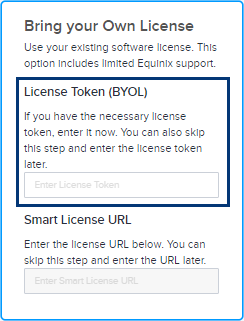
You can enter your License Token during the device creation process. Once you enter the license token, your virtual device will be provisioned with the license based on the token provided. If you do not provide token information, your virtual device will still be provisioned but you will need to manually register your license with the smart server using your license token after the virtual device is provisioned.
-
Alternatively, you can enter your Smart License URL. You must have a valid Cisco account to complete this process. To get a Cisco Smart License token, follow the instructions in the Cisco documentation.
To get a Cisco Smart License token:
- Sign in to the Cisco Smart Software Manager (CSSM) with your Cisco.com account credentials.
- Locate the Virtual Accounts > Inventory section to create a new token.
- Your newly created token will appear in the token list. Click the token to see the details and copy the token string.
To register the new token on your device, access the device CLI and enter a command to register your token.
license smart register idtoken <your_token_string>To verify your token registration enter a command such as:
show license statusIf you encounter any issues or need more detailed steps, see Cisco DNA Center Administrator Guide or contact Cisco support.
-
You are responsible for obtaining support from Cisco or their partners. If you are subscribing with a license from Equinix Network Edge, you can open a support case with Cisco Technical Assistant Center (TAC) to troubleshoot Cisco IOX-XE software issues or ask Cisco IOX-XE configuration questions from the Network Edge portal. See Cisco Catalyst 8000V Subscriptions for more information.