On-Demand Billing by Use
The environment (Virtual Data Center) classified as pay-as-you-go is available for use by default. This allows you to quickly scale your environment in an interconnected manner with the Dedicated environment, through the EdgeGateways-Tierl, offering unlimited capabilities.
Important Limitations
- Equinix reserves the right to ensure the delivery of up to 50% of the contracted quota for the dedicated environment (vCPU, vRAM, vHD and Storage Tier I, II, III). Values beyond this limit may be provided upon interaction with Equinix support, subject to availability conditions on the respective date of use.
- If you do not agree with the On-Demand Virtual Data Center use terms and conditions, it can be disabled through the Equinix Managed Services Portal.
Virtual machines created in this area will be charged by use, and the ticketing for On-Demand vCPU and vRAM capabilities begins when the virtual machine is turned on, and interrupted when the virtual machine is turned off.
The events Start Virtual machine and Stop Virtual Machine coincide with the Active Capability and Idle Capability status. On-Demand vCPU and vRAM capabilities only demand the Equinix Hybrid Cloud infrastructure when the virtual machine is on.
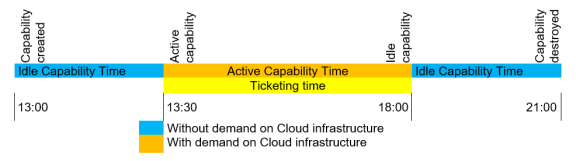
For On-Demand storage policies and quotas such as VHD (General Purpose) and Managed Storage Tier I, II and III; ticketing begins after the Instance-VM capability is created or when the data volume is created, and is interrupted after the capability is destroyed.
When the storage is attached to a virtual machine and it is on, the capability becomes active and ticketing will increase in value for time of use; when the virtual machine is turned off, the capability becomes semi-active and ticketing resumes its normal price for time of use (without extra charges). The events, Start Virtual Machine and Stop Virtual Machine coincide with the Active Capability and Semi-active Capability status.
Capabilities related to storage policies and quotas are never considered Idle Capabilities, since they impact the Equinix Hybrid Cloud infrastructure throughout their entire lifecycle.
Ticketing time considers an entire hour (1 hour) as a unit value, and fractions of an hour will be rounded to the next whole hour for billing purposes. Billing occur every 30 days, according to the following formula:
Billing amount = (Rounded Semi-active Capability Time * Semi-active capability cost per hour) + (Rounded Active Capability Time * Active capability cost per hour)
Migration approach for existing workloads
Equinix Hybrid Cloud supports onboarding workloads through the creation of new virtual machines. While customers may contact their Equinix Account Manager to request Equinix Enablement Services for Cloud Migration, Equinix generally recommends deploying new virtual machines and manually moving applications and data (for example, by installing the application and copying files).
Migrating existing virtual machines from external environments should be avoided because compatibility with legacy operating systems and configurations cannot be guaranteed. In addition, guest operating systems may not be optimized for the hypervisor used in Equinix Hybrid Cloud, which can result in suboptimal or unpredictable performance.
Using On‑Demand Resources (Pay‑as‑You‑Go Billing)
By default, a pay‑as‑you‑go Virtual Data Center (On‑Demand) is available so you can quickly scale your environment. It is interconnected with your Dedicated VDCs through Edge Gateways (Tier‑1).
Although resources appear unlimited, Equinix guarantees delivery of up to 50% of the dedicated baseline quota (vCPU, vRAM, vHD, and Managed Storage Tier I/II/III). Capacity beyond this may be provided by Support, subject to availability.
If you do not agree with the On‑Demand VDC terms, you can disable it via the Global Managed Solutions Portal.
Metering behavior:
- vCPU and vRAM usage is metered only while the VM is powered on.
The events Power On and Power Off correspond to Active and Idle resource states. - Storage (VHD and Managed Storage tiers) is metered for its lifecycle; see the On‑Demand and Data Volumes pages for details.
On-Demand Storage Quotas and Policies
For resources related to On-Demand quotas and storage policies (such as VHD and Managed Storage Tier I, II, and III), billing starts when the Instance-VM resource or data volume is created and stops when the resource is destroyed.
When storage is associated with a virtual machine and the VM is powered on, the resource becomes Active, and billing increases based on usage time. When the VM is powered off, the resource becomes Semi-Active, and billing returns to its normal rate (without the additional charge).
The events Power On Virtual Machine and Power Off Virtual Machine correspond to the statuses Active Resource and Semi-Active Resource.
Resources related to quotas and storage policies are never considered idle because they impact the infrastructure throughout their lifecycle.
Billing time is calculated in whole hours (rounded up to the next full hour) and occurs every 30 days.
Variable Billing Use Management
Access the Global Managed Services Portal, open the Services menu and select Hybrid Cloud in Managed Your Services category.
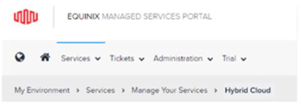
On the dashboard, check the management possibilities in Consumption, Billing and Settings.

Consumption shows a detailed summary of capabilities used in the Equinix Hybrid Cloud product, with charts updated on an hourly basis.

vCPU vs GHz Quotas. By default, the Hybrid Cloud Consumption Portal displays the vCPU quota in GHz format, based on the contracted vCPU pool.
It is possible to view consumption in GHz by Hours, Days, or Months.
- The Hourly chart shows the last 10 days.
- The Daily chart shows the last 90 days.
The Request Analysis button allows the user to quickly open a performance analysis request, if necessary.
CPU Chart (GHz)
In Standard Mode, resources are dedicated exclusively to the customer.
CPU allocation is based on the number of physical hosts required to support the contracted number of vCPUs.
In this model, proportional reservation does not apply (CPU Guarantee = 0%) because the customer has access to 100% of the physical capacity of the allocated hosts—considering only a discount of up to 8% for hypervisor overhead.
Example:
- Ratio: Regular Load (1:8)
- Cluster Size Medium: Host = 84 GHz total capacity
- vCPUs per Host: 320
- vCPU Speed: 0.2625 GHz
- CPU Guarantee: 0%
Total Allocation Calculation:
- 320 vCPUs contracted = 1 host required
- CPU Allocated = 84 GHz Each vCPU has approximately 0.2625 GHz of physical processing capacity (84 ÷ 320).
The CPU chart displays the sum of powered-on (allocated) vCPUs in GHz. Consumption is calculated based on the vCPU speed. Each powered-on VM contributes to the total according to its number of vCPUs. For example: two powered-on VMs with 8 vCPUs each → (8 × 0.2625) + (8 × 0.2625) = 4.19 GHz.
In Flex Mode, the customer contracts a number of vCPUs based on a Ratio (guarantee level) and calculates GHz based on the fixed CPU clock according to the hardware availability of the Flex cluster.
Example:
- Contract: 160 vCPUs
- Ratio: Regular Load (1:8) → 12.5% guarantee
- Flex Host CPU Clock: 2.1 GHz
Total allocation calculation:
- 160 vCPUs × 2.1 GHz = 336 GHz
- This value represents the total allocation limit displayed in the Org VDC chart within Hybrid Cloud.
Performance guarantee:
- With a ratio of 1:8, the environment guarantees 12.5% of this total allocation for the customer.
- Therefore: 336 GHz × 12.5% = 42 GHz guaranteed.
The CPU chart displays the sum of powered-on (allocated) vCPUs in GHz. Consumption is calculated based on the vCPU speed. Each powered-on VM contributes to the total according to its number of vCPUs. For example: two powered-on VMs with 8 vCPUs each → (8 × 2.1) + (8 × 2.1) = 33.6 GHz.
Selecting the Environment / Contract to Manage. If the customer has more than one contract, it is possible to view consumption information for all of them. Simply click on the contract tab and select the one you want to see consumption and billing details for.
Billing dashboard easily and conveniently shows fixed and variable costs of your Hybrid Cloud environment.
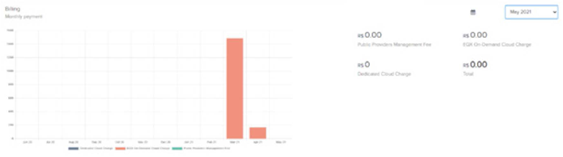
Enter an email address in Settings to receive warnings if variable consumption exceeds the established use threshold.
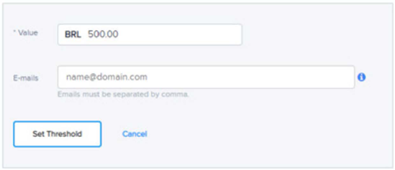
Configuring Consumption Alerts
In the Settings tab, enter an email address to receive alerts when variable consumption exceeds the value you set for usage.