Service Specifications
Equinix Hybrid Cloud offers an essentially hybrid cloud environment with dedicated cloud capabilities (reserved exclusively for the user) and allows the consumption of additional shared computing capabilities, while enabling the management of its multicloud environment in a single portal.
Capability consumption above the baseline established in the agreement may be charged On Demand.
This Hybrid Cloud provides a management portal where you can track your capability consumption, payments, and general product settings. In addition, you have access to the MultiCloud Portal (MCP), which allows you to manage your capabilities across other Cloud Providers (AWS, Azure, and GCP).
Service Modality
Hybrid Cloud is offered in Standard modality.
You can hire dedicated capabilities for this modality, and consume the capabilities on demand when needed. In this mode, you must previously choose the capacity to be hired as a baseline (choosing values for vCPUs, vRAM, vHD and, when applicable, Block Storage Tier1, Tier2, and Tier3).
You have a MCP to integrate and manage your public clouds (Azure, AWS and GCP). When connecting to these providers, you must pay a fee for each virtual machine that will be managed through this MCP.
Replication
The Replication service is the Hybrid Cloud solution for Business Continuity needs. Fully integrated with Hybrid Cloud, it enables asynchronous replication between multi-tenant Hybrid Cloud environments and on-premises VMware environments.
Through the Replication service, you can migrate, protect, perform failover, and reverse failover of vApps and virtual machines. Its unified architecture for disaster recovery and workload migration allows organizations to migrate and protect vApps and virtual machines using Equinix’s managed service or self-service directly through the Hybrid Cloud Portal.
The number of virtual machines available for replication is limited to the contracted amount.
Replication includes:
- Disaster Recovery – strategy for disaster recovery scenarios:
- Migrate
- Protect
- Failover
- Reverse failover
- Migration – planned data copy:
- Migration of multiple VMs/vApps
- Migration as a Service (Easy Migration)
Main use cases:
- Replication of data from on-premises to Hybrid Cloud
- Replication of data from Hybrid Cloud to Hybrid Cloud
- Replication of data from on-premises to multiple Hybrid Clouds
Accessing the Replication Service
To access the Replication service, the customer must select the submenu Availability (“Site”) under the More tab in the Equinix Hybrid Cloud portal.
The customer will see a dashboard displaying:
- Incoming VMs – virtual machines being replicated to the site where the user is logged in.
- Outgoing VMs – virtual machines leaving the current site and replicating to another site.
The dashboard also includes:
- Traffic graph: Apply filters and view data traffic (in GB) transferred during replication.
- Disk usage graph: Shows the amount of disk space (in GB) used at the logged-in site to store the replicated environment.
Additionally, the customer can view a topology summary and the resources required (vCPU, memory, vHD) to accommodate replication. If resources are insufficient, replication will occur, but the VM may not power on during a declared DR event.
Configuring a New Outgoing Replication (New Protection)
On the Replication service home screen, customers can configure Incoming and Outgoing replications. To configure data replication from the logged-in site to a destination site, set up an Outgoing Replication.
Steps:
- Select New Protection in the Outgoing Replications menu.
- Enter the username and password authorized for creating Replication services. Example: If logged into SP3, the customer sees a list of VMs and vApps in SP3 and selects the destination site—either RJ2 or an on-premises site (if available).
- Identify VMs ready for replication in the State (Ready) column.
- Choose the SLA profile (RPO) from the preconfigured options based on requirements.
- Review the selected settings and click Confirm to complete the process.
Configuring a New Outgoing Replication (New Migration)
To create a New Migration, the customer must access the Outgoing Replications menu and click the New Migration icon.
Steps:
- Enter the username and password authorized for creating Replication services.
- Select the destination site, which must be different from the logged-in site, then click Next. Example: If logged into RJ2 and migrating VMs to SP3, indicate the target Virtual Data Center and where to store migrated data. If any selected VM is powered off, the system will alert you. Click Next to continue.
- Configure additional details such as traffic compression and VDC policy. Click Next.
- Review the configuration and click Finish to complete the migration setup.
Configuring a New Incoming Replication
Just like Outgoing Replication, Incoming Replication is configured from the Replication service home screen. To set this up, select New Protection.
Steps:
- Based on the selected source site, indicate the desired VMs and vApps.
- If any selected VMs are powered off, the system will display an alert at the bottom of the screen.
- Specify the target Virtual Data Center (VDC) and the storage policy for the recovered VMs.
- Choose the SLA profile (RPO) from the preconfigured options according to your needs.
- Review the selected settings and complete the process to create a new Incoming Replication.
Viewing Replication Tasks
Replication Tasks are the actions executed during a replication. The customer can view all tasks or filter by running, failed, or successful.
Recovery Plans
Under the Recovery Plans menu, the customer configures a New Recovery Plan, which defines the tasks executed during a recovery—such as the exact failover sequence, wait times between stages, etc.
- At least one replication must exist before a Recovery Plan can be created.
- VMs added later to a vApp that already belongs to a Recovery Plan are automatically included in the plan.
- The customer can test the Recovery Plan without impacting workloads on the source site and can delete test runs afterward.
- After creating the plan, the customer configures the stages to be performed in that plan and may enable notifications when all replications of a stage have completed.
- The customer has all necessary options to manage the plan, such as Edit, Delete, Suspend, Test, Failover, Migrate, Monitor tasks, Clone, and Get reports.
Under the Recovery Plans menu, the customer can also configure a New Recovery Plan. Similar to a Recovery Plan, a Migration Plan enables the migration sync, which will start according to the migration window configured by the customer.
Only Migrations will be shown in the step-by-step flow, not Protection Jobs.
Creating Paired Sites (Peer Sites)
Sites RJ2 and SP3 are paired by default for all customers. On-premises sites can be paired from this screen. Example: If the customer is logged into SP3 (local site), they will see paired sites such as RJ2 (default) and SBXOnPremises (created by the customer).
Events and Notifications
Customers can monitor, enable, and disable replication and RPO events, such as RPO violation timeout.
Required Resources
Under the Required Resources menu, customers can view the amount of resources (vCPUs, vRAM, and vHD) needed for a potential failover. This information is critical because failover may fail or workloads may not power on due to insufficient resources in the target VDC.
Cluster Size
Equinix offers Hybrid Cloud with multiple hardware profiles that customers can select during contracting. Each profile, or cluster size, defines the maximum resource limits for individual virtual machines. For Flex, the cluster size uses the same hardware profile as the Medium option in Standard Mode but operates as a separate resource cluster to support workloads under the Flex model.
Ratios (vCPU per pCPU)
To increase customization options for Equinix Hybrid Cloud, customers can now choose the ratio of vCPUs (virtual processors) derived from each pCPU (physical processor) in their dedicated resource environment. Two ratio configurations are available:
- Regular Load (1:8): The default ratio offered since Equinix Hybrid Cloud service release 2.0.
- Intensive Load (1:4): A new ratio that delivers higher performance per vCPU.
For the Flex Mode, only the Regular Load option is available.
Processing Capacity (GHz per vCPU)
The amount of GHz associated with contracted vCPUs depends on the service mode.
Standard Mode (Dedicated) Processing resources are dedicated exclusively to the customer. This means that all GHz capacity available on the hosts assigned to the environment is fully available to the customer.
The table below shows reference values for calculating the number of vCPUs allocated per host according to the hardware profile of each Cluster Size:
| Mode | Cluster Size | Regular Load | Intensive Load |
|---|---|---|---|
| Standard | Medium | 0.26 GHz | 0.52 GHz |
| Standard | Large | 0.25 GHz | 0.50 GHz |
Flex Mode (Shared Pool) In Flex Mode, processing resources come from a shared pool. The GHz per vCPU contracted represents a minimum guaranteed processing capacity, as shown in the table below. The GHz value defined per vCPU in the table represents the minimum guaranteed reservation ensured for the Customer during periods of high cluster demand. During periods of lower environment utilization, the platform may provide additional GHz above the guaranteed value, depending on available idle capacity.
| Mode | Cluster Size | Regular Load | Intensive Load |
|---|---|---|---|
| Flex | Medium | 0.26 GHz | N/A |
The Product Policy contains more detailed information on this topic. Contact the support team for technical details and suggestions on how to choose the most suitable configuration for your needs.
Enablement
Equinix Brazil is responsible for the initial enablement of the Equinix Hybrid Cloud product, according to the mode you purchase. Enablement includes:
- Dedicated capabilities provisioning
- Access to the Equinix Cloud Portal
During enablement, you will receive access to the MCP that allows initial use. To connect the new Equinix Hybrid Cloud environment to the Internet, or to another user’s environment in the IBX, provisioning activities for other solutions are necessary, which can be purchased separately (e.g. Network Edge, EQX Cloud Exchange, etc.).
Support
Equinix Brazil offers 24x7 support for the Equinix Hybrid Cloud product. The following services may be ordered by opening a ticket with the Equinix Service Desk, by phone or online, at no additional charge:
- Investigate and solve service failures
- Request product information
Support at the operating system or application level is available as an add-on (Premier Support).
Additional support and other services can be requested via the Equinix Service Desk, phone, or portal, and are billed separately as Premier Support Hours under a Non-Recurring Charge (NRC).
Billing
In Hybrid Cloud (standard), users commit to the baseline established in the agreement and On Demand payment of any extra capabilities consumed. Any usage over the baseline (as established in the agreement), using additional dedicated or shared capabilities) will be charged.
Dedicated Computing Capabilities
The baseline is billed by monthly recurring charges (MRC) according to the determined amount of dedicated capabilities in the agreement. If any dedicated capabilities are consumed in addition to the amounts established in the agreement, you are charged on a per-use basis according to the OnDemand price list.
Shared Computing Capabilities
Billing for shared computing resources varies on a per-use and monthly basis, according to the price list for OnDemand capabilities.
OnDemand vCPU and vRAM Consumption
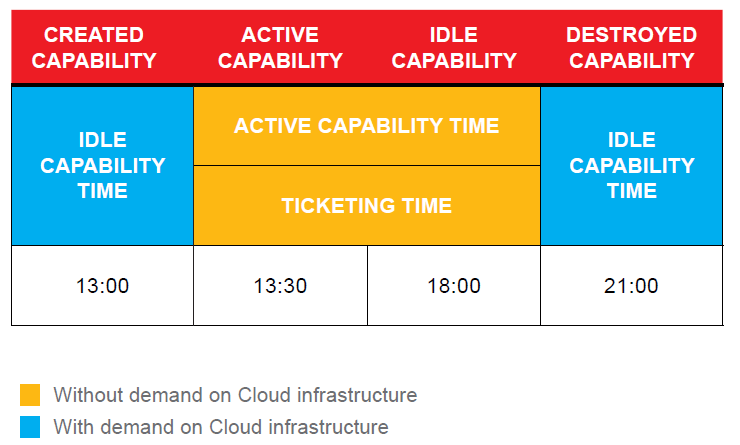
Ticketing for OnDemand vCPU and vRAM computing capabilities over the baseline established in the agreement begins when the virtual machine is turned on, and is interrupted when the virtual machine is turned off. The Start Virtual Machine and Stop Virtual Machine events coincide with the Active Capability and Idle Capability events, defining the consumption of these elements.
For vCPU and vRAM computing capabilities, ticketing time is according to the example in the following chart.
vHD Consumption and Block Storage Tiers I, II and III – OnDemand
For the vHD and Block Storage capabilities consumed over the baseline established in the agreement or in the OnDemand charges, begins when the capability (storage volume) is created, and is interrupted when the capability is destroyed.
In this scenario, the Create Disk and Erase Disk events coincide with the Active Capability and Idle Capability events. For the vHD or Block Storage capabilities, ticketing time considers an entire hour (1 hour) as a unit value, and fractions of an hour will be rounded to the next whole hour for billing purposes.
Billing occurs every 30 days, according to the following formula:
Billing amount = (Rounded Active Capability Time * Active capability charge per hour)
Using the Equinix MultiCloud Portal
Usage of the Equinix Cloud Portal (multicloud) is charged on demand for each virtual machine managed on the portal.
Equinix Hybrid Cloud does not include billing for computing capabilities in public cloud providers. This service can be offered as part of the Cloud Reselling offer.
Service Features
Dedicated Computing Capabilities
Dedicated computing capabilities are available through a pool of capabilities exclusive to the user, free of competition with other users.
Allocation of dedicated computing capabilities is determined by Equinix Brazil such that they are distributed according to the demand and in compliance with the Service Level Agreement (SLA) for the Equinix Hybrid Cloud service.
The specific features of the purchased items are listed in the Equinix Order and complies with the limitations described. The capability pool consists of a processor (vCPU), memory (vRAM) and storage (vHD and Block Storage Tier I, II or III).
Maximum Limits on a Single Virtual Machine
The maximum allocation limits for Processor (vCPU) and Memory (vRAM) for a single virtual machine are linked to the cluster model chosen when contracting the Equinix Hybrid Cloud. These clusters are available in the following options.
| Cluster Size | Maximum vCPU per VM | Maximum vRAM per VM |
|---|---|---|
| Small | 32* vCPUs | 128 GB |
| Medium | 40 vCPUs | 192 GB |
| Large** | 80 vCPUs | 512 GB |
Note:
*Hyper Threading technology is considered in the Cluster Size to deliver vCPUs (16 physical Cores | 16 HT Cores)
** Cluster Size Large can be chosen upon Equinix availability.
The maximum allocation limit for the storage resource (vHD) in a single virtual machine is set at up to 120 GB, since the purpose of this resource is only for use by the Operating System. Other data must be directed to Managed Storage, offered in three different Tiers.
The maximum limit of a single disk inside a virtual machine is 8 TB, and multiple disks can be presented for each virtual machine if so contracted by the user.
Storage Performance Guarantees
To attain the performance levels in the Equinix Hybrid Cloud, users must set up their environment as specified.
| Área vHD | Storage Tier I | Storage Tier II | Storage Tier III | |
|---|---|---|---|---|
| Disk Type | Híbrido (NVMe + SAS) | NVMe | SSD | HDD |
| Indicated for | Operating System, Log files, program installation | Transactional data, low response time, need for IOPS, Reading and writing with smaller blocks, random data | Nontransactional environments, low response time | High response time, backup and archiving area, volume-based storage |
| Maximum volume | 100 GiB for Windows OS 50 GiB for Linux OS | 8 TiB | 8 TiB | 8 TiB |
| Max IOPS/GB | Auto-tier (boot volume) | 4 IOPS per GB | 2 IOPS per GB | 1 IOPS per GB (2700 limit per volume) |
| Latency | 13 ms | 7 ms | 10 ms | > 20 ms |
| Block Size1 | 4 KBps | 64 KBps | 64 KBps | 64 KBps |
| Access profile | 70% read / 30% write | |||
| Boot Volume | Recommended2 | Supported | Supported | Not Supported |
Note:
- The block size must be configured when formatting data disks, disregarding the operating system volume.
- Operating system disks must be created exclusively in the vHD area to maintain guaranteed performance.
Shared Computing Capabilities
Shared capabilities are made available by Equinix Brazil, delivered in a high-availability, secure infrastructure. The instances created in this infrastructure compete for computing capabilities with other users, and the capacities are scaled to a variable workload.
Equinix Hybrid Cloud already comes with shared capabilities enabled for on-demand use. The maximum limits for Processor (vCPU) and Memory (vRAM) allocation for a single virtual machine in the shared environment respect the same limits established above for the Medium Cluster Size. Virtual memory capabilities are allocated by Equinix Brazil so that their distribution is according to the demand in compliance with the Service Level Agreement (SLA) for Equinix Hybrid Cloud.
Operating System Images
Equinix Hybrid Cloud has the following predefined operating system images on the Equinix Cloud Portal for quick provisioning:
- Microsoft Windows Server
- RedHat Enterprise Linux
- SUSE Enterprise Linux
- Ubuntu Server Linux
- CentOS Linux
- Debian Linux
The images are offered in the latest available version of the operating system and in up to 2 previous versions (according to the manufacturer’s official support matrix).
In Equinix Hybrid Cloud, you are responsible for the software licenses used in the virtual machines. You are made aware that software use is subject to vendor terms. Equinix Brazil allows you to employ your licenses in Equinix Hybrid Cloud, or also offers licenses for purchase through Equinix Software Licensing whenever authorized by the software manufacturer.
Note: To enable you to use your software licenses in Equinix Hybrid Cloud, the licenses must be regular and up-to-date. Any failure or damage caused by the licenses brought by you cannot be attributed to Equinix.
Hardware Profiles for Virtual Machines
Equinix Hybrid Cloud allows the contracting of a free combination of vCPUs and vRAM (in addition to vHD and Block Storage capabilities). However, when creating the virtual machines, you must choose between different hardware profiles available (combinations of vCPU and memory), respecting the maximum limits for vCPU and vRAM.
Hardware profiles for virtual machines serve to optimize the configurations according to best practices, and users must adhere to them. Although there is already a reasonable number of combinations, if you have any other specific combination needs, you can request them via a ticket. The feasibility of the request will be analyzed and the new profile can be created.
Equinix Cloud Portal
You are offered a unique view of the capabilities in your different Cloud infrastructures through the Equinix Cloud Portal. The portal provides you with operational management functionalities through management consoles of the dedicated, shared, and public cloud environments.
Consumption Management
You can use the portal to view the amount of vCPU, vRAM, vHD and Block Storage Tier 1, 2 and 3 capabilities contracted; versus the amount of capabilities available, in addition to displaying a consumption history of capabilities in the dedicated, shared and Storage environments.
Financial Management
The Equinix Cloud Portal can track expenses related to the product, where you can observe expenses related to the dedicated, shared, and management environment of public cloud providers. This information is available visually and will allow consumption to be viewed. The information can also be exported to a CSV file for further analysis.
Settings
You can create alerts to be notified if you reach the determined consumption of capabilities over the baseline. You must configure the alerts to the desired value and indicate email addresses to receive the message.
Operational Management
In addition to being able to view the items, you have access to the operational services catalog provided through the Managed Services Portal.
Note: Advanced operations inherent to each Cloud infrastructure that are available in the cloud and provider service portfolio must be performed on the interface (GUI, CLI or API) of the Cloud infrastructure itself. All the features listed in the image above are only available in public clouds approved by the Equinix Brazil team.
Assumptions
Equinix Hybrid Cloud makes the following assumptions:
- Equinix Brazil does not guarantee or provide support for services acquired from a third-party Cloud Service Provider.
- The capabilities contracted by a single user may not be subdivided or shared with other users.
- Additional costs of data transfer or connection to third-party Cloud Service Providers are not included in the Equinix Hybrid Cloud.
- For connection to public cloud providers, Equinix suggests using Equinix Fabric.
- For users in the Standard mode, Equinix guarantees up to 50% of the capacity contracted in its baseline available in the shared environment. Thus, if you desire additional capacity, it will be limited to 50% of the capacity previously hired by the user. After this limit, new requests in the shared environment can be made available or denied according to the capacity available at the time.
- After enablement of Equinix Hybrid Cloud, a complementary solution is required to connect this infrastructure to the Internet or to the user’s environment on the IBX. This solution needs compatibility with BGP.
- Equinix has no obligation, nor legal or material possibility to supervise or, in any way, monitor or control the content or data transmitted or stored by the user. As such, Equinix has no direct or indirect liability for the content and/or data transmitted or stored by the user, especially, but not limited to, with respect to the origin, integrity, accuracy and/or violations of confidentiality and/or intellectual property agreements, or for any broadcasts, including those of an illegal, immoral or unethical nature, that may be conducted by the user. The user undertakes all responsibility for e-commerce and/or e-business operations, thus understood to be sales and purchase transactions in the virtual environment that imply the transfer of confidential information of the user and third parties, such as credit card number, codes and passwords, among others, exempting Equinix from any liability resulting from such transactions.
Scheduled Maintenance
Equinix Brazil performs routine scheduled maintenance on the IBX.
In such situations, user equipment and/or equipment from Equinix Brazil may become unable to transmit and/or receive data for the time required to resolve the situation and the user may be unable to access them.
Such events generate no liability for Equinix Brazil.
Equinix Brazil informs the user about the schedule for performing routine scheduled maintenance 15 (fifteen) days in advance, and at least 48 (forty-eight) hours in advance for imminent situations. Preventive maintenance is scheduled by Equinix Brazil, and users are notified at least 48 (forty-eight) hours in advance. This time is not counted when calculating the aforementioned uptime.
Emergency Maintenance
Equinix Brazil may carry out emergency maintenance procedures at any time.
In such situations, user equipment and/or equipment from Equinix Brazil may become unable to transmit and/or receive data for the time required to resolve the situation and the user may be unable to access them.
During such maintenance, users are entitled to the discounts stated in the Service Level Agreement.
Note:
- During any events of maintenance, user equipment and/or equipment from Equinix Brazil may become unable to transmit and/or receive data for the time required to resolve the situation, and the user may be unable to access them.
- The maximum number of discounts that Equinix Brazil can grant users in a given contractual month is limited to the value of 30 (thirty) days of the amount purchased by the user, regardless of the number of times that the service provided to the user remains inoperative, or the duration of the inoperability during the same contractual month. The discount is calculated based on the monthly fee for the month in which the event took place.
User Responsibilities
You need to provide an email address and phone number for a primary contact and an operational contact, and ensure such information is up to date. Users aren't allowed to:
- Conduct any activity that may interfere with or impair the service of any other user
- Incorporate any of its own components in equipment provided by Equinix Brazil
- Request assistance for technologies that are not supported by the Equinix Brazil support team