Managed Private Storage Block Storage
Block Storage stores structured data by dividing it into fixed-size blocks that are managed and accessed independently. It provides low-latency access and predictable performance, supporting workloads that require consistent throughput and high reliability. Typical applications include databases, virtual machines, and transactional systems.
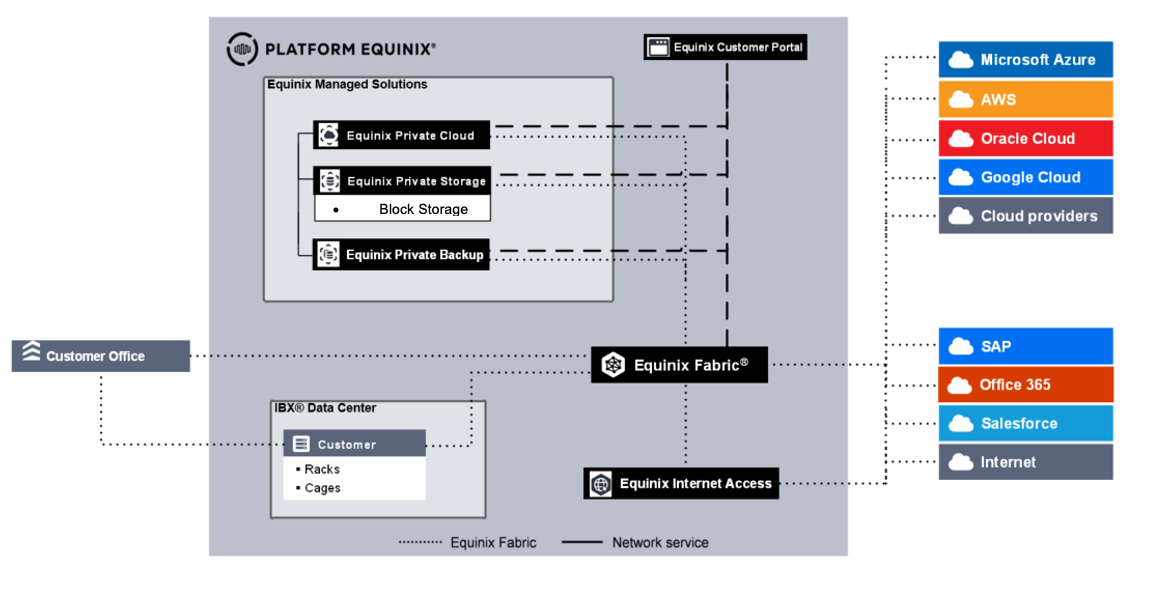
Block Storage Capabilities
- High-performance support for structured data workloads requiring consistent speed and reliability.
- Scalable capacity expansion without performance degradation.
- iSCSI-based connectivity for integration with existing environments and efficient data transfer.
- Snapshot and cloning capabilities for point-in-time recovery and data duplication.
- Data security through encryption and role-based access control (RBAC).
- Data residency controls to maintain storage within defined geographic locations unless configured otherwise.
- Continuous monitoring and proactive maintenance with 24×7 operational support.
Block Storage Use Cases
- Databases requiring high-performance data storage and management, supporting rapid processing and high transaction throughput.
- Virtual machine storage requiring consistent performance, fast boot times, and reliable application operation.
- Transactional workloads with high read and write demands, requiring low latency and dependable throughput.
- Colocation environments connected via cross connects configured in link aggregation groups (LAG) within an Equinix IBX.
- Direct VLAN connectivity to Managed Private Cloud (MPC) environments, with storage presented either in-guest or as a VMware datastore.
Service Demarcation and Enabling Services
Service demarcation defines the boundary between the customer environment and the Equinix-managed environment. MPS is delivered as a Storage as a Service offering in which Equinix provides and operates the platform, including the operational console, servers, and storage components. Licensing and support for the MPS platform are provided by Equinix. Responsibility for client software and internet connectivity used to access or manage the service remains with the customer. For additional details, see Product Policies.
Onboarding
During the MPS onboarding process, the following information is provided:
- The ordered quota
- Service VLANs assigned to the customer for iSCSI connectivity
There is the option to receive:
- Local administrator account with root permissions for each tenant (MPS virtual machine)
- MPS virtual machine management URLs or IP addresses
Performance Targets
| Service Tier | Performance Target IOPS/TB (SLO) | Average Latency (SLO) | Profile | Protocols |
|---|---|---|---|---|
| Block (Performance) | 1024 | 1-2 ms / 3-5 ms | 60% Read / 40% Write; 32 KB Block Size | iSCSI |
| Block (Standard) | 512 | 2-4 ms / 5-7 ms | 60% Read / 40% Write; 32 KB Block Size | iSCSI |
Purchase Units
The MPS service is charged monthly based on baseline values or baseline with overage charge types.
- Baseline - The specific volume of the service, defined in the order, measured in the unit of measure (UoM).
- Overage - The quantity of the service consumed above the contracted baseline volume.
MPS is billed per terabyte, based on the total volume of data written. Access is provided up to the baseline volume ordered. If data usage exceeds the contracted amount, storage access continues without disruption. An overage charge is applied according to the overage price defined in the quote.
| Category | Purchase Unit | UoM | Install Fee | Billing Method | Overage |
|---|---|---|---|---|---|
| MPS Service | Block | TB | No | Baseline | Yes |
Calculation of Overage Values
MPS consumption is measured multiple times per day. Each day, the maximum consumption reading is used for overage calculation. The monthly overage value is calculated as the sum of daily maximum consumption values above baseline divided by the number of days in the billing month.
The number of days in a billing month is defined as the period from two days before the start of the month to two days before the next month. For example, consumption for October is measured from 29 September through 30 October.
For example, if a customer orders 100 TB of Block Storage, the daily maximum consumption is recorded as the following:
| Day of the month | 1 | 2 | 3 | 4 | 5 | 6 | … | 30 | 31 |
|---|---|---|---|---|---|---|---|---|---|
| Usage | 70 TB | 75 TB | 85 TB | 110 TB | 111 TB | 110 TB | … | 98 TB | 98 TB |
The subscribed limit is exceeded on days 4, 5, and 6. After these days, the customer reduced the overall volume, bringing usage back below the subscribed limit.
During the period, the monthly overage would be (10 TB + 11 TB + 10 TB) / 31 days = 1 TB overage.
The overage volume is capped at 25 percent of the committed volume. In this example, the customer can burst up to 125 TB (100 TB baseline + 25 TB burst capacity).
Roles and Responsibilities
RACI defines responsibility roles: Responsible, Accountable, Consulted, and Informed.
Onboarding
Once the MPS order is received by the Equinix fulfillment team, onboarding tasks are started.
| Activity | Equinix | Customer |
|---|---|---|
| Schedule and execute project kickoff meeting | RA | CI |
| Schedule and execute customer onboarding | RA | CI |
| Connectivity (order and setup) | CI | RA |
| Selection of policies for volumes | CI | RA |
| Configure customer tenant including capacity | RA | I |
| Solution documents and user guides | RA | CI |
| Infrastructure licensing and use rights | RA | I |
Acceptance Into Service
After onboarding activities are completed, testing confirms whether the product was delivered successfully and is ready for billing.
| Activity | Equinix | Customer |
|---|---|---|
| Test access to MPS product page on Managed Solutions Portal | CI | RA |
| Create access key and access key password | RA | CI |
| Change initial password | RA | CI |
| Password management and additional users | RA | CI |
Operational
Once the MPS service is active, the following operational activities apply.
| Activity | Equinix | Customer |
|---|---|---|
| Install software and firmware updates and patches for storage infrastructure | RA | I |
| Create storage volumes | RA | CI |
| API management and key management | - | RA |
| Change management and schedule changes | RA | CI |
| Confirm changes to the customer | RA | CI |
| Configure IAM policies for data management and customer isolation | RA | CI |
| Tenant capacity management | I | RA |
| 24x7 platform management (incident/event management) | RA | I |
| Data life cycle management | I | RA |
| Platform capacity management | RA | I |
| Infrastructure life cycle management | RA | I |
| Performance management | RA | CI |
Incident Management
Incident management is included as part of service support. All incidents are handled according to priority. Priority is determined after the issue is reported and assessed by Equinix based on the information provided.
| Priority | Impact/Urgency | Description |
|---|---|---|
| P1 High | Unforeseen unavailability of a service or environment delivered and managed by Equinix in accordance with the service description due to a disruption. The user cannot fulfill obligations towards users and suffers direct demonstrable damage due to the unavailability of this functionality. | The service must be restored immediately. The production environments are unavailable, with platform-wide disruptions. |
| P2 Medium | The service does not offer full functionality or has partial functionality or reduced performance, impacting users. The user suffers direct demonstrable damage due to unavailability of the functionality. The service may be impacted due to limited availability. | The service must be repaired the same working day. The management environment is not available. |
| P3 Low | The service functions with limited availability for one or more users and a workaround is in place. | The moment of repair is determined in consultation with the reporting person. |
This classification does not apply to disruptions caused by user-specific applications, user actions, or dependencies on third parties. Incidents can be submitted in the Customer Portal under Managed Solutions. P1 incidents must be submitted by phone.
Service Requests
Customers can raise a Service Request for configuration changes that cannot be implemented through self-service in the Operational Console or when assistance is required for changes made in the Operational Console. Support is available 24x7x365 for the Managed Private Storage service.
There are two types of Service Requests:
- Included - Service Requests within the scope of the service, with no additional charges.
- Additional - Service Requests outside the scope of the service, with additional charges.
Guidance is available for all service requests that can be executed through self-service. In these cases, Equinix provides procedural instructions and oversees execution by the customer.
| Type of change | Self-service | Request type |
|---|---|---|
| Initial installation and configuration¹ | No | One-time charge |
| Add/Delete capacity | No | Included |
| Add/Delete a service tier | No | Additional |
| Add/Delete Inter-IBX protection | No | Additional |
| Add service in a new IBX² | No | One-time charge |
¹Initial installation and configuration includes setting up the storage environment (size/volume, storage type, tier, protocol, and replication status), enabling connectivity (switching, VLANs, IP assignment, zoning), creating LUNs, applying SAN masking, and granting access to the environment. ²Expansion to a new IBX requires a business case assessment on a site-by-site basis, driven by financial and technical requirements. A feasibility study is required.
Customers may request changes not listed in the table by selecting Change in the Service Request module in the Managed Solutions Portal. Equinix will conduct an impact analysis to determine feasibility, associated costs, and lead time.
Any charges related to service requests are deducted from the Premier Support Plan balance. If the balance is insufficient, charges are invoiced in arrears at the prevailing rate. Changes to baseline capacity, the amount ordered, or any other change affecting the monthly service fee must be initiated through the Sales team.
Reporting
As part of the service, customers have access to monthly service reporting covering the following topics:
- SLA reporting (available via Service Request)
- Capacity
Service Levels
The Service Level Agreement (SLA) defines the measurable performance levels for the MPS service and specifies the remedies available if these levels are not met. The service credits described in this section are the sole and exclusive remedy for failure to meet the stated thresholds.
The SLA for support applies to incident registration and resolution.
| Priority | Response time¹ | Resolution time² | Execution of work | SLA³ |
|---|---|---|---|---|
| P1 | < 30 min | < 4 hours | 24x7 | 95% |
| P2 | < 60 min | < 24 hours | 24x7 | 95% |
| P3 | < 120 min | < 5 days | 24x7 | 95% |
¹ Response time is measured from the moment a trouble ticket is submitted until a formal response is sent by an Equinix Managed Solutions specialist. ² Resolution time is measured from case registration until the ticket is closed, cancelled in the ITSM tool, or handed over to IBX Support. ³ SLA applies to response time. Specific SLA terms are defined in the product policy.
Availability
The MPS service is considered Unavailable when the customer cannot access the storage environment due to Equinix-caused reasons. The SLA applies only to the storage environment; unavailability caused by connection issues is not included.
| Availability Service Level | Description |
|---|---|
| 99.95%+ | Achieved when total monthly unavailability of the storage service is less than 22 minutes. |
| Service option | Availability |
|---|---|
| Managed Private Storage – Block | 99.95% |