Managed Private Cloud Core
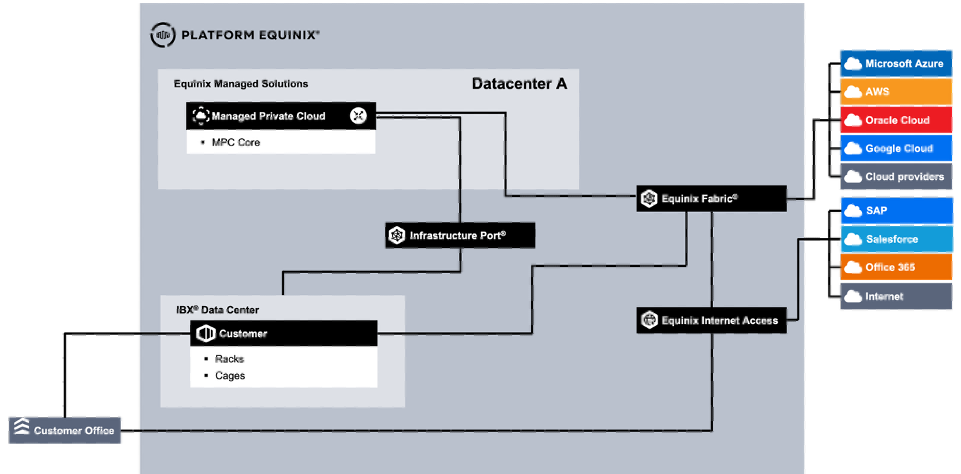
MPC Core is a dedicated, VMware Cloud Foundation (VCF)-based option for customers who need full-stack control within a managed environment. MPC Core provides a dedicated infrastructure with compute, storage, and network resources in a dedicated Secure Cabinet Express in an Equinix datacenter.
The MPC Core service is based on and aligned with the VMware Cloud Foundation architectural blueprints. Connectivity is supported for Layer-2 and Layer-3 networks through Equinix Fabric or direct connections using Equinix Metro, Campus, and/or Cross Connect. Equinix manages the full stack, including VCF, while customers configure their infrastructure within the boundaries of a VCF deployment. Customers can choose to include the VCF license in the service or use the BYOL option from Broadcom.
MPC Core is available in selected datacenters globally. When procured in different regions (AMER, EMEA, APAC), an independent implementation is delivered for each region. When multiple implementations are delivered within the same region, Active Directory and DNS can be shared between those implementations.
Related content: Hosted Private Cloud
Getting Access
For different use cases, access to MPC Core is required:
- First-time access during delivery to set up the MPC Core Service
- Platform access for management
- Contingency access when normal user access is unavailable
First-time Access
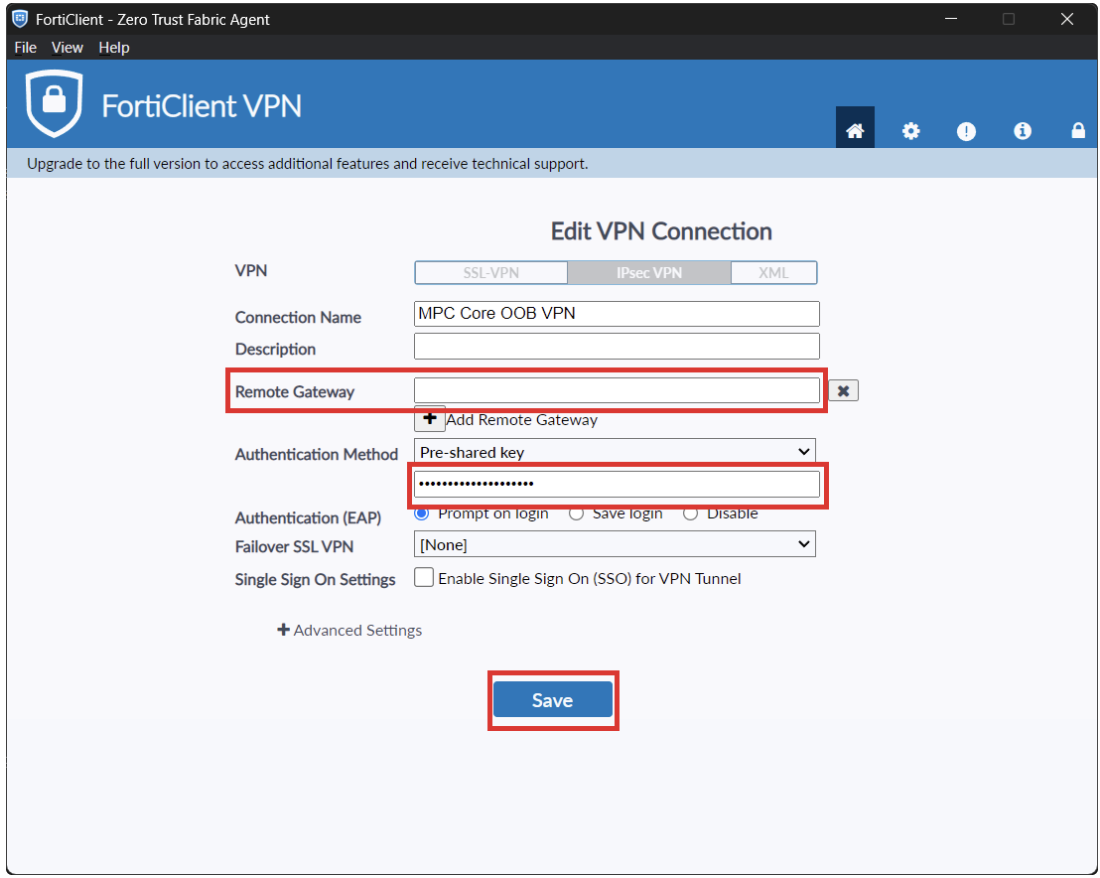
To get first-time access to MPC Core, an IPSec VPN solution is available. Using this VPN, the customer can configure the connectivity required to manage the environment. The installation, configuration, and credentials for the VPN solution are provided to the customer during fulfillment.
Platform Access
The following portals and services are available for the customer to manage MPC Core.
| Portal | Purpose |
|---|---|
| VCF Operations | VCF management and operations |
| VCF Identity Broker | Central authentication |
| VCF Ops for Logs | VCF platform logging |
| vCenter | VM management |
| NSX Manager | Software-defined networking |
| HCX Manager | Migration tooling |
| ESX Hypervisor | VM console access |
During fulfillment, the IP addresses and FQDNs of the MPC Core portals are shared with the customer for environment setup. To access the portals, update the firewall configuration to allow the following:
| Role | Direction | Purpose | Allowed services |
|---|---|---|---|
| DNS | Inbound | DNS name resolution from the customer to MPC DNS servers | DNS (TCP, UDP/53), ping |
| DNS | Outbound | DNS name resolution from MPC to customer DNS servers | DNS (TCP, UDP/53), ping |
| NTP | Inbound | Network time synchronization from the customer to MPC time servers | NTP (TCP, UDP/123), ping |
| VCF Operations | Inbound | Customer access to the VCF Operations portal | HTTP (TCP/80), HTTPS (TCP/443), ping |
| VCF Identity Broker | Inbound | Customer access to the Identity Broker portal | HTTPS (TCP/443), ping |
| VCF Identity Broker | Outbound | Identity Broker access to customer LDAP | TCP/636, TCP/3269, ping |
| VCF Ops for Logs | Inbound | Customer access to the VCF Ops for Logs portal | HTTPS (TCP/443), ping |
| vCenter | Inbound | Customer access to the vCenter portal | HTTP (TCP/80), HTTPS (TCP/443), ping |
| NSX Manager | Inbound | Customer access to the NSX Manager portal | HTTPS (TCP/443), ping |
| HCX Manager | Inbound | Customer access to the HCX Manager portal | HTTPS (TCP/443), ping |
| ESX | Inbound | Customer access to the ESX hypervisor for VM console access | HTTPS (TCP/443), ping |
Configuring Portal Access
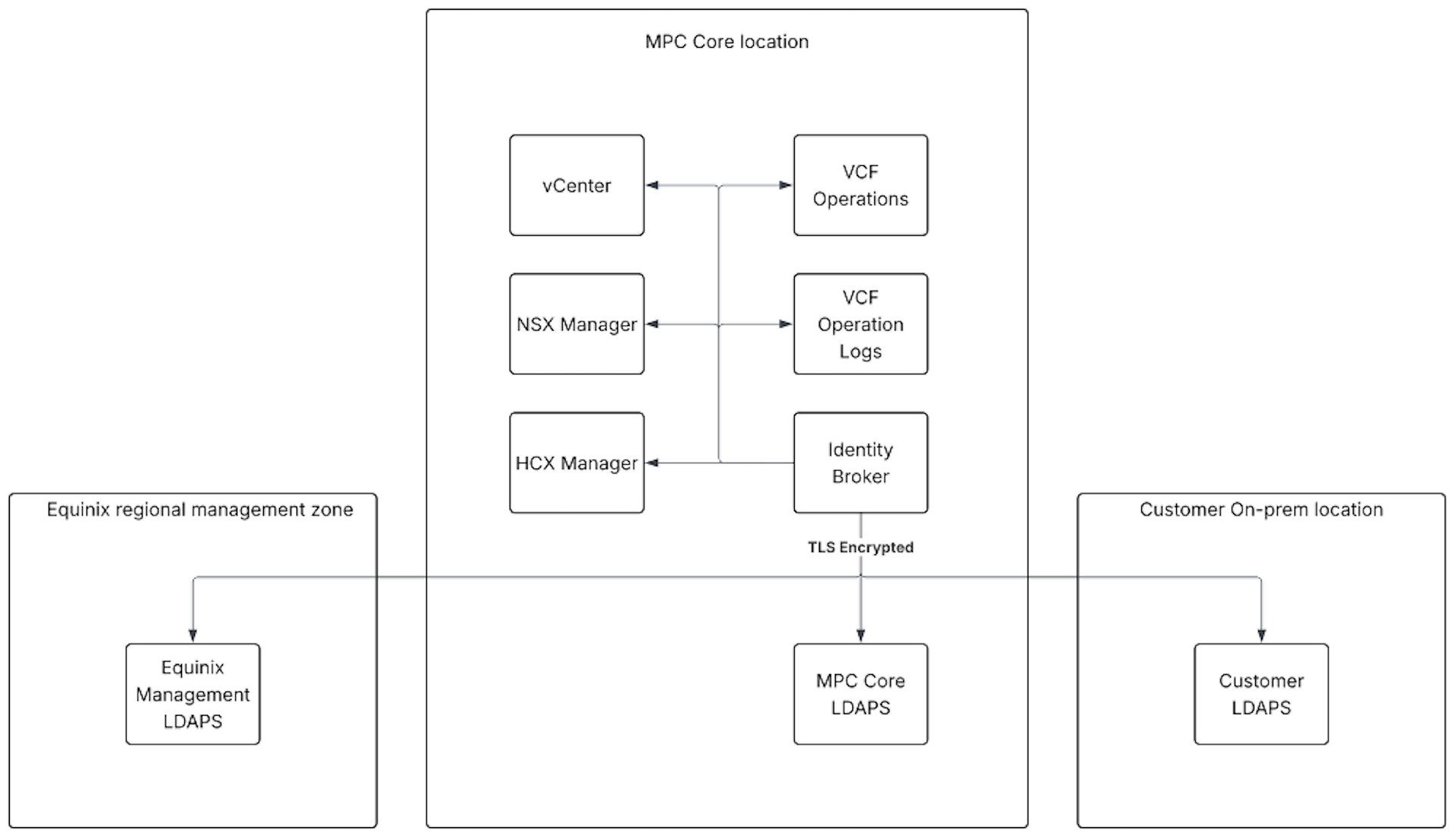
To grant users from the customer's organization access to the MPC Core environment, it is important to understand the available Identity and Access Management (IAM) options and limitations. Users are managed in the customer's directory service, which is connected to the MPC Core Identity Broker through LDAPS. The Identity Broker is the VCF component that uses customer groups to grant access to the MPC Core environment based on predefined roles. Authentication for VCF components such as vCenter and VCF Operations is handled through the Identity Broker.
The customer must define groups in the directory service. These groups are imported into the Identity Broker and used for authentication and authorization.
Identity Broker
The Identity Broker is the VMware VCF component that manages single sign-on (SSO) across the platform. The Identity Broker provides access to the following services:
- NSX Manager
- VCF Operations
- vCenter
- VCF Ops for Logs
- HCX Manager
Access Management Protocol
The supported protocol for identity and access management is LDAPS. Customers can connect their own identity provider (IdP) using LDAPS. To use LDAPS, configure DNS forwarding. Deployment procedures are provided during order fulfillment.
Setting Up Users, Groups, Roles, and Permissions
During fulfillment, customer groups are assigned to MPC Core roles. Customers must provide groups from their own directory service. The fulfillment team configures the roles and groups in the MPC Core environment.
Changes to permissions or group assignments can be requested by submitting a service request. Customers are advised to:
-
Use a unique name for each group assigned to an MPC role. At a minimum, provide groups for the highest-access role for each VCF component. Otherwise, the customer cannot manage that component.
- For example: VCF Operator, vCenter Admin, NSX Admin
-
For each VCF component (for example, vCenter or NSX), do not assign a user to multiple groups for the same component.
- For example: Do not assign a single user to both the "vCenter Admin" and "vCenter ReadOnly" groups. vCenter uses a least-privilege model, so the lowest permission level applies.
| MPC Core Role(s) | Component | Example Customer Group(s) | Status | Purpose |
|---|---|---|---|---|
| Customer_VCF_Operator | VCF Operations | ADM_VCF_Operator | Required | Role that allows customers to manage the VCF platform with Operator permissions |
| Customer_VCF_ReadOnly | VCF Operations | N/A | Optional | Role that allows customers to manage the VCF platform with ReadOnly permissions |
| Customer_vCenter_Admin | vCenter | ADM_vCenter_Admin | Required | Role that allows customers to manage vCenter with limited Admin permissions |
| Customer_vCenter_Operator | vCenter | N/A | Optional | Role that allows customers to manage vCenter with Operator permissions |
| Customer_vCenter_User | vCenter | N/A | Optional | Role that allows customers to manage vCenter with User permissions |
| Customer_vCenter_ReadOnly | vCenter | ADM_vCenter_Monitor | Optional | Role that allows customers to manage vCenter with ReadOnly permissions |
| Customer_vCenter_Backup-Admin | vCenter | ADM_vCenter_Backup | Required if customer backup integration is needed | Role for customer service accounts that perform backups for customer workloads running on the VCF platform |
| Customer_vCenter_Replication-Admin | vCenter | N/A | Required if customer replication integration is needed | Role for customer service accounts that perform replication for customer workloads running on the VCF platform |
| Customer_HCX_Tenant | HCX (Migration) | ADM_HCX_Tenant | Required if HCX is needed | Role that allows customers to manage HCX, excluding network profile management |
| Customer_NSX_Admin | NSX | ADM_NSX_Admin | Required | Role that allows customers to manage NSX with limited Admin permissions |
| Customer_NSX_Operator | NSX | N/A | Optional | Role that allows customers to manage NSX with Operator permissions |
| Customer_NSX_ReadOnly | NSX | N/A | Optional | Role that allows customers to manage NSX with ReadOnly permissions |
Configuring LDAP
Equinix configures LDAPS on the Identity Broker as part of the initial MPC Core deployment process. To establish a secure LDAPS connection, MPC Core must access the customer identity provider (IdP) by using its DNS name and validating the associated certificates. DNS name resolution must be configured in both directions between MPC Core and the customer environment.
The following steps are required to connect MPC Core to the customer's IdP.
Firewall Rules and DNS Forwarding
The customer must enable the required firewall rules in the customer environment where Equinix provides the MPC Core source IP addresses.
Customer DNS and LDAP Servers
The customer must provide the IP addresses and FQDNs of the following systems:
- Customer DNS servers
- Customer LDAP servers
- Customer Active Directory domain controllers, where applicable
CA Certificate
The customer must provide the CA certificate that signed the certificates used by the LDAP servers. This certificate is typically a root CA certificate and does not include a private key. The certificate must be provided in PEM format and include the BEGIN CERTIFICATE and END CERTIFICATE lines.
LDAP Parameters
The customer must provide the following LDAP parameters.
| Parameter | Value |
|---|---|
| Domain FQDN | customer.com |
| Base DN | DC=customer, DC=com |
| Bind user name | CN=<LDAP Service Account>, OU=<Active Directory OU>, OU=<Active Directory OU>, DC=<Customer AD Name>, DC=<Customer AD TLD> Example: CN=ldap-sa, OU=Service Accounts, OU=Groups, DC=customer, DC=com |
| Bind user password | <Password via secure media> |
Access to the VCF Portals
MPC Core provides direct customer access to VCF portals. This access requires routing between the MPC Core environment and the customer network. After connectivity is established, customers can access the VCF portals through this connection.
Service Access Overview
The service runs on a dedicated VMware-based platform that includes components such as vCenter and NSX. All platform and service components reside in segmented management subnets. Because the platform uses hostnames across components, customers must configure DNS resolution and establish certificate trust to access platform services and portals.
DNS Resolution
Customers must configure DNS forwarding so that internal DNS resolvers can reach the MPC Core DNS servers. To configure DNS resolution:
- Accept the routes advertised by MPC Core so that customer DNS servers can reach the MPC Core DNS servers.
- Configure a conditional forwarder on the customer DNS servers for the MPC Core DNS zones.
- Create a reverse DNS zone on the customer DNS servers for each network advertised by MPC Core.
Certificate Trust
MPC Core uses a Certificate Authority (CA). This ensures that all MPC Core components, such as vCenter and NSX Manager, use certificates that are issued and renewed by a central server. As part of the managed service, Equinix performs certificate renewal.
To ensure that MPC Core certificates are trusted, customers must add the MPC Core root CA certificate to their internal systems. This prevents certificate warning messages from appearing in customer browsers. All MPC Core certificates use the following naming standard: xxx.mpc-core.com
Adding the MPC Core Root CA Certificate
Customers can generally add the MPC Core root CA certificate to their devices in one of the following ways:
-
Distribute the Root CA Certificate Through Device Management
- In most environments, tools such as Microsoft Active Directory Group Policy are used to distribute trusted root certificates. Device management solutions from other vendors may provide similar functionality.
-
Install the Certificate Manually on Each Device
-
Import the CA chain into customers' trust stores
- Import the Root CA certificate and any intermediate CA certificates provided by Equinix in .cer or .crt format.
- Import the certificates into:
- OS trust store (Windows: Local Computer → Trusted Root/Intermediate; Linux: system trust store as applicable; macOS: System Keychain).
- Browser trust (Chrome/Edge/Firefox inherit OS trust on most platforms; if your policy isolates browser trust, import there as well).
- Non-browser clients (automation tools, SDKs, PowerShell modules, API clients) if they maintain separate trust stores.
-
CRL and OCSP Reachability
- If certificate revocation checking is enforced, ensure your systems can reach the CRL/OCSP endpoints specified in the certificates. If those are not reachable from your network, configure your policy accordingly or contact Equinix Support to request offline CRL files.
-
Protocol Policy
- Ensure that the customer security baseline allows TLS 1.2 or higher and common modern cipher suites.
-
Outcome
Browsers and clients will trust the platform endpoints (e.g., vCenter, NSX Manager) without warnings, enabling secure access.
Contingency Access
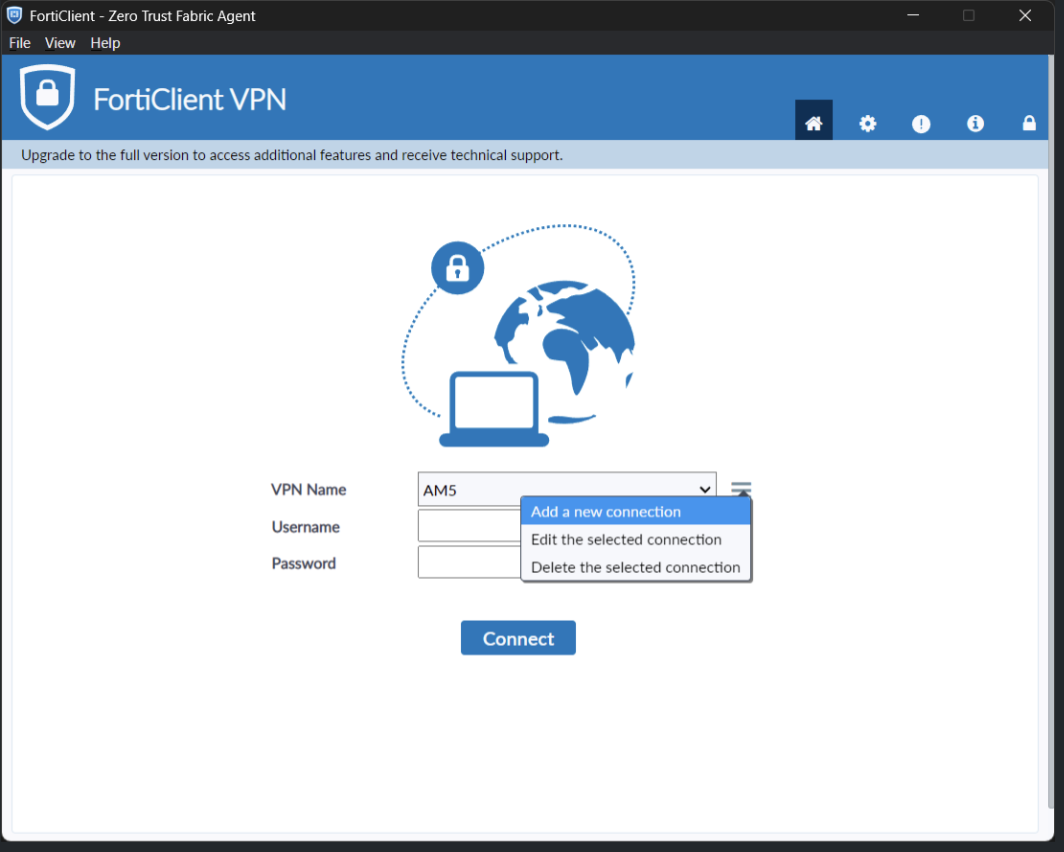
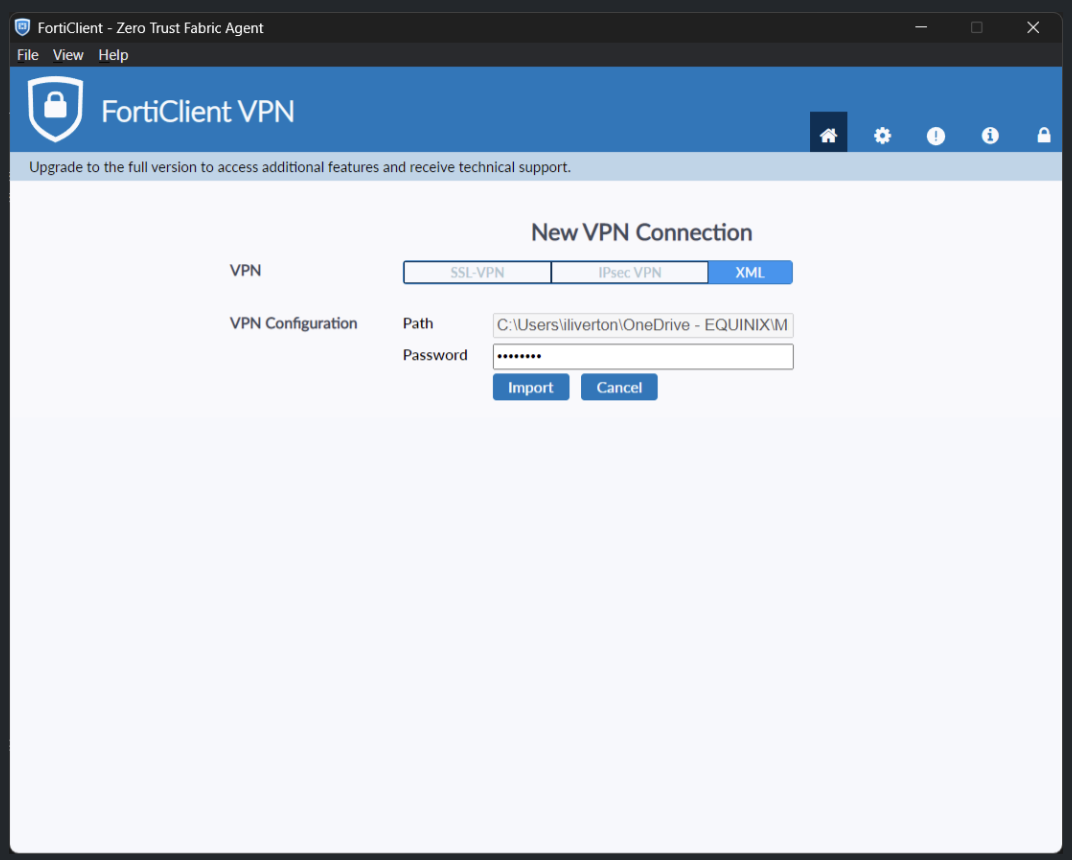
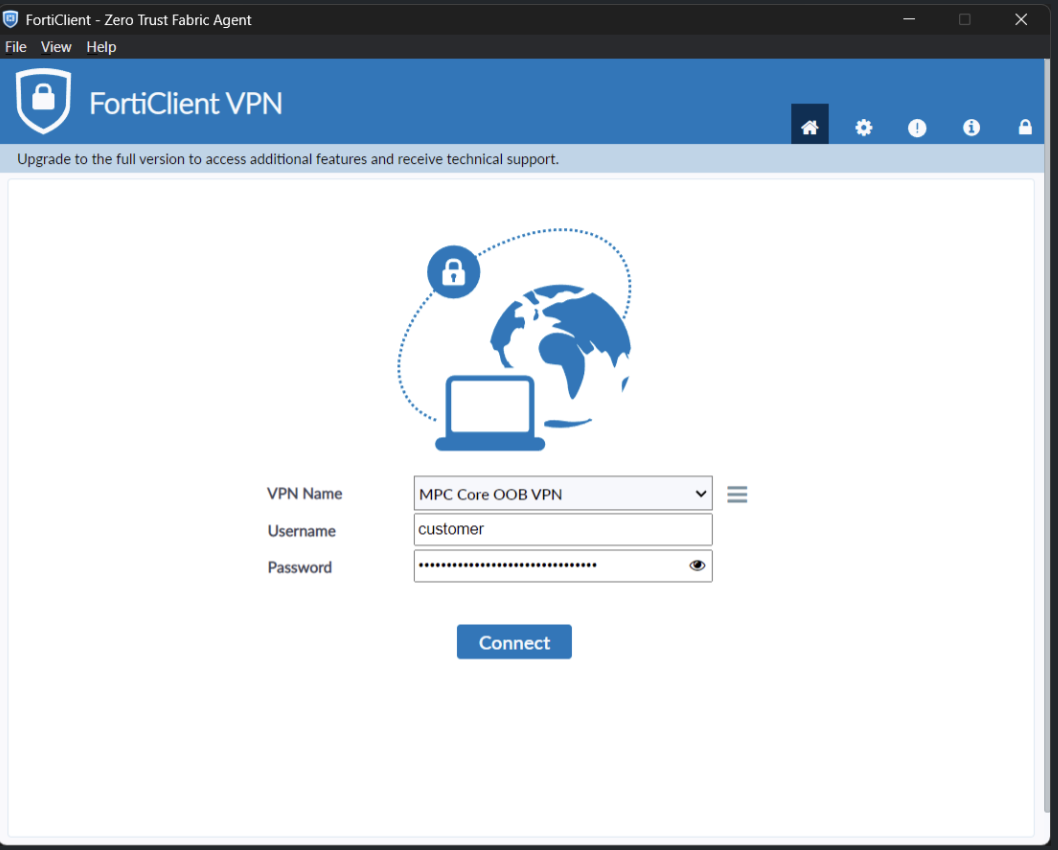
When normal access to MPC Core is unavailable, customers can use a contingency VPN solution to access the environment. Customers must download and install the VPN software and configure it for MPC Core access. To use this service, customers must provide a whitelisted IP range.
External Connectivity
MPC Core can connect to the customer environment through Cross Connect, Metro Connect, or Fiber Connect using single-mode fiber at 1 Gbps, 10 Gbps, or 25 Gbps. These connections can be configured as a single, non-redundant connection. For a redundant configuration, LACP is required.
Equinix Fabric connectivity is available over single-mode fiber at 1 Gbps or 10 Gbps. Fabric can be configured in a single or redundant configuration by using a single virtual circuit (VC) or two virtual circuits across different ports.
The following table shows the available connectivity options and the number of available ports.
| Product | Supported bandwidth | Type | Ports available |
|---|---|---|---|
| Cross Connect, Metro Connect, Fiber Connect | 1 Gbps | Single-mode fiber | 4 |
| Cross Connect, Metro Connect, Fiber Connect | 10/25 Gbps | Single-mode fiber | 2 |
| Fabric | 10 Gbps | Single-mode fiber | 4 |
External connections (VLANs) are terminated on the Equinix-provided NSX Edge by default. Alternatively, customers can use their own virtual appliance to terminate external connections. This configuration can be applied after service delivery. If Edges are not required, customers can remove them through self-service in the VCF portal.
VLAN Range
For Layer 2 service connectivity, 64 consecutive VLANs in the range 2000-4000 are reserved for external connections. These VLANs support Layer 2 connectivity services such as Metro Connect and Cross Connect and allow for future expansion. If the customer does not specify a starting VLAN range, Equinix assigns VLANs 2000-2063. This choice is final and cannot be changed later. A VLAN is configured on only one external connection to prevent Layer 2 loops.
IP Range
For Equinix management tooling, customers must provide a /18 IP range so that services can be routed correctly. This standard allocation:
- Prevents overlap between the service deployment and the customer's IP address plan.
- Allows direct access to services without NAT, including vCenter, NSX Manager, template uploads, IdP integrations, and other integrations.
- Allows the service environment to grow without IP address constraints.
If the customer does not specify an IP range, Equinix selects an IP range from RFC1918 172.16. This choice is final and cannot be changed later.
Application Integration
MPC Core supports integration with customer applications, such as backup and disaster recovery tools. To maintain service availability, the following integration methods are not supported:
- Root access to hypervisor.
- Applications that require the installation of customer-provided software on the hypervisor.
MPC Core Blueprints
The MPC Core design is based on the VMware VCF blueprint VCF Fleet in a Single Site with minimal footprint, with HA enabled at the management component level (clustered implementations). VCF management components and customer resources run in a single cluster. This blueprint provides a management domain containing one cluster with a resource pool for management components and a resource pool for customer resources.
The management domain is additionally equipped with VCF Operations HCX to support migration to the MPC Core platform. The management domain is controlled by Equinix. The resource pool contains customer resources, and the available capacity depends on the installed management components, the number of hosts in the cluster, and the host type.
Storage is provided by vSAN. For connectivity, a customer can use NSX and/or install a self-managed routing appliance. A customer may also use the Managed Firewall service, which is an Equinix-managed firewall offering that must be ordered separately (Option Connectivity Managed Firewall).
Fleet
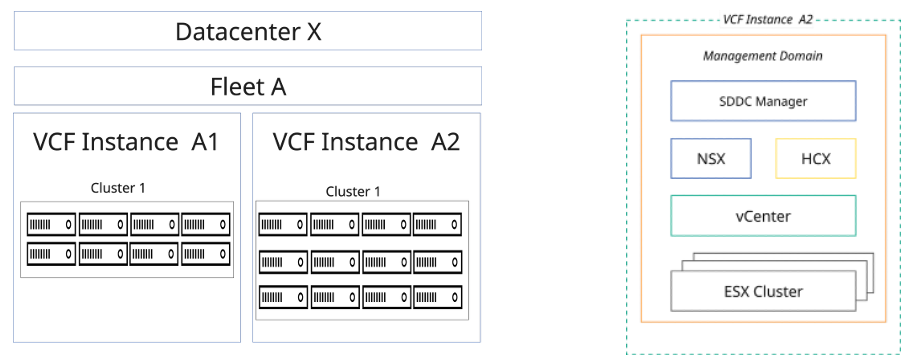
A fleet is an architectural construct that groups multiple VCF instances to support centralized management and self-service operations. The first MPC Core instance in a datacenter is a VCF fleet containing a single VCF instance. This design supports up to 5 clusters, 100 hosts, or 1000 VMs by default. When additional scaling is required, some management components must be increased in size, and this capacity is deducted from the customer resource pool.
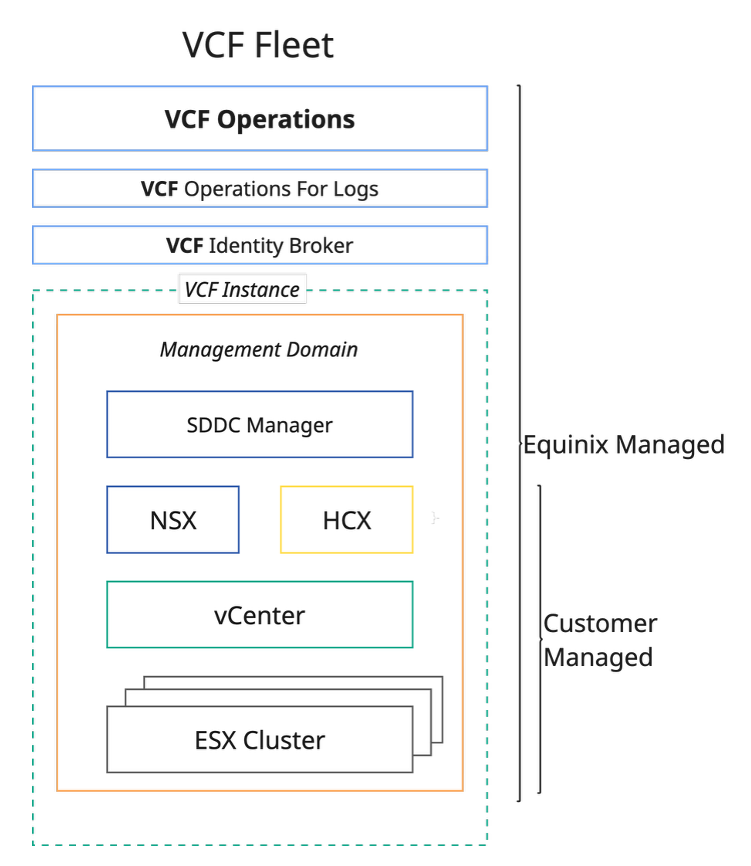
The installed software included in the MPC Core VCF Fleet in a Single Site is:
- VCF Installer
- VCF Fleet Management
- VCF Operations
- VCF Operations Cloud Proxy
- vCenter
- NSX Managers
- NSX Edges
- VCF Operations for Logs
- VCF Identity Broker
- VCF Operations HCX
- Core Management Infrastructure (Active Directory Domain Services, DNS, Certificate Authority, NTP Monitoring, Jump Host)
MPC Core Cabinet
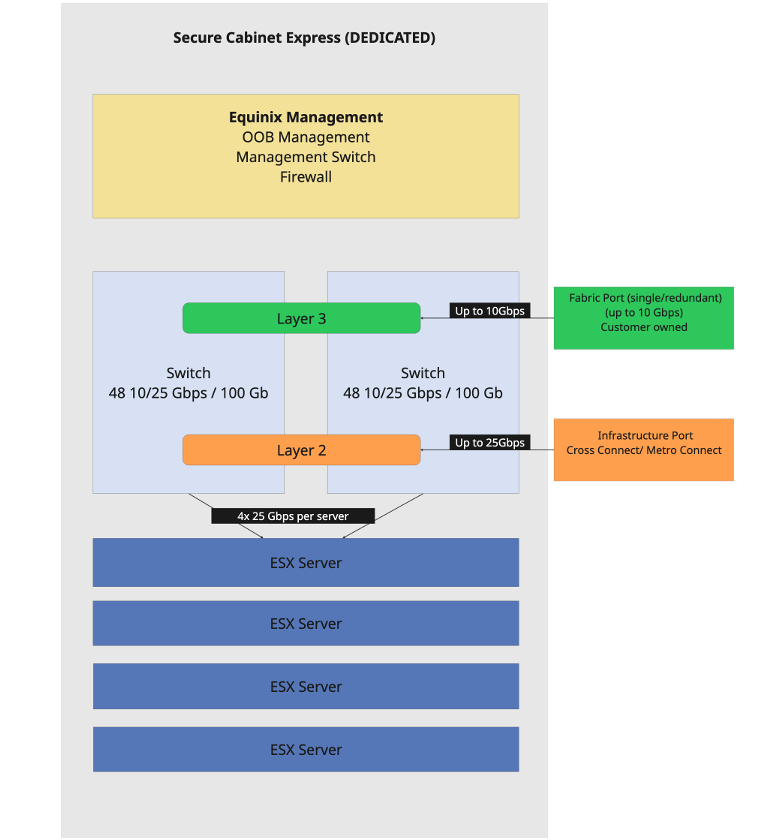
MPC Core is delivered from an Equinix datacenter in a dedicated Secure Cabinet Express. Depending on the size of the cluster, a cluster can span multiple cabinets. The cabinet and power are included in the host price. The cabinet and access are managed by Equinix and are not available for customer equipment. The maximum number of hosts per cabinet depends on power availability and on the number and power consumption of the servers.
MPC Core infrastructure
For management of MPC Core, the first cabinet is equipped with management firewalls, out‑of‑band (OOB) management capabilities, and management switches. Every cabinet includes two redundant switches with 2×48 25 Gbps ports for external connectivity and server connectivity. Each server uses two ports from each switch for redundancy. The switches are managed by Equinix. When two cabinets are deployed, the switches are redundantly interconnected between the cabinets, providing 400 Gbps of bandwidth.
MPC Core Cluster
- Cluster - An MPC Core environment includes a cluster configuration of at least seven hosts, in which six hosts are available for use and one host is reserved for maintenance and high availability (N + 1 principle).
- Host - MPC Core provides a catalog of host types based on CPU, cores, RAM, and storage.
| Host | Host Type | Billing Type | Description |
|---|---|---|---|
| AHL-16L05V4#4 | Generic Host | Baseline | 16C, 512GB RAM, 4*3.84TB NVME |
| AHL-16L05V6#4 | Generic Host | Baseline | 16C, 512GB RAM, 6*3.84TB NVME |
| AHL-32L05V8#4 | Generic Host | Baseline | 32C, 512GB RAM, 8*3.84TB NVME |
| AHL-32L05V6#8 | Generic Host | Baseline | 32C, 512GB RAM, 6*7.68TB NVME |
| AHL-32L05V8#8 | Generic Host | Baseline | 32C, 512GB RAM, 8*7.68TB NVME |
| AHL-32L05V6#15 | Generic Host | Baseline | 32C, 512GB RAM, 6*3.68TB NVME |
| AHL-32L10V8#4 | Generic Host | Baseline | 32C, 1024GB RAM, 4*15.36TB NVME |
| AHL-32L10V6#8 | Generic Host | Baseline | 32C, 1024GB RAM, 6*7.68TB NVME |
| AHL-32L10V8#8 | Generic Host | Baseline | 32C, 1024GB RAM, 8*7.68TB NVME |
| AHL-32L10V6#15 | Generic Host | Baseline | 32C, 1024GB RAM, 6*15.36TB NVME |
| AHL-64L10V8#8 | Generic Host | Baseline | 64C, 1024GB RAM, 8*7.68TB NVME |
| AHL-64L10V6#15 | Generic Host | Baseline | 64C, 1024GB RAM, 6*15.36TB NVME |
| AHL-64L20V8#8 | Generic Host | Baseline | 64C, 2048GB RAM, 8*7.68TB NVME |
| AHL-64L20V6#15 | Generic Host | Baseline | 64C, 2048GB RAM, 6*15.36TB NVME |
Note: The cluster hosts are committed for the full contracting period. Every MPC Core cluster must use hosts of the same type. MPC Core limits of the platform are defined at the VCF solution level.
Cluster Sizing
Cluster sizing should be based on the required compute capacity and availability. A cluster consists of net consumable capacity in the number of hosts (N) and includes spare capacity for availability, recovery, and maintenance. The spare capacity required depends on the cluster size.
- Minimal cluster size is 7 hosts (N+1).
- Cluster sizes above 15 hosts require a second spare host (N+2).
Cluster Sizes and Net Capacity
Capacity for spare servers is reserved to ensure availability. Spare nodes cannot be used while all active nodes remain operational, and the capacity they provide is not included in the calculated available capacity. The overview below describes example cluster sizes, including minimum and maximum sizes, and the associated usable net capacity expressed in CPU cores and GB RAM. Vendor‑specified overhead must be subtracted from the capacity of the first cluster. The advised sizing is based on vendor recommendations:
-
Compute
- N = N+1
- Overhead for hypervisor
- Maximum 80% average use of CPU and memory
-
Storage
- Overhead for vSAN rebuild and operations reserve
| MPC Core Cluster Size | Hypervisor Server Model | Spare Servers | Usable Capacity | Advised Capacity |
|---|---|---|---|---|
| 7 (6+1) minimum | 16C, 512 GBRAM | 1 | 42 CPU Cores 1350 GBRAM | 39 CPU Cores 1220 GBRAM |
| 32C, 512 GBRAM | 1 | 90 CPU Cores 1350 GBRAM | 77 CPU Cores 1220 GBRAM | |
| 32C, 1024 GBRAM | 1 | 90 CPU Cores 2850 GBRAM | 77 CPU Cores 2450 GBRAM | |
| 64C, 1024 GBRAM | 1 | 180 CPU Cores 2850 GBRAM | 154 CPU Cores 2450 GBRAM | |
| 64C, 2048 GBRAM | 1 | 180 CPU Cores 5700 GBRAM | 154 CPU Cores 4910 GBRAM | |
| 14 (13+1) | 16C, 512 GBRAM | 1 | 182 CPU Cores 5850 GBRAM | 167 CPU Cores 5320 GBRAM |
| 32C, 512 GBRAM | 1 | 390 CPU Cores 5850 GBRAM | 333 CPU Cores 5320 GBRAM | |
| 32C, 1024 GBRAM | 1 | 390 CPU Cores 12350 GBRAM | 333 CPU Cores 10640 GBRAM | |
| 64C, 1024 GBRAM | 1 | 780 CPU Cores 12350 GBRAM | 666 CPU Cores 10640 GBRAM | |
| 64C, 2048 GBRAM | 1 | 780 CPU Cores 24700 GBRAM | 666 CPU Cores 22930 GBRAM | |
| 16 (14+2) | 16C, 512 GBRAM | 2 | 196 CPU Cores 6300 GBRAM | 180 CPU Cores 5730 GBRAM |
| 32C, 512 GBRAM | 2 | 420 CPU Cores 6300 GBRAM | 359 CPU Cores 5730 GBRAM | |
| 32C, 1024 GBRAM | 2 | 420 CPU Cores 13300 GBRAM | 359 CPU Cores 11460 GBRAM | |
| 64C, 1024 GBRAM | 2 | 840 CPU Cores 13300 GBRAM | 717 CPU Cores 11460 GBRAM | |
| 64C, 2048 GBRAM | 2 | 840 CPU Cores 26600 GBRAM | 717 CPU Cores 22930 GBRAM |
Note: The MPC Core management stack and VCF overhead (hypervisor, vSAN, NSX) are deducted from available capacity. Sizing should target a maximum of 80% utilization to avoid future growth limitations.
MPC Core Storage
In MPC Core, storage is included in the host and based on vSAN technology. The raw capacity of the cluster is available to the customer. Data redundancy policies depend on the number of hosts in the cluster. Vendor‑specified overhead must be deducted from the cluster capacity. Customers can select their preferred RAID configuration. vSAN is configured with encryption at rest and encryption in transit. Customers are responsible for ensuring that enough space is available for maintenance operations.
The following table lists the guaranteed capacity based on six disks in each server. The expected capacity can be up to a factor of 1.2 higher, depending on generic VM data characteristics, compressibility, and data that is not customer‑encrypted, according to platform averages and vendor‑recommended policies.
| Servers in Cluster | Capacity with Disk Size in TB (3.84) | Capacity with Disk Size in TB (7.68) | Protection |
|---|---|---|---|
| 4 | 24.6 | 53.43 | RAID-5 (Single Parity / 2+1 Scheme / 50% RAID overhead) |
| 5 | 34.09 | 73.47 | RAID-5 (Single Parity / 2+1 Scheme / 50% RAID overhead) |
| 6 | 52.29 | 112.19 | RAID-5 (Single Parity / 4+1 Scheme / 25% RAID overhead) |
| 7 | 53.06 | 113.53 | RAID-6 (Dual Parity / 4+2 Scheme / 50% RAID overhead) |
| 8 | 62.55 | 133.56 | RAID-6 (Dual Parity / 4+2 Scheme / 50% RAID overhead) |
| 9 | 72.03 | 153.59 | RAID-6 (Dual Parity / 4+2 Scheme / 50% RAID overhead) |
| 10 | 81.51 | 173.62 | RAID-6 (Dual Parity / 4+2 Scheme / 50% RAID overhead) |
| 11 | 90.99 | 193.65 | RAID-6 (Dual Parity / 4+2 Scheme / 50% RAID overhead) |
| 12 | 100.47 | 213.68 | RAID-6 (Dual Parity / 4+2 Scheme / 50% RAID overhead) |
| 13 | 109.95 | 233.71 | RAID-6 (Dual Parity / 4+2 Scheme / 50% RAID overhead) |
| 14 | 119.43 | 253.74 | RAID-6 (Dual Parity / 4+2 Scheme / 50% RAID overhead) |
| 15 | 128.91 | 273.77 | RAID-6 (Dual Parity / 4+2 Scheme / 50% RAID overhead) |
VMware Licensing
MPC Core supports the use of customer‑owned VCF licensing from Broadcom/VMware or licenses provided by Equinix. Bring‑Your‑Own‑License (BYOL) usage is subject to Broadcom compliance requirements. To use BYOL licensing for an MPC Core instance, the licenses must be shared with Equinix and included in Equinix reporting to Broadcom.
MPC Core Connectivity
To integrate MPC Core into customer (multi) cloud architectures, it can be connected to different connectivity options. Two aspects must be considered when determining how MPC Core connects to external resources:
- The connectivity type (layer 2 or layer 3)
- The routing (Equinix provided or customer provided)
MPC Core external connectivity supports the following:
-
BGP-based layer-3 a. Equinix routed using Equinix Fabric™, Equinix Cloud Router™, or Equinix Network Edge™
b. Customer-provided routing using Cross Connect™, Metro Connect™, or Infrastructure Port™ -
Layer-2 via Infrastructure Port™, Cross Connect™, or Metro Connect™ a. Non-redundant using a single connection
b. Redundant, using LACP-based dual connections not via Fabric
Layer-2 and layer-3 connections are both supported within a single MPC Core implementation.
| Product | Layer-3 | Layer-2 | Layer-2 redundant with LACP |
|---|---|---|---|
| Fabric | X | X | - |
| Network Edge | X | X | - |
| Cloud Router | X | X | - |
| Cross Connect | X | X | X |
| Metro Connect | X | X | X |
-
Connectivity Routed - In this variant, the NSX network solution included in the VCF suite is used as the routing and virtual network function. Two NSX Edge appliances, deployed in the Large size, are installed by Equinix in the customer resource pool and configured with customer‑provided BGP. All layer‑3 connectivity is terminated at the NSX Edge router. The Edge is connected using two VLANs for external connectivity. Layer‑2 connections are terminated in a port group in vCenter. With connectivity routed, the available network functions are limited to stateless firewalling.
When stateful firewalling or distributed firewalling is required, additional service options can be ordered, including Gateway Firewall and Distributed Firewall.
-
Connectivity Customer Routed - In this variant, the customer provides a licensed routing appliance. NSX components are still installed as required by the VCF deployment. All routed external connections are terminated at the customer‑provided routing appliance. The appliance connects using two VLANs for external connectivity. Layer‑2 connections are terminated in a port group in vCenter.
With customer‑provided routing, the Distributed Firewall can be used as an optional feature, licensed through the service option.
-
IP Addressing and VLANs - Equinix uses default IP ranges and VLANs for the MPC Core instance. Customers may supply their own IP addresses and VLANs. If a conflict occurs, Equinix will assign an alternative range in consultation with the customer.
The service is configured using IPv4. Customers can use IPv4 and IPv6 for their workloads if supported by the VMware VCF solution.
NSX Networking Functions
VCF and NSX provide a catalog of networking functions. Some functions are included as part of the VCF license, while others require additional per‑core licensing.
| Type | Description | Edge Cluster Required | Extra License |
|---|---|---|---|
| Edge | Basic network functions | Yes | No |
| Gateway Firewall | Stateful Firewall | Yes | Yes |
| Distributed Firewall | East‑West protection | No | Yes |
To use NSX networking functions, the Connectivity Routed option must be selected. With this configuration, NSX functions become available to the customer. Edges are deployed in the customer cluster and consume resources from that cluster. The Edge type determines available features and performance.
| Edge Type | Size | Use Case |
|---|---|---|
| Edge Medium | Two edges in HA with 4 vCPU, 16 GB RAM, 300 GB storage each | - L2–L4 features - Expected bandwidth up to 2 Gbps - L3–L4 Firewall - NAT - Routing |
| Edge Large | Two edges in HA with 8 vCPU, 16 GB RAM, 300 GB storage each | - L2–L4 features - Expected bandwidth up to 10 Gbps - L3–L4 Firewall - NAT - Routing - Bridging - VPN - TLS Inspection |
| Edge X‑Large | Two edges in HA with 16 vCPU, 32 GB RAM, 300 GB storage each | - L2–L7 features - L3–L4 Firewall - NAT - Routing - Bridging - VPN - TLS Inspection - L7 Access Profile (URL filtering) - IDS / IPS - Malware prevention |
The Gateway Firewall provides a software‑defined Layer 2–7 firewall designed to secure virtualized workloads in a private cloud. It supports stateful firewalling with threat prevention capabilities. Advanced threat protection (ATP) combines multiple detection technologies, including Intrusion Detection and Prevention (IDS/IPS), network sandboxing, and network traffic analysis (NTA), along with aggregation, correlation, and context engines from network detection and response (NDR). This function requires additional licenses that can be ordered through the Gateway Firewall service option. The number of required licenses depends on the size of the Edge.
| Type | Number of Licenses |
|---|---|
| Edge Medium | 24 |
| Edge Large | 48 |
| Edge X‑Large | 96 |
The Distributed Firewall provides a software‑defined Layer 2–7 firewall designed to secure virtualized workloads, containers, and bare‑metal servers in a private cloud. It can be applied at each workload to segment east‑west traffic and prevent lateral movement of threats. To use the Distributed Firewall, the Service Option Distributed Firewall (DFW) must be selected. The number of required licenses is based on the size of the cluster in cores, and every core must be licensed.
Access to MPC Core
MPC Core provides multiple user interfaces for operations:
- VCF Operations
- VCF Operations for Logs
- NSX
- vCenter
- VCF Operations HCX (available only during migration)
For identity and access management, MPC Core includes an identity broker that must be connected to the customer’s Active Directory via secure LDAP. Users and groups from the customer Active Directory are used to assign permissions within MPC Core. Customer-defined groups are mapped to predefined roles as part of the fulfillment process. Changes to the permission model can be requested through a service request.
Permissions
MPC Core distinguishes three types of permission:
| Name | Description |
|---|---|
| Restricted | Only Equinix has access and determines the configuration required for service availability. |
| Limited | Only Equinix has access, but the customer can request parameter changes via a service request. |
| Free | Functions are available to the customer through the consoles. |
Application Integration
For some applications or integrations, access to the management environment is required. Common use cases include:
- Integration for backup
- Integration for DR tooling
- Integration for VDI solutions
- Integration for automation CI/CD and Infrastructure as Code
For application integrations, customer Active Directory service accounts are assigned predefined roles in MPC Core. These roles must not grant full administrative or root-level privileges within the management system.
Extension of the Service
Extending the MPC Core service can be achieved in several ways:
- Adding more of the same servers to the existing clusters
- Extending the number of clusters in the instance, up to a maximum of 5 clusters per installation
- Starting a new VCF instance
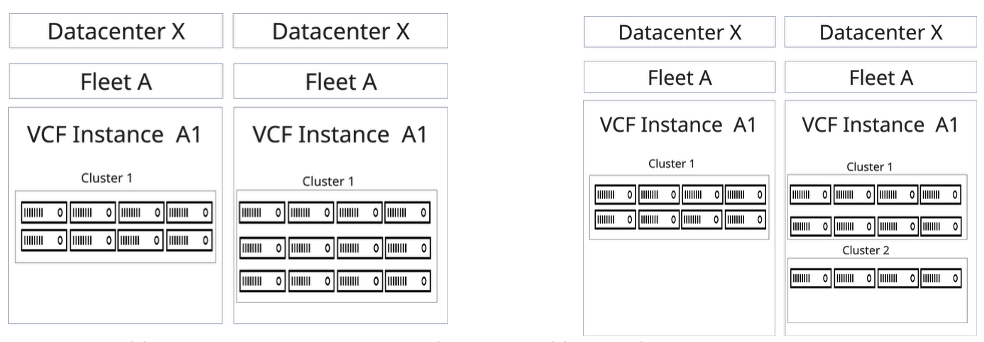
When a compute cluster requires strong separation of resources, a second instance can be created within the same fleet. The additional VCF instance includes its own management stack.
Service Options
MPC Core includes several service options that are ordered separately.
Backup and Restore
Backup and restore of MPC resources are provided through the Managed Private Backup Service (ordered separately). The service includes backup of VM data or application data using a shared backup platform.
Software Licensing
A catalog of non‑licensed software ISOs for MPC is available. This catalog lists software that can be used in VMs running in an MPC Core deployment. Licensed software can be purchased through the Software Licensing product. After procurement, the ISOs are available in the catalog.
Customers may also bring their own software licenses. When using Bring Your Own License (BYOL), compliance with the software vendor’s license terms must be validated.
For all licensing, the customer is responsible for meeting the software vendor’s compliance requirements.
Support Plan
The Support Plan provides additional services, including service requests, enhanced support, reporting, and design assistance.
- The Managed Solutions Premier Support Plan is a prepaid program offering monthly or annual (one-time payment) support hour blocks at a discounted rate.
- Support time is calculated in 15-minute increments.
- Without a prepaid plan, support is charged per hour at the Premier Support Service standard rate, calculated in 15-minute increments.
| Purchase Unit | Type | Charge Type | UOM | Ordering and Billing |
|---|---|---|---|---|
| Technical Support Plan | Monthly | Baseline | hour | Monthly reservation of hours for technical support |
| Technical Support Plan | Annual | Baseline | hour | Yearly reservation of hours for technical support |
The Support Plan applies to all Managed Solutions products, not to one specific product.
If all the hours from the plan are consumed, additional hours are charged at the Premier Support Service per hour rates (standard hourly rate).
Monthly or prepaid Managed Solutions Premier Support Plan hours do not roll over and are forfeited if not used. Prepaid Managed Solutions Premier Support Plan usage beyond the pre-purchased allotted amount are billed at regular “Premier Support Service” rates unless an upgrade is requested.
The plan is country specific and cannot be linked to a specific IBX data center.
Migration Support
To migrate workloads to MPC Core from on‑premises environments, other colocation facilities, or public‑cloud‑based VMware platforms (such as AWS or OCVS), Equinix provides migration tooling that enables self‑service workload migration without refactoring applications. The tooling supports workloads running on vSphere, Hyper‑V, and other virtualization platforms by using multiple migration methods, including hypervisor‑level and in‑guest OS migration.
To enable migration for vSphere workloads, the customer receives a VCF Operations HCX appliance that is installed in the customer environment and paired with the MPC Core environment during configuration. The tooling supports asynchronous replication.
-
vMotion Migration - This method uses the VMware vMotion protocol to move a virtual machine to a remote site.
- Designed for moving a single virtual machine at a time
- Migrates the virtual machine state with no service interruption
- Requires 250 Mbps or higher throughput capability
- Latency < 150 ms
- Minimum MTU: 1150
- Maximum VMs per operation: 1
-
Cold Migration - This method uses the VMware NFC protocol and is automatically used when the source virtual machine is powered off.
- Requires 250 Mbps or higher throughput capability
- Latency < 150 ms
- Minimum MTU: 1150
- Maximum VMs per operation: 1
-
Bulk Migration - This method uses VMware vSphere Replication to move virtual machines to the destination site.
- Designed for moving multiple virtual machines in parallel
- Can be scheduled to complete at a predefined time
- The virtual machine runs at the source until failover begins (service interruption similar to a reboot)
- Requires 50 Mbps or higher throughput capability
- Latency < 150 ms
- Minimum MTU: 1150
- Supports up to 1000 concurrent migrations (dependent on HCX Manager appliance size)
-
Replication Assisted vMotion (RAV) - Replication Assisted vMotion combines advantages of Bulk Migration (parallel operations, resiliency, scheduling) with vMotion (zero‑downtime state migration).
- Requires 250 Mbps or higher throughput capability
- Latency < 150 ms
- Minimum MTU: 1150
- Supports up to 1000 concurrent migrations (dependent on HCX Manager appliance size)
Easy migration requires dedicated Fabric circuits or VLANs in a Cross Connect. After migration is complete, the migration tooling is removed.
Service Demarcation
The following shows the demarcation of responsibilities between the customer and Equinix.
| Area | Responsibility | Details |
|---|---|---|
| Customer Data | Customer | Data governance and data access rights management |
| Account & Access Management | Customer | User account management, identity MFA/ID, multifactor authentication |
| Data Protection | Customer | Antivirus, client & server data encryption, network traffic encryption |
| Applications | Customer | Functional and technical application management |
| Databases | Customer | MySQL, Microsoft SQL, Oracle, PostgreSQL |
| Middleware | Customer | Enterprise Service Bus, Tomcat, .NET Framework |
| Operating System | Customer | Windows & Linux OS management |
| Compute Virtualization | Equinix Managed Solutions | VMware ESXi hypervisor, vCenter configuration |
| Network Virtualization | Equinix Managed Solutions | VMware NSX platform, NSX configuration (firewall, edges), connectivity |
| Compute | Equinix Managed Solutions | Dedicated compute resources |
| Storage | Equinix Managed Solutions | vSAN storage, vSAN configuration |
| Datacenter Connect | Equinix Managed Solutions | Redundant switches |
| Datacenter Facilities | Equinix Managed Solutions | Secure cabinet express, power, cooling, access control, physical security |
Purchase Units
The MPC service is charged monthly based on Baseline values or Baseline with Overage charge types.
- Baseline - The specific volume of the service unit of measure as defined in the order.
- Overage - The quantity of the service consumed that exceeds the contracted Baseline volume.
Catalog of Purchase Units
The table lists the purchase units for Managed Private Cloud, including unit of measure and billing method:
| Category | Purchase Unit | UOM | Install Fee | Billing Method | Overage |
|---|---|---|---|---|---|
| MPC Service | Connectivity | Each | No | Baseline | No |
| MPC Compute | <Host Type> | Host | Yes | Baseline | No |
| MPC Service Option | Gateway Firewall <n> Size Edge | Edge | No | Baseline | No |
| Distributed Firewall <n> Cores | Host | No | Baseline | No |
Roles and Responsibilities
During service fulfillment and delivery, responsibilities are shared between Equinix and the customer. The following section provides an overview of these responsibilities.
Tenant Provisioning
| Activities | Equinix | Customer |
|---|---|---|
| Schedule / execute project kickoff meeting | RA | CI |
| Schedule / execute customer onboarding | RA | CI |
| Delivery of the hosts in a cluster according to the design blueprint and order | RAC | I¹ |
| Delivery of the storage capacity in accordance with design | RAC | I¹ |
| Delivery of the connectivity in accordance with the order | RAC | I¹ |
| Delivering agreed network functionality in accordance with design (optional) | RAC | C |
| Set up service accounts for selected applications | RAC | C |
| Delivery of the MPC Operational Console | RAC | I¹ |
| Delivery of user groups according to the customer | RAC | I¹ |
Acceptance Into Service
Once onboarding activities have been completed, testing will confirm that the product was delivered successfully and is ready for billing.
| Activities | Equinix | Customer |
|---|---|---|
| Test access to MPC documentation on docs.equinix.com | CI | RA |
| Test access to the different consoles for the different groups | CI | RA |
| Confirm MPC fulfillment based on provided evidence | CI | RA |
| Check handover documentation | CI | RA |
| Set product as enabled for customer internal systems | RA | I |
Operational
Once the Managed Private Cloud service is enabled, the following operational items are addressed:
| Activities | Equinix | Customer |
|---|---|---|
| Technical management of the service (overall) | RAC | I* |
| Patching and LCM of software: VCF Operations, vSphere, NSX, vSAN, HCX | RAC | I* |
| MPC infrastructure monitoring and maintenance | RA | I |
| Keep applications with integration into MPC compliant with MPC Core versions | I* | RAC |
| Functional management of the customer environment within the service (overall) | I¹ | RAC |
| Manage capacity of the compute and storage in the cluster | I¹ | RAC |
| Create, import and manage VMs and vApps | I¹ | RAC |
| Keep VM‑tooling up to date | I¹ | RAC |
| Scale VMs up and down | I¹ | RACI |
| Manage VM snapshots | RACI | |
| Manage access to VMs with console | RACI | |
| Request performance statistics | RACI | |
| Create and fill “Library” with customer’s own ISO/OVA files | RACI | |
| Separate or group VMs for availability or performance | I¹ | RAC |
| NFV: Virtual L2 networks | I¹ | RAC |
| NFV: Standard firewalling | I¹ | RAC |
| NFV: Routing (static) | I¹ | RAC |
| NFV: Routing (dynamic OSPF / BGP) | I¹ | RAC |
| NFV: NAT | I¹ | RAC |
| NFV: DHCP | I¹ | RAC |
| NFV: Load Balancing | I¹ | RAC |
| NFV: VPN (IPsec, Client) | I¹ | RAC |
| Setup and manage scripting & automation capabilities | RACI |
Note: RACI stands for Responsible, Accountable, Consulted and Informed.
I¹ Informing is only mandatory for tasks that have an impact on the functioning of the user environment.
I² Informing is only required for tasks that have an impact on the operation and/or management of the service.
Incident Management
Incident Management is included as part of service support. All incidents are handled based on priority. Priority is determined after an incident is reported and assessed by Equinix based on the information provided.
| Priority | Impact / Urgency | Description |
|---|---|---|
| P1 High | Unforeseen unavailability of a service or environment delivered and managed by Equinix, in accordance with the service description, due to a disruption. The customer cannot fulfill obligations towards its own users. The customer experiences direct demonstrable impact due to unavailability of this functionality. | The service must be restored immediately; production environments are unavailable with platform‑wide disruptions. |
| P2 Medium | The service does not offer full functionality, or operates with partial functionality or reduced performance, resulting in user impact. The customer experiences direct demonstrable impact due to limited availability of the functionality. | The service must be repaired the same working day; the management environment is not available. |
| P3 Low | The service functions with limited availability for one or more users, and a workaround is in place. | The repair timeline is determined in consultation with the reporting person. |
Note: This classification does not apply to disruptions that are, for example, caused by user-specific applications, actions by the user, or dependent on third parties. The incidents can be submitted through the Customer Portal under Managed Solutions. P1 incidents need to be submitted by phone.
Service Requests
Service requests are used to report service issues or to request assistance with implementation or configuration changes. Standard configuration changes can be requested through the MPC self‑service portal as a Service Request. Support is available 24×7×365. Two types of service requests are available:
- Included - Service requests that are within the scope of the service and do not incur additional charges.
- Additional - Service requests that are outside the scope of the service and incur additional charges.
| Request Name | Included / Additional |
|---|---|
| Create a new permission group | Included |
| Remove a permission group | Included |
| Add VLAN to MPC Core instance | Included |
| Delete a VLAN from MPC Core | Included |
| Create Edge Cluster | Additional |
| Delete Edge Cluster | Additional |
| Resize Edge Cluster | Additional |
Changes not listed above can be requested by selecting Change in the service request module. Equinix will perform an impact analysis to determine feasibility, cost, and lead time. Charges related to service requests are deducted from the Premier Support Plan balance. If the balance is insufficient, charges are invoiced at the prevailing rate. Requests that impact baseline capacity, ordered quantities, or any changes impacting the monthly service fee must be requested through the Equinix Sales team.
Reporting
As part of the service, the customer will receive monthly service reporting covering the following topics:
- Raised tickets measured against SLA parameters
- Capacity per OVDC
Service Levels
The Service Level Agreement (SLA) defines the measurable performance levels applicable to the MPC service and specifies the remedies available to the customer if Equinix fails to meet these levels. The service credits listed below are the sole and exclusive remedy for failure to meet the service level thresholds defined in this section.
| Priority | Response Time¹ | Resolution Time² | Execution of Work | SLA³ |
|---|---|---|---|---|
| P1 | < 30 min | < 4 hours | 24x7 | 95% |
| P2 | < 60 min | < 24 hours | 24x7 | 95% |
| P3 | < 120 min | < 5 days | 24x7 | 95% |
¹ Response time is measured from the moment a trouble ticket is submitted until an Equinix Managed Solutions specialist provides a formal response.
² Resolution time is measured from ticket creation to closure, cancellation, or handover to IBX Support.
³ SLA applies to the response time, details on the SLA can be found in the Product Policy.
The Availability Level for MPC service reflects availability of a cluster. The service is considered unavailable when infrastructure managed by Equinix causes the workload cluster to enter an error state that disrupts customer services.
| AVAILABILITY SERVICE LEVEL | DESCRIPTION |
|---|---|
| 99.95%+ | Less than 22 minutes of unavailability per calendar month |
A service credit regime applies to the availability SLA as defined in the Product Policy. Availability of the MPC service does not include data restoration. Customers are responsible for restoring their data. When Managed Private Backup is contracted, data can be restored through self-service using the Managed Private Backup Operational Console. If Managed Private Backup is not contracted, data restoration is the responsibility of the customer.