サステナビリティ・ツール
カスタマーポータルのサステナビリティツールは、サステナビリティデータダッシュボードとサステナビリティデータレポートの生成機能を提供します。組織の権限を持つすべてのユーザーがサステナビリティツールにアクセスできます。
サステナビリティ・ツールが提供するもの:
- お客様が割り当てたEquinixスコープ1排出量データ(年間値)のダッシュボードビュー。
- お客様が割当てたEquinixスコープ2排出量データ(月次および年次値)のダッシュボードビュー。
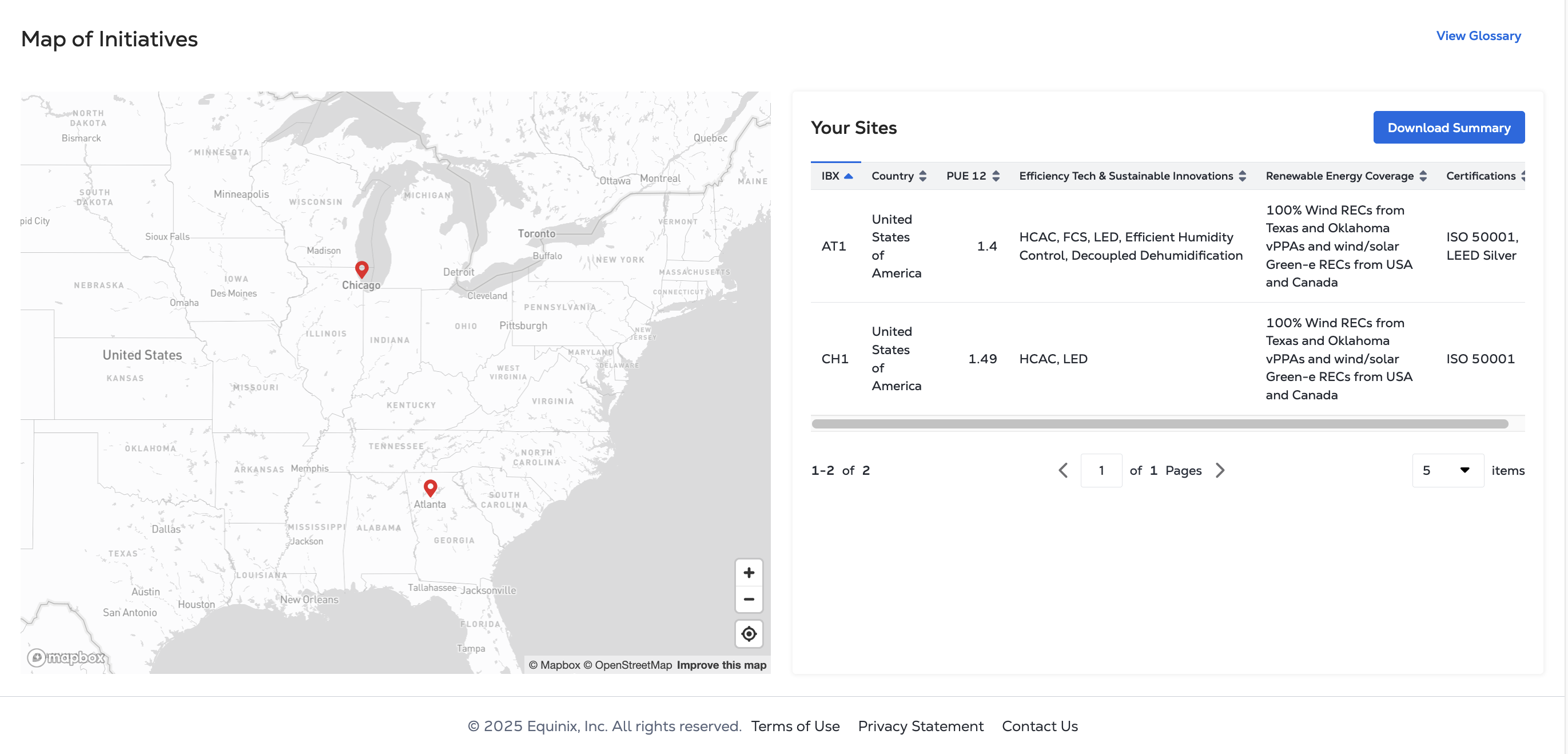
- サイトレベルの持続可能性イニシアチブのインタラクティブマップ。
- サイトレベルの持続可能性への取り組みと電力使用効率(PUE)のダウンロード可能な表。
- ダウンロード可能なグリーン電力レポートとグリーン電力レポートデータのダッシュボードビュー。
- 年次検証前に排出量の推定値と再生可能エネルギーデータを提供する、お客様が割り当てたEquinixスコープ2見積りレポートをダウンロードできます。
サステナビリティ報告のベストプラクティスに基づき、EquinixはISO14064-3を取得しています。2019年エクイニクスの年間エネルギー消費量、再生可能エネルギー消費量、スコープ1、2、3の温室効果ガス排出量メトリクスの限定保証。この検証プロセスは、前年暦年の毎年第1四半期に実施され、検証済みのメトリクスは3月に利用可能になります。
サステナビリティ・ツールにアクセスするには
-
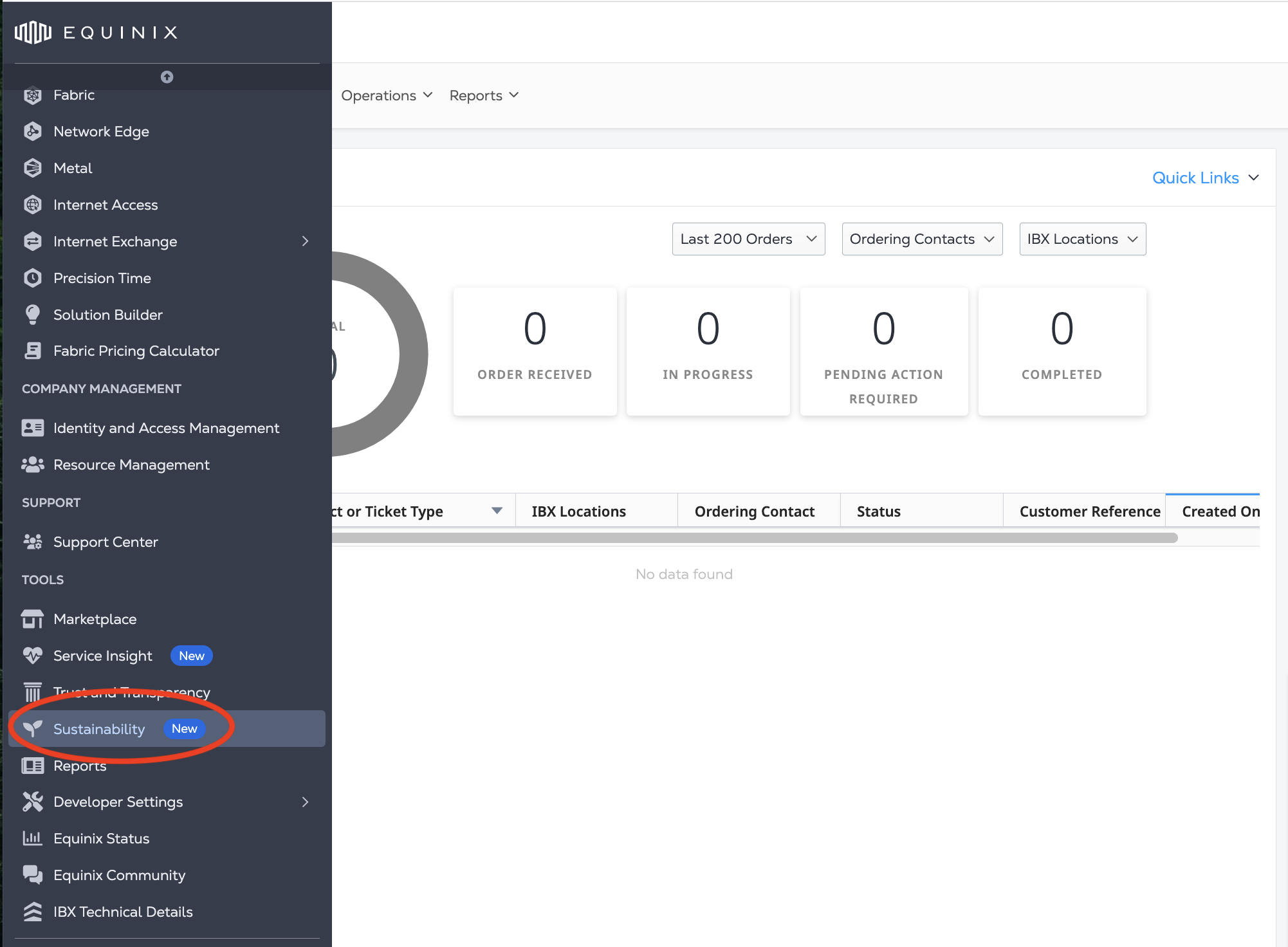
グローバルナビゲーションメニューから、サステナビリティをクリックします。
概要
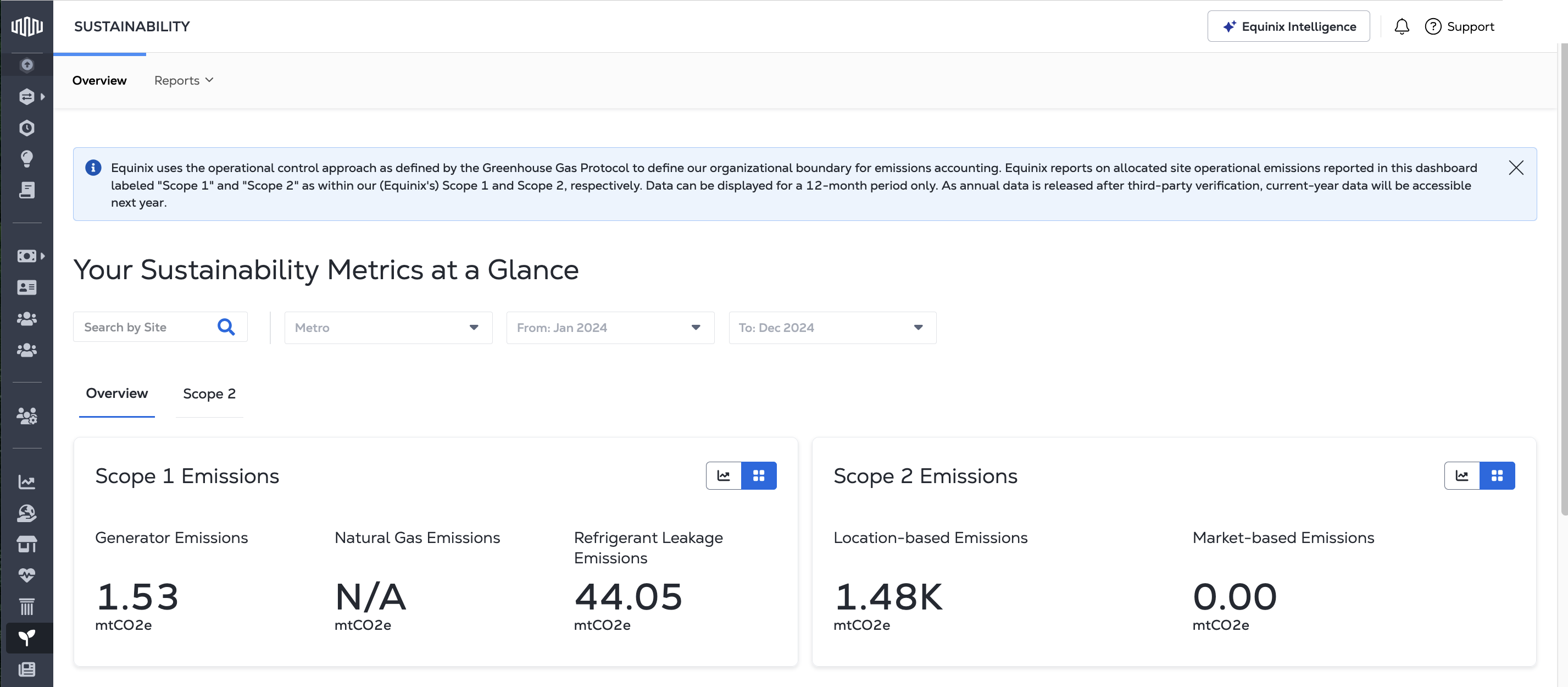
概要ダッシュボード
- 発電機、天然ガス、冷媒に関連してお客様に割り当てられた年間Equinixスコープ1排出量
- 年間Equinixスコープ2市場ベースおよび拠点ベースの排出量を顧客に配分すること
- サイトレベルの12カ月平均電力使用効率(Power Usage Effectiveness)。
計算されたメトリクスの方法論については、サステナビリティツールの方法論を参照してください。
スコープ2ダッシュボード
スコープ2ダッシュボードでは、Equinixスコープ2排出量データを月次および年次で確認できます。
- IT電気使用量 - IT機器によって消費された電気の合計。
- 機械電気(M&E)使用量 - 配備に起因するサイトのM&E諸経費の一部。
- 再生可能エネルギーのカバー率 - 電気使用量のうち、再生可能エネルギーの購入によってカバーされている割合。
- 再生可能エネルギーの種類 - 各IBXにおける再生可能エネルギーに関する契約内容。
- ロケーションベースの排出量 - 各施設の地理的位置に基づいて計算された、配備に関連する排出量。
- 市場ベースの排出量 - 各施設の契約上の購入エネルギーと再生可能エネルギーに基づいて計算された、配備に関連する排出量。
- 電力消費量と排出量の月別内訳。
イニシアチブマップ
_イニシアチブマップ_には、各Equinix IBXにおけるサステナビリティの取り組みが表示されています。
- マップマーカーをクリックすると、選択したIBXのサステナビリティの詳細が表示されます。
お客様のサイト
_お客様のサイト_の表には、サステナビリティへの取り組みと12か月の電力使用効率(PUE12)データが表示されます。表に表示されるデータをフィルターするには、概要ダッシュボードの都市圏と日付ドロップダウンフィルターを使用します。
「サイト」テーブルのデータをExcel形式でダウンロードするには、「概要をダウンロード」をクリックします。
用語集
- A1A =米国暖房冷凍空調学会A1許容
- ATES = 帯水層熱エネルギー貯蔵
- ECプラグファン = 電気的に整流されたプラグファン
- EV = 電気自動車用充電器
- FCS = 自由冷却システム
- GoO = 原産地保証
- GR = グリーンルーフ
- GW = 冷却/灌漑に使用される中水
- HCAC = ホット/コールドアイルコンテインメント
- HVO = 水酸化植物油
- I-REC = 国際再生可能エネルギー証書
- LED = LED照明
- LGC = 大規模発電証書
- LGWPR = 低温暖化係数冷媒
- REC = 再生可能エネルギー証書
- REGO = 再生可能エネルギーの原産地保証
- RW = 雨水利用
- Solar PV = 太陽光発電
- VPPA = 仮想電力購入契約
*-リセラーサイトを示す
x- xScaleサイトを示す
グリーン電力報告書の作成
グリーン電力レポートはPDFまたはExcelファイルでダウンロードでき、_スコープ2ダッシュボードの_データを含めることができます。ただし、毎月の電力消費量と排出量の内訳は含まれていません。
- IT電気使用量 - IT機器によって消費された電気の合計。
- 機械電気(M&E)使用量 - 配備に起因するサイトのM&E諸経費の一部。
- 再生可能エネルギーのカバー率 - 電気使用量のうち、再生可能エネルギーの購入によってカバーされている割合。
- 再生可能エネルギーの種類 - 各IBXにおける再生可能エネルギーに関する契約内容。
- ロケーションベースの排出量 - 各施設の地理的位置に基づいて計算された、配備に関連する排出量。
- 市場ベースの排出量 - 各施設の契約上の購入エネルギーと再生可能エネルギーに基づいて計算された、配備に関連する排出量。
レポートを作成するには
-
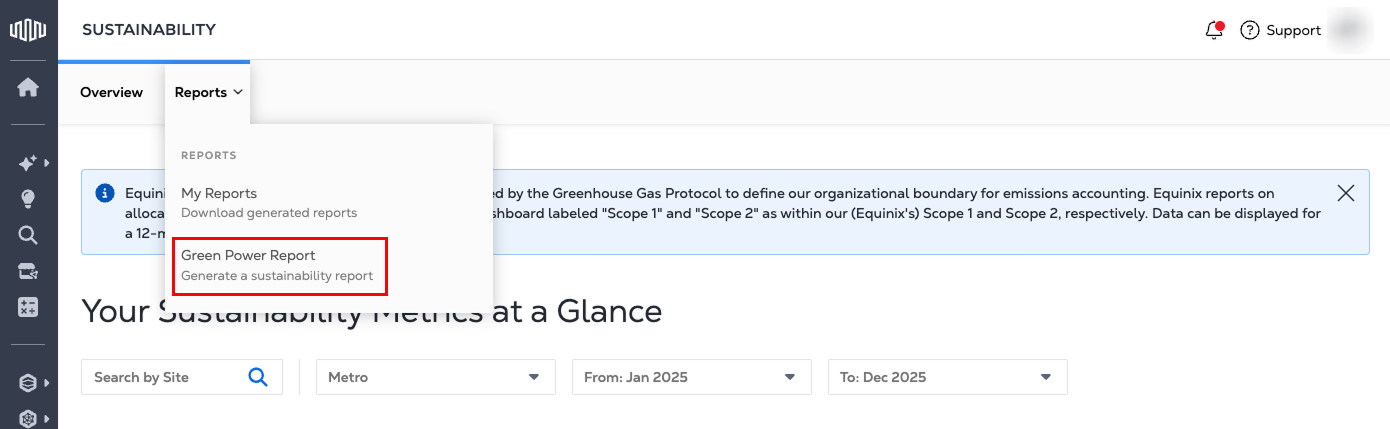
_サステナビリティツール_から、[_レポート]_タブを選択します。[グリーン電力レポート]をクリックします。
-
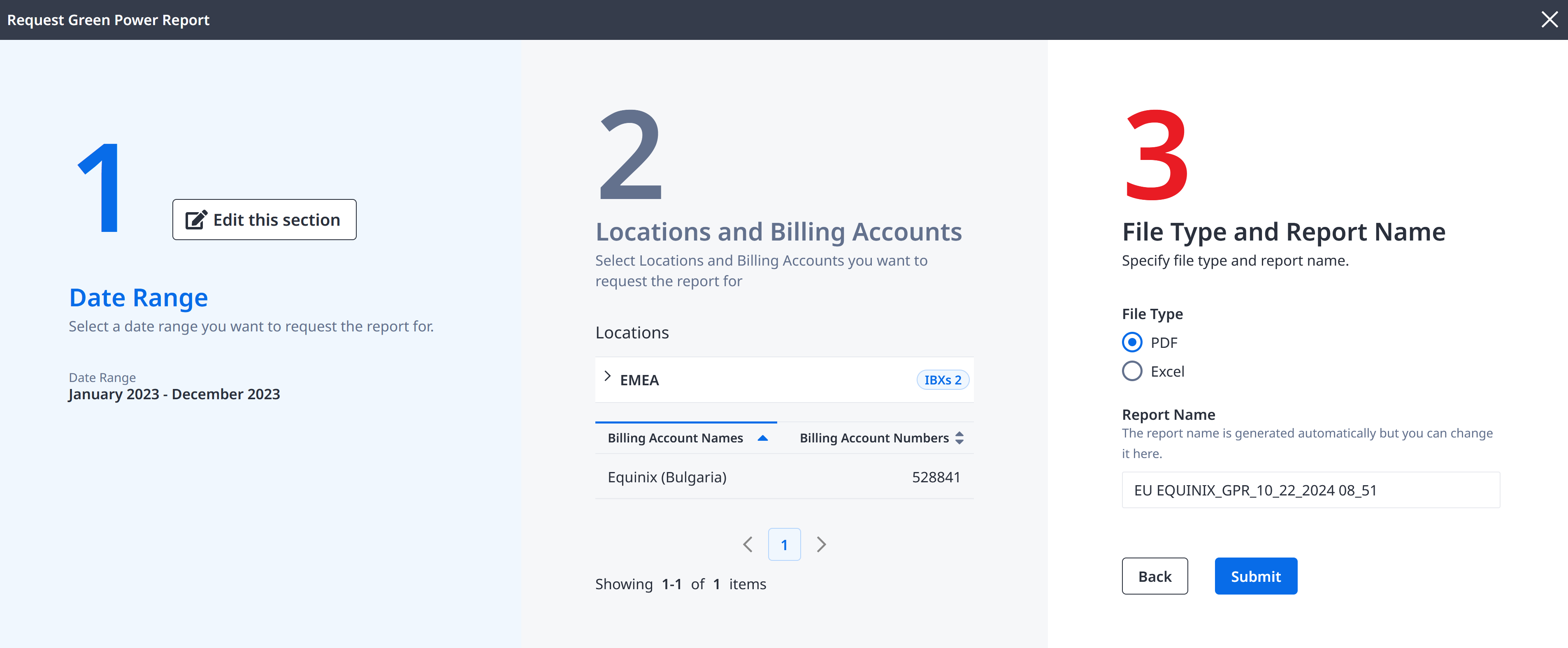
レポートの日付範囲、場所、請求アカウントを選択します。
-
レポートをPDF形式とExcel形式のどちらで作成するかを選択します。レポートの名前を入力できます。
-
[送信]をクリックして、グリーン電力レポートを生成します。
グローバルレポート
お客様の請求アカウント構成に基づくグローバル・グリーン電力レポート、および12ヶ月間の電力使用効果レポートは、アカウントチームを通じてご請求いただけます。
スコープ1のデータはグローバルレベルでは利用できません。グローバルフットプリント全体でスコープ1データを取得するには、すべての組織のサステナビリティツールにアクセスする必要があります。
グローバルなサステナビリティへの取り組みの詳細については、Equinixコーポレートサステナビリティプログラムのページをご覧ください。
スコープ2見積りレポートの生成
スコープ2見積りレポートは、最終的かつ検証済みの指標が発表される前に、推定された未検証の電力、再生可能エネルギー、排出量データを提供します。レポートはExcelファイルでダウンロードでき、再生可能エネルギータイプを除くグリーン電力レポートの推定メトリックが含まれています。
-
IT電力使用量–IT機器が消費する総電力量(グリーン電力レポートと同じ方法で算出)。
-
推定機械的および電気的(M&E)使用量–お客様の導入に起因するサイトのM&Eオーバーヘッドの推定部分。
-
推定再生可能エネルギーカバレッジ–再生可能エネルギーの購入によってカバーされる電力使用量の推定パーセンテージ。
-
推定ロケーションベース排出量–各施設の地理的位置に基づいて計算された、お客様の導入に関連する推定排出量。
-
推定市場ベース排出量–お客様の導入に関連する推定排出量。契約で購入したエネルギーと各施設の再生可能エネルギーに基づいて計算されます。
レポートを作成するには
-
_サステナビリティツール_から、[_レポート]_タブを選択します。
-
**[新規レポートの作成]**ドロップダウンから、[スコープ2見積りレポート]を選択します。
![[新規レポートの生成]ドロップダウンで[スコープ2見積りレポート]を選択](/ja/assets/images/scope-2-report-f00fa2ff521794f0dff0bcc3e0c7f02d.png)
-
レポートの日付範囲、場所、請求アカウントを選択します。
- データがサードパーティによって検証されていない日付のみ選択できます。検証は、前年の1月から4月まで毎年行われます。
-
レポートの名前を入力します。
-
[送信]をクリックして、スコープ2見積りレポートを生成します。
スコープ2見積りレポートの値は算出された見積りであり、Equinixの年次温室効果ガスインベントリおよび第三者データ検証後に変更される可能性があります。電力使用効率推定値(PUE)、再生可能エネルギーカバレッジ、および前年からの排出係数は、当年度の検証済み値がまだ入手できない場合に使用されます。スコープ2見積りレポートでカバーされている報告年度中に開設されたサイトは、データが不完全であるため除外されます。正式な報告または規制上の開示にこれらの情報を使用する場合は、お客様の裁量に任されています。詳細については、レポート方法を参照してください。
以前に生成されたレポート
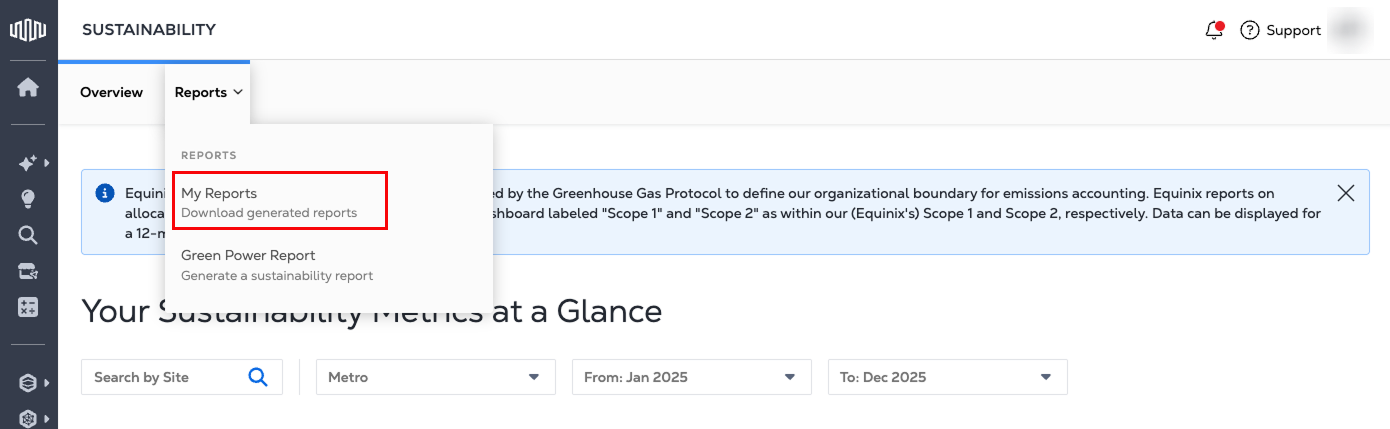
以前に生成されたレポートは、_[レポート]_タブで利用できます。
出版ポリシー
グリーン電力レポートおよびスコープ2見積りレポートに含まれる情報を抽出して、サステナビリティおよび環境報告を行うことはできますが、報告書自体は機密情報であり、一般に公開されるべきではありません。