購読を管理する
Subscription Management APIを使用して、データコレクタへのテレメトリデータの配信を管理する。
プロビジョニング
-
Subscription Management APIを呼び出す前に、Data Collectorのセットアップを参照して、選択したシンクタイプを設定する。
-
サブスクリプションを作成するには、( stream_subscription permission create and read )ロールが必要である。
Fabric Stream Subscription Manager会社の管理者またはIAM管理者に連絡して、アクセスとロールを管理する。 -
APIを使用している場合は、OAuth2認証のためにユーザー資格情報、クライアントID、クライアントシークレットを送信する。Equinix APIへのリクエストを認証する方法については、API認証を参照。
サブスクリプションの作成
- Portal
- API
ポータルはSplunk、Datadog、Microsoft Teams、PagerDutyへのサブスクリプションの作成と管理をサポートしている。
-
[カスタマーポータル]>[Fabricダッシュボード]にログインします。
-
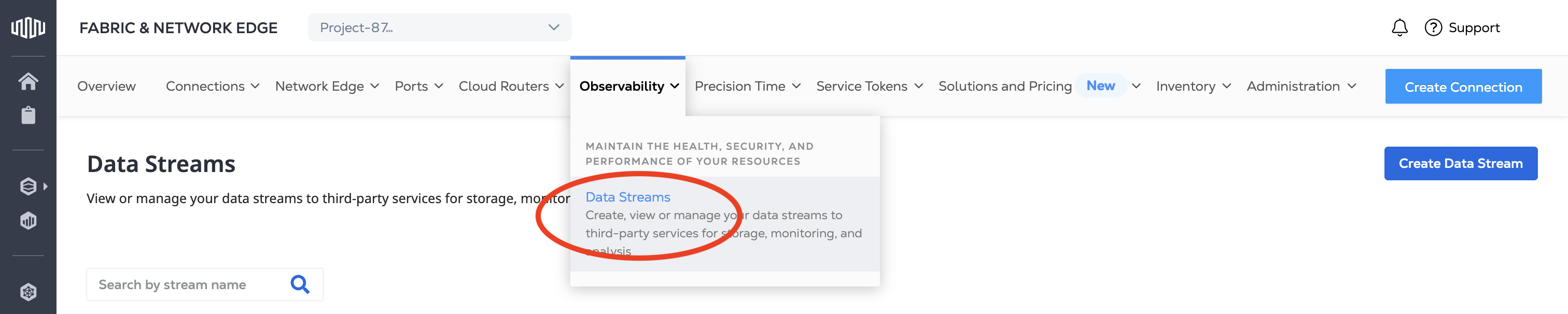
[Observability]メニューから[*Data Streams]を選択する。
-
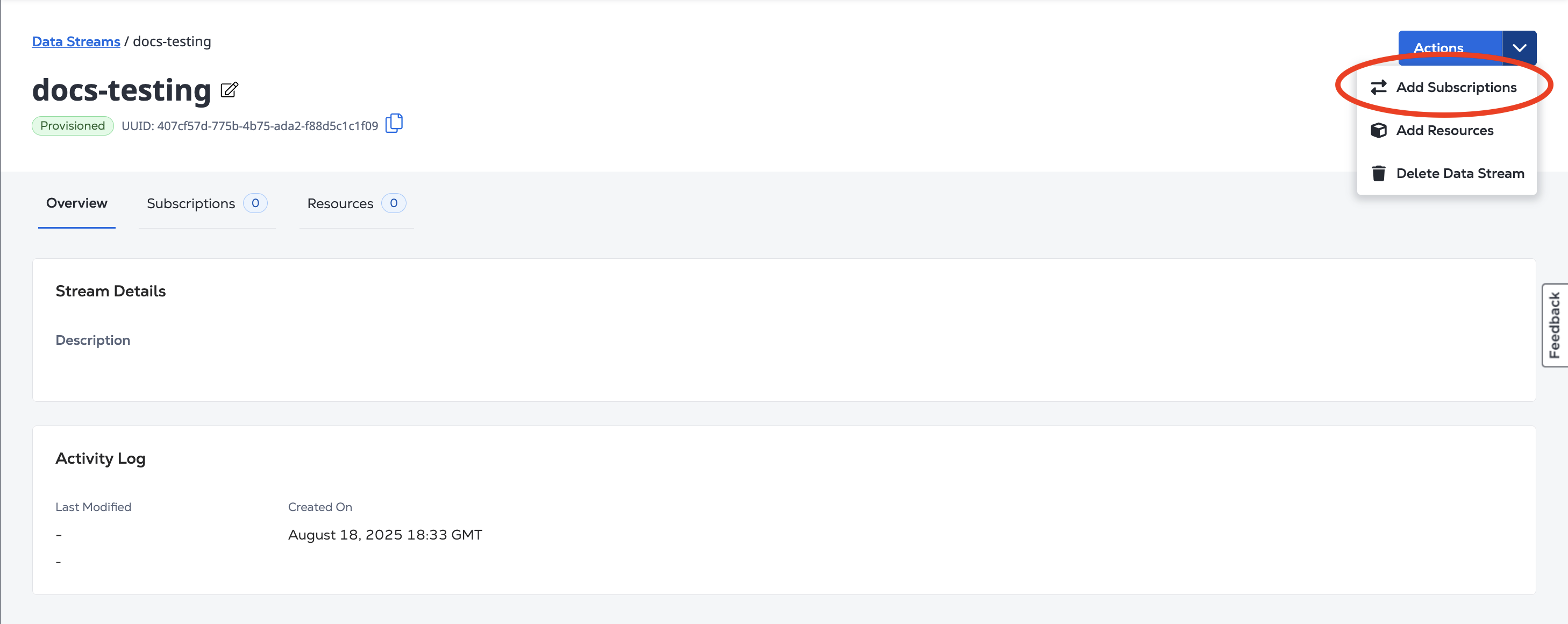
[Actions]ドロップダウンメニューから[*Add Subscriptions]を選択する。
-
ドロップダウンメニューからサブスクリプションのデータコレクタを選択する。サポートされているデータコレクタについては、以下の例を参照のこと。
サブスクリプションを作成するには、エンドポイントにリクエストを/fabric/v4/streams/<streamId>/subscriptions送信する。POSTオブジェクトにStream IDを指定し、リクエストの本文にあるオブジェクトにデータコレクタの設定と認証情報をsink指定する。stream
サポートされているデータコレクタのストリームサブスクリプションを作成するには、以下の例を参照する。
Subscription APIのuri/host値はHTTPSのみをサポートし、自己署名証明書はサポートしない。
Datadog
- Portal
- API
- Event
- Metric
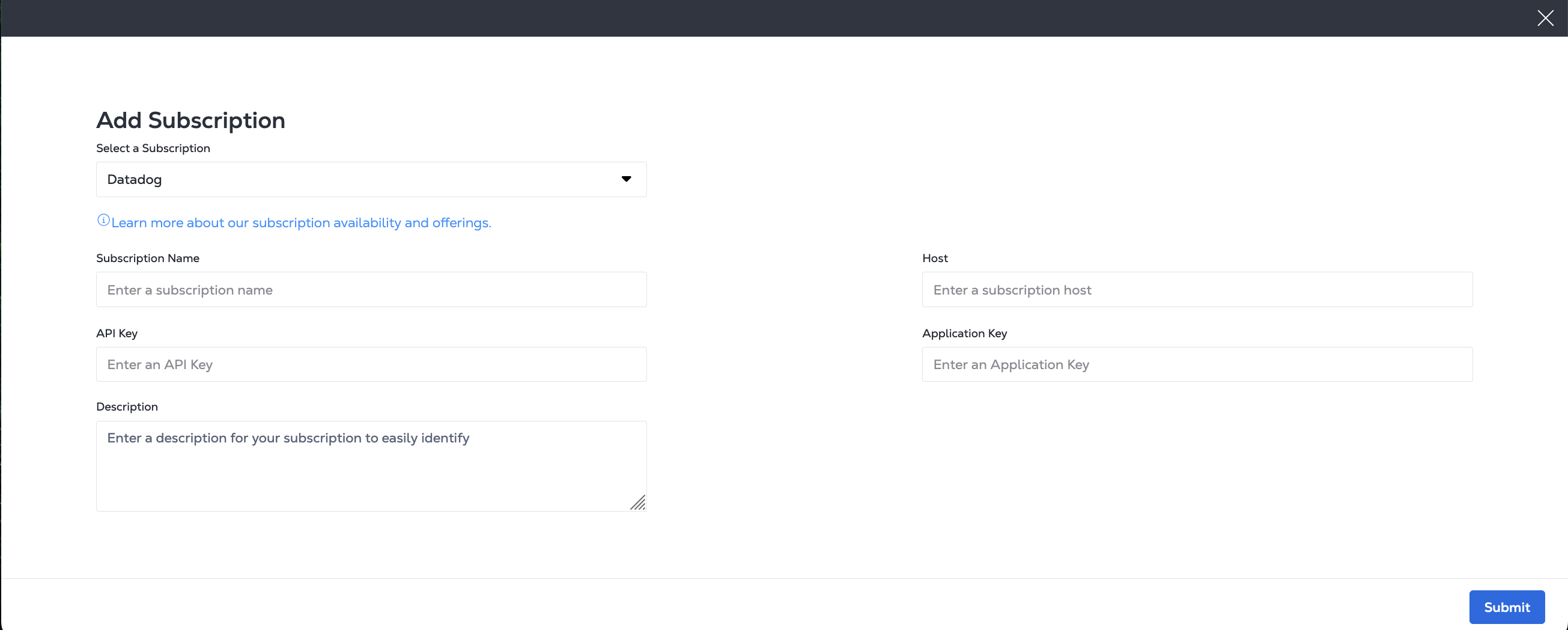
_Add Subscription_pageで、次のようなDatadog情報を入力する。
- サブスクリプション名
- DatadogホストURL
- Datadog APIキー
- Datadogアプリケーションキー
- 説明を入力する(オプション)
Datadogサイト参照テーブルを使用して、パラメーターのサイトパラメーターを見つける。sink.host
cURLリクエストの例:
curl -X 'POST' 'https://api.equinix.com/fabric/v4/streams/<streamId>/subscriptions' \
-H 'Content-Type: application/json' \
-H 'Authorization: Bearer <Bearer Token>' \
-d '{
  "type": "STREAM_SUBSCRIPTION",
  "name": "<datadog_subscription_name>",
  "description": "<datadog_subscription_desc>",
  "sink": {
    "host": "https://<datadog_site_parameter>",
    "type": "DATADOG",
    "credential": {
      "type": "API_KEY",
      "apiKey": "<datadog_api_key>"
    },
    "settings": {
      "applicationKey": "<datadog_application_key>"
    }
  }
}'
応答の例:
{
  "href": "https://api.equinix.com/fabric/v4/streams/241372e9-79c9-4ef8-b77a-8b8176c228b4/subscriptions/1a39648d-c407-4470-b08b-454965f31bf4",
  "uuid": "1a39648d-c407-4470-b08b-454965f31bf4",
  "type": "STREAM_SUBSCRIPTION",
  "name": "datadog_subscription",
  "description": "datadog_subscription_desc",
  "state": "PROVISIONED",
  "enabled": true,
  "sink": {
    "host": "https://<datadog_site_parameter>",
    "type": "DATADOG",
    "credential": {
      "type": "API_KEY",
      "apiKey": "<encrypted_datadog_api_key>"
    },
    "batchEnabled": false,
    "batchSizeMax": 50,
    "batchWaitTimeMax": 5,
    "settings": {
      "metricUri": "https://<datadog_site_parameter>/api/v2/series",
      "eventUri": "https://<datadog_site_parameter>/api/v1/events"
    }
  },
  "changeLog": {
    "createdBy": "user1",
    "createdDateTime": "2024-10-07T06:48:45.861755Z",
    "updatedDateTime": "2024-10-07T06:48:51.514474Z"
  }
}
---
date_happened: 1719864741 # in seconds
source_type_name: Equinix
aggregation_key: NCAB543WC4lrLpET8nLX4Vd8
title: 'Virtual port status changed to Up'
status: info # INFO->info, WARN -> warn, ERROR->error, CRITICAL->warn, FATAL->error, default: info
text: "{\"cloudevent\":{\"specversion\":\"1.0\",\"source\":\"https://api.equinix.com/fabric/v4/cloudevents\",\"id\":\"6c573287-9914-4202-8b6d-2d15e7da04b8\",\"type\":\"equinix.fabric.port.status.up\",\"subject\":\"/fabric/v4/ports/956a86fb-d03d-436c-8d5d-30d1f51f7688\",\"time\":\"2024-07-01T20:12:21.306Z\",\"severitynumber\":9,\"severitytext\":\"INFO\",\"equinixalert\":\"clear/NCAB543WC4lrLpET8nLX4Vd8\",\"equinixproject\":\"123\",\"data\":{\"message\":\"Virtual port status changed to Up\",\"resource\":{}}}}"
---
series:
- type: 3 # 0(unspecified), 1(count), 2(rate), 3(gauge)
  metric: equinix.fabric.port.bandwidth_rx.usage
  resources:
  - type: subject
    name: /fabric/v4/ports/956a86fb-d03d-436c-8d5d-30d1f51f7688
  - type: equinixproject
    name: 123
  unit: bit/s
  points:
  - timestamp: 1719889941
    value: 440023
- type: 1
  metric: equinix.fabric.port.packets_erred_tx.count
  resources:
  - type: subject
    name: /fabric/v4/ports/956a86fb-d03d-436c-8d5d-30d1f51f7688
  - type: equinixproject
    name: 123
  unit: packet
interval: 300 # in seconds
  points:
  - timestamp: 1719889941
    value: 10
Google PubSub
- Portal
- API
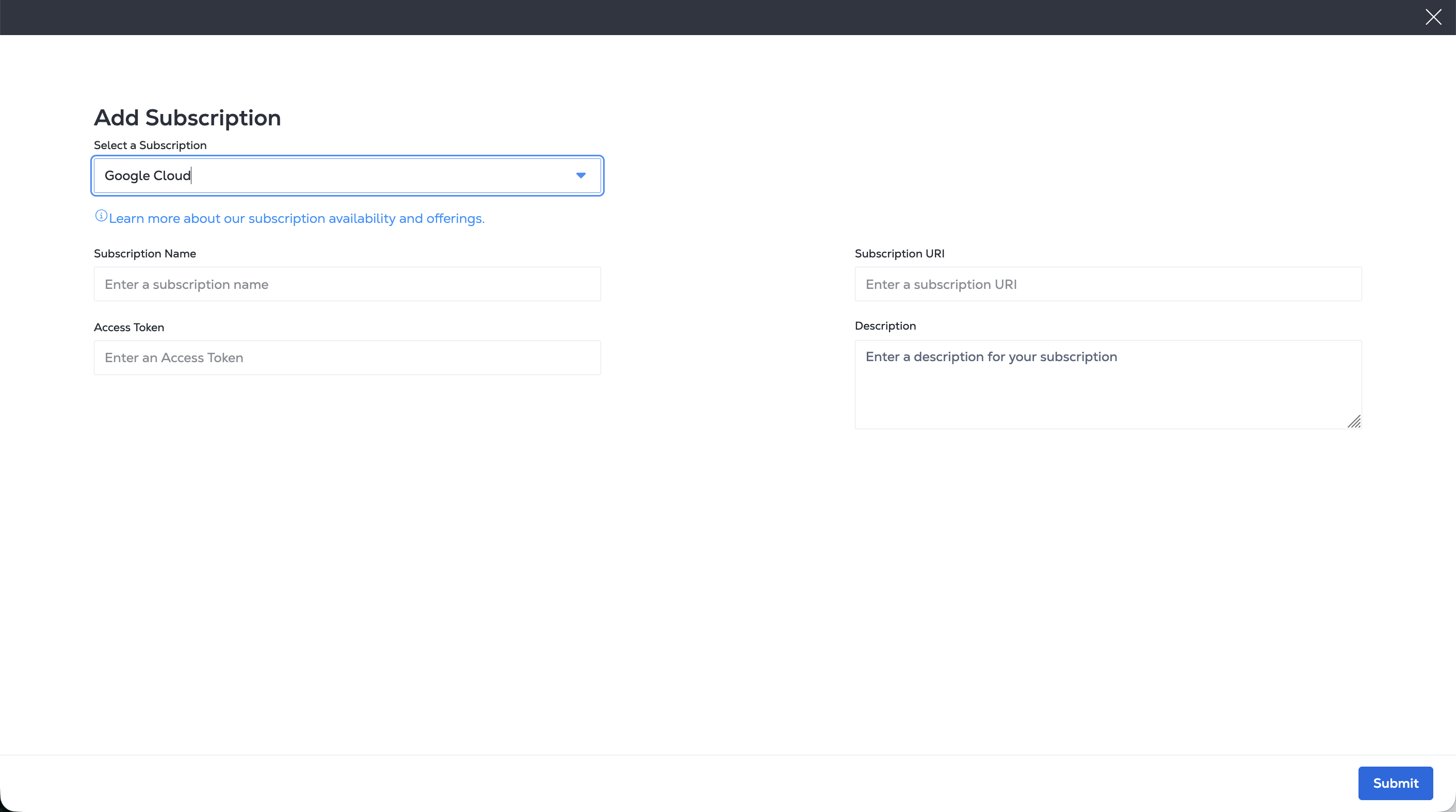
[サブスクリプションの追加]ページで、Google Cloud PubSub情報を入力する。
- サブスクリプション名
- Google Cloud PubSubアクセストークン
- Google Cloud PubSubサブスクリプションURI
- 説明を入力する(オプション)
curl -X POST 'https://api.equinix.com/fabric/v4/streams/<streamId>/subscriptions' \
-H 'Content-Type: application/json' \
-H 'Authorization: Bearer <Bearer Token>' \
-d '{
    "type": "STREAM_SUBSCRIPTION",
    "name": "<gcp_pubsub_subscription_name>",
    "description": "<gcp_pubsub_subscription_desc>",
    "sink": {
    "uri": "https://pubsub.googleapis.com/v1/projects/<gcp_project_name>/topics/<gcp_topic_name>:publish",
    "type": "GOOGLE_PUBSUB",
    "credential": {
        "type": "ACCESS_TOKEN",
        "accessToken": "<encoded_base64_service_account_json>"
    }
    }
}'
応答の例:
{
"href": "https://api.equinix.com/fabric/v4/streams/241372e9-79c9-4ef8-b77a-8b8176c228b4/subscriptions/12190e7d-a486-4a77-ba56-fecdab616837",
"uuid": "12190e7d-a486-4a77-ba56-fecdab616837",
"type": "STREAM_SUBSCRIPTION",
"name": "<gcp_pubsub_subscription_name>",
"description": "<gcp_pubsub_subscription_desc>",
"state": "PROVISIONED",
"enabled": true,
"sink": {
    "uri": "https://pubsub.googleapis.com/v1/projects/<gcp_project_name>/topics/<gcp_topic_name>:publish",
    "type": "GOOGLE_PUBSUB",
    "credential": {
    "type": "ACCESS_TOKEN"
    },
    "batchEnabled": false,
    "batchSizeMax": 50,
    "batchWaitTimeMax": 5
},
"changeLog": {
    "createdBy": "user1",
    "createdDateTime": "2025-04-28T21:23:02.006057019Z"
}
}
Grafana Webhook
- Portal
- API
- CloudEvent
- CloudEvents Metric
- OpenTelemetry Log
- OpenTelemetry Metric
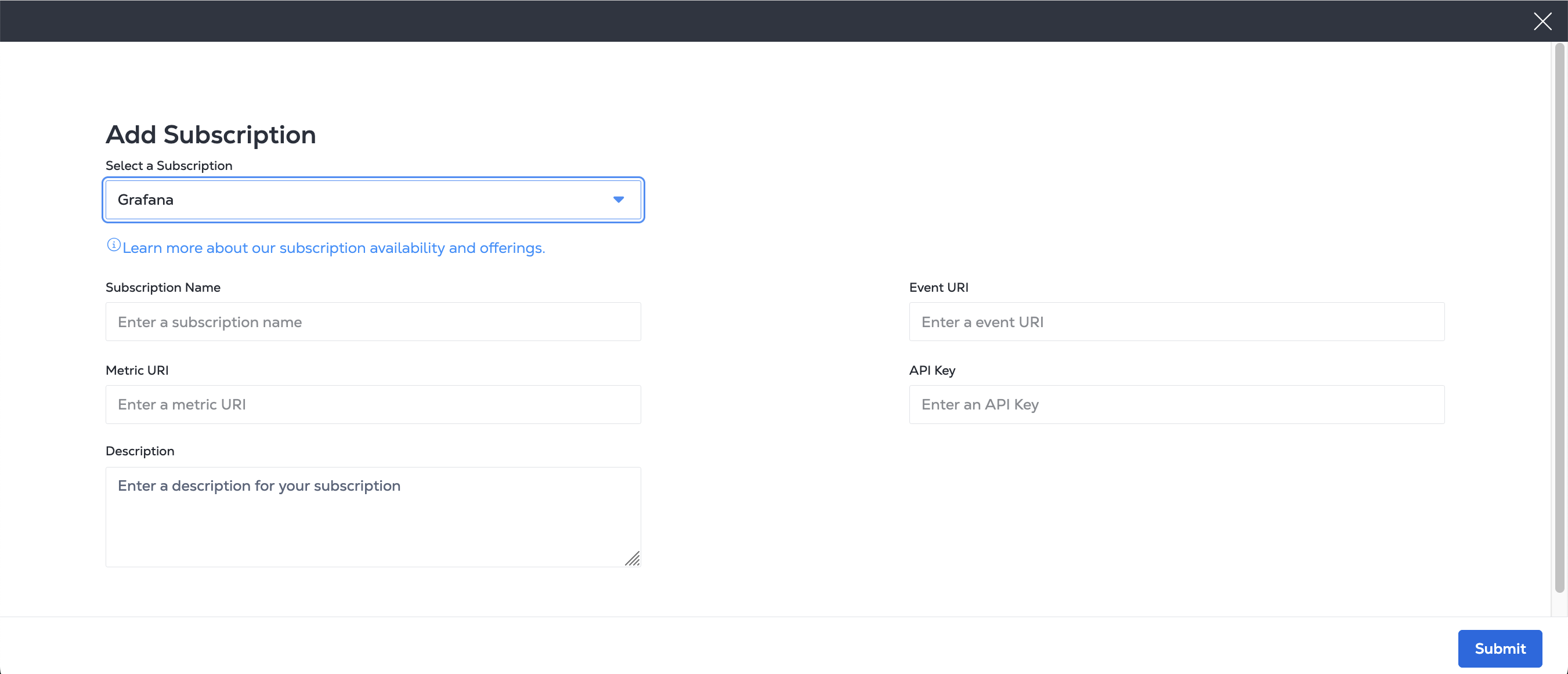
_Add Subscription_pageで、Grafana情報を入力する。
- サブスクリプション名。
- Grafana Metrics URI。
- GrafanaイベントURI。
- Grafana APIキー。
- オプションの説明。
cURLリクエストの例:
curl -X POST 'https://api.equinix.com/fabric/v4/streams/<streamId>/subscriptions' \
-H 'Content-Type: application/json' \
-H 'Authorization: Bearer <Bearer Token>' \
-d '{
"type": "STREAM_SUBSCRIPTION",
"name": "<webhook_subscription_name>",
"description": "<webhook_subscription_desc>",
"enabled": true,
"sink": {
    "type": "WEBHOOK"
    "settings": {
    "eventUri": "https://<grafana_oltp_endpoint>/otlp/v1/logs",
    "metricUri": "https://<grafana_oltp_endpoint>/otlp/v1/metrics",
    "format": "OPENTELEMETRY"
    },
    "credential": {
    "type": "API_KEY",
    "apiKey": "<granfana_instance_id>:<grafana_api_key>",
    }
}
}'
応答の例:
{
"href": "https://api.equinix.com/fabric/v4/streams/241372e9-79c9-4ef8-b77a-8b8176c228b4/subscriptions/1a39648d-c407-4470-b08b-454965f31bf4",
"uuid": "1a39648d-c407-4470-b08b-454965f31bf4",
"type": "STREAM_SUBSCRIPTION",
"name": "datadog_subscription",
"description": "datadog_subscription_desc",
"state": "PROVISIONED",
"enabled": true,
"sink": {
    "host": "https://<datadog_site_parameter>",
    "type": "DATADOG",
    "credential": {
    "type": "API_KEY",
    "apiKey": "<encrypted_datadog_api_key>"
    },
    "batchEnabled": false,
    "batchSizeMax": 50,
    "batchWaitTimeMax": 5,
    "settings": {
    "metricUri": "https://<datadog_site_parameter>/api/v2/series",
    "eventUri": "https://<datadog_site_parameter>/api/v1/events"
    }
},
"changeLog": {
    "createdBy": "user1",
    "createdDateTime": "2024-10-07T06:48:45.861755Z",
    "updatedDateTime": "2024-10-07T06:48:51.514474Z"
}
}
---
specversion: '1.0'
source: https://api.equinix.com/fabric/v4/cloudevents
id: 6c573287-9914-4202-8b6d-2d15e7da04b8
type: equinix.fabric.metric
subject: /fabric/v4/ports/956a86fb-d03d-436c-8d5d-30d1f51f7688
time: '2024-07-01T20:12:21.306Z'
severitynumber: 9
severitytext: INFO
equinixproject: 123
dataschema: https://github.com/Fabric/.../ApiConfigEventData.json
datacontenttype: application/json
data:
  message: New metrics collected
  resource:
    href: https://api.equinix.com/fabric/v4/ports/956a86fb-d03d-436c-8d5d-30d1f51f7688
    uuid: 956a86fb-d03d-436c-8d5d-30d1f51f7688
    name: my-test-port
    description: port description
  metrics:
  - type: GAUGE
    name: equinix.fabric.port.bandwidth_rx.usage
    description: Port inbound bandwidth utilization
    unit: bit/s
    datapoints:
    - endDateTime: '2024-07-01T20:12:21.000Z'
      value: 440023
  - type: SUM
    name: equinix.fabric.port.packets_erred_tx.count
    description: Port error packets
    interval: PT5M
    unit: packet
    datapoints:
    - endDateTime: '2024-07-01T20:12:21.000Z'
      value: 10
{
  "specversion": "1.0",
  "source": "https://api.equinix.com/fabric/v4/cloudevents",
  "id": "16c7e20a-d147-40c4-81ad-f60d25548aad",
  "time": "2026-06-24T20:20:59.000Z",
  "type": "equinix.fabric.metric",
  "subject": "/fabric/v4/ports/956a86fb-d03d-436c-8d5d-30d1f51f7688",
  "dataschema": "https://equinix.github.io/equinix-cloudevents/jsonschema/equinix/fabric/v1/MetricEvent.json",
  "datacontenttype": "application/json",
  "severitynumber": "9",
  "severitytext": "INFO",
  "equinixproject": "123",
  "data": {
    "message": "Metrics collected",
    "resource": {
      "href": "https://api.equinix.com/fabric/v4/ports/956a86fb-d03d-436c-8d5d-30d1f51f7688",
      "uuid": "956a86fb-d03d-436c-8d5d-30d1f51f7688",
      "type": "XF_PORT",
      "state": "PROVISIONED"
    },
    "metrics": [
      {
        "type": "GAUGE",
        "name": "equinix.fabric.port.bandwidth_rx.usage",
        "unit": "bit/s",
        "datapoints": [
          {
            "endDateTime": "2026-06-24T20:20:59.000Z",
            "value": 179
          }
        ]
      },
      {
        "type": "GAUGE",
        "name": "equinix.fabric.port.bandwidth_tx.usage",
        "unit": "bit/s",
        "datapoints": [
          {
            "endDateTime": "2026-06-24T20:20:59.000Z",
            "value": 1711
          }
        ]
      }
    ]
  }
}
---
resourceLogs:
- resource:
    attributes:
    - key: service.name
      value:
        stringValue: Equinix
    - key: equinix.event.specversion
      value:
        stringValue: '1.0'
    - key: equinix.event.source
      value:
        stringValue: https://api.equinix.com/fabric/v4/cloudevents
    - key: equinix.event.subject
      value:
        stringValue: /fabric/v4/ports/956a86fb-d03d-436c-8d5d-30d1f51f7688
    - key: equinix.event.equinixproject
      value:
        stringValue: 123
  scopeLogs:
  - scope:
    logRecords:
    - timeUnixNano: '1719889941306000000'
      severityNumber: 9
      severityText: Information
      body:
        stringValue: '{"message":"Virtual port status changed to Up","resource":{"href":"https://api.equinix.com/fabric/v4/ports/956a86fb-d03d-436c-8d5d-30d1f51f7688","uuid":"956a86fb-d03d-436c-8d5d-30d1f51f7688","name":"my-test-port","description":"port description"}}'
      attributes:
      - key: equinix.event.id
        value:
          stringValue: 6c573287-9914-4202-8b6d-2d15e7da04b8
      - key: equinix.event.type
        value:
          stringValue: equinix.fabric.port.status.up
---
resourceMetrics:
- resource:
    attributes:
    - key: service.name
      value:
        stringValue: Equinix
    - key: equinix.event.specversion
      value:
        stringValue: '1.0'
    - key: equinix.event.source
      value:
        stringValue: https://api.equinix.com/fabric/v4/cloudevents
    - key: equinix.event.subject
      value:
        stringValue: /fabric/v4/ports/956a86fb-d03d-436c-8d5d-30d1f51f7688
    - key: equinix.event.equinixproject
      value:
        stringValue: 123
  scopeMetrics:
  - scope:
    metrics:
    - name: equinix.fabric.port.bandwidth_rx.usage
      description: Port inbound bandwidth utilization
      unit: 'bit/s'
      gauge:
        dataPoints:
        - attributes:
          - key: service.name
            value:
              stringValue: Equinix
          - key: equinix.event.source
            value:
              stringValue: https://api.equinix.com/fabric/v4/cloudevents
          - key: equinix.event.subject
            value:
              stringValue: /fabric/v4/ports/956a86fb-d03d-436c-8d5d-30d1f51f7688
          - key: equinix.event.equinixproject
            value:
              stringValue: 123
          - key: equinix.event.resource.name
            value:
              stringValue: 'my-port-name'
          timeUnixNano: '1719889941306000000'
          asInt: 566
    - name: equinix.fabric.port.packets_erred_tx.count
      description: Port error packets
      unit: packet
      sum:
        aggregationTemporality: 2 # required for sum https://github.com/open-telemetry/opentelemetry-proto/blob/v0.9.0/opentelemetry/proto/metrics/v1/metrics.proto#L230
        dataPoints:
        - attributes:
          - key: service.name
            value:
              stringValue: Equinix
          - key: equinix.event.source
            value:
              stringValue: https://api.equinix.com/fabric/v4/cloudevents
          - key: equinix.event.subject
            value:
              stringValue: /fabric/v4/ports/956a86fb-d03d-436c-8d5d-30d1f51f7688
          - key: equinix.event.equinixproject
            value:
              stringValue: 123
          - key: equinix.event.resource.name
            value:
              stringValue: 'my-port-name'
          startTimeUnixNano: '1719889641306000000' # optional
          timeUnixNano: '1719889941306000000'
          asInt: 10
Microsoft Teams
- Portal
- API
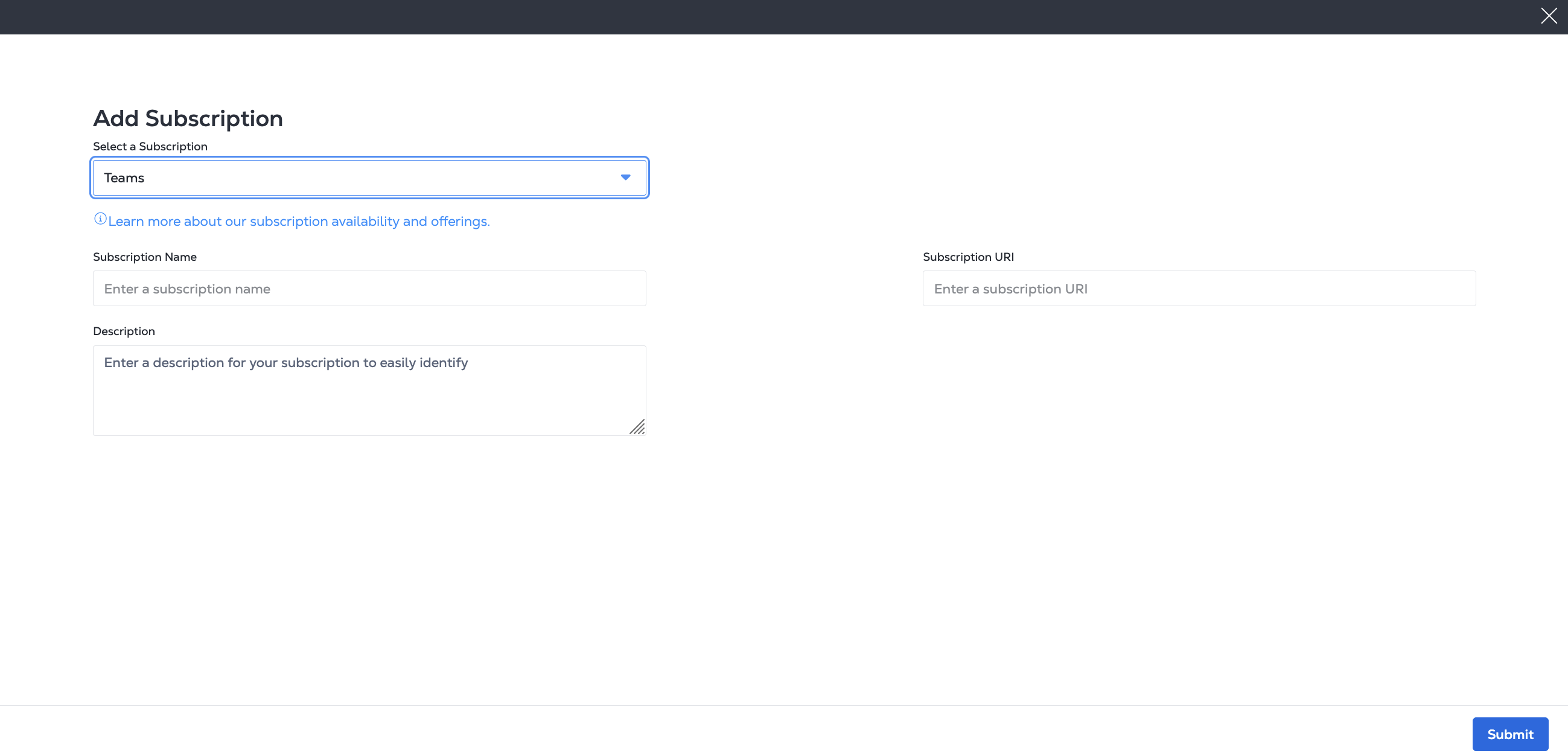
[Add Subscription]ページで、Microsoft Teams情報を入力する。
- サブスクリプション名
- Microsoft Workflow Webhook URI
- 説明を入力する(オプション)
cURLリクエストの例:
curl -X 'POST' 'https://api.equinix.com/fabric/v4/streams/<streamId>/subscriptions' \
-H 'Content-Type: application/json' \
-H 'Authorization: Bearer <Bearer Token>' \
-d '{
  "type": "STREAM_SUBSCRIPTION",
  "name": "<ms_teams_subscription>",
  "description": "<ms_teams_subscription_desc>",
  "sink": {
    "uri": "<teams_webhook_uri>",
    "type": "TEAMS"
  }
}'
応答の例:
{
  "href": "https://api.equinix.com/fabric/v4/streams/241372e9-79c9-4ef8-b77a-8b8176c228b4/subscriptions/12190e7d-a486-4a77-ba56-fecdab616837",
  "uuid": "12190e7d-a486-4a77-ba56-fecdab616837",
  "type": "STREAM_SUBSCRIPTION",
  "name": "ms_teams_subscription",
  "description": "ms_teams_subscription_desc",
  "state": "PROVISIONED",
  "enabled": true,
  "sink": {
    "uri": "****",
    "type": "TEAMS",
    "batchEnabled": false,
    "batchSizeMax": 50,
    "batchWaitTimeMax": 5
  },
  "changeLog": {
    "createdBy": "user1",
    "createdDateTime": "2024-10-04T13:20:40.127727Z"
  }
}
PagerDuty
- Portal
- API
- Event
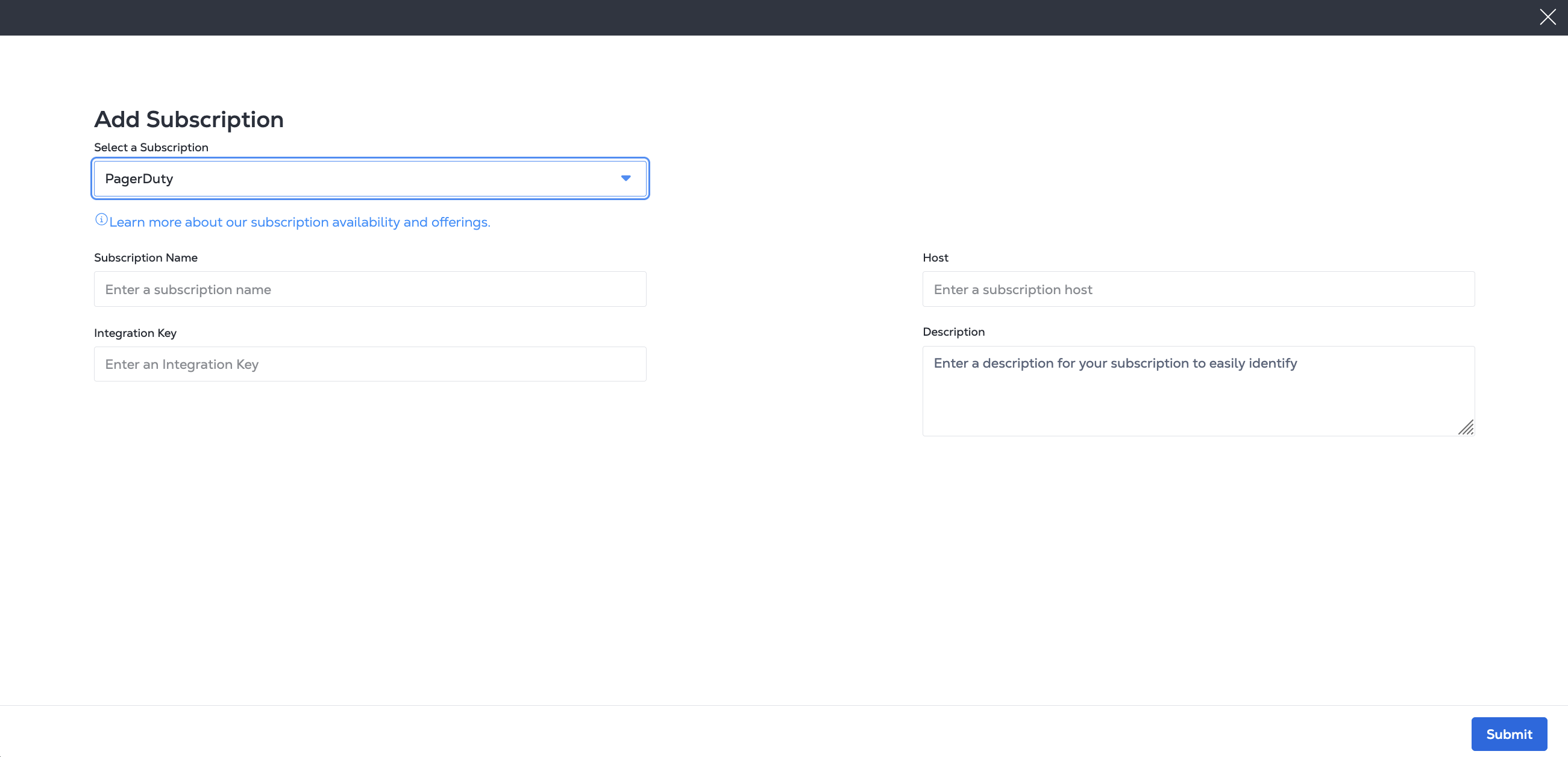
_Add Subscription_ページで、PagerDuty情報を入力する。
- サブスクリプション名
- PagerDutyホストURL
- PagerDuty統合キー
- 説明を入力する(オプション)
cURLリクエストの例:
curl -X 'POST' 'https://api.equinix.com/fabric/v4/streams/<streamId>/subscriptions' \
-H 'Content-Type: application/json' \
-H 'Authorization: Bearer <Bearer Token>' \
-d '{
  "type": "STREAM_SUBSCRIPTION",
  "name": "<pagerduty_subscription_name>",
  "description": "<pagerduty_subscription_desc>",
  "sink": {
    "host": "https://events.pagerduty.com",
    "type": "PAGERDUTY",
    "credential": {
      "type": "INTEGRATION_KEY",
      "integrationKey": "<pagerduty_integration_key>"
    }
  }
}'
応答の例:
{
  "href": "https://api.equinix.com/fabric/v4/streams/241372e9-79c9-4ef8-b77a-8b8176c228b4/subscriptions/dae0726a-87f0-4c5f-8662-ccbcf44a0de2",
  "uuid": "dae0726a-87f0-4c5f-8662-ccbcf44a0de2",
  "type": "STREAM_SUBSCRIPTION",
  "name": "pagerduty-subscription",
  "description": "pagerduty-subscription-desc",
  "state": "PROVISIONED",
  "enabled": true,
  "sink": {
    "host": "https://events.pagerduty.com",
    "type": "PAGERDUTY",
    "credential": {
      "type": "INTEGRATION_KEY",
      "integrationKey": "<encrypted_integration_key>"
    },
    "batchEnabled": false,
    "batchSizeMax": 50,
    "batchWaitTimeMax": 5,
    "settings": {
      "source": "equinix",
      "changeUri": "https://events.pagerduty.com/v2/change/enqueue",
      "alertUri": "https://events.pagerduty.com/v2/enqueue"
    }
  },
  "changeLog": {
    "createdBy": "user1",
    "createdDateTime": "2024-09-18T22:04:58.664523Z"
  }
}
---
routing_key: routingKey
dedup_key: NCAB543WC4lrLpET8nLX4Vd8
event_action: trigger # or resolve
payload:
  source: Equinix
  timestamp: '2024-07-01T20:12:21.306Z'
  severity: critical
  summary: Virtual port status changed to Down
  custom_details:
    equinixsource: https://api.equinix.com/fabric/v4/cloudevents
    specversion: '1.0'
    id: 6c573287-9914-4202-8b6d-2d15e7da04b8
    type: equinix.fabric.port.status.down
    subject: /fabric/v4/ports/956a86fb-d03d-436c-8d5d-30d1f51f7688
    time: '2024-07-01T20:12:21.306Z'
    severitynumber: 21
    severitytext: FATAL # or INFO
    equinixalert: raise/NCAB543WC4lrLpET8nLX4Vd8
    equinixproject: 123
ServiceNow
- Portal
- API
- Event
- Metric
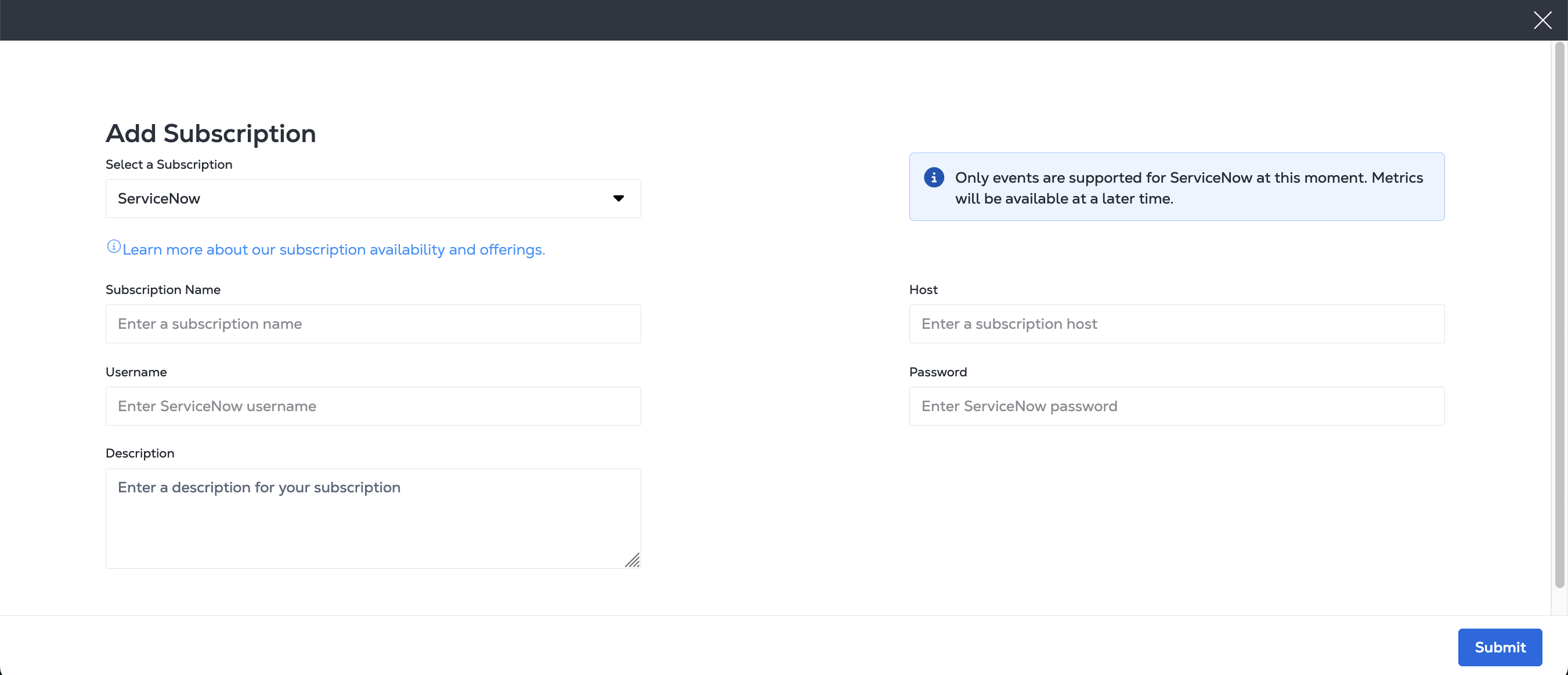
[Add Subscription]ページで、次のようなServiceNow情報を入力する。
- サブスクリプション名。
- ServiceNowホストのURL。
- ServiceNowユーザ名。
- ServiceNowパスワード。
- オプションの説明。
cURLリクエストの例:
curl -X 'POST' 'https://api.equinix.com/fabric/v4/streams/<streamId>/subscriptions' \
-H 'Content-Type: application/json' \
-H 'Authorization: Bearer <Bearer Token>' \
-d '{
"type": "STREAM_SUBSCRIPTION",
"name": "<servicenow_subscription_name>",
"description": "<servicenow_subscription_desc>",
"sink": {
    "host": "https://<host>.service-now.com",
    "type": "SERVICENOW",
    "settings": {
    "source": "<source_name>"
    },
    "credential": {
    "type": "USERNAME_PASSWORD",
    "username": "<servicenow-username>",
    "password": "<servicenow-password>"
    }
}
}'
応答の例:
{
"href": "https://api.equinix.com/fabric/v4/streams/241372e9-79c9-4ef8-b77a-8b8176c228b4/subscriptions/9b503760-b30f-4eb8-a681-aab1cfa9db1f",
"uuid": "9b503760-b30f-4eb8-a681-aab1cfa9db1f",
"type": "STREAM_SUBSCRIPTION",
"name": "servnow_subscription",
"description": "servnow_subscription_desc",
"state": "PROVISIONING",
"enabled": true,
"sink": {
    "host": "https://<host>.service-now.com",
    "type": "SERVICENOW",
    "credential": {
    "type": "USERNAME_PASSWORD"
    },
    "batchEnabled": false,
    "batchSizeMax": 50,
    "batchWaitTimeMax": 5,
    "settings": {
    "source": "source_name",
    "metricUri": "https://<host>.service-now.com/api/mid/sa/metrics",
    "eventUri": "https://<host>.service-now.com/api/global/em/jsonv2"
    }
},
"changeLog": {
    "createdBy": "user1",
    "createdDateTime": "2025-01-22T18:09:20.894582046Z"
}
}
---
source: Equinix
time_of_event: '2024-07-01T20:12:21.306Z'
description: Virtual port status changed to Down
severity: 1 # 1 for clear and 0 for clear
resolution_state: New # or Closing
message_key: NCAB543WC4lrLpET8nLX4Vd8
resource: fabric.port
node: /fabric/v4/ports/956a86fb-d03d-436c-8d5d-30d1f51f7688
type: equinix.fabric.port.status.down
additional_info: '{"cloudevent":{"specversion":"1.0","source":"https://api.equinix.com/fabric/v4/cloudevents","id":"6c573287-9914-4202-8b6d-2d15e7da04b8","type":"equinix.fabric.port.status.down","subject":"/fabric/v4/ports/956a86fb-d03d-436c-8d5d-30d1f51f7681","time":"2024-07-01T20:12:21.306Z","severitynumber":13,"severitytext":"CRITICAL","equinixalert":"raise/NCAB543WC4lrLpET8nLX4Vd8","equinixproject":"123","data":{"message":"Virtual port named \'Test-port\' status changed to Down","resource":{}}}}'
---
- timestamp: 1719889941306000. #mili sec
  source: Equinix
  resource_path: "/fabric/v4/ports/956a86fb-d03d-436c-8d5d-30d1f51f7681"
  metric_type: equinix.fabric.port.bandwidth_rx.utilization
  value: 70.5
  ci2metric_id:
    type: GAUGE
    subject: "/fabric/v4/ports/956a86fb-d03d-436c-8d5d-30d1f51f7681"
    equinixproject: 123
    unit: "%"
- timestamp: 1719889941306000 #mili sec
source: Equinix
  resource_path: "/fabric/v4/ports/956a86fb-d03d-436c-8d5d-30d1f51f7681"
  metric_type: equinix.fabric.port.packets_erred_tx.count
  value: 70.5
  ci2metric_id:
    type: GAUGE
    interval: PT5M
    subject: "/fabric/v4/ports/956a86fb-d03d-436c-8d5d-30d1f51f7681"
    equinixproject: 123
    unit: "%"
Slack
- Portal
- API
- CloudEvent
- CloudEvent Metric
_Add Subscription_pageで、次のようなSlack情報を入力する。
- サブスクリプション名
- サブスクリプション URI
- 詳細 (任意)
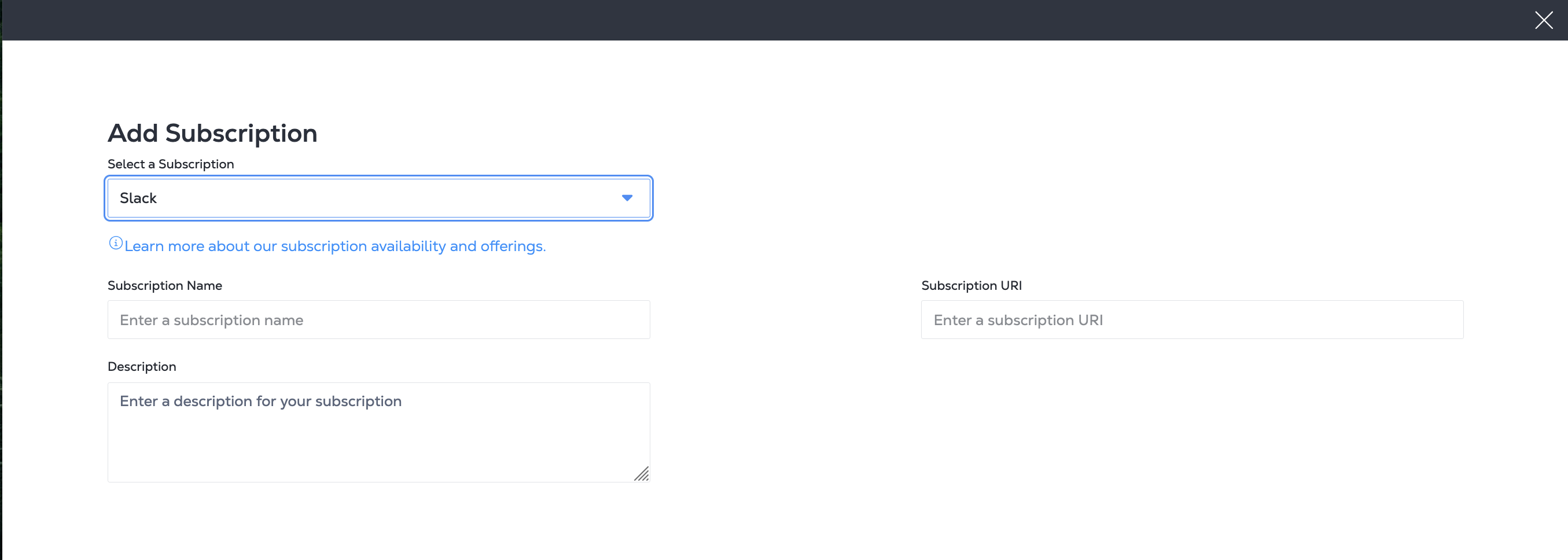
cURLリクエストの例:
curl -X 'POST' 'https://api.equinix.com/fabric/v4/streams/<streamId>/subscriptions' \
-H 'Content-Type: application/json' \
-H 'Authorization: Bearer <Bearer Token>' \
-d '{
"type": "STREAM_SUBSCRIPTION",
"name": "<slack_subscription_name>",
"description": "<slack_subscription_desc>",
"sink": {
    "uri": "<slack_webhook_uri>",
    "type": "SLACK"
}
}'
応答の例:
{
"href": "https://api.equinix.com/fabric/v4/streams/241372e9-79c9-4ef8-b77a-8b8176c228b4/subscriptions/12190e7d-a486-4a77-ba56-fecdab616837",
"uuid": "12190e7d-a486-4a77-ba56-fecdab616837",
"type": "STREAM_SUBSCRIPTION",
"name": "slack_subscription",
"description": "slack_subscription_desc",
"state": "PROVISIONED",
"enabled": true,
"sink": {
    "uri": "****",
    "type": "SLACK",
    "batchEnabled": false,
    "batchSizeMax": 50,
    "batchWaitTimeMax": 5
},
"changeLog": {
    "createdBy": "user1",
    "createdDateTime": "2024-10-04T13:20:40.127727Z"
}
}
---
cloudevent:
  source: https://api.equinix.com/fabric/v4/cloudevents
  specversion: '1.0'
  id: 6c573287-9914-4202-8b6d-2d15e7da04b8
  type: equinix.fabric.port.status.up
  subject: /fabric/v4/ports/956a86fb-d03d-436c-8d5d-30d1f51f7688
  time: '2024-07-01T20:12:21.306Z'
  severitynumber: 9
  severitytext: INFO
  equinixalert: clear/NCAB543WC4lrLpET8nLX4Vd8
  equinixproject: 123
  data:
    message: Virtual port status changed to Up
    resource:
      href: https://api.equinix.com/fabric/v4/ports/956a86fb-d03d-436c-8d5d-30d1f51f7688
      uuid: 956a86fb-d03d-436c-8d5d-30d1f51f7688
      name: my-test-port
      description: port description
---
specversion: '1.0'
source: https://api.equinix.com/fabric/v4/cloudevents
id: 6c573287-9914-4202-8b6d-2d15e7da04b8
type: equinix.fabric.metric
subject: /fabric/v4/ports/956a86fb-d03d-436c-8d5d-30d1f51f7688
time: '2024-07-01T20:12:21.306Z'
severitynumber: 9
severitytext: INFO
equinixproject: 123
dataschema: https://github.com/equinixapis/.../ApiConfigEventData.json
datacontenttype: application/json
data:
  message: New metrics collected
  resource:
    href: https://api.equinix.com/fabric/v4/ports/956a86fb-d03d-436c-8d5d-30d1f51f7688
    uuid: 956a86fb-d03d-436c-8d5d-30d1f51f7688
    name: my-test-port
    description: port description
  metrics:
  - type: GAUGE
    name: equinix.fabric.port.bandwidth_rx.usage
    description: Port inbound bandwidth utilization
    unit: bit/s
    datapoints:
    - endDateTime: '2024-07-01T20:12:21.000Z'
      value: 440023
  - type: SUM
    name: equinix.fabric.port.packets_erred_tx.count
    description: Port error packets
    interval: PT5M
    unit: packet
    datapoints:
    - endDateTime: '2024-07-01T20:12:21.000Z'
      value: 10
Splunk
- Portal
- API
- Event
- Metric
_Add Subscription_pageで、Splunk情報を入力する。
- サブスクリプション名
- Splunk HTTP Event Collector URI
- Splunkアクセストークン
- Splunkイベントインデックス(必須)
- Splunk Metrics Index(Splunkにメトリクスを取り込む予定がある場合)
- 説明を入力する(オプション)
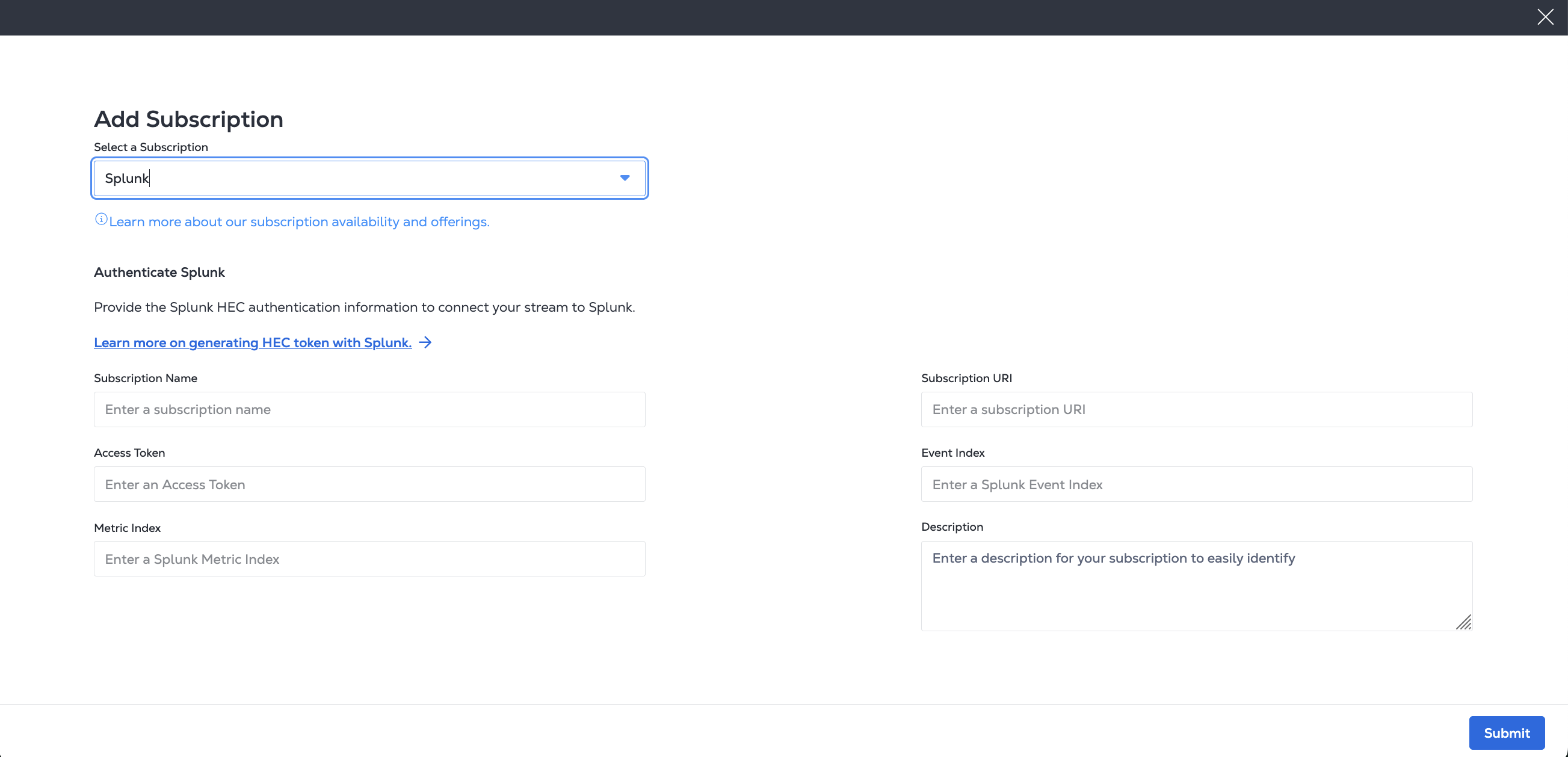
cURLリクエストの例:
curl -X 'POST' 'https://api.equinix.com/fabric/v4/streams/<streamId>/subscriptions' \
-H 'Content-Type: application/json' \
-H 'Authorization: Bearer <Bearer Token>' \
-d '{
  "type": "STREAM_SUBSCRIPTION",
  "name": "<splunk_subscription_name>",
  "description": "<splunk_subscription_desc>",
  "sink": {
    "uri": "https://http-inputs-<host>.splunkcloud.com:<port>/services/collector/event"
    "type": "SPLUNK_HEC",
    "settings": {
      "eventIndex": "<name_of_eventIndex>",
      "metricIndex": "<name_of_metricIndex>",
      "source": "<name_of_splunk_hec>"
    },
    "credential": {
      "type": "ACCESS_TOKEN",
      "accessToken": "Splunk <Splunk AccessToken>"
    }
  }
}'
応答の例:
{
  "href": "https://api.equinix.com/fabric/v4/streams/241372e9-79c9-4ef8-b77a-8b8176c228b4/subscriptions/958a9854-dc49-4ded-87bd-be4d0099355e",
  "uuid": "958a9854-dc49-4ded-87bd-be4d0099355e",
  "type": "STREAM_SUBSCRIPTION",
  "name": "eq-splunk ",
  "description": "subscription1",
  "state": "PROVISIONING",
  "enabled": true,
  "sink": {
    "uri": "https://http-inputs-<host>.splunkcloud.com:<port>/services/collector/event",
    "type": "SPLUNK_HEC",
    "credential": {
      "type": "ACCESS_TOKEN"
    },
    "batchEnabled": false,
    "batchSizeMax": 50,
    "batchWaitTimeMax": 5,
    "settings": {
      "eventIndex": "<name_of_eventIndex>",
      "metricIndex": "<name_of_metricIndex>",
      "source": "<name_of_splunk_hec>"
    }
  },
  "changeLog": {
    "createdBy": "user1",
    "createdDateTime": "2024-08-12T21:49:21.761029359Z"
  }
}
---
sourcetype: _json
index: test-event-index
source: equinix # optional
event:
  equinixsource: https://api.equinix.com/fabric/v4/cloudevents
  specversion: '1.0'
  id: 6c573287-9914-4202-8b6d-2d15e7da04b8
  type: equinix.fabric.port.status.up
  subject: /fabric/v4/ports/956a86fb-d03d-436c-8d5d-30d1f51f7688
  time: '2024-07-01T20:12:21.306Z'
  severitynumber: 9
  severitytext: INFO
  equinixalert: clear/NCAB543WC4lrLpET8nLX4Vd8
  equinixproject: 123
  data:
    message: Virtual port status changed to Up
    resource:
      href: https://api.equinix.com/fabric/v4/ports/956a86fb-d03d-436c-8d5d-30d1f51f7688
      uuid: 956a86fb-d03d-436c-8d5d-30d1f51f7688
      name: my-test-port
      description: port description
---
time: 1719889941.306
event: metric
index: test-index-metric
source: Equinix # Optional
fields:
  subject: /fabric/v4/ports/956a86fb-d03d-436c-8d5d-30d1f51f7688
  equinixproject: 123
  "metric_name:equinix.fabric.port.bandwidth_rx.usage": 440023
  "metric_name:equinix.fabric.port.packets_erred_tx.count": 10
Generic Webhook
イベントとメトリクスの汎用Webhookサービスへのサブスクリプションを作成する。シンクタイプをWebhookとして指定する。イベントURIまたはメトリックURIのいずれかを含める必要がある。イベントとメトリクスの両方をストリーミングするには、イベントURIとメトリクスURIの両方を提供する必要がある。これらのフィールドのうち1つだけを指定すると、対応するデータ型(イベントまたはメトリック)のみが宛先プラットフォームに送信される。
- Portal
- API
[Add Subscription]ページで、次のようなWebhook情報を入力する。
- サブスクリプション名
- ストリーミングデータのCloudEvent形式またはOpen Telemetry形式を選択する。
- イベントURI
- メトリックURI
- 認証タイプをNo Auth、Username/Password、Access Token、またはAPI Keyオプションから選択する。表示されたフィールドに関連情報を入力する。
- および説明を入力する(オプション)。
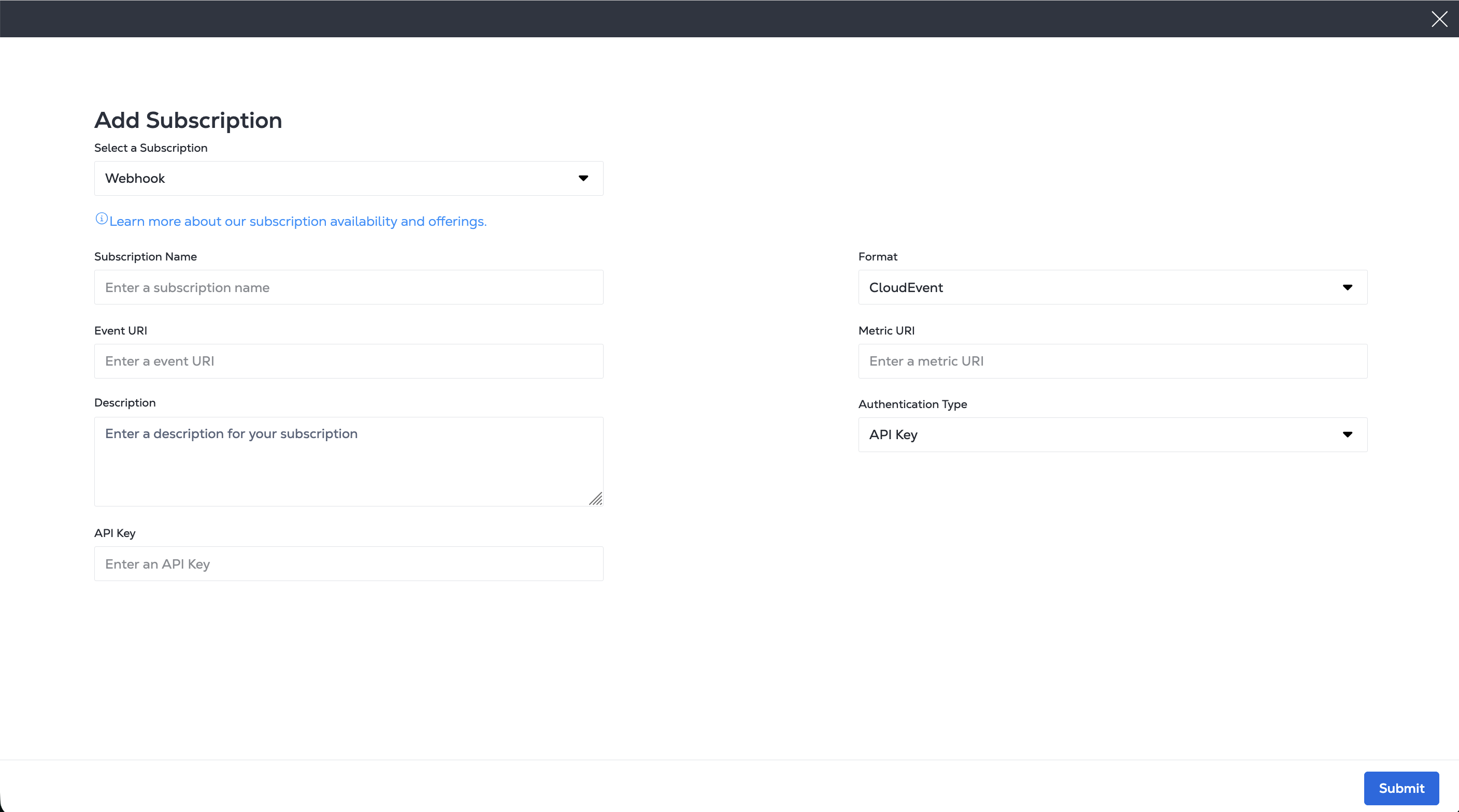
cURLリクエストの例:
curl -X POST 'https://api.equinix.com/fabric/v4/streams/<streamId>/subscriptions' \
-H 'Content-Type: application/json' \
-H 'Authorization: Bearer <Bearer Token>' \
-d '{
  "type": "STREAM_SUBSCRIPTION",
  "name": "<webhook_subscription_name>",
  "description": "<webhook_subscription_desc>",
  "enabled": true,
  "sink": {
    "type": "WEBHOOK",
    "settings": {
      "eventUri": "<webhook_uri>",
      "metricUri": "<webhook_uri>",
      "format": "<format>"
    }
  }
}'
応答の例:
{
"href": "https://api.equinix.com/fabric/v4/streams/241372e9-79c9-4ef8-b77a-8b8176c228b4/subscriptions/12190e7d-a486-4a77-ba56-fecdab616837",
"uuid": "12190e7d-a486-4a77-ba56-fecdab616837",
"type": "STREAM_SUBSCRIPTION",
"name": "<webhook_subscription_name>",
"description": "<webhook_subscription_desc>",
"state": "PROVISIONED",
"enabled": true,
"sink": {
    "type": "WEBHOOK",
    "batchEnabled": false,
    "batchSizeMax": 50,
    "batchWaitTimeMax": 5,
    "settings": {
    "eventUri": "<webhook_uri>",
    "format": "CLOUDEVENT"
    }
},
"changeLog": {
    "createdBy": "user1",
    "createdDateTime": "2025-04-30T15:31:34.528915714Z"
}
}
購読を表示する
- Portal
- API
-
_Observability_メニューからデータストリームをクリックする。
-
ストリームインベントリ_からストリームを選択する。
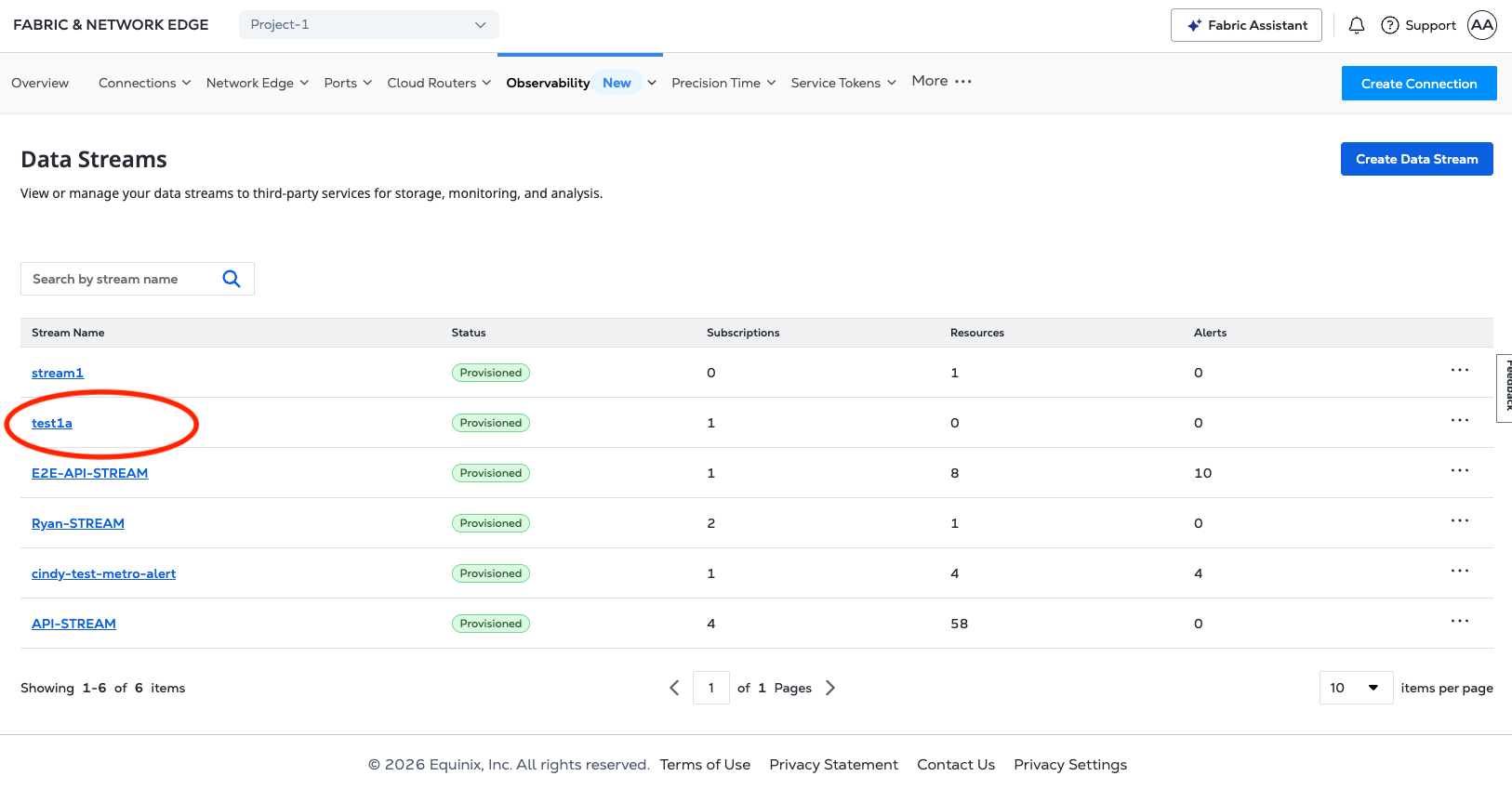
-
[Stream Details]ページで、[*Subscriptions]をクリックする。
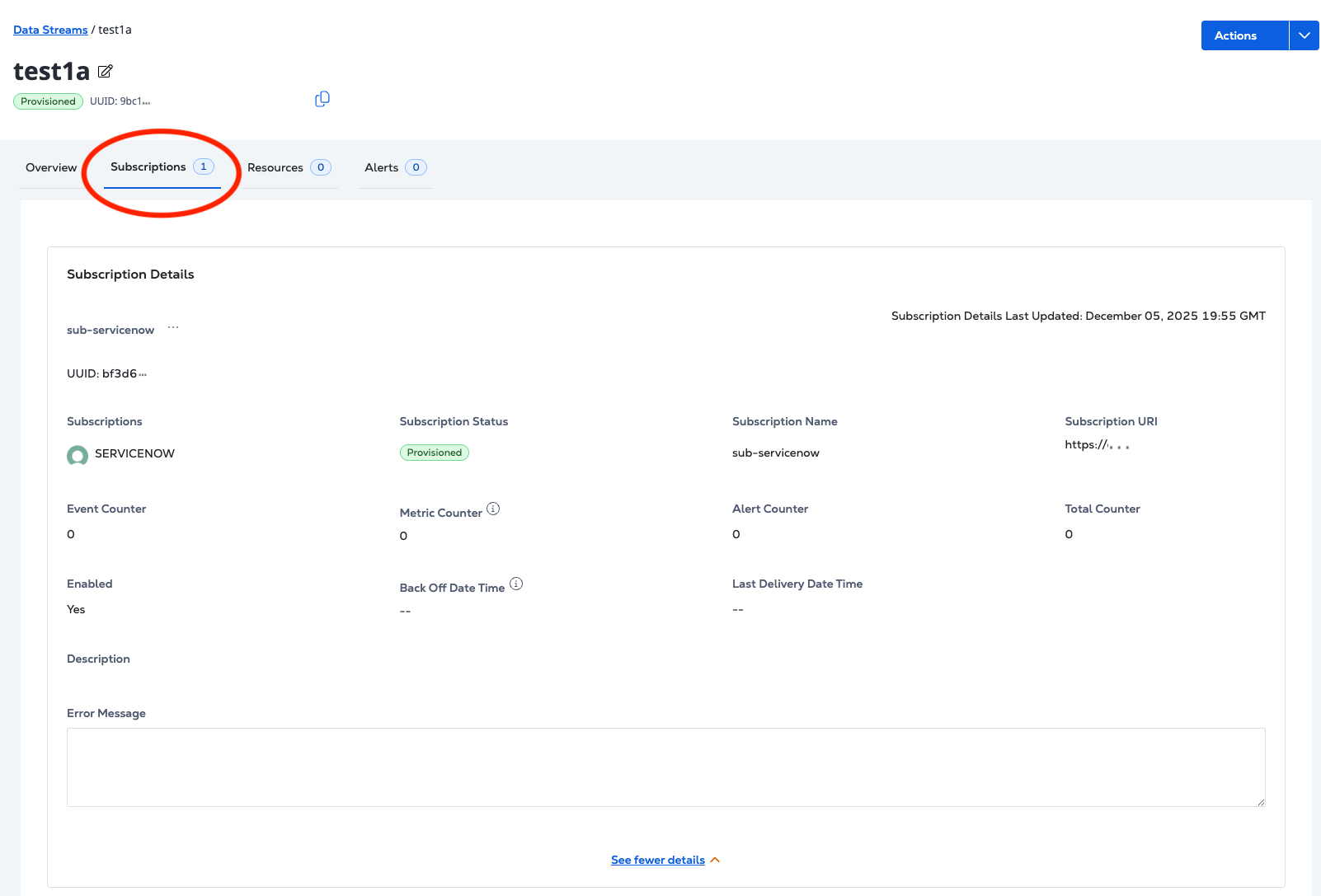
サブスクリプションの詳細を取得するには、エンドポイントにリクエストを/fabric/v4/streams/{streamId}/subscriptions/{subscriptionId}送信する。GET
cURLリクエストの例:
curl -X 'GET' 'https://api.equinix.com/fabric/v4/streams/241372e9-79c9-4ef8-b77a-8b8176c228b4/subscriptions/557400f8-d360-11e9-bb65-2a2ae2dbcce4' \
-H 'Content-Type: application/json' \
-H 'Authorization: Bearer <Bearer Token>'
応答の例:
{
  "href": "https://api.equinix.com/fabric/v4/streams/241372e9-79c9-4ef8-b77a-8b8176c228b4/subscriptions/958a9854-dc49-4ded-87bd-be4d0099355e",
  "uuid": "958a9854-dc49-4ded-87bd-be4d0099355e",
  "type": "STREAM_SUBSCRIPTION",
  "name": "eq-splunk",
  "description": "subscription1",
  "state": "PROVISIONED",
  "enabled": true,
  "sink": {
    "uri": "https://http-inputs-<host>.splunkcloud.com:<port>/<endpoint>",
    "type": "SPLUNK_HEC",
    "credential": {
      "type": "ACCESS_TOKEN"
    },
    "settings": {
      "eventIndex": "<name_of_eventIndex>",
      "metricIndex": "<name_of_metricIndex>",
      "source": "<name_of_splunk_hec>"
    }
  },
  "changeLog": {
    "createdBy": "user1",
    "createdDateTime": "2024-08-12T21:49:21.761029Z"
  }
}
サブスクリプションを削除する
- Portal
- API
-
_Observability_メニューからデータストリームをクリックする。
-
ストリームインベントリ_からストリームを選択する。
-
[Stream Details]ページで、[*Subscriptions]をクリックする。
-
_サブスクリプションの詳細_で、オプションメニューをクリックし、
...サブスクリプションの削除。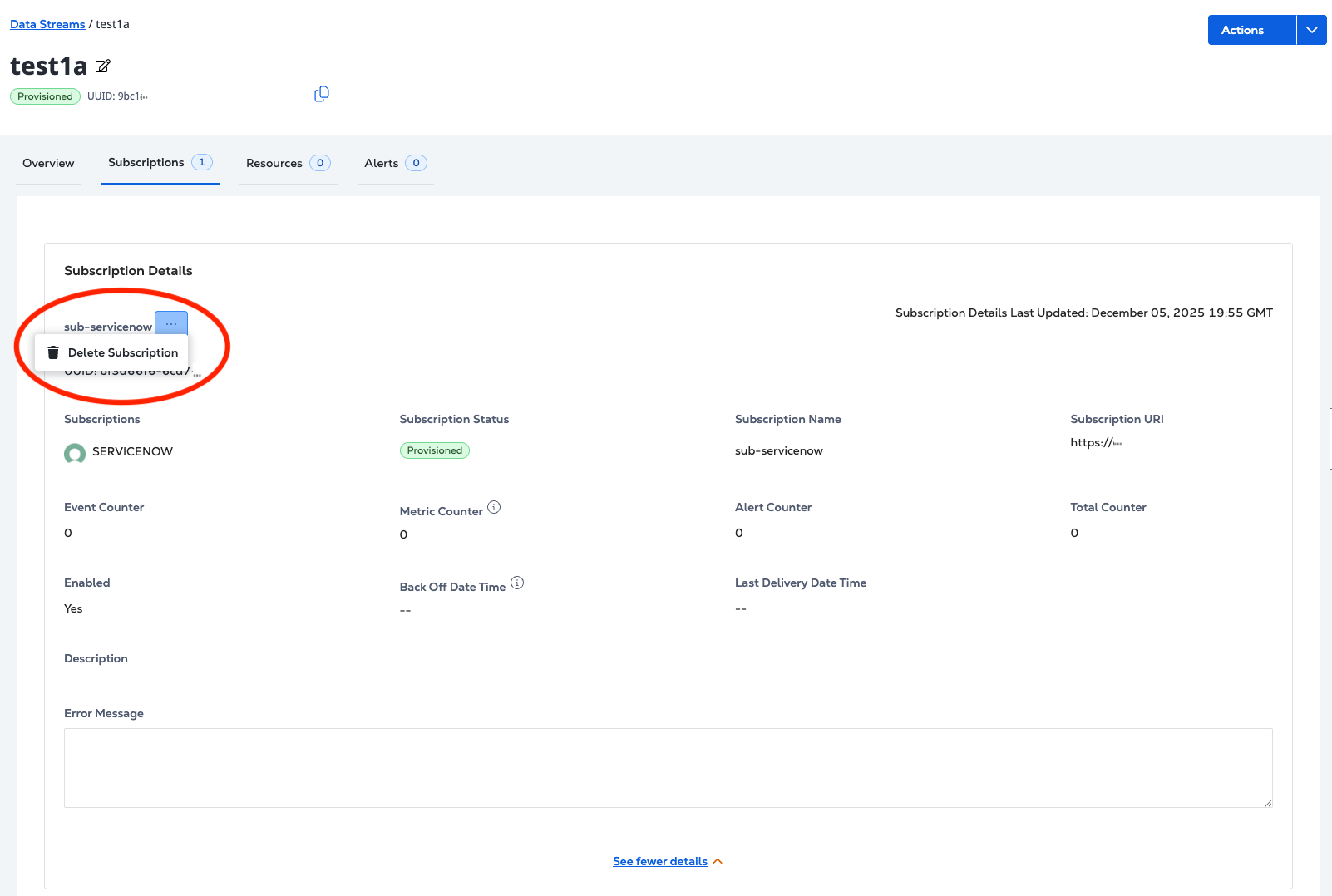
サブスクリプションを削除するには、エンドポイントにリクエストを/fabric/v4/streams/{streamId}/subscriptions/{subscriptionId}送信する。DELETE
cURLリクエストの例:
curl -X 'DELETE' 'https://api.equinix.com/fabric/v4/streams/241372e9-79c9-4ef8-b77a-8b8176c228b4/subscriptions/557400f8-d360-11e9-bb65-2a2ae2dbcce4' \
-H 'Content-Type: application/json' \
-H 'Authorization: Bearer <Bearer Token>'
応答の例:
{
"href": "https://api.equinix.com/fabric/v4/streams/241372e9-79c9-4ef8-b77a-8b8176c228b4/subscriptions/958a9854-dc49-4ded-87bd-be4d0099355e",
"uuid": "958a9854-dc49-4ded-87bd-be4d0099355e",
"type": "STREAM_SUBSCRIPTION",
"name": "eq-splunk",
"description": "subscription1",
"state": "DEPROVISIONING",
"enabled": true,
"sink": {
    "uri": "<protocol>://http-inputs-<host>.splunkcloud.com:<port>/<endpoint>",
    "type": "SPLUNK_HEC",
    "credential": {
    "type": "ACCESS_TOKEN"
    },
    "settings": {
    "eventIndex": "<name_of_eventIndex>",
    "metricIndex": "<name_of_metricIndex>",
    "source": "<name_of_splunk_hec>"
    }
},
"changeLog": {
    "createdBy": "user1",
    "createdDateTime": "2024-08-12T21:49:21.761029Z"
}
}