Cisco Catalyst 8000Vルーター(自律モード)
Cisco Catalyst 8000Vエッジソフトウェアの概要
Cisco Catalyst 8000Vエッジソフトウェアデータシート
SD-DNA WANおよびルーティング用Cisco DNAソフトウェア発注ガイド
導入タイプ
- 単一デバイス
- 冗長デバイス
ライセンスオプション
接続オプション
- パブリックIPアドレスを使用する
- パブリックIPアドレスがない場合
デバイスの詳細
| 2コア | 4コア | 6コア | 8コア | 16コア | |
|---|---|---|---|---|---|
| メモリ | 8 GB | 8 GB | 16 GB | 16 GB | 16 GB |
| ソフトウェアパッケージ(BYOL) | DNAエッセンシャルズ DNAの優位性 DNAプレミア | ||||
| ソフトウェアパッケージ(サブスクリプション) | DNAエッセンシャルズ DNAの優位性 | ||||
| スピードティア(BYOL) | T0、T1、T2、T3 | ||||
| スピードティア(サブスクリプション) | T2 | T2およびT3 | |||
| サポートされる仮想データインターフェース(デフォルト/最大) | 10 / 24 | ||||
| システム予約インターフェイス | ギガビットイーサネット1(管理) ギガビットイーサネット2(WAN / SSH) | ||||
| アクセス方法 | SSH(CLI) HTTPS (Webコンソール) | ||||
| イメージバージョン | 使用可能なイメージバージョンを表示 | ||||
| 制限されたCLIコマンド | なし |
デバイスの作成中に_デバイスの詳細を_設定するには:
-
_デバイスリソース_を選択するときは、それらのリソースの最大スループットが正しく決定されていることを確認する。スループット層オプションはデバイスリソースによって決定される
-
ソフトウェアパッケージの選択:DNA Essentials、DNA Advantage、またはDNA Premier。
-
_数値スループット(_BYOLのみ)を入力するか、_スループットティアを_選択する。選択できるのは1つだけ数値スループットを入力してから、スループットティアを選択することはできない。

誤ったスループットを選択すると、デバイスの最適なスループットよりも低下する可能性がある。詳細については、「自律モードでのスループットとスロットリングの仕様(表4)」を参照してください。表に記載されているティア4はNetwork Edgeでサポートされていない
-
ACLテンプレートの適用は、デバイス作成プロセスの必須ステップである。デバイスに適用するテンプレートを作成する必要がある場合は、[Create Access Control List Template]をクリックする。詳細については、「仮想デバイスでのアクセス制御の構成」を参照してください。
-
Network Edgeのイメージダウンロードツールを使用すると、Cisco Catalyst 8000V(自律モード)で使用可能なソフトウェアバージョンを表示してダウンロードし、アップグレードまたはダウングレードするためにデバイスにアップロードできる。このツールは、Equinixによって認定されたイメージを持つサブスクリプションデバイス用。
-
Equinix Customer Portalにサインインし、Network Edgeに移動する。
-
Network Edge_(仮想デバイスインベントリ)_メニューから、_仮想デバイスインベントリ(Virtual Device Inventory)を_選択する。続行する前に、目的のプロジェクト名/IDに切り替えておくこと。
-
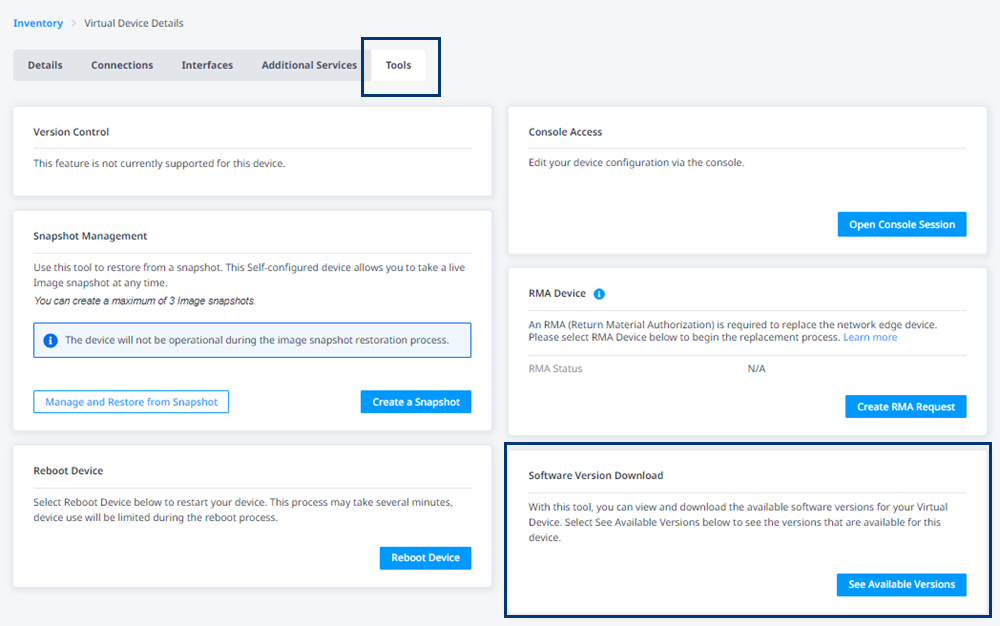
Cisco Catalyst 8000デバイスを見つけてデバイス名をクリックし、_[Virtual Device Details]_ページを表示する。
-
[ツール]をクリックする。
-
_Software Version Download(ソフトウェアバージョンダウンロード)_カードで、See Available Versions(使用可能なバージョンを表示)
-
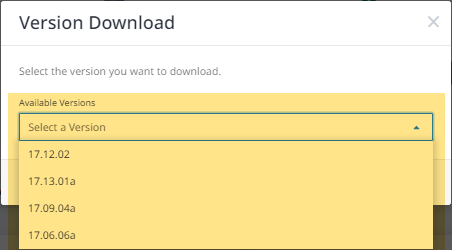
**使用可能なバージョン(Available Versions)**ドロップダウンで、ダウンロードするバージョンを選択する。
-
[バージョンのダウンロードの開始]をクリックする。
-
ダウンロードのプロンプトが表示されたら、ファイルを任意の場所に保存します。
-
ライセンスの持ち込み
独自ライセンス(BYOL)を取得する場合は、次のデバイス作成手順が適用される。
-
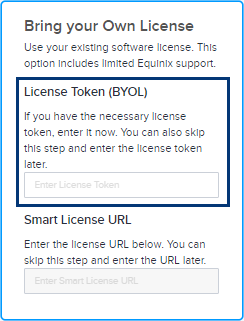
デバイス作成プロセス中にライセンストークンを入力できる。ライセンストークンを入力すると、提供されたトークンに基づいて仮想デバイスにライセンスがプロビジョニングされる。トークン情報を提供しない場合でも、仮想デバイスはプロビジョニングされるが、仮想デバイスのプロビジョニング後にライセンストークンを使用してスマートサーバーに手動でライセンスを登録する必要がある。
-
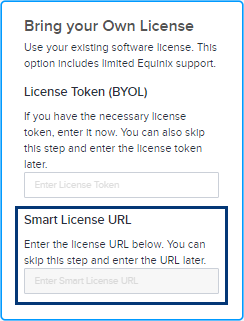
または、スマートライセンスURLを入力することもできる。このプロセスを完了するには、有効なシスコアカウントが必要である。Cisco Smart Licenseトークンを取得するには、シスコのマニュアルの指示に従う。
Ciscoスマートライセンストークンを取得します:
- Cisco.com アカウント情報を使用して Cisco Smart Software Manager (CSSM) にサインインします。
- [仮想アカウント]>[_インベントリ]_セクションを見つけて、新しいトークンを作成する。
- 新しく作成したトークンがトークンリストに表示される。トークンをクリックして詳細を確認し、トークン文字列をコピーする。
新しいトークンをデバイスに登録するには、デバイスCLIにアクセスし、トークンを登録するコマンドを入力します。
license smart register idtoken <your_token_string>トークンの登録を確認するには、次のようなコマンドを入力します:
show license status問題が発生した場合、またはより詳細な手順が必要な場合は、『Cisco DNA Center Administrator Guide』を参照するか、シスコサポートに連絡する。
-
お客様は、シスコまたはそのパートナーからサポートを受ける責任がある。Equinix Network Edgeからライセンスを取得している場合は、シスコテクニカルアシスタントセンター(TAC)でサポートケースをオープンして、Cisco IOX-XEソフトウェアの問題のトラブルシューティングを行うか、Network EdgeポータルからCisco IOX-XE設定に関する質問を受けることができる。詳細については、『Cisco Catalyst 8000V Subscription and Support』を参照。
Cisco Catalyst 8000Vサブスクリプション
パブリックIPアドレスのないデバイスは、サブスクリプションライセンスオプションをサポートしない。
Cisco Catalyst 8000V自律モードのサブスクリプションライセンスオプションは、Equinix Network Edgeポータルから利用できる。Cisco VNFサポートについては、次の表を参照して、シスコと直接サポートケースを作成するタイミングを理解する。
| ライセンスタイプ | Equinix | Cisco |
|---|---|---|
| エクイニクスを通じたサブスクリプション | エクイニクスを介したライセンスサブスクリプションの場合、ライセンス登録などライセンスに関する問題については、エクイニクスのサポートチケットをご利用ください。 | IOX-XE関連の問題または設定関連の質問については、Network Edgeポータル(以下のセクションを参照)からシスコTACケースをオープンする。Equinix契約なしでシスコTACと直接連携 |
| BYOL | ライセンスに関するエクイニクスのサポートはありません。 | お客様は、シスコまたはシスコパートナーからシスコサポートを受ける責任がある。シスコの営業担当者またはパートナーに連絡して、ライセンスおよびサポート契約を購入する。 |
いずれのライセンスでも、VNFの運用、接続の問題、Network Edgeサービスの問題など、Network Edgeのインフラストラクチャに関するエクイニクスのサポートチケットを発行できます。
Catalyst 8000V Autonomousモードサブスクリプションライセンスオプションを使用すると、Cisco 8000Vソフトウェアまたは設定の問題をCisco Technical Assistance Center(TAC)で直接トラブルシューティングできるこれを行うには、シスコTACサポートケースをNetwork Edgeポータルから送信し、直接シスコTACに送信する。Equinix Network Edgeインフラストラクチャ関連の問題があると判断された場合は、Equinixがトラブルシューティングを行う。Equinixサポートは、Cisco 8000Vソフトウェアまたは設定の問題およびトラブルシューティングには関与しない。
Network Edgeの Catalyst 8000V サブスクリプション ライセンスの Cisco TAC ケースを開く
Catalyst 8000V Autonomous モード サブスクリプション ライセンスについて Cisco TAC でケースを作成するには、次の手順に従ってください:
-
Network Edge の右上隅にあるサポートアイコンをクリックします。
-
[サポートケースを開く]をクリックする。
-
_製品またはサービスの選択_ドロップダウンで、_Network Edge_を選択し、仮想デバイスをクリックする。
-
[既存のデバイス]をクリックする。
-
仮想デバイスの UUID を入力するか、サブスクリプション オプション付きの既存の Cisco C8000V 仮想デバイスを選択します。
-
_[ケースタイプ(Case Type)]_ドロップダウンで、[Open _Cisco TAC Case(オープンCisco TACケース)]を_選択して、シスコと直接問題をトラブルシューティングする。
-
プロンプトが表示され、C8000VのDevice _Details_ページにリダイレクトして詳細情報を提供する。[はい続行]をクリックする。リクエストが正常に送信されると、通知が表示される。

-
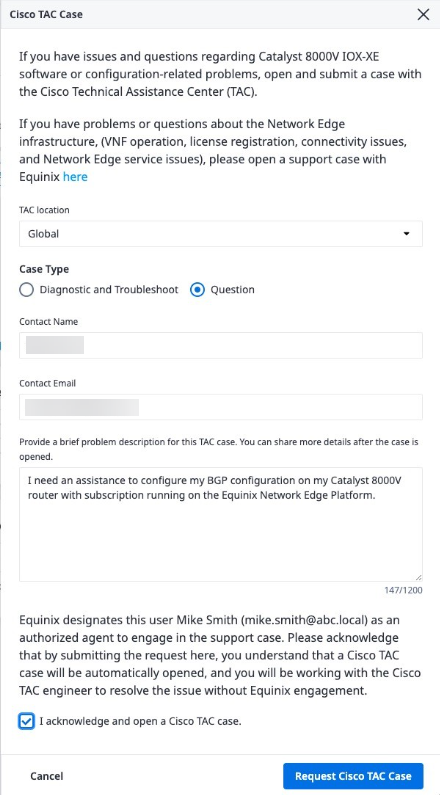
****[Device Details]ページで、Cisco TAC Case BOXに要求された情報を入力する。
-
[Request Cisco TAC Case]をクリックする。
情報Cisco 8000V IOX-XEソフトウェアの問題または設定に関する質問について、Cisco TACケースをオープンする。Equinix契約を締結せずに、シスコTACと直接連携することになる。
****[Device Details]ページで[Open Cisco TAC Case]をクリックしても、Cisco TACケースワークフローを開くことができる。
-
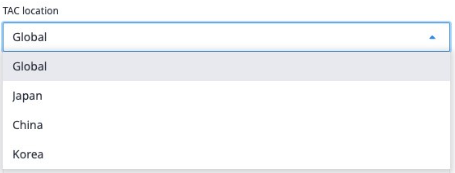
最初にTACロケーションを選択する。日本、韓国、または中国に在住し、特定の言語で現地のTACからサポートを受ける必要がある場合を除き、グローバルTACを使用する。その場合は、適切なTACロケーションを選択する。選択したTACロケーションでTACケースがオープンされる。
-
ケースタイプ:
- Cisco IOX-XEソフトウェアの問題が発生し、Cisco TACでトラブルシューティングする必要がある場合は、[診断とトラブルシューティング]を選択する。
- Cisco 8000V IOX-XEの設定に関する質問についてサポートが必要な場合は、[質問]を選択する。
-
Cisco TACでケースをオープンする際に使用する担当者名を入力する。
-
連絡先メールアドレスを入力する。Cisco TACとの通信に使用される主要な電子メールアドレス。
-
このTACケースの問題点を簡単に説明してください。ケースをオープンした後で詳細を入力できる。
-
[I acknowledge and open a Cisco TAC case(シスコTACケースの確認とオープン)]
-
[Request Cisco TAC Case]をクリックして、TACケースプロセスを開始する。リクエストを確認する電子メールが送信される。Cisco TACケースがオープンされ、Cisco TACエンジニアと協力する。
IPアドレスを使用しないCisco Catalyst 8000Vルータの設定
パブリックIPアドレスのないデバイスは、サブスクリプションライセンスオプションをサポートしない。
EquinixパブリックIPアドレスを使用せずにCatalyst 8000Vルータ(自律モード)を作成した場合、WANまたは管理インターフェイス上でパブリックIPアドレスを使用せずにVNFがプロビジョニングされる
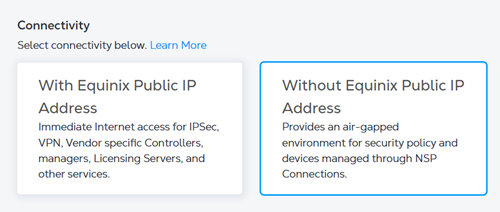
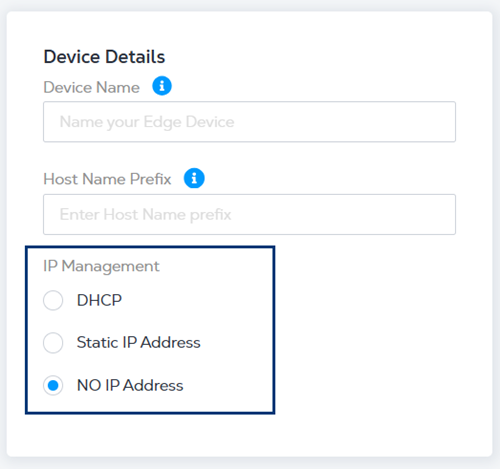
Device Detailsを入力するときに、次のIPアドレスオプションのいずれかを選択する。
- DHCP - IPアドレスを自動的に割り当てるネットワーク管理プロトコル。
- 静的IPアドレス - IPアドレス、サブネットマスク、デフォルトゲートウェイを入力します。
- NO IP Address - IPアドレスは割り当てられません。
連邦情報処理標準(FIPS)モードを有効にする
デフォルトでは、Cisco Catalyst 8000VデバイスでFIPSモードが有効になっていないため、手動で有効にする必要がある。
Catalyst 8000V で FIPS モードを有効にします:
-
構成。
platform ipsec fips-modeC8000V#conf t>Enter configuration commands, one per line. End with CNTL/Z.C8000V-FIPS(config)#platform ipsec fips-modeEnable FIPS mode will take effect after reboot! -
設定を保存します。
C8000V#copy running-config startup-config>Destination filename [startup-config]?Building configuration...[OK] -
ルーターをリロードする。
C8000V#reload>Proceed with reload? [confirm] -
ルータがオンラインになった後、FIPS モードが有効になっていることを確認します。
C8000V-#show running-config | inc fips>platform ipsec fips-mode
詳細については、シスコのマニュアルを参照してください。