Cisco Adaptive Security仮想アプライアンス
- Cisco適応型セキュリティ仮想アプライアンス(ASAv)データシート。
- Cisco Secure Firewall ASAシリーズ機能ライセンス。
- Cisco ASAシリーズ、9.16(x)リリースノート
ライセンスオプション
導入タイプ
- 単一デバイス
- 冗長デバイス
接続オプション
- パブリックIPアドレスを使用している場合
Cisco適応型セキュリティ仮想アプライアンスの仕様
| 仮想デバイスのリソース | 2コア- 4GB 4コア- 8GB 8コア- 16GB |
| ソフトウェアパッケージ | 標準 |
| サポートされるインターフェース(デフォルト/最大) | 10/10 |
| システム予約インターフェイス | 管理0/0(MGMT) ギガビットイーサネット0/1(WAN) |
| 利用可能なライセンスタイプ | BYOL |
| アクセス方法 | SSH (CLI) HTTPS(ウェブコンソール) |
| イメージバージョン | 利用可能なイメージバージョンを表示 |
| 接続性 | EquinixパブリックIPアドレスを使用 |
| 返品/交換契約(RMA) | サポート対象 |
| スナップショット | サポート対象 |
| サイズ変更 | サポート対象 |
ライセンス持込み(BYOL)
ライセンス(BYOL)を持ち込む場合は、以下のデバイス作成手順が適用されます。
-
デバイスの作成プロセス中にライセンストークンを入力できます。ライセンストークンを入力すると、提供されたトークンに基づいて、仮想デバイスにライセンスがプロビジョニングされます。トークン情報を提供しない場合でも、仮想デバイスはプロビジョニングされますが、仮想デバイスのプロビジョニング後にライセンストークンを使用してスマートサーバーに手動でライセンスを登録する必要があります。
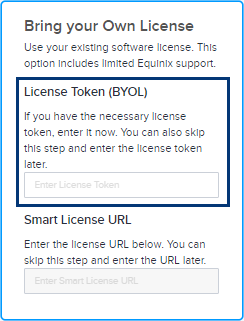
-
または、スマートライセンスのURLを入力することもできます。このプロセスを完了するには、有効なシスコアカウントが必要です。Cisco Smartライセンストークンを取得するには、シスコのドキュメントの指示に従ってください。
Ciscoスマートライセンストークンを取得します:
- Cisco.com アカウント情報を使用して Cisco Smart Software Manager (CSSM) にサインインします。
- [仮想アカウント]>[_インベントリ]_セクションを見つけて、新しいトークンを作成します。
- 新しく作成したトークンがトークンリストに表示されます。トークンをクリックすると詳細が表示され、トークン文字列がコピーされます。
新しいトークンをデバイスに登録するには、デバイスCLIにアクセスし、トークンを登録するコマンドを入力します。
license smart register idtoken <your_token_string>トークンの登録を確認するには、次のようなコマンドを入力します:
show license status問題が発生した場合、またはより詳細な手順が必要な場合は、『Cisco DNA Center管理者ガイド』を参照するか、シスコサポートにお問い合わせください。