クラスタデバイスの起動

前提条件
-
認証- OAuth2認証のためにユーザー資格情報、クライアントID、およびクライアントシークレットを送信する。認証情報を検証および認証するためにOAuth APIを呼び出す方法については、API認証を参照。
-
Get Device Typesを呼び出して、NEプラットフォームで起動するクラスタデバイス(ルータやファイアウォールなど)を検索する。仮想デバイスが利用可能な都市圏、デバイスのベンダー、利用可能なコア数、ソフトウェアパッケージとそのバージョンについて学習する。
deviceTypeCode、metroCode、core、、packageCodeおよびを選択する。version -
Get Allowed Interfacesを呼び出して、選択したコアに許可されているインターフェイス数を確認する。利用可能なデバイスインタフェースをsshInterfaceIdとして選択できる。 そうでない場合、Equinixは最初に利用可能なインターフェイスを選択する。
-
Get Accounts {metro}を呼び出して、
acountReferenceId仮想デバイスが必要なメトロの(または)とステータスを確認する。account number課金上の理由から、仮想デバイスが必要なメトロ内のアカウント(アクティブまたは保留中の状態)が必要である。アカウントをお持ちでない場合は、アカウントを作成する。販売店がお客様用のデバイスを作成しようとしている場合は、お客様のアカウントと(販売店の)アカウントの両方が「アクティブ」または「保留中」のステータスになっていることを確認する必要がある。アカウントには請求が発生するが、お客様用のデバイスを作成するには、お客様のアカウント番号をPOST APIに送信する必要がある。
ライセンスオプション
現在のところ、クラスタにはBYOL(ライセンス持ち込み)オプションしか提供していません。
-
Juniper Cluster - Juniper Clusterのライセンスファイルをアップロードする必要はない。ただし、2つのライセンスファイルをアップロードすることもできる。2つのライセンスファイルをアップロードするには、Post License Fileを2回呼び出す。クラスタの作成に使用できる応答でライセンスファイルIDSが取得される。
-
Palo Alto Cluster -ベンダーから2つのライセンストークンをアップロードする必要があるライセンストークンは同じでも異なる場合もある。
-
Fortinetクラスタ-トークンやライセンスを入力する必要はない。ライセンスファイルをアップロードする場合は、2つの異なるライセンスファイルをアップロードする必要がある。2つのライセンスファイルをアップロードするには、Post License Fileを2回呼び出す。クラスタの作成に使用できる応答でライセンスファイルIDSが取得される。
-
アリスタ・ベロクラウドSD - WANエッジクラスターライセンスファイルやトークンをアップロードする必要はない。ただし、アクティベーションキーを入力する必要がある。デバイスの作成後にライセンスの登録に失敗した場合は、デバイスにログインしてライセンスをアップロードする必要がある。次に、ステータス値で仮想デバイスの更新を呼び出す。
PROVISIONED
クラスターデバイスの作成
| POST/NE/v1/デバイス | |
|---|---|
| 方法 | POST |
| URLまたはエンドポイント | /ne/v1/devices |
| ヘッダー | Authorizationトークン、Content-Type |
| クエリーパラメータ | draft、draftUuid |
注:仮想デバイスを作成することで、注文条件に同意したことになる。注文条件の取得に電話して詳細を確認する。
デバイスの下書きを保存するには、deviceTypeCode、accountNumberまたはaccountReferenceId
、およびを指定する必要がある。metroCode
vSRX クラスタを作成するためのサンプル curl リクエスト:
curl -X
POST "https://api.equinix.com/ne/v1/devices?draft=false"
-H "content-type: application/json"
-H "Authorization: Bearer <token>"
-d '
{
    "deviceTypeCode": "VSRX",
    "clusterDetails": {
        "clusterName": "sroy-juniper",
        "clusterNodeDetails": {
            "node0": {
                "vendorConfig": {
                    "hostname": "sr012"
                },
                "licenseFileId": "1274fe9f-511c-436f-bc0c-14c876ec55da"
            },
            "node1": {
                "vendorConfig": {
                    "hostname": "sr123"
                },
                "licenseFileId": "65a9be3f-57fb-4c4d-a15b-40950951bc13"
            }
        }
    },
    "metroCode": "SV",
    "termLength": "1",
    "licenseMode": "BYOL",
    "packageCode": "STD",
    "virtualDeviceName": "Test-device-001-SROY",
    "notifications": [
        "test@equinix.com"
    ],
    "hostname": "sr012",
    "aclDetails": [
       {
         "uuid": "fb2e69bb-cbd7-40c4-bc01-8bcc5fa741c2",
         "interfaceType": "WAN"
       }
    ],
    "accountNumber": "201148",
    "version": "18.4R3-S2",
    "interfaceCount": 8,
    "agreeOrderTerms": true,
    "deviceManagementType": "SELF-CONFIGURED",
    "core": 5,
    "userPublicKey": {
        "username": "sroy",
        "keyName": "keyLlhzL"
    },
    "additionalBandwidth": "100"
}
'
Arista Velocloud SDWAN クラスタを作成するためのサンプル curl リクエスト:
curl -X
POST "https://api.equinix.com/ne/v1/devices?draft=false"
-H "content-type: application/json"
-H "Authorization: Bearer <token>"
-d '
{
    "metroCode": "SY",
    "deviceTypeCode": "VELOCLOUD-SDWAN",
    "termLength": "1",
    "clusterDetails": {
        "clusterName": "sroy-velo-cluster",
        "vendorConfig": {
            "node0": {
                "activationKey": "GJUK-JM2X-59BJ-SAMPLE",
                "controllerFqdn": "demo.velocloud.net",
                "rootPassword": "TestPassword!"
            },
            "node1": {
                "rootPassword": "TestPassword#"
            }
        }
    },
    "licenseMode": "BYOL",
    "packageCode": "VeloCloud-4",
    "virtualDeviceName": "velo-cluster",
    "notifications": [
        "test@equinix.com"
    ],
    "aclDetails": [
       {
         "uuid": "fb2e69bb-cbd7-40c4-bc01-8bcc5fa741c2",
         "interfaceType": "WAN"
       }
    ],
    "accountNumber": "2393479",
    "version": "3.4.2",
    "interfaceCount": 8,
    "deviceManagementType": "SELF-CONFIGURED",
    "agreeOrderTerms": true,
    "core": 4,
    "userPublicKey": {
        "username": "sroy",
        "keyName": "key7YFfL"
    },
    "additionalBandwidth": "200"
}
'
Internet AccessのないPANWクラスタを作成するためのcurlリクエストのサンプル:
curl -X
POST "https://api.equinix.com/ne/v1/devices?draft=false"
-H "content-type: application/json"
-H "Authorization: Bearer <token>"
-d '
{
    "deviceTypeCode": "PA-VM",
    "clusterDetails": {
        "clusterName": "NEAut-",
        "clusterNodeDetails": {
            "node0": {
            "vendorConfig": {
                "hostname": "PANCluster"
            }
            },
            "node1": {
            "vendorConfig": {
                "hostname": "PANCluster"
            }
            }
        }
    },
    "metroCode": "#(supportedMetro)",
    "zoneCode": "Zone1",
    "termLength": "1",
    "licenseMode": "BYOL",
    "packageCode": "VM100",
    "virtualDeviceName": "NEAut-",
    "notifications": [
        "t@t.com"
    ],
    "version": "10.1.3",
    "interfaceCount": 10,
    "deviceManagementType": "SELF-CONFIGURED",
    "core": 2,
    "connectivity": "PRIVATE"
}
'
パラメータとオプションの完全なリストについては、『APIリファレンス』を参照。
回答例
応答例202:リクエストが承認された。
{
    "uuid": "34b7838c-ec82-4166-ac19-efa03b4e34fe",
    "deviceIds": {
        "node0": "34b7838c-ec82-4166-ac19-efa03b4e34fe",
        "node1": "f27f1475-3c7f-447f-b0db-e3bb3af3de16"
    },
    "clusterId": "27eea9aa-327b-431b-bf62-3cee4d880f2e"
}
デバイスステータス
クラスタが作成されると、自己構成クラスタは
Equinixインフラストラクチャ内のさまざまな状態を遷移する。これらの状態は、Get Virtual Device {uuid}メソッドのresponse属性を使用して監視できる。statusクラウドサービスプロバイダーに接続するためにクラスターを使用するには、クラスターをプロビジョニングし、ライセンスを登録する必要がある。
| 仮想デバイスの状態 | 説明 |
|---|---|
INITIALIZING | エクイニクスは現在、リソースの予約とデバイスの作成を進めています。 |
PENDING_ACCOUNT | お客様のアカウントが承認されていない。アカウントが承認されると、デバイスの作成は続行される。 |
PROVISIONING | デバイスが起動している。 |
PENDING_ORDER | このステータスは、SiebelからNEに着信するオーダーにのみ適用される。お客様はNetwork Edgeポータルにログインし、保留中の注文を送信する必要がある。 |
PENDING_SIGNATURE | お客様は、Network Edge の利用規約にまだ同意していません。 |
CANCEL_ORDER | シーベルからNEへの注文はキャンセルされる。このステータスは、SiebelからNetwork Edgeに送信される注文にのみ適用される。 |
WAITING_FOR_PRIMARY | セカンダリデバイスは準備ができているが、プライマリデバイスは準備ができていない。この状態は、冗長デバイスを要求した場合に表示されることがある。 |
WAITING_FOR_SECONDARY | プライマリデバイスの準備ができているが、セカンダリデバイスの準備ができていない。この状態は、冗長デバイスを要求した場合に表示されることがある。 |
FAILED | デバイスの作成に失敗しました。 |
PROVISIONED | デバイスは準備できている。 |
DEPROVISIONING | エクイニクスはお客様からの仮想デバイスの削除要求を受け入れました。 |
DEPROVISIONED | デバイスはプロビジョニング解除/削除される。 |
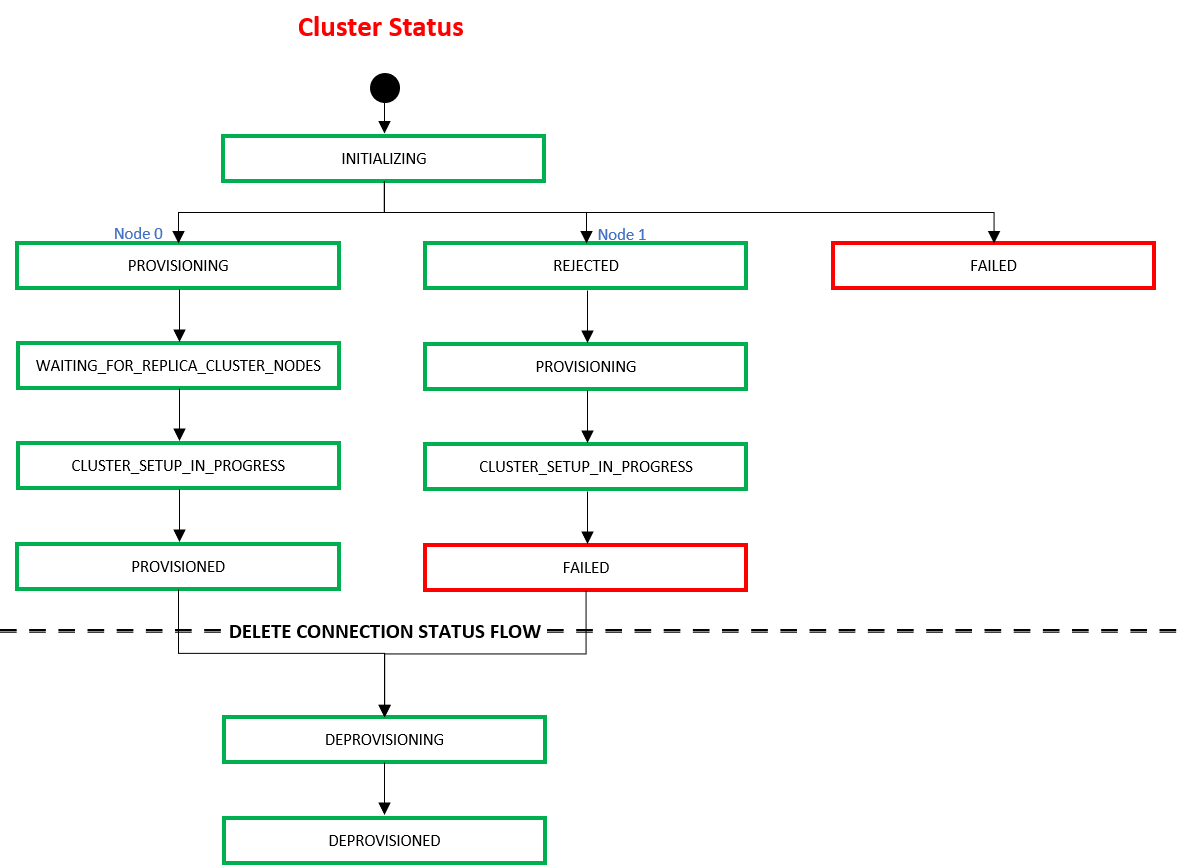
エンドユーザーが仮想デバイスの削除APIを使用してデバイスを削除すると、デバイスはEquinix インフラストラクチャ内で次の状態に移行する。
| ステータス | 説明 |
|---|---|
DEPROVISIONING | エクイニクスはお客様からの仮想デバイスの削除要求を受け入れました。 |
DEPROVISIONED | デバイスはプロビジョニング解除/削除される。 |