Network Edge
Network Edge(NE)は、ルーター、ロードバランサー、ファイアウォールなどの仮想ネットワークサービスやアプライアンスを、専用ハードウェアの代わりに汎用デバイス上で展開・実行できるプラットフォームです。
Network Edgeユーザーは以下のことが可能です:
- お客様のニーズに合わせて、適切なネットワークサービスやベンダーをお選びください。
- お客様の組織に適したライセンス体系をお選びください。お客様ご自身でライセンスをお持ちいただくか、エクイニクスのマネージドサブスクリプションサービスをご利用ください。
- ポータルの基本設定またはAPIを使用してデバイスを構成します。
- 世界中のご希望のエクイニクス拠点にデバイスを配置します。
- 他のネットワーク機器と同様に、他の機器や他のエクイニクスサービス(エクイニクスファブリックなど)への接続を作成したり、機器に直接アクセスして追加設定を行うことができます。
Network Edgeには、以下のものがあります。
- 完全自動化されたVNF環境と、業界をリードするネットワーク機能の簡単な注文とプロビジョニングマーケットプレイス。
- エクイニクスファブリックへの設定済みサービス対応仮想ポートにより、世界中のクラウドプロバイダーやソフトウェアサービスプロバイダー、パートナー、Platform Equinix上の自社インフラストラクチャに接続できます。
- 専用の15Mbpsインターネット接続により、HTTPS、SSH(エクイニクスの設定した導入オプションを使用した場合、最大5ユーザー/デバイス)、IPSec VPN、SD-WANを通じてどこからでも仮想デバイスにアクセスし、管理できます。
- パブリックにルーティング可能なIPスペース(/32 - 1つのIPアドレス)で、ネットワークサービスプロバイダー(NSP)を通じて独自の登録パブリックアドレススペースを追加できます。エクイニクスファブリックには、複数のNSPが接続可能です。
このプラットフォームには、Network Edgeデバイスもある:
- ベンダーのOSがプリロードされた選択したデバイスのフルイメージ。
- 既存のライセンス(Bring Your Own License)または月額使用料(Pay As You Go)モデルに対応したデバイスライセンス管理システムです。
- VPN、SSH、ACL(アクセスコントロールリスト)、その他のポータルベースのサービスにより、デバイスへの安全な直接アクセスを確保します。
デバイスをアクティブにしたら、物理的なポートのように、あらゆる接続のためのAエンドとして使用します。
NetworkEdgeデバイスは、世界32カ所のメトロに設置可能です。
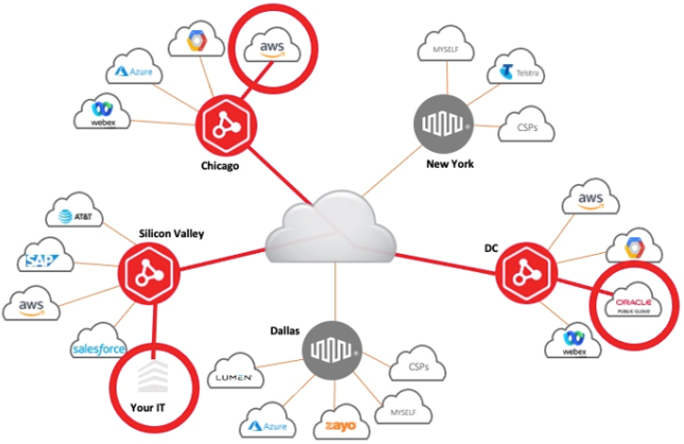
ネットワーク・エッジ・コンポーネント
このトピックでは、Network Edge サービスの使用時に表示される主なコンポーネントの概要を説明します。以下に説明するコンポーネントはすべて、カスタマーポータルでプロビジョニングできます。
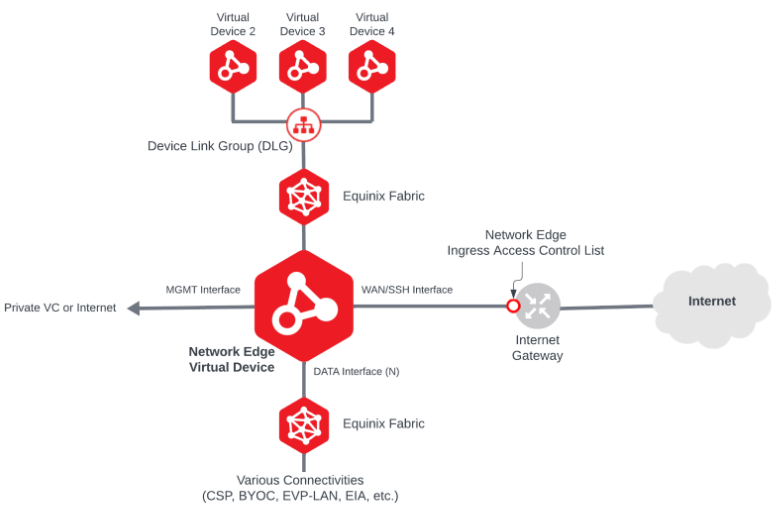
この表では、Network Edgeの主なコンポーネントについて説明します。各コンポーネントの詳細については、リンクをクリックしてください。
| Component | Description |
|---|---|
| Network Edge Virtual Devices | The main Virtualized Network Functions (VNFs) that Network Edge service offers. |
| Equinix Fabric | Network Edge connectivity is provided through Equinix Fabric virtual connections. |
| Device Link Group (DLG) | The Network Edge service that establishes connectivity between Network Edge virtual devices. |
| Virtual Connections | The connection enabled by Equinix Fabric service. Network Edge virtual devices can be connected to various Cloud Service Providers (CSPs), Network Service Providers via BYOC (bring your own connection), EAP-LAN network, Equinix Internet Access and more. |
| Internet Gateway | By default, 15 Mbps Internet connectivity is included in the Network Edge device. This connection is typically used to access the device using SSH protocol. The user can increase additional bandwidth for a fee. The WAN/SSH interface on the virtual device is used to connect to this Internet service. |
| Network Edge Ingress Access Control List (ACL) | Access Control Lists allow you to define and restrict traffic inbound to the Network Edge virtual device. By default, all traffic is disallowed except protocols required for bootstrapping purpose. |
| Management Interface | The Management interface is used in the Virtual Device. The implementation of the management interface and its connectivity type vary based on the vendor and device type. |
アカウント/ユーザー設定
-
アカウントの設定と主管理者の設定 - エクイニクスのカスタマーポータルでは、新規ユーザーがEquinix Fabricアカウントにサインアップし、Network Edge仮想デバイスとEquinix Fabricリモートポートを注文します。このポータルアカウントでは、お客様の会社で最初にサインアップするユーザーとして、プライマリ管理者アカウントにアクセスできます。詳しい手順については、「新規ユーザーのエクイニクスカスタマーポータルアクセス」(../customer-portal/new-customer-onboarding.md)をご覧ください。
-
アクセス許可の設定 - エクイニクスの[カスタマーポータルでは、プライマリ管理者がアクセス許可を設定し、エクイニクスのカスタマーポータルにアクセスできるユーザーを決定します。詳細な手順については、Managing Network Edge Permissionsを参照してください。
-
仮想接続とデバイスのアクセス許可の設定 - エクイニクスのカスタマーポータルでは、プライマリ管理者が仮想デバイスと接続のアクセス許可を設定し、どのユーザーが接続できるかを設定します:
- Network Edgeデバイスの作成、変更、削除。
- Network Edgeデバイス設定の作成、変更、削除。
- Network Edgeデバイス接続の作成、変更、削除。
詳細な手順については、Network Edgeユーザーアカウントと権限の管理を参照してください。
-
新規請求先アカウントの設定 - エクイニクスのカスタマーポータルで、各請求先国の請求先アカウントを設定します。詳細な手順については、「課金アカウント管理」(billing/ne-billing-account-creation.md)を参照してください。
-
利用規約の確認 - エクイニクスのカスタマーポータルで、Network Edgeの利用規約を確認してください。法律上の規約を確認するには、Network Edgeポリシーをご覧ください。