プロジェクトの作成
組織内では、プロジェクトはサーバー、ストレージ、ネットワークインフラを論理的にグループ化します。多くのプロジェクトが同じ組織内に存在することができ、プロジェクトの使用量、月額料金、1回限りの料金はすべて組織の請求アカウントにロールアップされます。
Equinix Metalアカウントにサインアップして組織を作成すると、プロジェクト設定ページから最初のプロジェクトが自動的に作成されます。プロジェクトがない既存の組織に招待されてアカウントを作成した場合は、組織の「プロジェクト」タブが表示されます。プロジェクトがある既存の組織に招待された後にアカウントを作成した場合は、プロジェクトの組織の_サーバー管理_ページに移動します。
組織のオーナーと管理者は、新しいプロジェクトを作成できます。プロジェクトを作成するには、次のようにします:
- Console
- CLI
- API
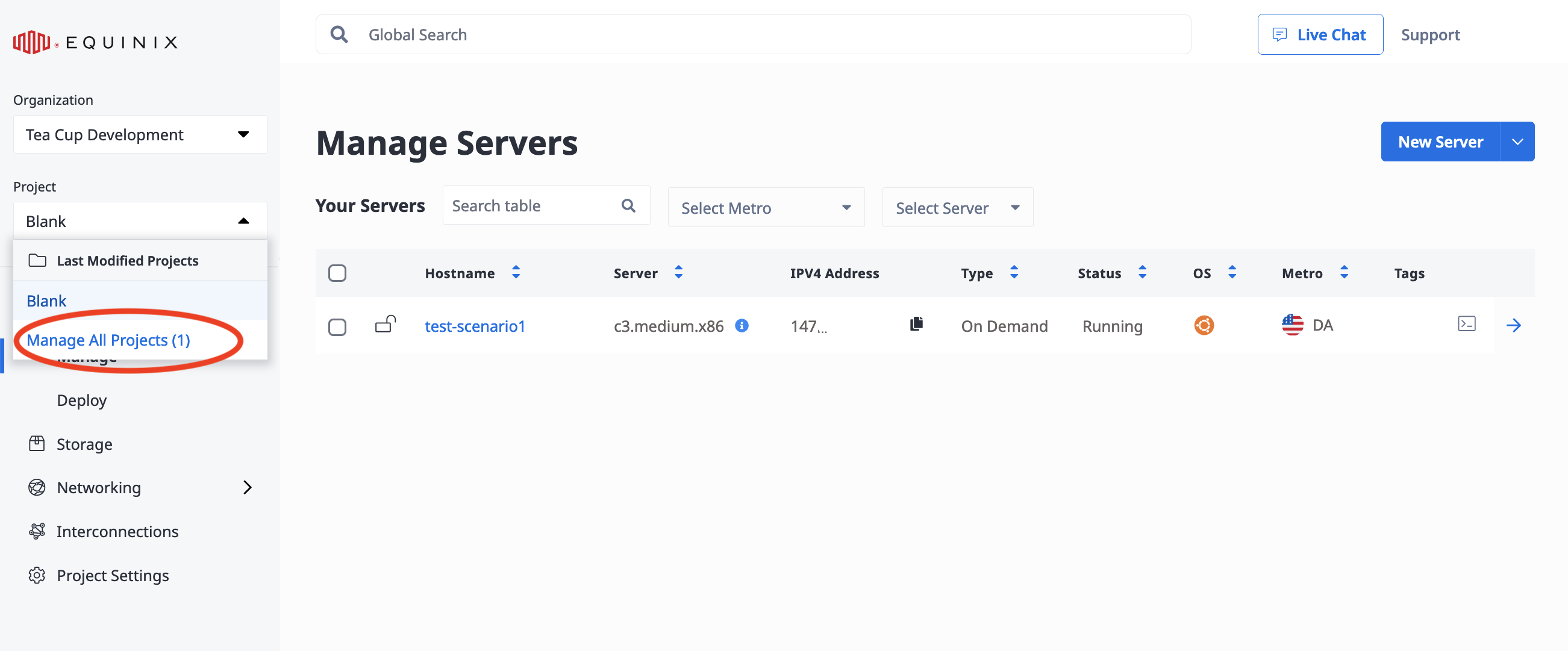
現在プロジェクトで作業している場合は、Project ドロップダウンメニューからManage All Projects を選択して、組織の_Project_ タブに移動します。
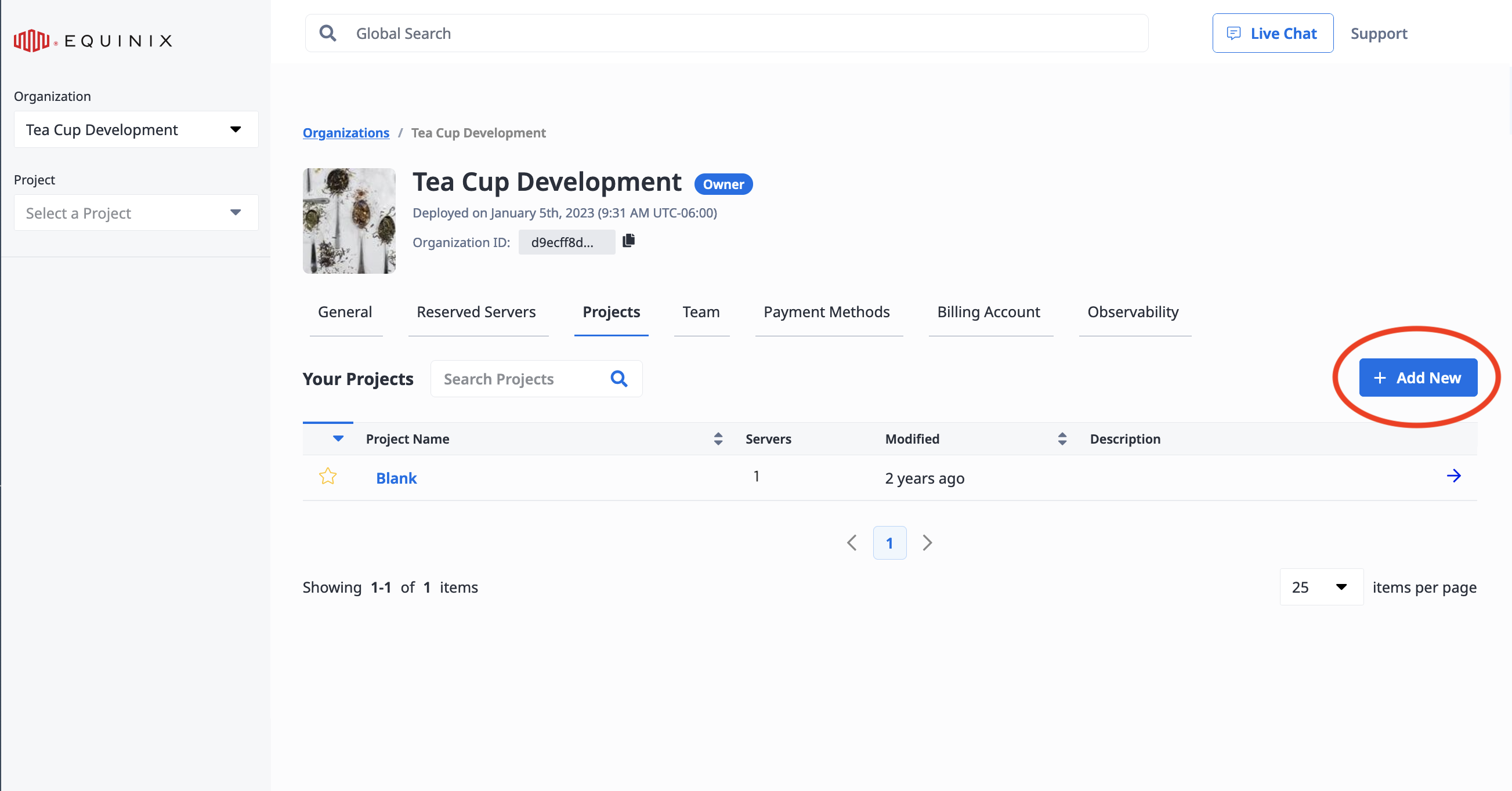
組織の_Project_タブから、Add New をクリックします。
Project Nameフィールドにプロジェクト名を入力します。
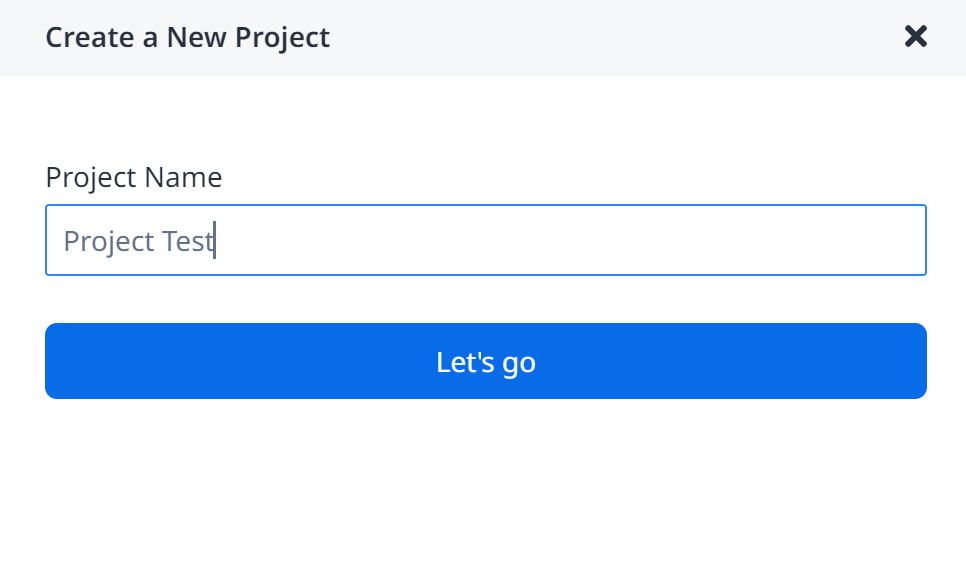
Let's go をクリックします。プロジェクトが正常に作成されたことを知らせるポップアップ通知メッセージが表示されます。プロジェクト]タブでプロジェクトを表示できます。
metal project create コマンドで新規プロジェクトを作成できます。--name フラグを使用して新しいプロジェクトの名前を指定します。オプションで、--organization-id フラグを使用してプロジェクトを作成する組織を指定することもできます。
metal project create --name <string> --organization-id <org_UUID>
/projects エンドポイントに POST リクエストを送信することで、新しいプロジェクトを作成できます。
curl -X POST \
    -H "Content-Type: application/json" \
    -H "X-Auth-Token: <API_TOKEN>" \
    "https://api.equinix.com/metal/v1/projects/" \
    -d '{
        "customdata": { },
        "name": "string",
        "organization_id": "<uuid>",
        "payment_method_id": "<uuid>"
    }'
"name"はリクエスト本文の唯一の必須フィールドです。
注:スターターアカウントには、複数のプロジェクトを作成するオプションはありません。複数のプロジェクトを作成する必要がある場合は、https://console.equinix.com/support または support@equinixmetal.com までメールでお問い合わせください。
ユーザーとプロジェクト
組織のメンバーであるユーザー、およびCollaboratorまたはLimited Collaboratorのロールを持つユーザーは、プロジェクトごとにプロジェクトへのアクセスを割り当てられます。プロジェクトのコラボレーターは、サーバーやその他のインフラストラクチャへのアクセス、プロビジョニング、管理が許可されます。 組織とロールの一般的な情報については、組織 ページを参照してください。
プロジェクトにユーザーを招待する
- Console
- API
ユーザーを組織に追加する と、プロジェクトに参加するようユーザーを招待します。
誰かを管理者として招待すると、その人は組織内のすべてのプロジェクトにアクセスできるようになります。
コラボレーターまたは限定コラボレーターとして誰かを招待した場合、プロジェクト単位でアクセスを許可することができます。
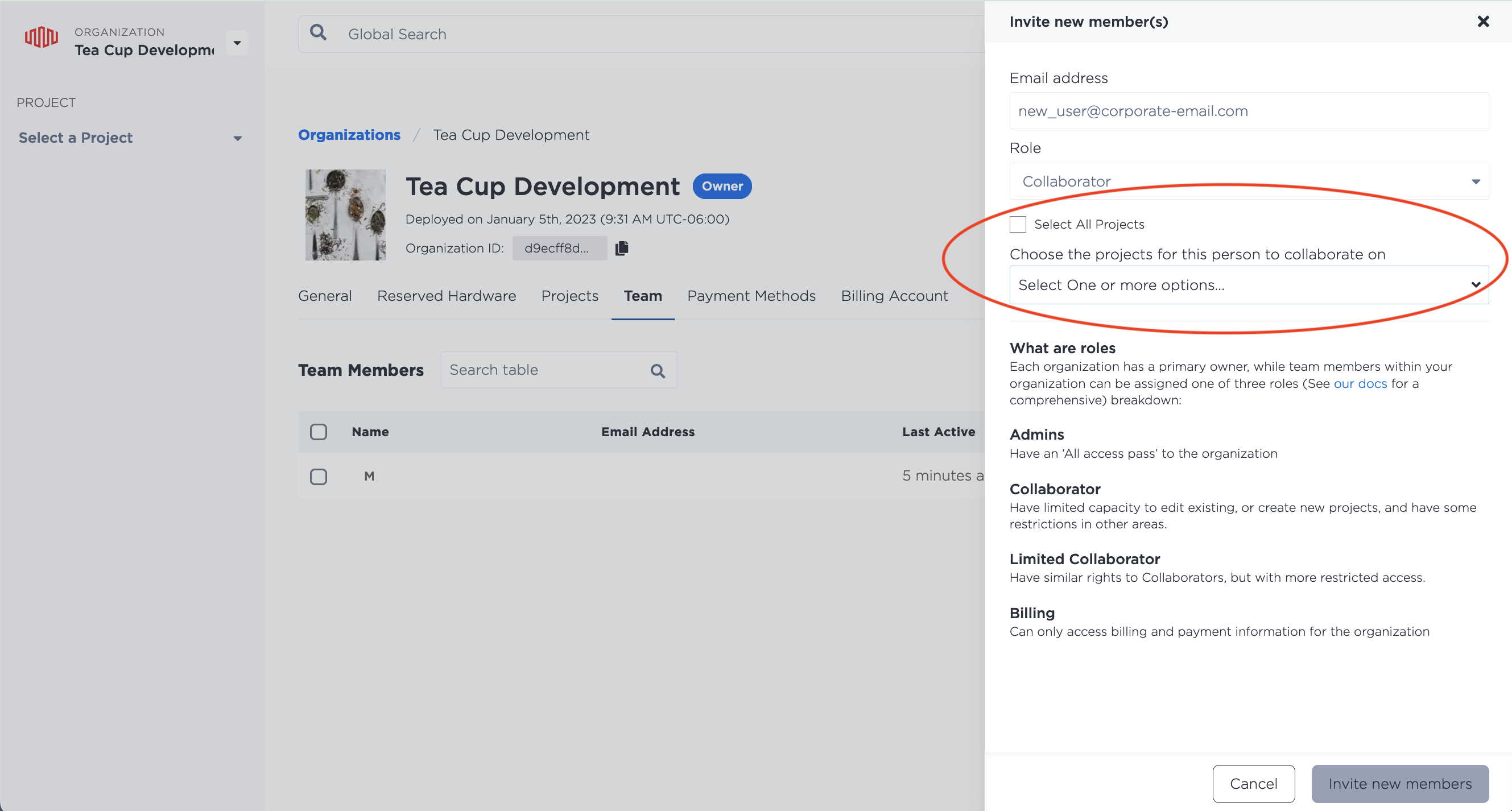
課金ユーザーとして誰かを招待した場合、その人は個々のプロジェクトにまったくアクセスできません。
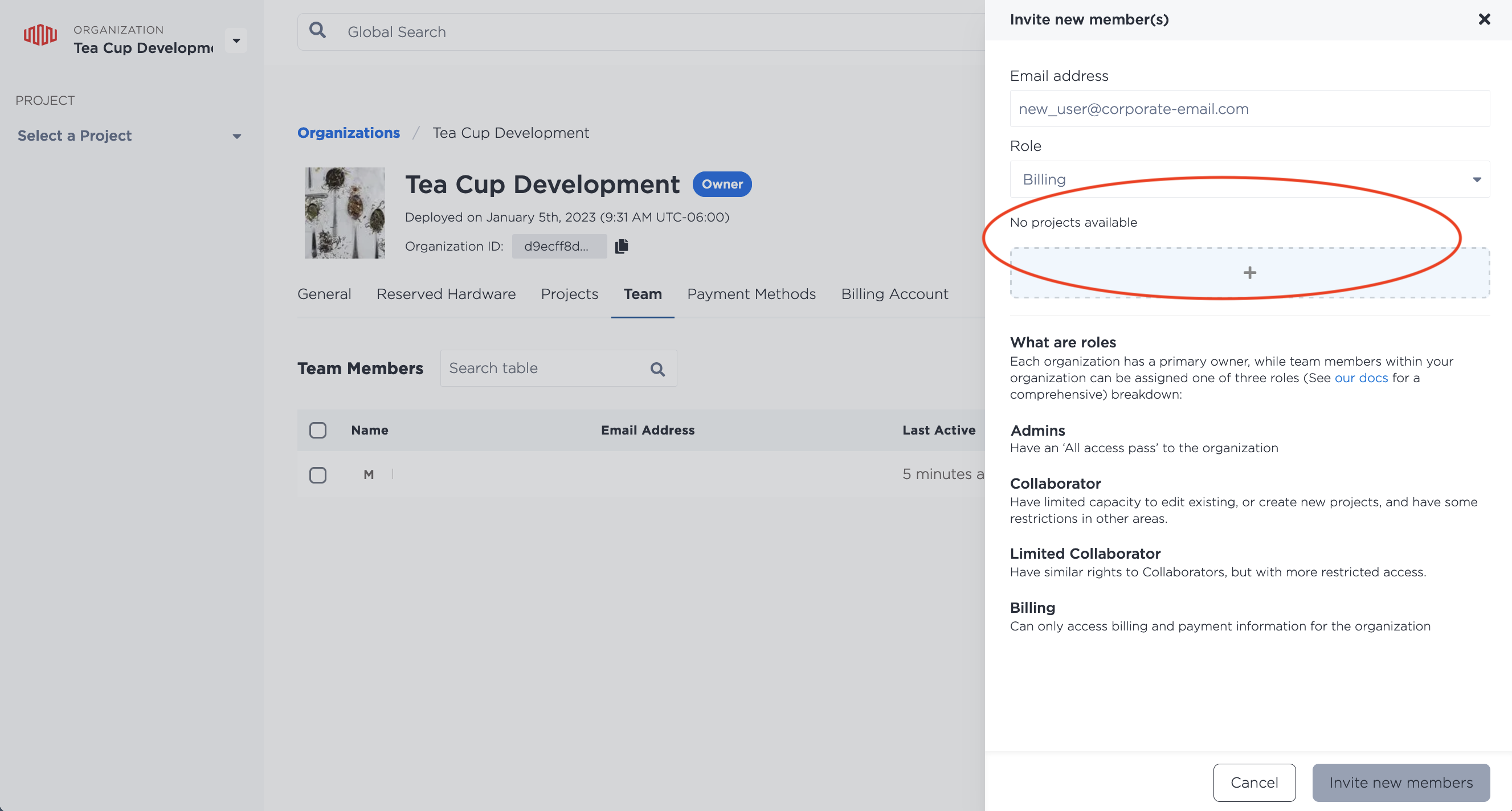
また、/organizations/{id}/invitations エンドポイントに POST リクエストを送信することで、API を通じてプロジェクトにユーザーを招待することもできます。
curl -X POST \
-H "Content-Type: application/json" \
-H "X-Auth-Token: <API_TOKEN>" \
"https://api.equinix.com/metal/v1/organizations/{id}/invitations" \
-d '{
    "invitee": "<valid_email_address>",
    "message": "<string>",
    "organization_id": "<uuid>",
    "roles": [
        "<string>"
    ],
    "projects_ids": [
        "<uuid>"
    ]
}'
ボディ・パラメーター
"invitee"(必須) - 招待を送信するユーザーのメールアドレス。"message"(オプション) - 招待メールにメッセージを含めます。"roles"- 招待者に割り当てるロールを含む配列。オプションは"admin"、"collaborator"、"limited_collaborator"または"billing"です。"admin"として招待した場合、その人は組織内のすべてのプロジェクトにアクセスできます。"collaborator"または"limited_collaborator"として招待した場合、プロジェクト単位でアクセス権を付与できます。"billing"ユーザーとして招待した場合、個々のプロジェクトにアクセスすることはできません。"projects_ids"- プロジェクト ID の配列で、共同作業者や限定的な共同作業者のために、プロジェクトごとにプロジェクトへのアクセスを割り当てます。