イベントストリーム
!!!お知らせ
Equinix Metal Observabilityの機能は現在ベータ版であり、すべてのお客様にご利用いただけるわけではありません。これは評価およびテストのみを目的としています。この機能は現在非課金であり、SLAの対象ではありません。
イベントストリームを使用して、メタル組織の特定のイベントおよびアクティビティデータをほぼリアルタイムで監視できます。イベント ストリームは、ビジネス ニーズの把握と分析に役立つ重要なイベント データを提供します。これらのイベントには以下が含まれます:
- アカウントと組織のイベント
- サービスと請求イベント
- デバイス管理イベント
- ネットワーク・マネジメント・イベント
イベントストリームは、組織のオーナーと管理者のみが見ることができます。
制限事項
現在、イベントストリームは送信先として Splunk のみをサポートしています。可視性ストリームのデータは、[Splunk HTTP Event Collector ("HEC") インターフェースを通じて Splunk に送信されます。Observability Stream データを受信するには、まず Splunk インスタンスに HTTP Event Collector を設定する必要があります。可視性ストリームデータの受信専用のコレクタを作成することをお勧めします。
Observability StreamデータをSplunkに送信するには、以下の制限があります:
- 転送中のデータを確実に暗号化するため、HTTPS 接続のみが許可されます。暗号化されていないプレーンな HTTP を使用して Splunk HEC にデータを送信することはサポートされていません。
- すべての Observability Stream データは、JSON イベントとして Splunk に送信されます。
- JSON イベントは標準
/services/collector/eventエンドポイントに送信されます。別のエンドポイント URL はサポートされていません。 - JSON イベントは、Splunk HTTP Event Collector の作成時に設定されたデフォルトのインデックスに送信されます。Splunk に送信されるイベントのインデックスを上書きすることはサポートされていません。
- インデクサの確認はサポートされていない。
オブザーバビリティAPI
可視性APIを利用する場合、現在のEquinix Metal APIとの違いに注意してください。
- 新しいAPIエンドポイント
- 新しい認証メカニズム
まず、可視性はhttps://observability.equinixmetal.netで到達できる独自のAPIエンドポイントを持っています。
次に、可視性APIには認証メカニズムがあり、お客様はEquinix Metal APIキーと短命のJSONウェブトークン(JWT)を交換し、すべての可視性リクエストの認証に使用します。トークンの有効期限は5分です。JWTを取得するには、iam.metalctrl.io/api-keys/exchangeエンドポイントにPOSTリクエストを送信します。
curl -X POST \
-H "Authorization: bearer <API_TOKEN>" \
https://iam.metalctrl.io/api-keys/exchange
応答は、可視性APIへのリクエストを認証するために使用するJSON "access_token"になります。
{
"access_token": "eyJ....98"
}
Observability APIは、認証のためにエクイニクスメタルAPIキーを受け付けません。
イベント・ストリームの作成
- Console
- API
イベントストリームを作成し、サーバデータを Splunk にエクスポートして保存・分析する。ストリームを作成するには、以下のようにします:
-
Equinix Metal Portal にアクセスし、認証情報を入力してポータルにサインインします。
-
Organization's_]ドロップダウンメニューから、イベントストリームを作成する組織を選択します。
-
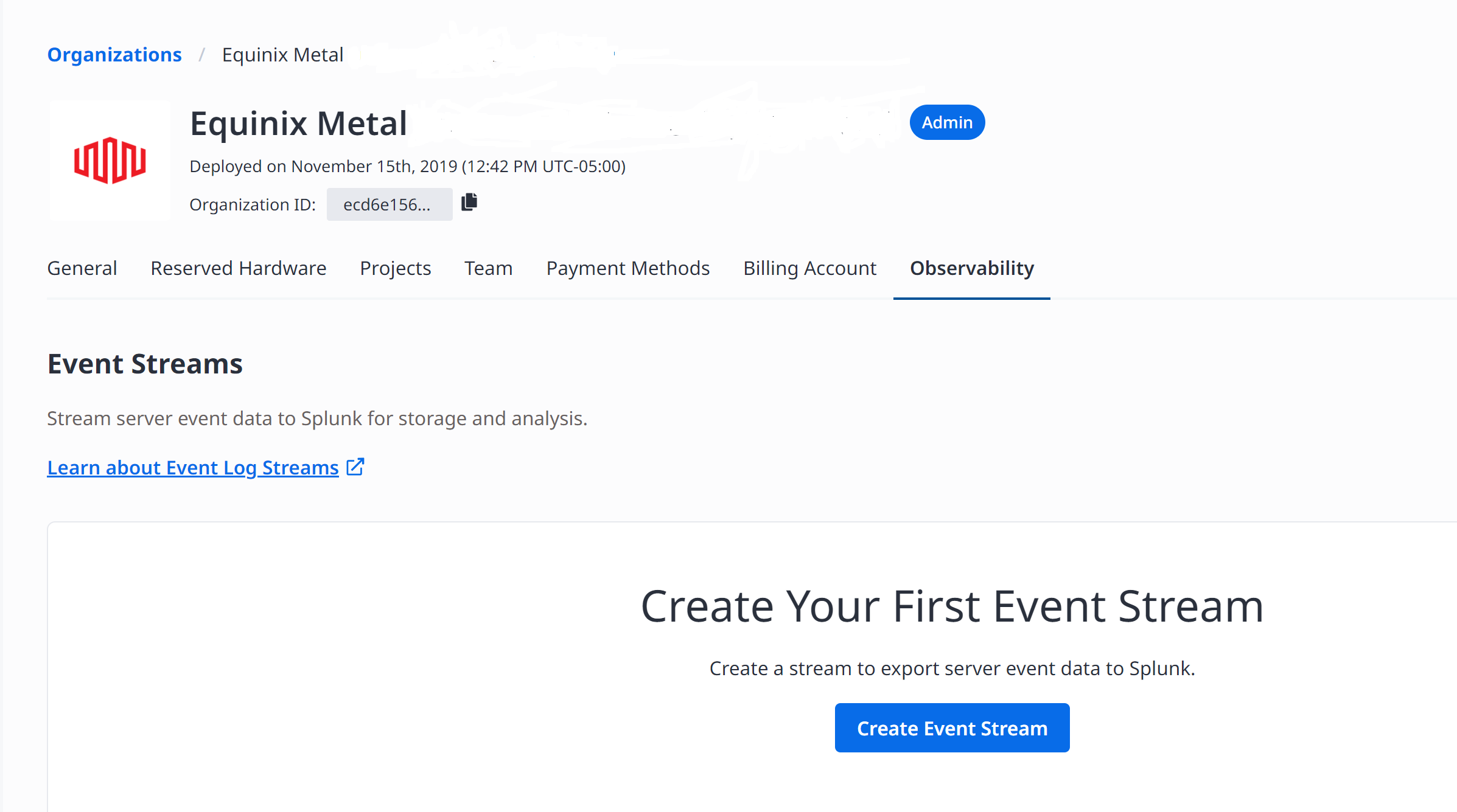
Observability_タブをクリックします。
-
イベントストリームの作成 をクリックします。
-
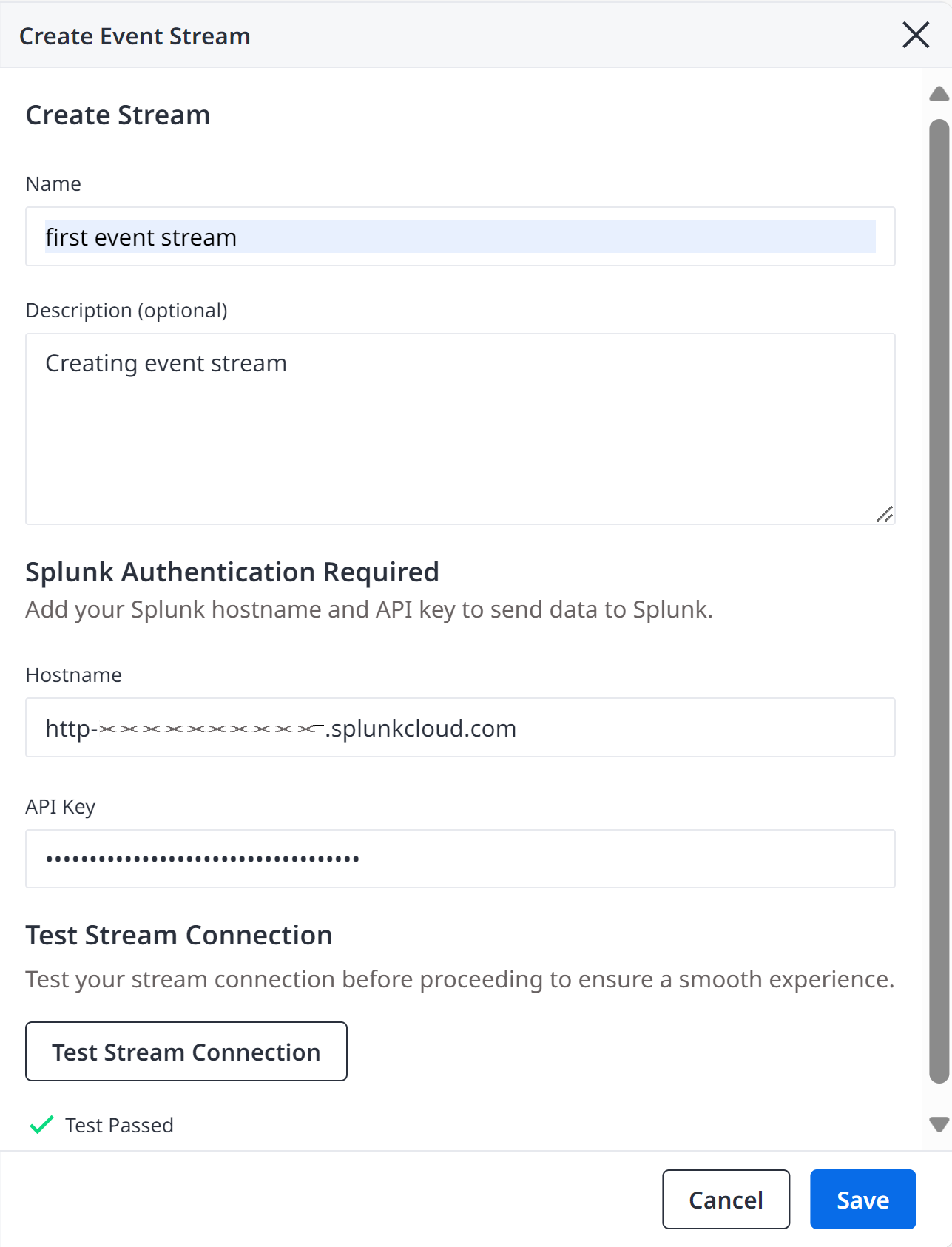
イベントストリームの作成]モーダルで、[名前]フィールドにユーザーフレンドリーな名前を入力します。
-
オプション説明フィールドにイベントストリームの説明を入力します。
-
Splunk ホスト名と API キーをプロバイダのフィールドに入力して、Splunk にデータを送信します。
接続ホスト名は、[HTTP イベントコレクタ URI から取得する必要があります。ホスト名は、オプションのポート番号サフィックスを持つ文字列として指定する必要があります。
API Key は、Splunk HEC エンドポイントの作成時に生成された HTTP Event Collector トークンでなければなりません。これは暗号化された形式で保存され、Observability Stream データを送信するワーカーによってのみ復号化されます。
/v1/organizations/{org-id}/streams エンドポイントに POST リクエストを送信することで、新しいストリームを作成できます。
curl -X POST \
    -H "Content-Type: application/json" \
    -H "Authorization: bearer <API_TOKEN>" \
    "https://observability.equinixmetal.net/v1/organizations/{org-id}/streams" \
    -d '{
        "stream_name": "<string>",
        "description": "<string>",
        "connection": {,
             "type": "splunk",
             "api_key": "<string>",
             "hostname": "<string>"
    }
ボディ・パラメーター
"org-id"(required) - The Metal organization ID that owns the stream."stream_name"(required) - Enter a name for this stream."description"(optional) - Include a description for a stream."connection"(required) - The connection parameters that define how data in an observability stream will be delivered to the customer.
ストリーム接続のテスト
- Console
- API
データ接続を Splunk にストリーム接続する前に、その有効性を確認するためにテストする必要があります。ストリーム接続をテストするには、以下のようにします:
-
イベントストリームの作成」モーダルで、Splunk のホスト名と API キーを入力します。
-
クリック、テストストリーム接続.
画面にTest Passed というメッセージが表示されれば、接続は有効です。テスト接続に合格しなかった場合は、エラーメッセージが表示されます。テスト接続が Splunk にデータをストリーミングするために有効であることを確認するには、Test Passed メッセージを受信する必要があります。
-
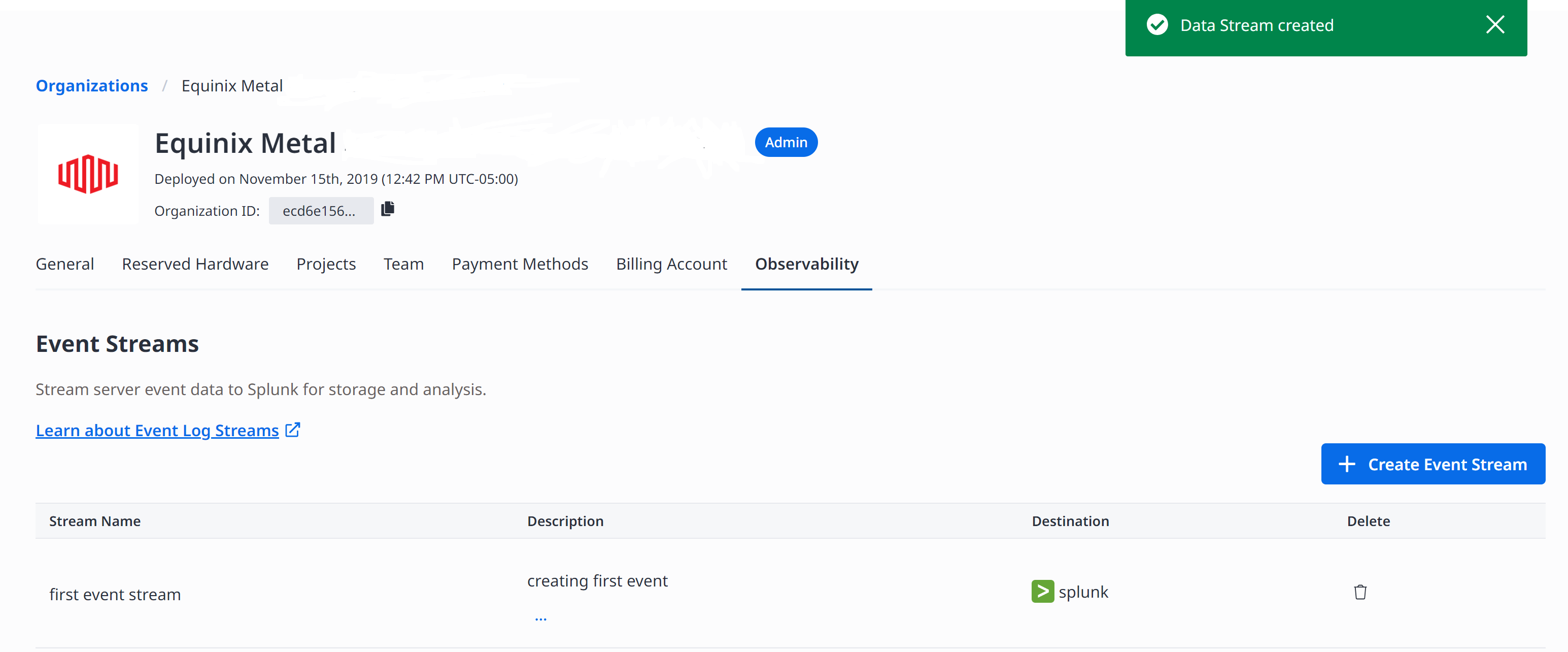
保存 をクリックして、イベントストリームを保存します。 イベント・ストリームは、可視性ページのイベント・ストリーム・テーブルに保存されます。
v1/organizations/{org-id}/connection/validate エンドポイントに POST リクエストを送信することで、新しいストリーム接続をテストできます。
curl -X POST \
    -H "Content-Type: application/json" \
    -H "Authorization: bearer <API_TOKEN>" \
    "https://observability.equinixmetal.net/v1/organizations/{org-id}/connection/validate \
    -d '{
             "type": "splunk",
             "api_key": "<string>",
             "hostname": "<string>"
    }
ボディ・パラメーター
"type"(required) - The type of system to connect to. This determines the available parameters."api_key"(required) - The API key that will be used to authenticate the connection to the Splunk HTTP Event Collector. The API key will be stored encrypted."hostname"(required) - The hostname of the Splunk server to connect to with an optional port number suffix.
イベントストリームの管理
- Console
- API
Metalコンソールでイベントストリームが作成されると、組織の_Observability_タブからイベントストリームを管理できます。
指定した組織に設定されているすべての可視性ストリームのリストを取得するには、/v1/organizations/{org-id}/streams エンドポイントに GET リクエストを送信します。
curl -X GET \
-H "Authorization: bearer <API_TOKEN>" \
"https://observability.equinixmetal.net/v1/organizations/{org-id}/streams"
所有者と ID に基づいて提供されたストリームの設定詳細を取得するには、/v1/organizations/{org-id}/streams/{stream-id} エンドポイントに GET リクエストを送信します。
curl -X GET \
-H "Authorization: bearer <API_TOKEN>" \
"https://observability.equinixmetal.net/v1/organizations/{org-id}/streams/{stream-id}"
既存の可視性ストリームの設定を更新するには、/v1/organizations/{org-id}/streams/{stream-id} エンドポイントに PUT リクエストを送信します。
注:このメソッドを使用して、接続APIキーなどの機密フィールドの値を更新することはできません。
curl -X PUT \
    -H "Content-Type: application/json" \
    -H "Authorization: bearer <API_TOKEN>" \
    "https://observability.equinixmetal.net/v1/organizations/{org-id}/streams/{stream-id} \
    -d '{
        "stream_name": "<string>",
        "description": "<string>",
        "connection": {
            "type": "splunk",
            "hostname": "<string>"
        }
    }'
イベントストリームの削除
- Console
- API
Splunk インスタンスへのデータストリームを停止するには、イベントストリームを削除する。イベントストリームを削除するには、以下のようにします:
-
Event Streamsテーブルで、_Delete_列のゴミ箱アイコンをクリックします。 イベントストリームの削除]ウィンドウが表示されます。
-
フィールドにDelete と入力し、Delete をクリックします。
API では、/v1/organizations/{org-id}/streams/{stream-id} エンドポイントに DELETE リクエストを送信することで、ストリームを削除できます。
curl -X DELETE -H "Authorization: bearer <API_TOKEN>" \
"https://observability.equinixmetal.net/v1/organizations/{org-id}/streams/{stream-id}"
ストリームが削除されると、ソースからの新しいデータの受け入れは直ちに停止されるが、インフライトデータの配信は継続される。飛行中のデータがすべて配信されると、ストリームは削除され、すべてのリソースが解放される。
Splunk イベントメタデータ
可視性サービスは、ストリームに送信するすべての監査ログイベントに対して、以下の [Splunk Event metadata キーを設定します:
time- The timestamp at which the event occurred, specified in seconds since the Unix epoch.source- All events will specify a source ofequinix.sourcetype- Audit log events will specify a source type oflog.fields- Additional fields for indexing as described below.
インデックス・フィールド
上記の標準 Splunk メタデータキーに加えて、Observability サービスはストリームに送信する各ログイベントに対して以下のカスタムインデックスフィールドを設定します。これらのフィールドはオプションであり、存在しない場合は省略されます。
level- A human-readable indication of the logging level, such asINFOorDEBUG.severity- A numeric severity level; higher numbers indicate more severe events (such as errors or violations).
Splunk イベントデータ
Splunk HTTP Event Collector に "Event data" として送信される event キーの内容は、ログに記録されるイベントに関するアプリケーション固有の情報を持つ構造化 JSON ドキュメントです。
完全なリファレンスについては、Splunk Event Schema Documentation を参照してください。
- Splunk Event - Example JSON
- Splunk Event - JSON Schema
{
"stream" : {
    "streamId" : "dce13c1d-0589-406b-af40-854156a0621e",
    "streamName" : "Example Stream"
},
"source" : {
    "category" : "audit",
    "type" : "api_request",
    "service" : "metal",
    "organizationId" : "99be473c-ee3c-4aeb-a678-eba3fdae7ca6",
    "projectId" : "99be473c-ee3c-4aeb-a678-eba3fdaebeef"

},
"schema" : "v1",
"timestamp" : "2024-04-16T14:58:21.442334Z",
"level" : "INFO",
"eventId" : "6910f03f-ec60-42fc-9e9d-c5f6af2f732d",
"event" : {
    "eventName" : "instance_provision_requested",
    "status" : "failed",
    "auth" : {
        "authType" : "user",
        "user" : {
            "userId" : "582865f9-904b-4061-b536-2420eb01ecdc",
            "userName" : "jdoe@equinix.com"
        },
        "role" : {
            "roleName" : "collaborator"
        }
    },
    "httpRequest" : {
        "host" : "api.equinix.com",
        "method" : "PUT",
        "path" : "/metal/v1/projects/99f8e7f1-fe4a-441a-ade9-687743f080f6",
        "scheme" : "http",
        "statusCode" : 200,
        "userAgent" : "metal-cli/metal equinix-sdk-go/0.30.0",
        "sourceIpAddress" : "111.111.111.11"
    }
}
}
{
"description" : "The customer-facing log format for the Equinix Observability Service.",
"type" : "object",
"properties" : {
    "stream" : {
    "description" : "Provides metadata about the observability stream that produced this log entry; can be used to differentiate data sources in situations where multiple streams are writing to the same destination.",
    "type" : "object",
    "properties" : {
        "streamId" : {
        "description" : "Unique identifier of the observability stream that produced this log entry.",
        "type" : "string",
        "format" : "uuid"
        },
        "streamName" : {
        "description" : "Name of the observability stream that produced this log entry.",
        "type" : "string",
        "examples" : [ "Example Stream" ]
        }
    },
    "required" : [ "streamId", "streamName" ],
    "title" : "Stream",
    "examples" : [ {
        "streamId" : "e55f79d4-0d8a-4460-a566-ff93af4f90e4",
        "streamName" : "Example Stream"
    } ]
    },
    "source" : {
    "description" : "Provides metadata about the source from which this log entry originated.",
    "type" : "object",
    "properties" : {
        "category" : {
        "description" : "Groups logs into high-level application categories.",
        "type" : "string",
        "enum" : [ "audit", "validation" ]
        },
        "type" : {
        "description" : "Differentiates types of log events withing a particular category.",
        "type" : "string",
        "enum" : [ "api_request", "validation_request" ]
        },
        "service" : {
        "description" : "Indicates the service that produced this log entry.",
        "type" : "string",
        "enum" : [ "metal" ]
        },
        "organizationId" : {
        "description" : "Indicates the customer Organization ID with which this log entry is associated.",
        "type" : "string",
        "format" : "uuid"
        },
        "projectId" : {
        "description" : "Indicates the customer Project ID with which this log entry is associated.",
        "type" : "string",
        "format" : "uuid"
        }
    },
    "required" : [ "category", "type", "service", "organizationId" ],
    "title" : "Source",
    "examples" : [ {
        "category" : "audit",
        "type" : "api_request",
        "service" : "metal",
        "organizationId" : "0e714017-6d9c-4dc5-828d-b8a156502496"
    } ]
    },
    "schema" : {
    "description" : "Indicates the schema version of this log entry.",
    "type" : "string",
    "enum" : [ "v1" ]
    },
    "timestamp" : {
    "description" : "The timestamp at which this log entry was produced, in ISO8601 format.",
    "type" : "string",
    "format" : "date-time",
    "examples" : [ "2024-04-16T14:58:21.442334Z" ]
    },
    "level" : {
    "description" : "A human-readable indication of the severity level of this log entry.",
    "type" : "string",
    "examples" : [ "INFO" ]
    },
    "eventId" : {
    "description" : "Unique identifier for this log event.",
    "type" : "string",
    "format" : "uuid"
    },
    "event" : {
    "description" : "The application-specific log event payload. In the future the specific format will vary based on the\n  source category and type, but for now we use a single log event schema.",
    "type" : "object",
    "properties" : {
        "eventName" : {
        "description" : "An application-provided name for the event. Event names should be fixed by the application\n  (i.e. should not vary based on request parameters) to enable filtering/querying by the customer, and should carry\n  meaning to the customer. In the case of API request logs, this would correspond to an operation name.",
        "type" : "string",
        "examples" : [ "project_updated", "instance_provision_requested" ]
        },
        "status" : {
        "description" : "An indication of the status associated with the event, e.g. request success/failure.",
        "type" : "string",
        "examples" : [ "success", "failed", "unauthorized" ]
        },
        "auth" : {
        "description" : "Provides authentication and authorization information about the principal associated with the\n  log event. In most cases, this will be the one who made the request.",
        "type" : "object",
        "properties" : {
            "authType" : {
            "description" : "Indicates the type of entity for the principal associated with the request.",
            "type" : "string",
            "enum" : [ "user" ]
            },
            "user" : {
            "description" : "Provides identifying information about the user associated with the log event.",
            "type" : "object",
            "properties" : {
                "userId" : {
                "description" : "Unique user identifier; this is an opaque system-assigned ID that is not expected to be recognizable to people.",
                "type" : "string",
                "examples" : [ "1bec4119-a889-4809-89e9-c4572dc002ec" ]
                },
                "userName" : {
                "description" : "Provides a more human-friendly display name for the user.",
                "type" : "string",
                "examples" : [ "jdoe@equinix.com" ]
                }
            },
            "required" : [ "userId", "userName" ],
            "title" : "User",
            "examples" : [ {
                "userId" : "1bec4119-a889-4809-89e9-c4572dc002ec",
                "userName" : "jdoe@equinix.com"
            } ]
            },
            "role" : {
            "description" : "Provides information about the role associated with the log event, which determines what permissions\n  are allowed. If the principal has access to multiple roles, this indicates the one they assumed when making the\n  request.",
            "type" : "object",
            "properties" : {
                "roleName" : {
                "description" : "The human-friendly display name for the role.",
                "type" : "string",
                "examples" : [ "collaborator" ]
                }
            },
            "required" : [ "roleName" ],
            "title" : "Role",
            "examples" : [ {
                "roleName" : "collaborator"
            } ]
            }
        },
        "required" : [ "authType", "user", "role" ],
        "title" : "AuthInfo",
        "examples" : [ {
            "authType" : "user",
            "user" : {
            "userId" : "1bec4119-a889-4809-89e9-c4572dc002ec",
            "userName" : "jdoe@equinix.com"
            },
            "role" : {
            "roleName" : "collaborator"
            }
        } ]
        },
        "httpRequest" : {
        "description" : "Provides details about the HTTP request associated with the log event, if there is one (for now, there\n  will always be one).",
        "type" : "object",
        "properties" : {
            "host" : {
            "description" : "The hostname to which the original HTTP request was made.",
            "type" : "string",
            "examples" : [ "api.equinix.com" ]
            },
            "method" : {
            "description" : "The HTTP request method.",
            "type" : "string",
            "examples" : [ "PUT" ]
            },
            "path" : {
            "description" : "The path portion of the original HTTP request URL.",
            "type" : "string",
            "examples" : [ "/metal/v1/projects/99f8e7f1-fe4a-441a-ade9-687743f080f6" ]
            },
            "scheme" : {
            "description" : "The HTTP request scheme",
            "type" : "string",
            "enum" : [ "http", "https" ]
            },
            "statusCode" : {
            "description" : "The HTTP status code that resulted from the processing of the request.",
            "type" : "integer",
            "examples" : [ 200 ]
            },
            "userAgent" : {
            "description" : "The user-agent that issued the request, as reported by the HTTP client.",
            "type" : "string",
            "examples" : [ "metal-cli/metal equinix-sdk-go/0.30.0" ]
            },
            "sourceIpAddress" : {
            "description" : "The IP address from which the HTTP request was sent.",
            "type" : "string",
            "examples" : [ "111.111.111.11" ]
            }
        },
        "required" : [ "host", "method", "path", "scheme", "statusCode", "userAgent", "sourceIpAddress" ],
        "title" : "HttpRequest",
        "examples" : [ {
            "host" : "api.equinix.com",
            "method" : "PUT",
            "path" : "/metal/v1/projects/99f8e7f1-fe4a-441a-ade9-687743f080f6",
            "scheme" : "https",
            "statusCode" : 200,
            "userAgent" : "metal-cli/metal equinix-sdk-go/0.30.0",
            "sourceIpAddress" : "111.111.111.11"
        } ]
        },
        "resource" : {
        "description" : "The resource associated with the request (for future use)",
        "type" : "object",
        "properties" : { },
        "examples" : [ { } ]
        },
        "request" : {
        "description" : "Detailed request parameters (for future use)",
        "type" : "object",
        "properties" : { },
        "examples" : [ { } ]
        },
        "response" : {
        "description" : "Detailed response body (for future use)",
        "type" : "object",
        "properties" : { },
        "examples" : [ { } ]
        }
    },
    "required" : [ "eventName", "status", "auth", "httpRequest" ],
    "title" : "Event",
    "examples" : [ {
        "eventName" : "project_updated",
        "status" : "unauthorized",
        "auth" : {
        "authType" : "user",
        "user" : {
            "userId" : "1bec4119-a889-4809-89e9-c4572dc002ec",
            "userName" : "jdoe@equinix.com"
        },
        "role" : {
            "roleName" : "collaborator"
        }
        },
        "httpRequest" : {
        "host" : "api.equinix.com",
        "method" : "PUT",
        "path" : "/metal/v1/projects/99f8e7f1-fe4a-441a-ade9-687743f080f6",
        "scheme" : "http",
        "statusCode" : 200,
        "userAgent" : "metal-cli/metal equinix-sdk-go/0.30.0",
        "sourceIpAddress" : "111.111.111.11"
        },
        "resource" : { },
        "response" : { }
    } ]
    }
},
"required" : [ "stream", "source", "schema", "timestamp", "level", "eventId", "event" ],
"title" : "LogEntry",
"examples" : [ {
    "stream" : {
    "streamId" : "b47f2eaf-d5c6-485c-a081-5d12333aa2e2",
    "streamName" : "Example Stream"
    },
    "source" : {
    "category" : "validation",
    "type" : "validation_request",
    "service" : "metal",
    "organizationId" : "a2337a57-4ad0-4708-abc6-c0973055c91e"
    },
    "schema" : "v1",
    "timestamp" : "2024-04-16T14:58:21.442334Z",
    "level" : "INFO",
    "eventId" : "e6de0ec4-027e-4733-aeb4-058c1fc53493",
    "event" : {
    "eventName" : "instance_provision_requested",
    "status" : "unauthorized",
    "auth" : {
        "authType" : "user",
        "user" : {
        "userId" : "1bec4119-a889-4809-89e9-c4572dc002ec",
        "userName" : "jdoe@equinix.com"
        },
        "role" : {
        "roleName" : "collaborator"
        }
    },
    "httpRequest" : {
        "host" : "api.equinix.com",
        "method" : "PUT",
        "path" : "/metal/v1/projects/99f8e7f1-fe4a-441a-ade9-687743f080f6",
        "scheme" : "http",
        "statusCode" : 200,
        "userAgent" : "metal-cli/metal equinix-sdk-go/0.30.0",
        "sourceIpAddress" : "111.111.111.11"
    },
    "response" : { }
    }
} ]
}