BGPの監視
プロジェクトでBGPを有効にしてセッションを開始すると、プロジェクトの_BGP_ページとサーバーの_BGP_ページの両方に、アクティブなセッションと学習済みのルートに関する情報が表示されます。
プロジェクトのBGPステータス
- Console
- CLI
- API
プロジェクトの_BGP_ページの_Networking_セクションには、以下の内容が含まれています:
- どのタイプのBGPが有効になっているか:ローカルまたはグローバル。
- ASN:ローカルBGPの場合は65000、グローバルBGPの場合は独自のASN。
- MD5パスワードを設定した場合。
- プロジェクト内のすべてのサーバーにわたるすべての BGP セッションを含むテーブル。
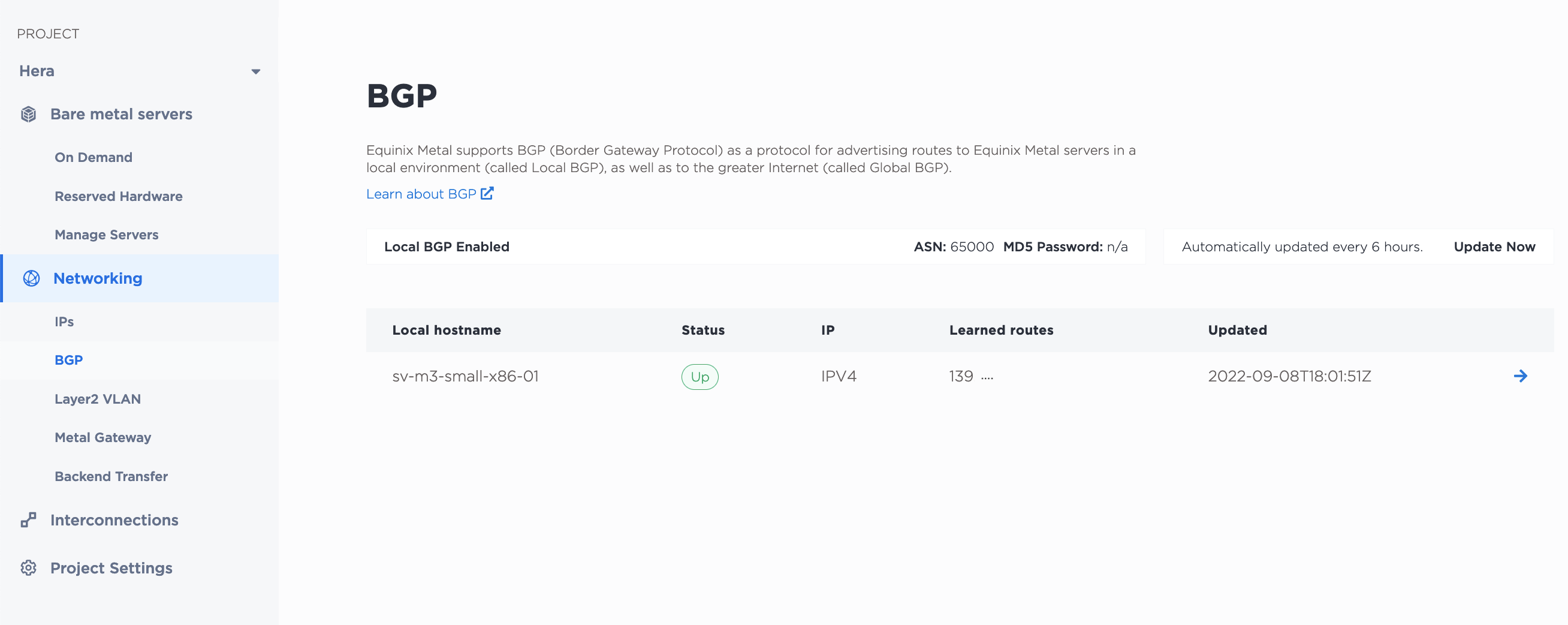
この表には、セッションのステータスや最終更新日時など、各サーバーのセッションの詳細が一覧表示されます。ステータスは 6 時間ごとに自動的に更新されますが、[今すぐ更新] をクリックすると、すべてのセッションのステータスを手動で更新できます。
セッションエントリの横にある矢印をクリックすると、サーバーの_BGP_ページからBGPセッションを表示および管理できます。
プロジェクトの BGP 設定は metal project bgp-config コマンドから取得できます。
metal project bgp-config -p <project_id>
metal project bgp-sessionsコマンドから、プロジェクト内の全サーバにわたる全BGPセッションのリストを取得できます。
metal project bgp-sessions -p <project_id>
APIで、/projects/{id}/bgp-configエンドポイントにGETリクエストを送信して、プロジェクトのBGP設定とセッション情報を取得します。
curl -X GET -H "Content-Type: application/json" -H "X-Auth-Token: <API_TOKEN>" "https://api.equinix.com/metal/v1/projects/{id}/bgp-config"
プロジェクト内のセッションのリストとその詳細が必要な場合は、/projects/{id}/bgp/sessions エンドポイントに GET リクエストを送信します。
curl -X GET -H "Content-Type: application/json" -H "X-Auth-Token: <API_TOKEN>" "https://api.equinix.com/metal/v1/projects/{id}/bgp/sessions"
BGPセッションステータス
- Console
- API
サーバーの_BGP_タブでは、このサーバー上のIPv4とIPv6の両方のセッションのBGPセッション情報(学習済みルートのリスト、現在のセッションステータス、ステータスが最後に更新された日時など)がテーブルに表示されます。ステータスは 6 時間ごとに自動的に更新されますが、[Update Now] をクリックして手動で更新することもできます。
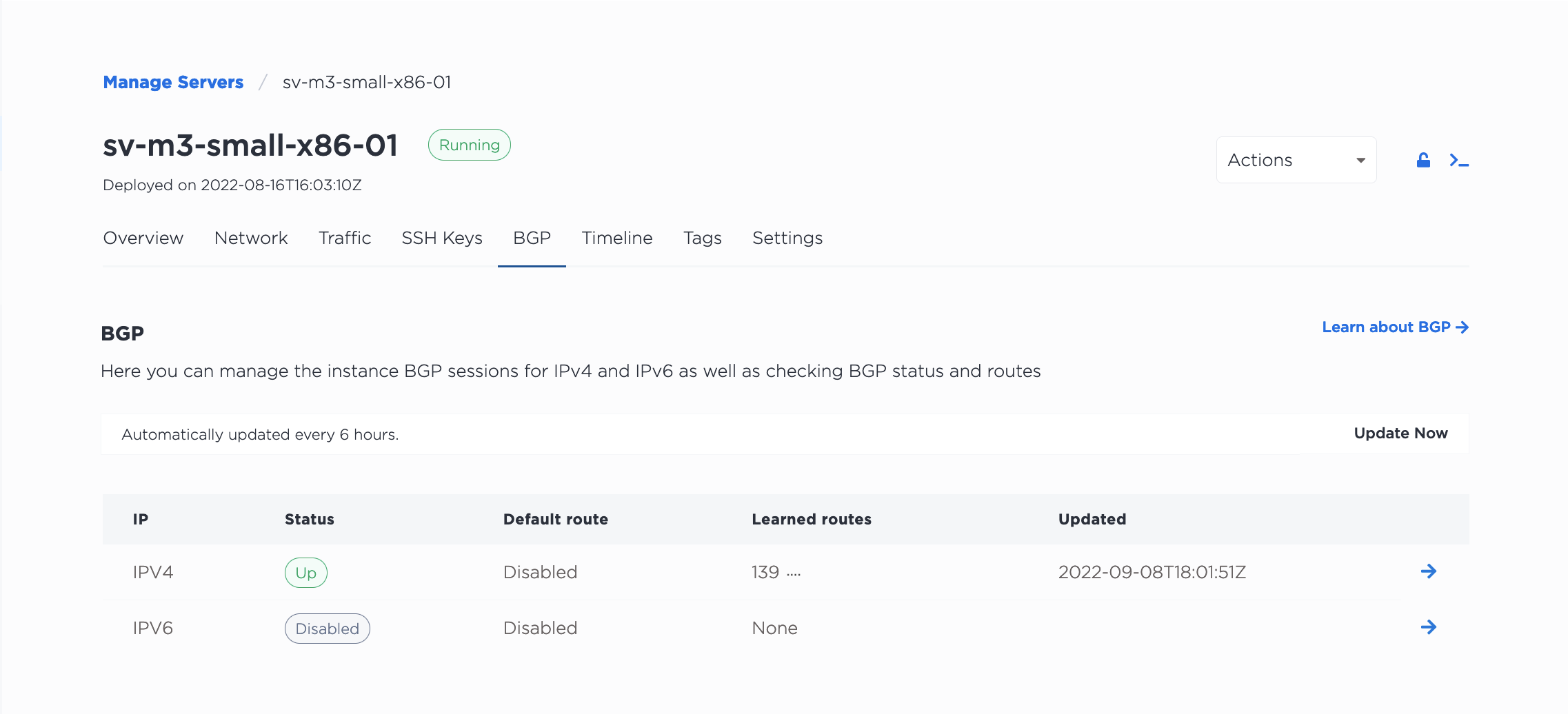
セッションエントリーの横にある管理 をクリックすると、Activate BGP パネルが表示されます。トグルを使用して、このサーバーのBGPセッションを有効または無効にします。デフォルトルート]トグルを使用して、このルートをデフォルトルートに設定します。
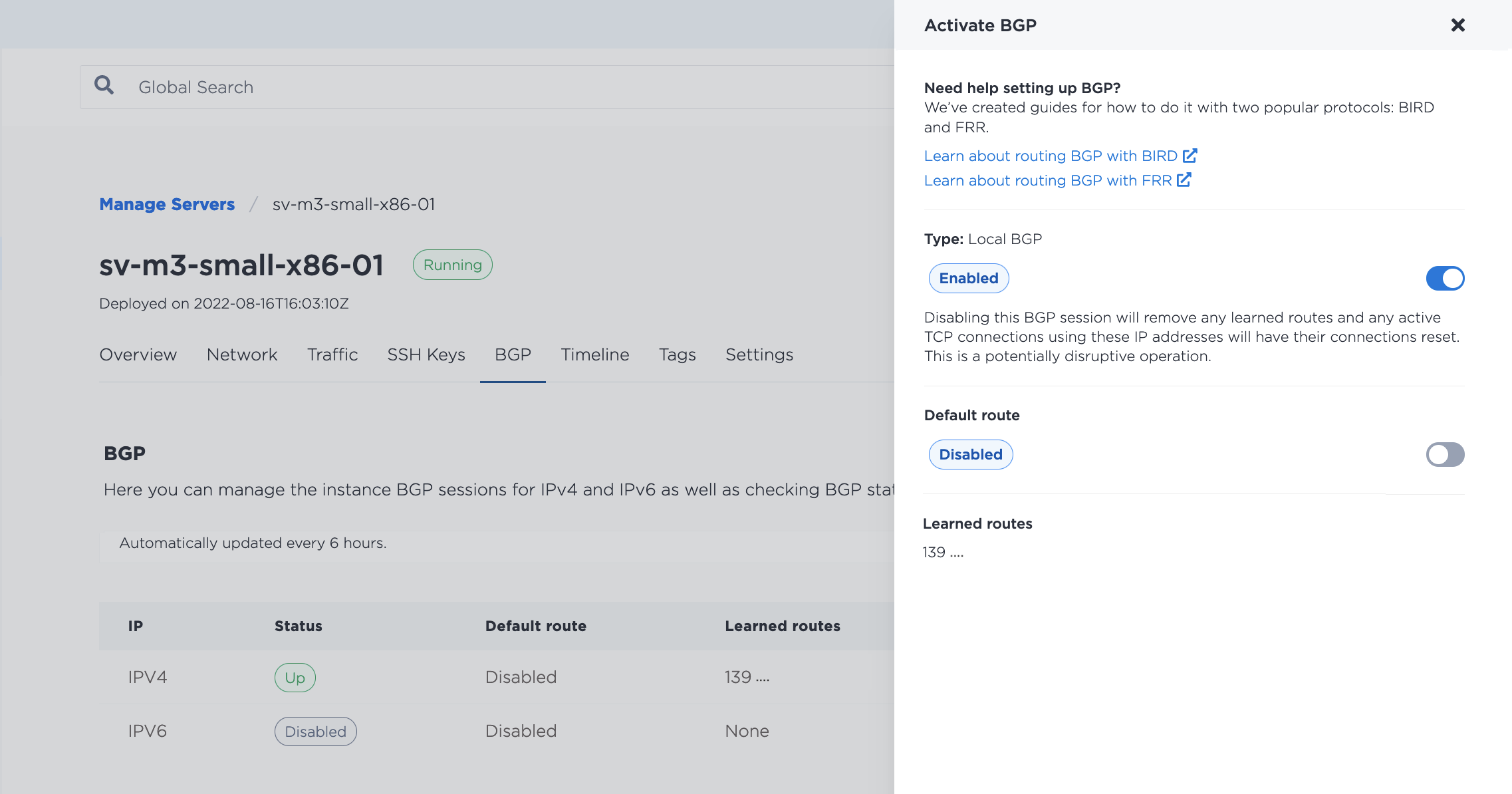
BGPセッションを無効にすると、学習したルートが削除され、開いている接続がリセットされます。セッションを無効にする前に注意してください。BGPを無効にしても、サーバー上のBGP設定は削除されません。必要であれば、セッションを再有効化して、サーバーの設定を変更せずにルートの公開に戻ることができます。再有効化する場合、セッションが確立されるまで5~10分かかることがあります。
サーバに対して実行中のすべてのセッションを取得するには、/devices/{id}/bgp/sessions エンドポイントに GET リクエストを送信します。
curl -X GET -H "Content-Type: application/json" -H "X-Auth-Token: <API_TOKEN>" "https://api.equinix.com/metal/v1/devices/{id}/bgp/sessions"
特定の BGP セッションに関連する情報を取得するには、/bgp/sessions/{id} エンドポイントに GET リクエストを送信します。
curl -X GET -H "Content-Type: application/json" -H "X-Auth-Token: <API_TOKEN>" "https://api.equinix.com/metal/v1/bgp/sessions/{id}"
セッションの近隣データを取得するには、/devices/{id}/bgp/neighbors エンドポイントに GET リクエストを送信します。
curl -X GET -H "Content-Type: application/json" -H "X-Auth-Token: <API_TOKEN>" "https://api.equinix.com/metal/v1/devices/{id}/bgp/neighbors"
セッション・ステータスの可能性
各BGPセッションのステータスはDisabled、Up、Down、Partial、Unknownのいずれかです。
Disabled- プロジェクトで BGP を有効にしているが、まだ BGP セッションを開始していない場合、プロジェクトの BGP ページに無効ステータスが表示されます。たとえば、IPv4アドレスをアナウンスしているセッションはありますが、IPv6アドレスへのセッションはありません。IPv4セッションのステータスはUpで、IPv6セッションのステータスはDisabledです。Up- BGPセッションが開始されました。エクイニクスメタルルーターがお客様がアナウンスするIPアドレスを受信し、サーバーへの経路を学習しています。エクイニクスIBXでは、このステータスは両方のルーターでBGPセッションがアクティブであることも示します。Down- BGP セッションがダウンしています。ホスト構成がまだ設定されていないか、構成内の何かが機能していません。ホストの設定を確認した場合は、BGPセッションを無効にして再度開始し、セッションが再び立ち上がるまで5~10分待ってみてください。それでもセッションがダウンしている場合は、サポートに連絡してください。Partial- サーバーがエクイニクスのIBX内にあり、2台のルーターのうち1台のみでBGPセッションが有効な場合、ステータスはPartialとなります。これは、ルーターのメンテナンス中であることを示しています。このステータスは一時的なものであるはずですが、解消されない場合はサポートにお問い合わせください。Unknown- セッションを有効にした直後は、セッションがまだ確立されていないため、ステータスが不明です。通常、ステータスが更新されるまで約 5~10 分かかります。ステータスが不明な状態が長く続く場合は、[今すぐ更新] をクリックして手動で更新してみてください。