オペレーション
役割と責任
オンボーディング
MFW-Vのインストール
| アクティビティ | Equinix | お客様 |
|---|---|---|
| MPC上の仮想ファイアウォール用の仮想マシンリソース(コンピュート、ストレージ、ネットワーク | RA | I |
| 仮想ファイアウォール・アプライアンス・ソフトウェア、ライセンス、サポート | RA | I |
| セルフサービス&分析ポータルを含むファイアウォール管理用Equinix管理環境 | RA | I |
MFW-P インストール
| アクティビティ | Equinix | お客様 |
|---|---|---|
| 物理ファイアウォール(顧客ライセンススペース)、ラックファイアウォール、ケーブル配線、クロスコネクトなどのための電源とラックスペースを提供する。 | CI | RA |
| 物理ファイアウォール(EMSライセンススペース)、ラックファイアウォール、ケーブル配線、クロスコネクトなどのための電源とラックスペースを提供する。 | RA | I |
| ソフトウェアとライセンスを含むファイアウォール・アプライアンスの提供 | RA | I |
| セルフサービス&分析ポータルを含むファイアウォール管理用Equinix管理環境 | RA | I |
MFW-VとMFW-Pの構成
| アクティビティ | Equinix | お客様 |
|---|---|---|
| ファイアウォール・アプライアンスの基本設定、ネットワーク・インターフェイス、ネットワーク設定、ハードニング | RA | I |
| Analyzer-Portalへのファイアウォール監視とロギングの設定 | RA | I |
| ポータルに顧客アカウントを設定し、ロギング、レポート、セルフサービスにアクセスできるようにする。 | RA | CI |
| 初期ファイアウォールルールセットの定義 | CI | RA |
| セルフサービスによる初期ファイアウォールルールセットのロード | CI | RA |
| サービスリクエストによる初期ファイアウォールルールセットのロード | RA | CI |
サービス開始
| アクティビティ | Equinix | お客様 |
|---|---|---|
| 運用管理の一環として、構成とフェイルオーバーをテストする。 | RA | CI |
| 機能テスト | CI | RA |
運用
| アクティビティ | Equinix | お客様 |
|---|---|---|
| サービスデスク | RA | CI |
| ファイアウォール・アプライアンスのメンテナンス(ハードウェア/ソフトウェアのブレーク&フィックス、ソフトウェア・アップデート、セキュリティ・パッチ) | RA | I |
| 仮想ファイアウォールの24時間365日の監視(ヘルスチェック) | RA | I |
| ログファイルとルールベースのバックアップと管理 | RA | I |
| ポータルからサービスリクエストを提出する | CI | RA |
| サービスリクエストに基づき、変更プロセスに従って変更を実施する。 | RA | CI |
| セキュリティ・イベントの解釈 | RA |
**重要:**お客様は、ファイアウォールルールセットとポリシー、オプションのVPN接続設定、およびサーバロードバランシング設定を担当する。Equinixは、顧客の指示に基づいてのみ変更を実装する。
報告と管理
レポートと分析
顧客は、ポータルを介してネットワークトラフィックとセキュリティイベントに関するレポートを表示および保存できる。セルフサービスポータルは、ネットワークトラフィック、脅威、アプリケーションなどの直感的なグラフ(図の例を参照)で問題をすばやく特定するのに役立つ、カスタマイズ可能なインタラクティブなダッシュボードを提供する。これは、リアルタイムデータと履歴データを1つの概要に統合する包括的な監視システムである。
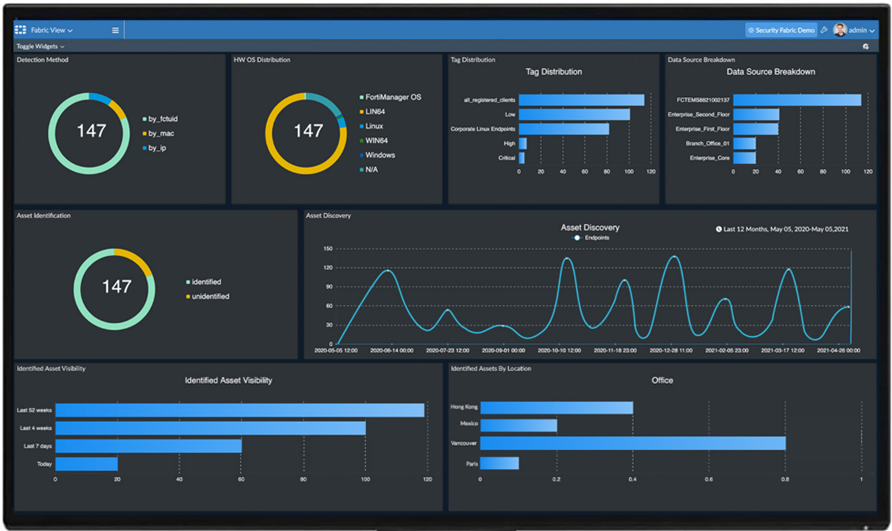
カスタムデータレポートは、70以上の組み込みテンプレートと、異常検出や脅威評価などの分析用に2,000以上のすぐに使用できるデータセット、チャート、マクロを組み合わせて生成できる。これらは、直接(オンデマンド)またはスケジュール(スケジュール)された(オプションの自動電子メール通知を使用)ことができる。レポートのフォーマットは、PDF、HTML、CSV、XML、JSONから選択できる柔軟性がある。
セキュリティ・イベント
顧客のセキュリティ・チームは、ファイアウォールからアラートとイベント・ログを監視・管理し、アナリストが容易に理解できる形式でイベントを処理・相関させることができる。
サービスの可用性
各サービスオプションには、以下のサービス内容が適用されます。
| サービスオプション | 可用性 |
|---|---|
| MFW-V および MFW-P1 標準サービス | 99.9% |
| MFW-V および MFW-P1 伸張展開オプション | 99.95% |
**注:**MFW-Pの場合、可用性は顧客固有のネットワークの設計とIBXデータセンター間の接続性に依存する。
SLA の計算方法、およびお客様のライセンス IBX スペースに物理的な機器が設置されている場合に適用される除外事項については、Managed Solutions 製品ポリシーをご覧ください。