通知の受信方法
Use this procedure to ensure you receive important updates, to customize the notifications you receive, and to turn off any notifications you don't need.
For information on how to view notifications in the portal, see Notification Center.
通知のタイプ
Options are available for:
| 通知タイプ | 詳細 | Permissions Needed |
|---|---|---|
| オーダー関連の通知 | Receive email notifications for Order Received, Order Scheduled, Order Completed, and Order Modified events. | 利用不可 |
| IBX関連の通知 | Receive notifications for IBX Maintenance events, IBX Incidents, IBX Security Incidents, and IBX Advisories. Note: Smart View notifications (for alerts and maintenance events) are managed in Equinix Smart View. For details, see the Equinix Smart View documentation. | マネージドサービス関連の通知の受信権限 |
| ネットワーク関連の通知 | Receive notifications for Network Maintenance events and Network Incidents. | マネージドサービス関連の通知の受信権限 |
| マネージドソリューション関連の通知 | Receive notifications for Managed Services IBX Maintenance events, Managed Services Network Maintenance events, and Managed Services Incidents. | マネージドサービス関連の通知の受信権限 |
| Smart Handsサポートプラン関連の通知 | Receive email notifications about the usage of your Monthly Support Plan Hours and Prepaid Support Plan Hours. | Smart Hands サポートプラン権限 |
| 荷物受取チケット未発行の荷物リスト通知 | Receive email notifications when unannounced shipments arrive at your IBXs. | マネージドサービス関連の通知の受信権限 |
| 仮想アセット通知の受信方法 | Receive notifications about Fabric and Network Edge virtual assets. | 仮想アセット通知の受信許可 |
| IBXポリシー違反通知の受信設定 | Receive notifications about violations of IBX policies (such as enforcement of our combustible materials policy and our airflow management policy). At least two administrators in your organization must be configured to receive IBX policy violations. Note: If a violation is not corrected within the allotted time, a billable Smart Hands order is created automatically. IBX technicians will correct the issue, and your company will incur a Smart Hands fee. | マネージドサービス関連の通知の受信権限 |
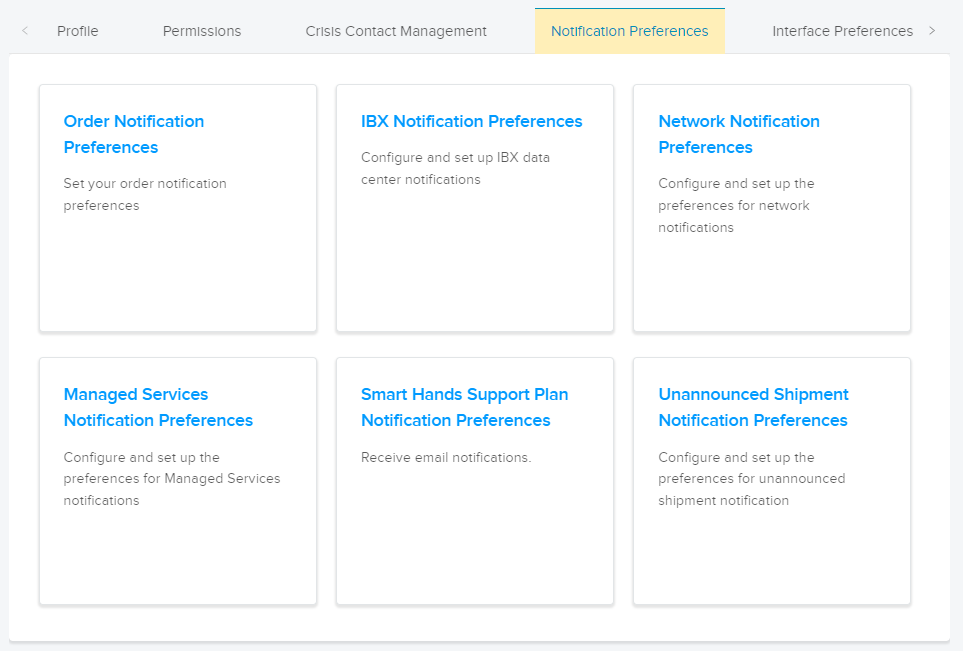
Important: If any of the Notification Preferences tiles are grayed-out, this indicates you do not have permissions to receive those notifications. Contact your company's Customer Portal administrator to request permissions, or refer to the Permissions page.
Updating Your Notification Preferences
To change your notification preferences in the Customer Portal:
-
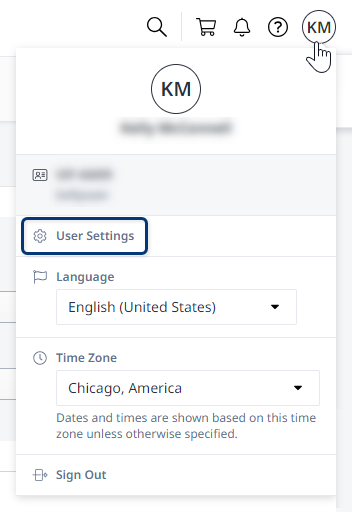
Click your user name in the global profile header and select User Settings.
-
Click the Notification Preferences tab and select a category.
-
Choose the type(s) of notifications you want.
For some categories, you can only receive email notifications. For others, you can choose to receive email, SMS (text messaging), and/or voice notifications.
メモVoice notifications are not supported for phones in China.
-
変更を確定する場合は「送信」をクリックしてください。
Repeat these steps to set your preferences for other notification categories.