接続を別のポートに移行する
接続を別のA側ポートに移行しましょう。
前提条件
-
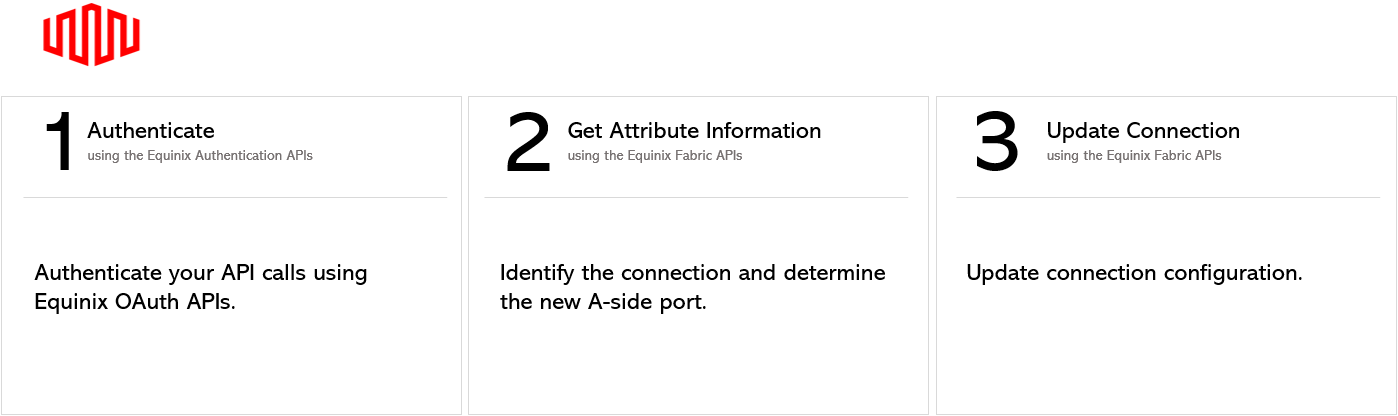
Authenticate - OAuth2認証のためのユーザー認証情報、クライアントID、クライアントシークレットを送信します。OAuth APIを呼び出して認証情報を検証および認証する方法については、API Authenticationを参照してください。
-
既存の接続 ID を確認します。接続の検索 エンドポイントを使用して接続のリストを取得し、別のポートに移行する接続の ID を決定します。
-
接続を移行したいポートの ID の Get All Ports エンドポイントを使用してポート情報を取得します。
接続の更新
接続を更新して別のポートに移行するには、/fabric/v4/connections/{id} エンドポイントに PATCH リクエストを送信します。接続の A 側のポート ID を、接続を移行するポートにリクエスト本文で指定します。
| PATCH /fabric/v4/connections/{uuid} | |
|---|---|
| Method | PATCH |
| URL or Endpoint | /fabric/v4/connections/{uuid} |
| Headers | Authorization, Content-Type |
| Path Parameters | uuid |
| Query Parameters | Not applicable |
| Body Parameters | op, path, value |
接続を変更せずに本番環境でこのリクエストを安全に検証するには、[本番環境でのテスト(APIドライラン)](../../equinix-api/testing/testing-in-production-dry-run.md)を参照してください。
サンプルcURLリクエスト:
curl -X
PATCH 'https://api.equinix.com/fabric/v4/connections/{connection_id}'
-H 'content-type: application/json'
-H 'authorization: Bearer <token>'
-d '[
    {
        "op": "replace",
        "path": "/aSide/accessPoint/port/uuid",
        "value": "c791f8cb-599a-99a0-8ce0-306a5c00a4ee"
    }
]'
パスパラメーター
| Parameter | Mandatory | Type | Example | Applicable Values | Description |
|---|---|---|---|---|---|
| uuid | yes | string | 3a58dd05-f46d-4b1d-a154-2e85c396ea62 | - | Equinix-assigned connection identifier. |
本体パラメータ
| Parameter | Mandatory | Type | Example | Applicable Values | Description |
|---|---|---|---|---|---|
| op | yes | string | replace | replace | Update reqest type. |
| path | yes | string | /aSide/accessPoint/port/uuid | /aSide/accessPoint/port/uuid | Parameter path. |
| value | yes | string | c791f8cb-599a-99a0-8ce0-306a5c00a4ee | - | Parameter value. |
| /aSide/accessPoint/port/uuid | |||||
| value | yes | string | c791f8cb-599a-99a0-8ce0-306a5c00a4ee | - | Eqinix-assigned port identifier. |
回答例
{
    "href": "https://api.equinix.com/fabric/v4/connections/3a58dd05-f46d-4b1d-a154-2e85c396ea62",
    "type": "EVPL_VC",
    "uuid": "3a58dd05-f46d-4b1d-a154-2e85c396ea62",
    "name": "Conn-Name-2",
    "state": "PROVISIONED",
    "order": {
        "purchaseOrderNumber": "1-129105284100",
        "billingTier": "Up to 1 Gbps"
    },
    "bandwidth": 1000,
    "redundancy": {
        "group": "m167f685-41b0-1b07-6de0-320a5c00abeu",
        "priority": "PRIMARY"
    },
    "aSide": {
        "accessPoint": {
            "type": "COLO",
            "port": {
                "href": "https://api.equinix.com/fabric/v4/ports/c791f8cb-599a-99a0-8ce0-306a5c00a4ee",
                "type": "XF_PORT",
                "uuid": "c791f8cb-599a-99a0-8ce0-306a5c00a4ee"
            },
            "linkProtocol": {
                "type": "DOT1Q",
                "vlanTag": 1001
            }
        }
    },
    "zSide": {
        "accessPoint": {
            "type": "SP",
            "profile": {
                "href": "https://api.equinix.com/fabric/v4/ports/a867f685-41b0-1b07-6de0-320a5c00abdd",
                "type": "L2_Profile",
                "uuid": "20d32a80-0d61-4333-bc03-707b591ae2f4"
            },
            "location": {
                "href": "https://api.equinix.com/v4/metros/SV",
                "metrocode": "SV",
                "region": "AMER"
            }
        }
    },
    "notifications": [
        {
            "type": "ALL",
            "emails": [
                "test@equinix.com",
                "test@equinix.com"
            ]
        }
    ],
    "operation": {
        "equinixStatus": "PROVISIONED",
        "providerStatus": "PROVISIONED"
    },
    "changeLog": {
        "createdDateTime": "2021-07-15T19:30:29.526Z",
        "updatedDateTime": "2021-08-15T19:30:29.526Z",
    }
}