サービスプロバイダーへの接続
Equinix Fabric を使用して、さまざまなサービスプロバイダへの直接の低遅延接続を確立し、Equinix Fabric ポート、Network Edge デバイス、または Fabric Cloud Router からネットワーク、通信、セキュリティ、クラウドプロバイダに接続することができます。
サービスプロバイダーへの接続方法に関する一般的な情報は、Fabricドキュメントのサービスプロバイダーへの接続ページに記載されています。このセクションでは、カスタマーポータル、エクイニクスAPI、Terraformプロバイダを介した特定のサービスプロバイダーへの接続の作成と設定について説明します。
つながりをつくる
カスタマーポータル
-
カスタマーポータル > _Fabric Dashboard_にログインします。
-
接続の作成 をクリックします。
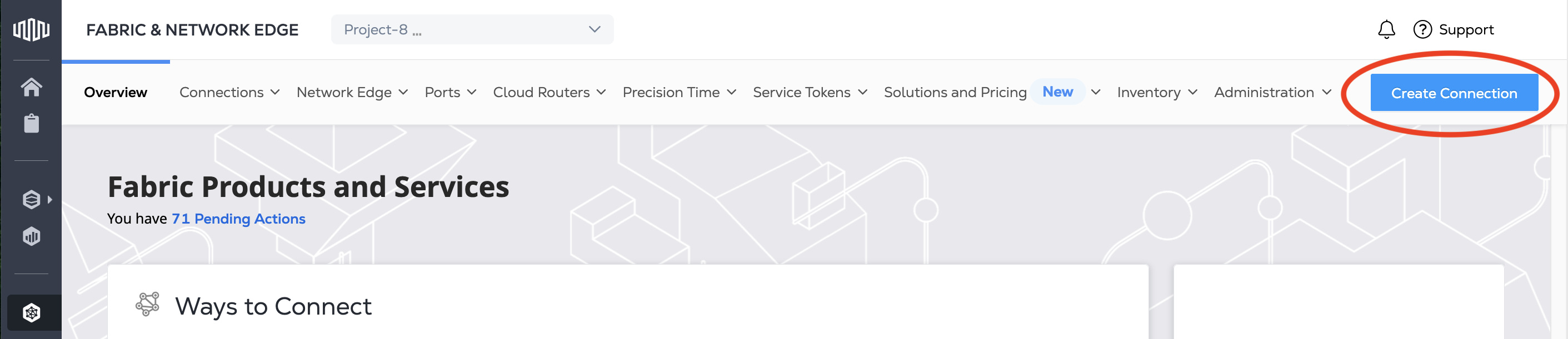
-
A Service Provider カードで、Connect to a Service Provider をクリックし、接続するサービスプロバイダを検索します。
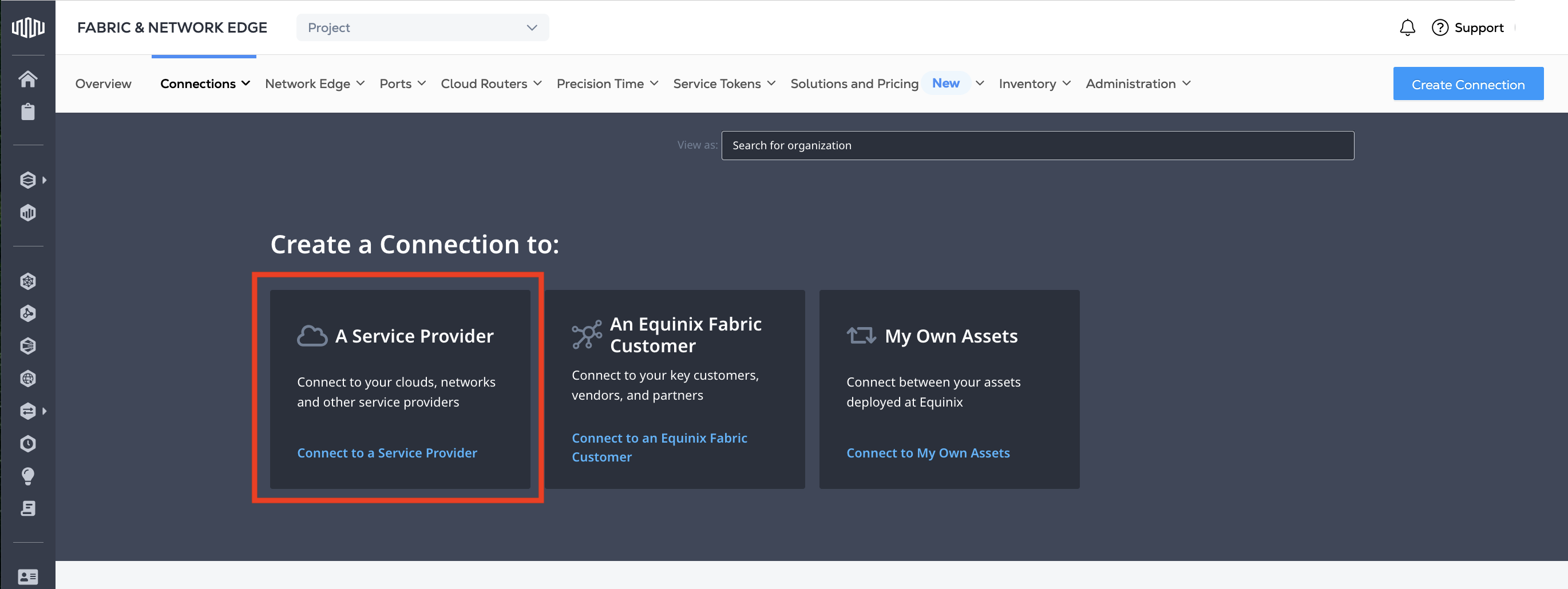
-
接続するサービスプロバイダのカードを検索して見つけます。Select Service をクリックします。
-
ご興味のあるサービスを選択し、接続の作成 をクリックします。
メモサービスプロバイダによっては、Network Edgeデバイス用に特定の接続設定手順を設けている場合があります。Network Edgeデバイスから接続する場合は、[接続の作成(Network Edgeデバイス)] をクリックします。
そこから、各サービスプロバイダは、接続の設定について異なる要件を定めています。
API
Equinix APIでサービスプロバイダーへの接続を作成するには、/fabric/v4/connections エンドポイントに POST リクエストを送信します。
リクエストの本文で、ポート、Network Edgeデバイス、Fabric Cloud Router、またはService Tokenの詳細をa-Sideオブジェクトに記入してください。
サンプルポート a-Side オブジェクト:
"aSide": {
   "accessPoint": {
     "type": "COLO",
     "port": {
       "uuid": "<port_uuid>"
     },
     "linkProtocol": {
       "type": "DOT1Q",
       "vlanTag": <vlan_ID>
     }
   }
 }
各サービスプロバイダーは、サイドオブジェクトで指定する要件が異なります。
AWS Direct Connect z-Side オブジェクトのサンプル:
"zSide": {
  "accessPoint": {
    "type": "SP",
    "profile": {
      "type": "L2_PROFILE",
      "uuid": "<service_profile_uuid>"
    },
    "location": {
      "metroCode": "<equinix_metro_code>"
    },
    "sellerRegion": "<aws_region_name>",
    "authenticationKey": "<amazon_account_ID>"
  }
}
Terraform のサポート
Equinix_fabric_connection`リソースを使用して、Terraformを使用してサービスプロバイダーへの接続を作成します。
AWS Direct Connect リソースへの QINQ ポートの例:
resource "equinix_fabric_connection" "port2aws" {
  name = "ConnectionName"
  type = "EVPL_VC"
  notifications {
    type = "ALL"
    emails = ["example@equinix.com","test1@equinix.com"]
  }
  bandwidth = 50
  redundancy { priority= "PRIMARY" }
  order {
    purchase_order_number= "1-323929"
  }
  a_side {
    access_point {
      type= "COLO"
      port {
        uuid = "<aside_port_uuid>"
      }
      link_protocol {
        type = "QINQ"
        vlan_s_tag = "2019"
        vlan_c_tag = "2112"
      }
    }
  }
  z_side {
    access_point {
      type = "SP"
      authentication_key = "<aws_account_id>"
      seller_region = "us-west-1"
      profile {
        type = "L2_PROFILE"
        uuid = "<service_profile_uuid>"
      }
      location {
        metro_code = "SV"
      }
    }
  }

  additional_info = [
    { key = "accessKey", value = "<aws_access_key>" },
    { key = "secretKey", value = "<aws_secret_key>" }
  ]
}
接続管理
接続を作成して設定したら、カスタマーポータルの「Fabric」セクションでそれらを管理します。
そこでは、次のことができます。
- View connections and connection status.
- Change the connection's bandwidth. Note that some service providers, notably AWS, do not support changing the bandwidth on an existing connection. Other service providers require additional steps on their platforms. Check the service provider's documentation for details.
- Monitor the connection usage. Streaming data on usage and other network statistics is also available from our Network Observability service.
プロバイダになる
エクイニクス経由での接続にご興味のあるサービスプロバイダーの方は、FabricドキュメントのService Provider On-Boardingをご覧ください。