Direct Routing
Direct Routing allows devices on a network to communicate with each other directly, without the need for intermediate routers. It is typically used in small networks where all devices are connected to the same network segment or subnet. Direct routing protocols do not involve complex routing algorithms or the exchange of routing information between devices. Instead, they rely on the devices' knowledge of the network topology and their ability to communicate directly with each other.
IP Subnet Sourcing
Your Internet Access service can use either Equinix-owned (provider-assigned) or customer-owned (provider-independent) IP Blocks. Direct routing does not support using both for the same service.
For more information, see the IP Address Allocation page.
Single Direct
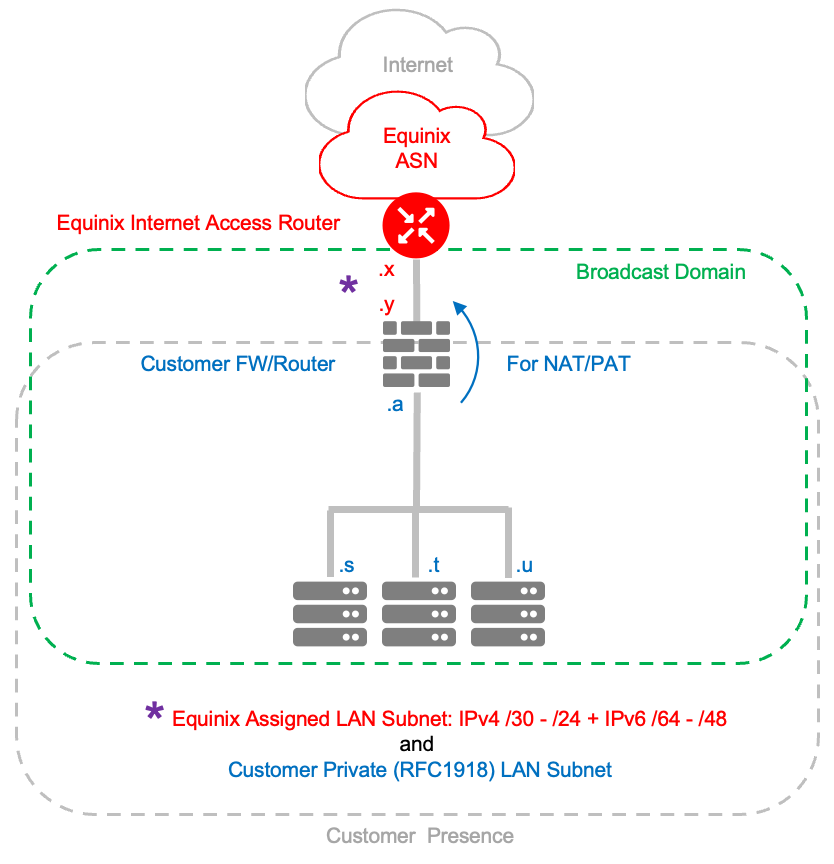
This configuration uses a flat network, meaning there is no routed network.
For Equinix-owned IPs, the default IP addresses assigned by Equinix are a /30 for IPv4 and a /64 for IPv6. The first octet is reserved for Equinix router.
For Customer-owned IPs, use your own public IP addresses for the LAN. Your subnets must be a minimum of /24 for IPv4 or /48 for IPv6. Assign an Equinix router address from your IP range.
To run Network Address Translation (NAT) or Port Address Translation (PAT), you must provide your own router or firewall.
VRRP Direct
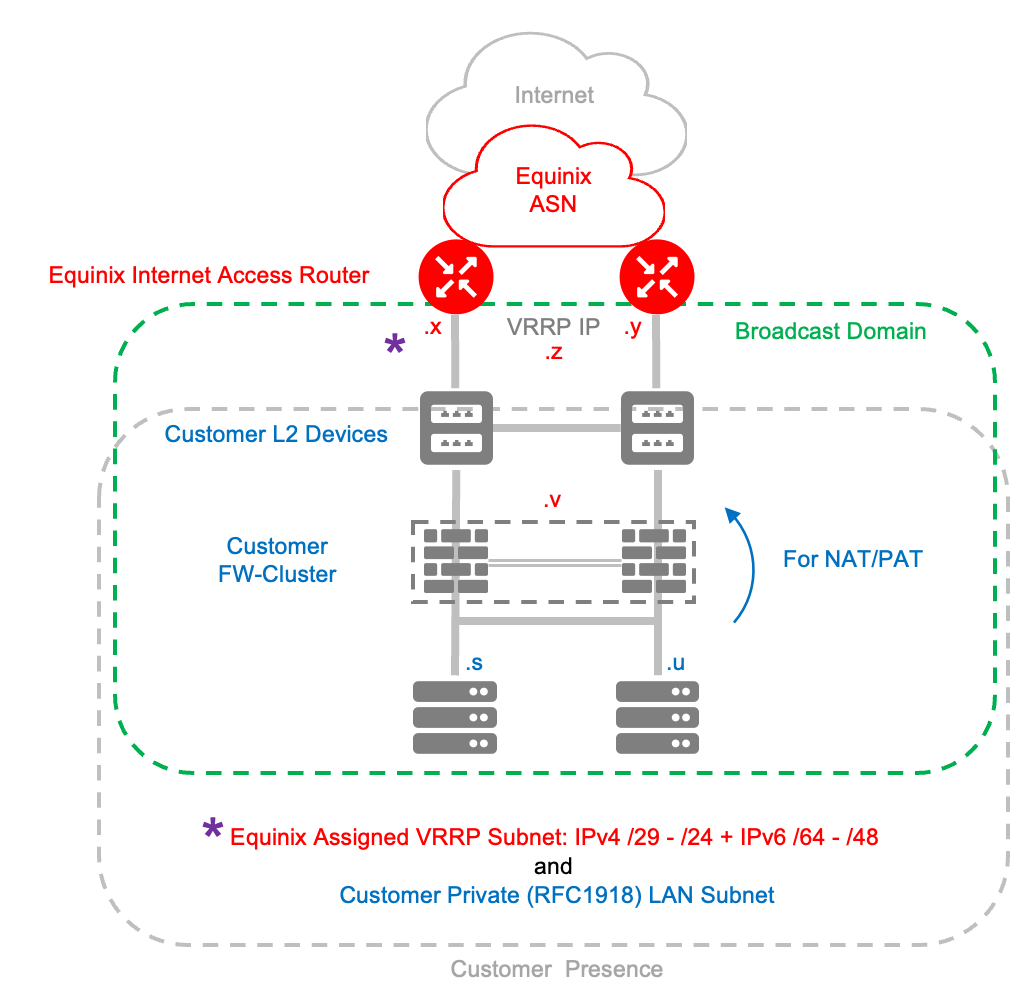
Dual-port Equinix Internet Access is designed for service resiliency rather than bandwidth aggregation. Customer-originated traffic (toward the internet) should always be sent to the Internet Access VRRP virtual IP (VIP) address to ensure optimal availability. Internet Access egress traffic (from Internet Access toward the customer) may, in some cases, be sent across both VRRP member ports/connections. However, customers should not expect full load-sharing of Internet Access-to-customer traffic. Both ports operate as one logical service with a single bandwidth commitment. The dual-port/connection design provides redundancy, not increased capacity.
For Equinix-owned IPs, Equinix assigns a default /29 for IPv4 addresses and /64 for IPv6 addresses for your LAN subnet. The first three octets are reserved for Equinix in this order: Equinix VRRP VIP, Equinix Primary IP, and Equinix Secondary IP. The customer gateway points to the Equinix VRRP IP.
Example:
| Network | 149.97.230.128/29 |
|---|---|
| Equinix VRRP IP | 149.97.230.129 |
| Equinix Primary IP | 149.97.230.130 |
| Equinix Secondary IP | 149.97.230.131 |
For Customer-owned IPs, use your own public IP addresses for the LAN. Your subnets must be a minimum of /24 for IPv4 addresses or /48 for IPv6 addresses. Assign Equinix router addresses from your IP range.
Protection switching is where your equipment switches based on monitoring hello messages. You must provide the multi-access network (Layer 2 switching) required for VRRP advertisements between the primary router and the client.
You must provide the switching network between your Layer 2 switches.
To run NAT or PAT, you must provide your own router or firewall behind your Layer 2 switches as shown: